

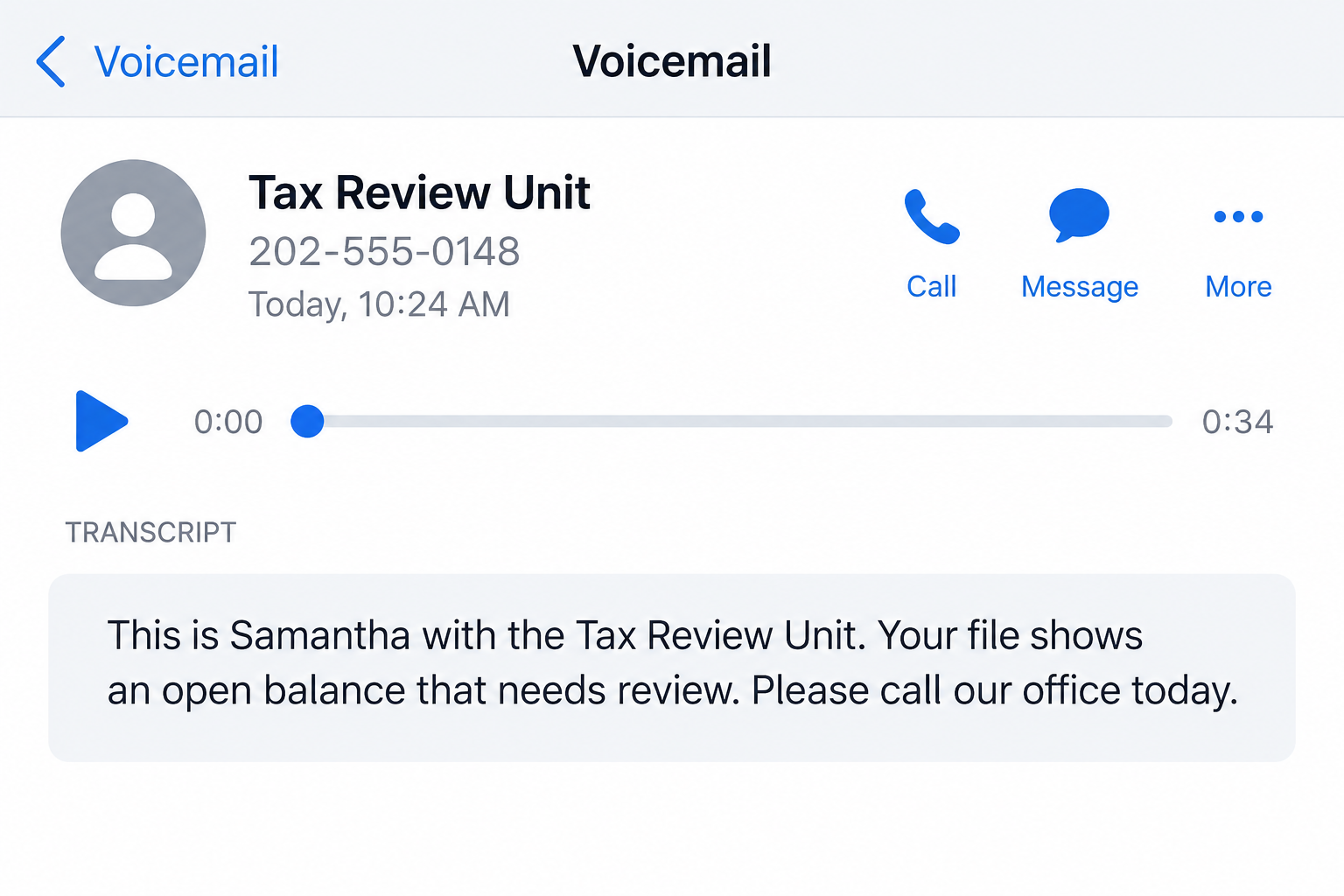
A voicemail says your tax file has an open balance. The caller sounds calm, uses an official-sounding name, and asks you to call back today.
Before you return that call, there is a simpler question worth answering: who actually has your tax file?
Overview
What the Tax Review Unit call claims
Reports of the Tax Review Unit scam describe a prerecorded call or voicemail from a person using a name such as Samantha.
The message says a tax balance, missing filing, or unresolved account item needs attention. It then supplies a callback number, often without identifying a specific tax year or notice.
That vagueness is useful to the caller. Many people have filed late, moved, changed jobs, or received a confusing tax letter at some point.
The caller does not need to know your real tax status to make you wonder whether the message could be about you.
What has and has not been verified
The name Tax Review Unit alone does not establish that a caller is from the IRS, a state tax agency, or a licensed tax professional.
Consumer reports to the BBB Scam Tracker describe the “Samantha” voicemail, open-balance language, and callback request.
Those reports record what people heard. They do not establish who placed every similar call or prove that any particular recipient owed tax.
The IRS warns that suspicious tax-debt-relief calls should be recorded and reported. It also says the IRS and authorized collectors may call in certain circumstances.
That nuance matters. A phone call is not automatically fraudulent, but an unverified caller should never decide whether you owe tax or how you pay it.
The safest first response
Do not use the number in the voicemail as your verification channel. Open your IRS Online Account or use a number from an authentic notice you already have.
- Save the voicemail and note the caller ID, time, and callback number.
- Check whether a real IRS notice or account balance exists.
- Ask any tax professional for a written business name, credentials, services, and fee schedule.
- Do not provide your Social Security number or payment details to an unexpected caller.
If the call is merely unsolicited marketing, you can decline it. If it impersonates an agency or demands sensitive information, treat it as a scam attempt.
Why an Open Tax Balance Is Such an Effective Hook
Tax matters rarely feel optional. A short voicemail can bring back the unease of a return you were unsure about or a letter you have not opened.
The message often avoids details that a real case file would contain. It may say “open balance” or “your file” without a notice number, tax period, or agency address.
That is not a reliable test by itself. Legitimate callers also avoid putting sensitive information in voicemail. The test is independent verification, not a single missing phrase.
Urgency does the rest. Someone who believes a deadline is hours away may call the supplied number before checking the IRS account.
When the callback begins, the caller may frame the conversation as an opportunity to solve a problem. The promised relief can sound more attractive than a dispute.
There are real IRS payment plans and offers in compromise. There are also promoters who charge for help that a taxpayer might obtain directly.
The IRS tax-scam guide specifically warns about tax-debt-relief offers that imply a cheap settlement is guaranteed.
Eligibility depends on a person’s actual situation. A stranger cannot know from a cold-call list that you qualify for a particular program.
Caller ID is another weak signal. A displayed local number, toll-free number, or agency-looking name can be spoofed.
Even if the caller knows your name or address, that information may come from public records or a marketing database.
The practical goal is to move the conversation from the caller’s story to records you control. Your own account, notice, and tax return are stronger evidence.
How the Tax Review Unit Scam Works
Step 1: A broad voicemail creates a tax problem
The contact usually arrives without any request from you. It may be an automated call, a voicemail transcription, or a live representative.
The caller says there is an unresolved item in a tax file. “Open balance,” “missing filing,” and “review deadline” sound specific, but they do not identify a real assessment.
Some messages present a first name, office name, and callback number. Those details make the call feel personal while giving you little to verify.
The agency-like label is the central trick. It invites you to assume the caller can see government records even when that access has not been demonstrated.
Do not try to settle the issue while listening to the recording. Capture the details, then use an independent source to check your account.
Step 2: The callback turns uncertainty into a conversation
If you call back, the person answering can learn more than the voicemail knew. They may ask whether you filed, what you owe, or whether you received notices.
Each answer lets the caller tailor the story. A late return can become a “priority resolution” case. A small balance can become a claimed opportunity for forgiveness.
A genuine tax professional should explain their identity, qualifications, and engagement terms. A caller who refuses basic business details is not ready for your records.
Be wary if the representative insists that the callback number is the only way to confirm the matter. Official account information can be checked separately.
If they say you are speaking with the IRS, ask for the notice reference and end the call. Confirm it through IRS notice guidance.
Step 3: The caller asks for information or a fee
The next request may be your Social Security number, date of birth, bank details, prior returns, or access to an IRS account.
Some tax-relief pitches ask for an upfront enrollment or “prequalification” payment. The label on the charge does not prove a legitimate service will follow.
Even a small initial fee can expose your card and create pressure to keep paying. Ask for a written contract before considering any paid representation.
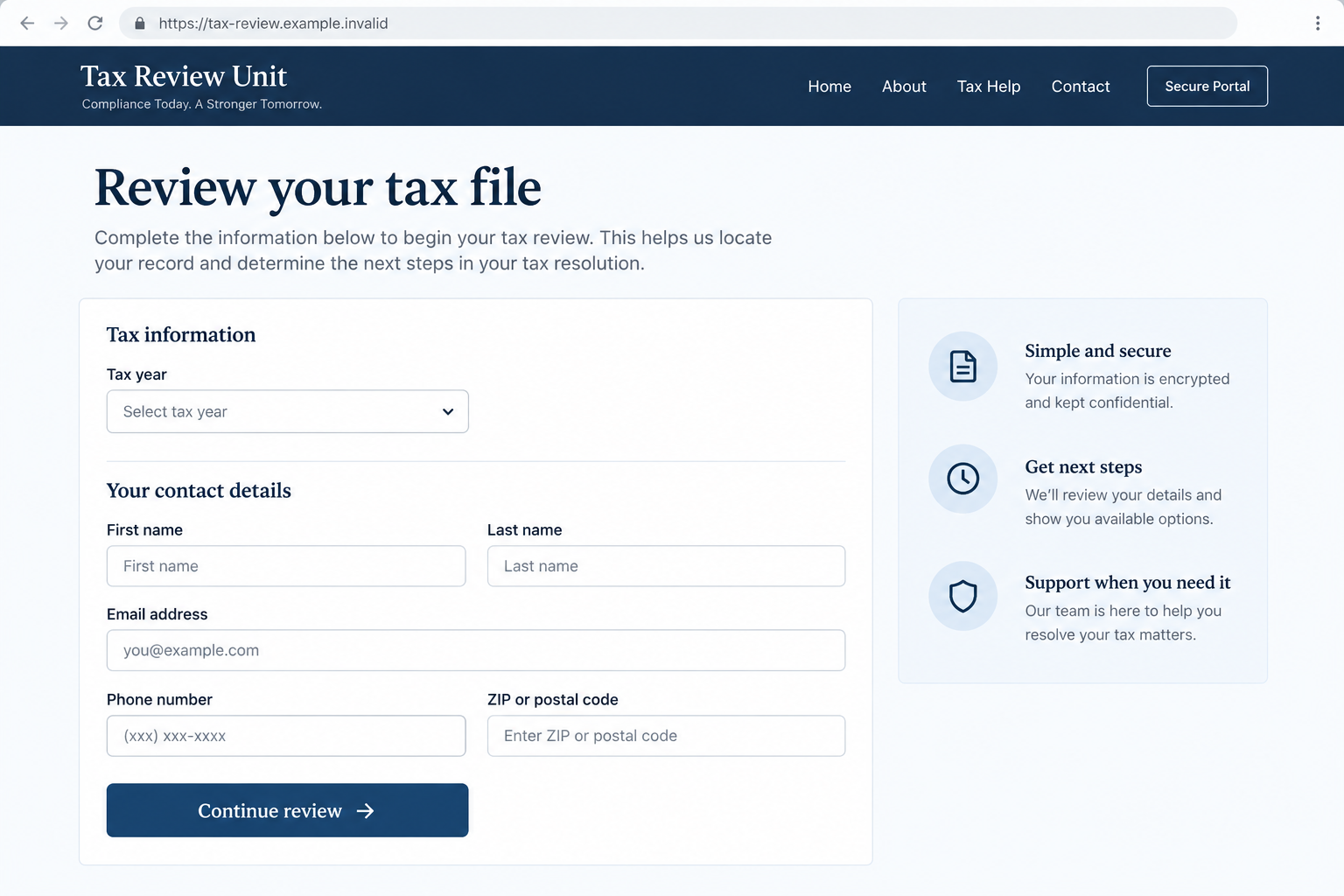
Do not send identity documents over a link supplied during an unexpected call. A polished upload page can still be controlled by an unknown party.
If the caller asks for gift cards, cryptocurrency, or a wire to settle IRS debt, stop. The IRS explains how legitimate collection contact works.
Step 4: Pressure replaces independent checking
A deceptive caller may warn that a case will escalate unless you act before a stated deadline. The threat can be legal, financial, or simply vague.
Another version offers a sudden discount on a supposed balance. The caller says you must authorize payment before the relief option disappears.
Neither approach changes your real account balance. A tax obligation is established by records and law, not by a stranger’s phone script.
Real IRS contact can be serious, but the agency says it does not call to demand immediate payment or threaten arrest.
Ask yourself whether the caller is helping you verify the claim or trying to keep you inside the call. That difference is often more useful than tone.
Step 5: The contact may continue after you decline
Some people receive repeated calls with changing numbers and similar scripts. Blocking one number may help, but it does not prove the campaign has stopped.
A caller who collected information may try again with more accurate details. They may claim to be a supervisor, tax advocate, or identity-verification specialist.
Do not treat a more detailed second call as proof the first one was real. The extra detail may have come from what you said.
If you paid or shared information, the risk also extends beyond tax. Identity theft and fraudulent account activity can appear later.
Move quickly on financial and identity safeguards, but do not pay a second company that promises to erase the problem overnight.
How to Verify a Real Tax Problem Without Calling Back
Start with the document or account you already control. Sign in to your IRS Online Account by typing the address yourself, not through a voicemail link.
Check your account balance, recent notices, payment history, and filing status. Remember that some notices may not appear online immediately.
If you have a paper notice, compare its number with the IRS notice search page. Call the number printed on a notice only after verifying the notice itself.
When there is no letter, use contact options found on IRS.gov. The IRS notes that agents or authorized private collectors can call after earlier written contact.
State tax agencies have separate systems. If the caller names a state, look up that agency independently and ask whether an actual case exists.
A tax professional can also help, but choose one yourself. The IRS maintains guidance on selecting a preparer and warns against “ghost” preparers.
Ask whether the person will sign a return when required, provide a written engagement letter, and explain the fee before you share records.
Never let an unsolicited caller log in as you, control your screen, or direct a payment from your bank app. Verification should lower uncertainty, not surrender control.
If your own records show a real balance, deal with that balance through official channels. Rejecting a suspicious voicemail does not mean ignoring genuine tax duties.
Red Flags in a Tax Review Unit Voicemail
No single phrase proves fraud, but several together make a callback unsafe. Listen for the way the message tries to control the next step.
- An office name is offered without a verifiable agency, address, or notice.
- The caller claims to know your balance but cannot identify the tax period.
- There is pressure to respond immediately or lose relief.
- The caller asks for a full Social Security number before basic verification.
- Payment must be made to a person, private wallet, or unusual method.
- You are told not to use IRS.gov or speak with your own tax adviser.
Some legitimate businesses use aggressive sales language. That does not make them government agencies, and it does not create an obligation to hire them.
Conversely, an apparently polite caller can still be deceptive. Focus on independent records and the request being made, not the caller’s manner.
What to Do if You Have Fallen Victim to This Scam
- End the contact and preserve the evidence. Save the voicemail, screenshots, call times, callback number, and any payment receipt. Do not continue arguing with the caller. A record helps your bank and reporting agencies understand what happened.
- Check your actual tax account. Use IRS.gov or the official state tax agency website from a clean browser. Look for a real notice or balance. If a concern remains, contact the agency through its published channels.
- Call your bank or card issuer if you paid. Explain that the payment followed a suspected tax-relief scam. Ask whether a transaction can be stopped or disputed, whether the card should be replaced, and how to monitor for further charges.
- Protect your identity if you shared personal data. If you disclosed your Social Security number or other identity details, follow the IRS guidance for tax-scam victims and use IdentityTheft.gov for a tailored recovery plan.
- Secure accounts that the caller touched. Change passwords from a trusted device if you shared login details. Review multifactor authentication, recovery addresses, and recent sign-ins. Tell the IRS if someone may have accessed your online tax account.
- Check the device only if a link or download was involved. A voice call alone does not mean your phone is infected. If you installed software or opened a risky page, remove the app and run a reputable scanner such as Malwarebytes. AdGuard can help reduce exposure to malicious ads, but neither product reverses a payment or replaces account recovery.
- Report the suspicious call. The IRS directs taxpayers to record the number, hang up, and report suspicious IRS-related calls to TIGTA. Tax-debt-relief marketing complaints can also go to the FTC or FCC. Include your evidence without publishing private information.
- Ignore recovery promises from strangers. Once a person pays, a second caller may offer a guaranteed refund for another fee. Contact your payment provider and official agencies directly instead of hiring someone from an unexpected message.
Frequently Asked Questions
Is the Tax Review Unit a real IRS department?
The name in a voicemail is not proof of an IRS office. Verify any claimed tax matter through your IRS account, an authentic notice, or official IRS contact information.
Does the IRS ever call taxpayers?
Yes. The IRS and authorized collectors may call about account matters. There is generally earlier written contact. They do not demand immediate payment or threaten arrest.
What if the voicemail mentions a real balance?
A correct amount could come from information you disclosed or another source. Confirm the balance independently, then use official payment or dispute options.
Should I call the number back to tell them to stop?
No. Returning the call gives the sender another chance to collect information or pressure you. Block the number after saving the evidence if you wish.
Can a tax-relief company legitimately charge for help?
Some professionals charge for real services. Ask for credentials, written scope, fees, and a contract. A cold call does not establish that you qualify for relief.
Is my phone infected because I answered the call?
Answering a normal voice call does not itself show a malware infection. Device checks become relevant if you opened a link, installed an app, or granted access.
The Bottom Line
A Tax Review Unit voicemail can sound authoritative while telling you almost nothing verifiable about your taxes. The callback request is not evidence of a debt.
Check your own records first. If you shared money or sensitive information, secure it promptly and report the contact through official channels.








