

A finance contact wants to share research before a call. The files are in an Obsidian vault, and a small setup change seems necessary to view them.
That request can sound like ordinary collaboration. The part worth slowing down for is what the shared workspace asks your computer to trust.
Overview
The business conversation sets up the technical request
Fake investors used professional-network contact and a group conversation to make a shared research workspace appear useful during a financial discussion.
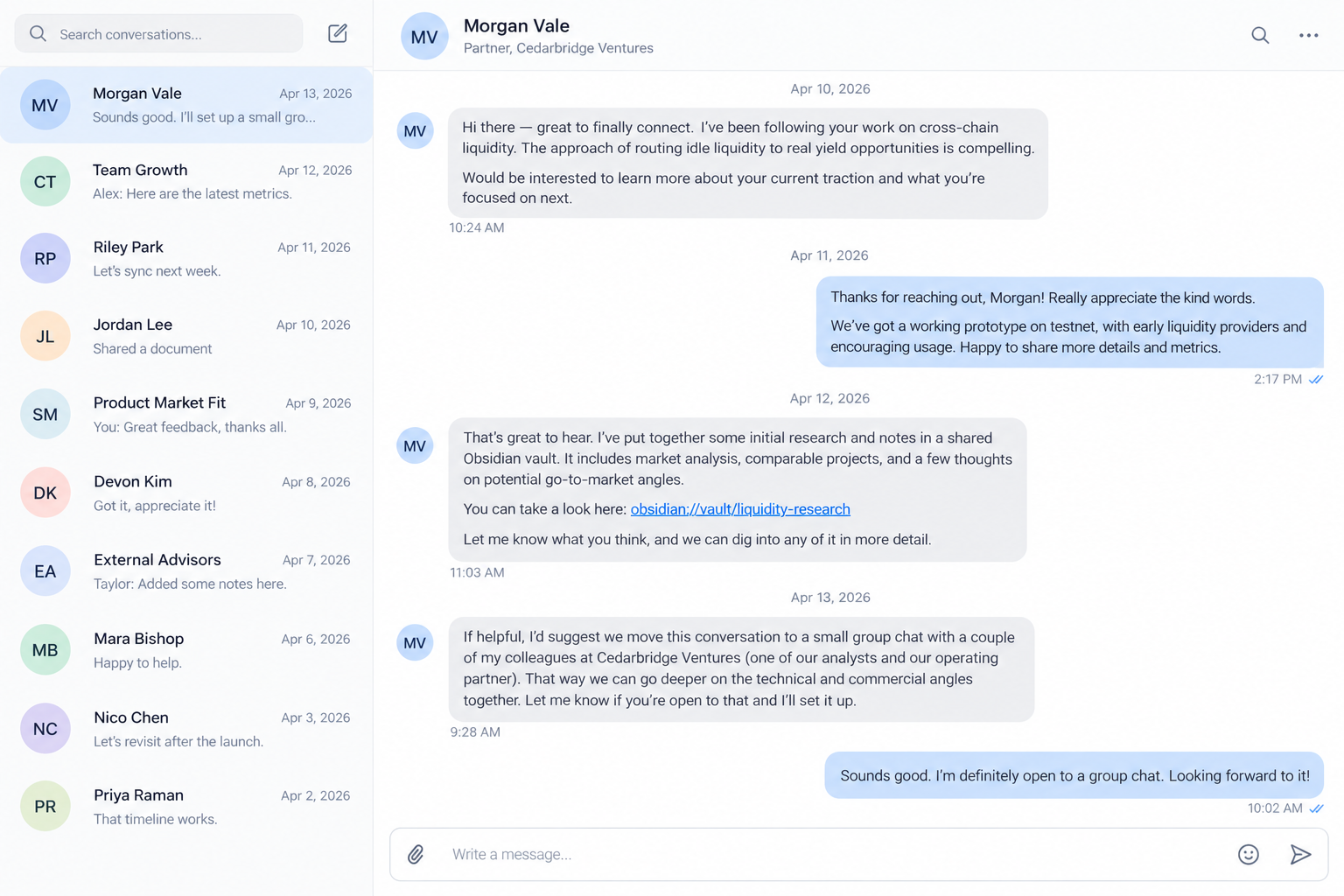
Elastic Security Labs documented one intrusion attempt aimed at people in financial and cryptocurrency sectors. The approach began on LinkedIn and moved to Telegram.
The supposed venture-capital contacts discussed cryptocurrency liquidity. They offered access to an Obsidian vault described as a management database or shared dashboard.
Those details gave the victim a reason to open unfamiliar material. The malicious step was not reading a note. It was enabling community-plugin synchronization for the supplied vault.
The real Obsidian application was abused, not replaced
Obsidian is a legitimate notes application. Elastic checked the signed application and found that the suspicious behavior originated from plugin configuration, not a counterfeit installer.
The attacker-controlled vault contained community-plugin settings. One plugin could run shell commands on configured events, including when the vault opened.
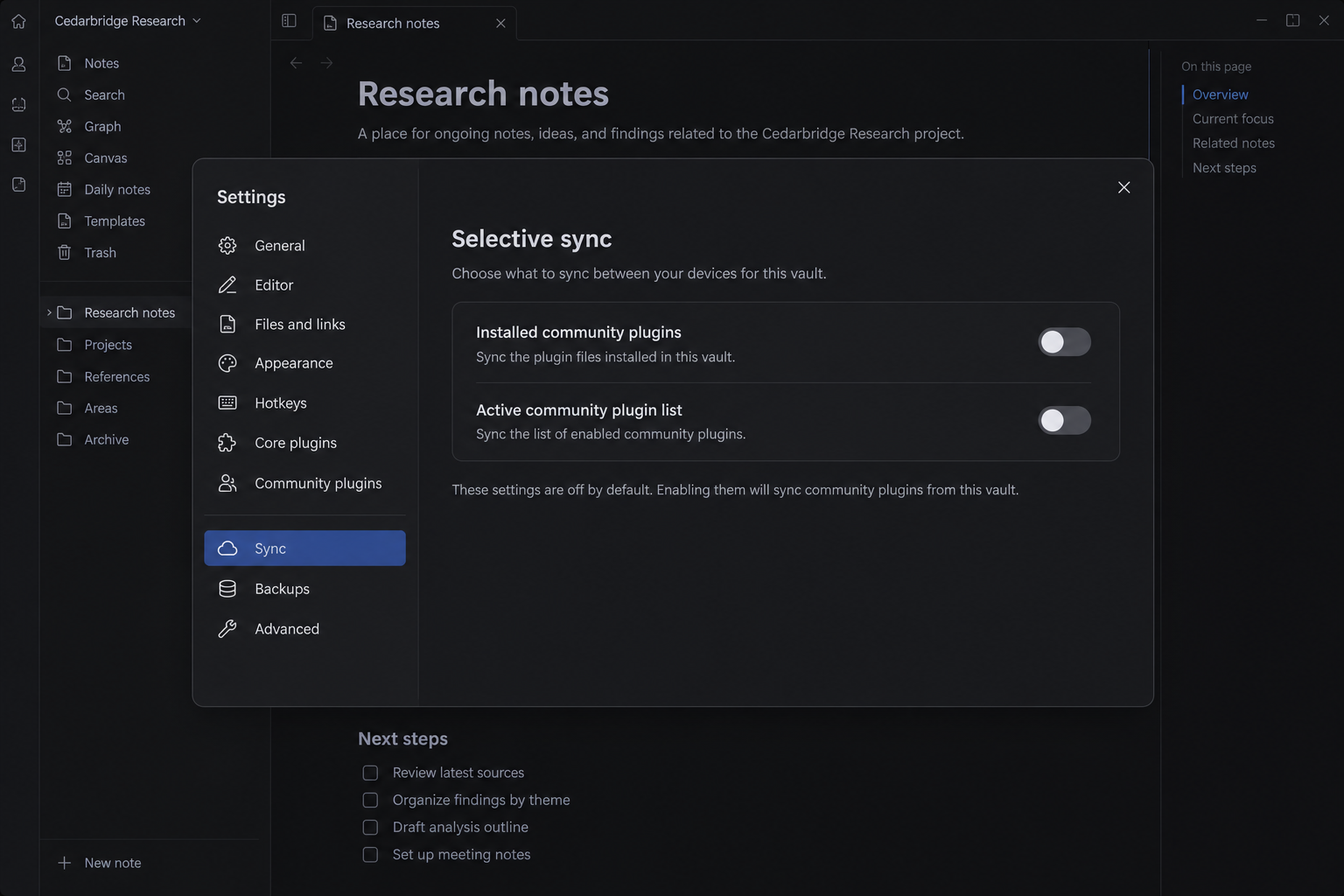
Elastic found that plugin synchronization is disabled by default. An attacker could not silently turn it on through the shared vault alone.
The victim had to cross that boundary by enabling the relevant sync options. That human decision is the scam’s turning point.
A security product stopped the observed intrusion early
Elastic observed suspicious PowerShell execution from Obsidian and blocked the attack before the Windows remote-access payload achieved the attacker’s objectives.
Researchers analyzed a multi-stage Windows chain ending in a backdoor named PHANTOMPULSE. They also found a separate macOS path using AppleScript.
That is evidence of a real malicious campaign, not proof that every person receiving a shared vault was infected.
The key checks are concrete:
- A stranger supplies account credentials to a shared vault for a proposed deal.
- The conversation moves from a professional network into a private group chat.
- Access supposedly depends on enabling community plugins or plugin sync.
- The vault contains plugins you did not choose or inspect.
- The contact discourages independent verification of the firm or project.
- A notes app unexpectedly launches a shell, installer, or security warning.
Why This Approach Works on Careful Professionals
Many finance teams exchange research before a meeting. A private workspace can seem more credible than a random attachment, especially when several supposed colleagues join the conversation.
A stranger who knows your role, company, and subject matter may sound informed. Those details can come from public profiles and do not establish authority.
Moving to a group chat creates social proof. Two or three accounts agreeing on next steps can look like a real investment team.
The vault itself presents ordinary notes and project language. That visible content can keep attention away from configuration files and plugin behavior.
Obsidian’s legitimate plugin ecosystem is useful because plugins extend the app. It also means enabling an unknown plugin can permit actions beyond displaying text.
Most users know to be cautious about executable files. Far fewer think of a synced plugin configuration as code they are allowing onto their machine.
Elastic’s investigation matters because it separates those pieces. The app was real, the shared content was attacker-controlled, and the requested configuration change enabled execution.
The scam does not require a universal Obsidian flaw. It relies on persuasion to get a target to change a default protection for a stranger’s workspace.
How the Shared Obsidian Vault Scam Works
Step 1: A professional contact opens a plausible conversation
An account presents itself as a venture investor or other finance contact. The outreach refers to a real field of work and offers a discussion rather than demanding money.
That softer opening reduces suspicion. A person exploring a legitimate opportunity may reasonably expect research materials before the first serious call.
Step 2: The conversation moves into a small group
Additional supposed partners join a Telegram conversation. They discuss liquidity solutions and the firm’s work in language suited to the target.
The number of participants is not proof. One operator can control several accounts, and copied profiles can make a fictional team look established.
Step 3: The target receives access to a shared vault
The contacts supply credentials for an attacker-controlled cloud vault. It is presented as the place where the team keeps its management notes and research.
Because the application is well known, the target may focus on signing in correctly rather than asking who prepared the workspace.
Step 4: Plugin synchronization is framed as setup
The user is told to enable community-plugin sync to make shared materials work. That turns an unfamiliar security decision into a minor onboarding task.
Elastic reproduced the behavior and found the plugin list and installed plugins did not sync by default. Manual enablement was necessary.
Step 5: A plugin runs attacker-defined commands
Once the malicious configuration is present and active, a command-capable community plugin can launch the next stage when its configured event occurs.
Elastic observed Obsidian spawning PowerShell. The path was not a browser pop-up merely claiming infection; it was process activity on the machine.
Another installed plugin helped hide parts of the configuration. A user browsing ordinary notes might not notice what had been prepared behind the interface.
Step 6: A remote-access payload is fetched
On Windows, the analyzed chain used an intermediate loader before PHANTOMPULSE. On macOS, researchers described an AppleScript-based delivery path.
These are capabilities observed in the investigated campaign. It would be wrong to claim that every shared vault contains the same payload or that every attempt succeeded.
Step 7: The attacker seeks continued access
A remote-access tool can allow further commands, information collection, and movement toward valuable accounts. The exact outcome depends on what ran and what protection blocked.
Elastic’s observed victim was protected early. That does not make the lure harmless; it shows why endpoint behavior detection and prompt reporting matter.
Why the Plugin Setting Matters More Than the Vault Link
The first invitation does not itself give a stranger remote control. It creates a reason to connect your normal application to content that the stranger prepared.
A vault can contain ordinary text and also configuration files. Those files influence how plugins behave after the workspace is synchronized.
Elastic found the Shell Commands community plugin in the malicious vault. That plugin is a legitimate extension capable of launching commands when configured.
The dangerous part was the attacker-selected configuration, not the existence of a command-capable plugin in every user’s installation.
Its settings included an event trigger. When the plugin and settings reached the victim’s computer, that event could start the next attack stage.
Another plugin helped conceal configuration from casual inspection. It did not make the malicious process invisible to Elastic’s endpoint monitoring.
The researchers tested synchronization themselves. By default, the remote vault did not deliver its installed plugin directory and active plugin list to the new device.
That default matters. It means the attacker needed the target to change settings that most people would leave untouched.
Social engineering supplied the missing step. The contacts could describe plugin sync as normal collaboration and make refusal feel like delaying a deal.
For a victim, the interface may show only notes and a setup prompt. For the operating system, enabling the plugin can permit a new process.
That is why a signed, genuine app can appear in the process tree of a malicious incident. Legitimate software can perform actions requested by untrusted content.
On Windows, Elastic saw PowerShell run from Obsidian. The detection provided stronger evidence than a vague warning about suspicious links.
On macOS, the reported path used AppleScript. A Mac user should not assume the Windows-specific PowerShell detail makes the lure irrelevant.
The observed macOS command server was offline during parts of the research. That limits what can be said about subsequent payload execution on that platform.
Security teams should review process events and plugin settings together. A clean-looking document view cannot answer whether a command already ran.
For personal users, the safest rule is simpler: do not enable executable extensions in a stranger’s shared workspace merely to read proposed business materials.
What the Evidence Does and Does Not Prove
Elastic inspected a specific intrusion and reproduced the critical plugin-sync path. It identified the fake investment discussion, the shared vault, command execution, and staged payloads.
The report does not prove that Obsidian itself is fraudulent. It does not say its ordinary notes or official plugins are generally unsafe.
It also does not show every LinkedIn finance contact using this technique. The warning applies when a stranger controls the vault and asks you to enable executable extensions.
The April 2026 research named the attack set REF6598. That label helps defenders correlate technical indicators; ordinary readers need only understand the trust boundary.
In the Reddit community, a commenter separately described a recruiter supplying an Obsidian vault and asking to trust its author and enable plugins.
That account is a tip, not independent malware analysis of the same operation. The Elastic report is the basis for the confirmed technical claims here.
There is another important limit: Elastic found the Windows payload blocked before the adversary achieved its objectives in the observed case.
Do not turn an attempted infection into a reported financial theft or assume that a named company lost funds. The practical danger remains serious without that embellishment.
How to Evaluate a Shared Vault Safely
Verify the person and organization through a channel you locate yourself. Use the firm’s published website or a known telephone number, not a link inside the chat.
Ask why the material must be delivered through a live, synchronized workspace. A static PDF or plain-text summary may be enough for an initial discussion.
If you must inspect a vault, treat its configuration and plugins as untrusted code. Notes can be read without enabling community-plugin synchronization.
Check the vault’s plugin list, installed plugin files, and sync settings before allowing anything to run. In a company environment, involve IT or security.
Do not use a workstation that holds production wallet keys, administrator sessions, customer records, or cloud credentials for a stranger’s assessment.
An isolated test environment reduces exposure, but only if it has no shared folders, credentials, clipboard integration, or access to the corporate network.
Even that is not a substitute for verifying the people. A convincing app workflow can still be a dishonest business approach.
If the contact insists that disabling protections is necessary to proceed, stop the interaction. A real partner can provide a safer way to share documents.
What to Do if You Have Fallen Victim to This Scam
- Stop interacting with the vault. Do not enable another plugin or rerun a command to see whether the first attempt worked.
- Disconnect the affected device from the network if a plugin ran or a security alert appeared. Tell your employer’s security team immediately.
- Preserve the messages, vault invitation, account names, configuration files, and alert details. Do not wipe the machine before responders collect evidence.
- From a clean device, change exposed passwords and revoke active sessions. Include email, cloud, developer accounts, finance systems, and password managers.
- Rotate API keys, SSH keys, wallet credentials, and recovery codes that were accessible from the affected system. Ask your organization which secrets require emergency rotation.
- Review account activity for unfamiliar logins, forwarding rules, new devices, downloads, and financial actions. Report any unauthorized transfer promptly.
- Have the endpoint examined with trusted security tools. Malwarebytes can help detect known threats, but enterprise incident response may require deeper forensic work.
- Report the fake profiles and group conversation to the platforms involved. Notify the legitimate firm if its identity was copied.
- If money or confidential business data was exposed, contact the relevant institution and file a report with IC3 or local cybercrime authorities.
AdGuard can reduce access to known malicious destinations, but it cannot make an attacker-controlled vault safe after dangerous plugins have been enabled.
Someone offering to recover stolen crypto or clean the device through a private message may be another scammer. Use your organization’s trusted responders.
Frequently Asked Questions
Is Obsidian itself a scam or malware?
No. Elastic found the genuine application was abused through attacker-controlled community-plugin configuration in a shared vault.
Can simply reading a note install PHANTOMPULSE?
Elastic’s reproduced path required manual enabling of community-plugin synchronization. Reading notes alone was not the documented trigger.
Were all victims infected?
No such claim is supported. Elastic said its protection blocked the observed intrusion early, before the attackers achieved their objectives.
Does a group of investors in chat prove the firm is real?
No. Multiple accounts can be controlled or coordinated by an attacker. Verify the firm and the people through independent channels.
Should I delete the vault after opening it?
Do not erase evidence if plugins executed or a company device was involved. Disconnect, alert security, and let responders decide what to preserve.
What if I enabled sync but did not see a warning?
Tell your security team anyway. An absent alert does not prove safety, and the plugin settings and process history should be reviewed.
The Bottom Line
Fake investment contacts used a real notes application to hide a malicious handoff inside a normal-looking research request.
Do not enable community plugins for a stranger’s vault just to keep a business conversation moving. Verify the contact and inspect the workspace first.

Join the discussion
0 commentsShare your experience or ask a question about this article.
Discussion
Start the conversation
Have a question or something useful to share? Add the first comment.