

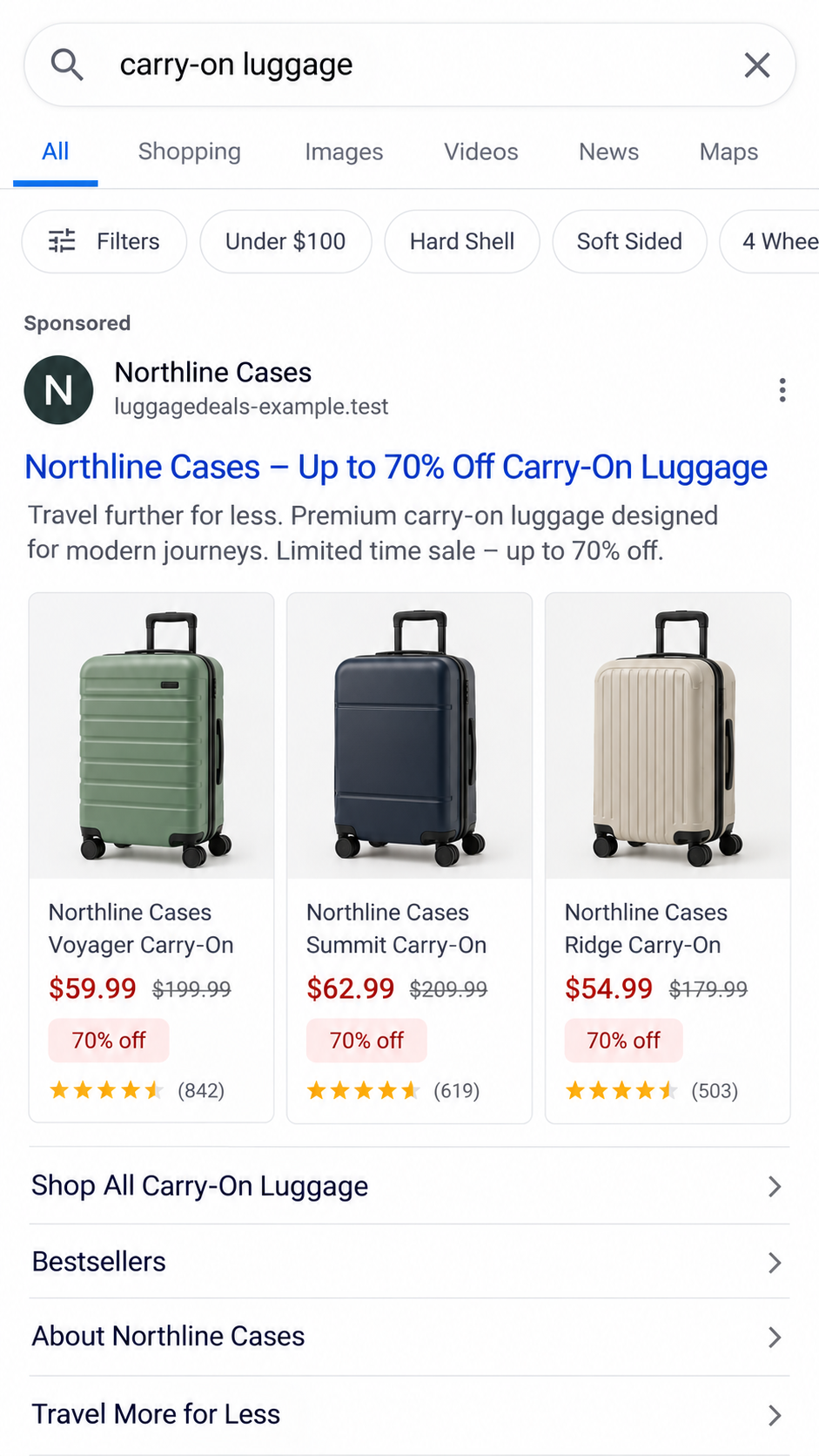
You search for a suitcase, see a familiar-looking store in a sponsored result, and find the color you wanted at a startling discount.
The page looks polished enough to keep browsing. The important details are smaller than the sale banner, and much easier to miss on a phone.
Overview
The search result is an advertisement, not a store endorsement
Fake sponsored shopping results are paid placements that lead to stores impersonating real retailers. The advertised item may be luggage, sandals, kitchenware, or a breast pump.
The decisive issue is who operates the destination. A genuine brand can appear in the headline and photographs while the web address belongs to somebody else.
The FBI has warned that criminals purchase search ads using lookalike domains and send visitors to pages resembling legitimate businesses.
An ad platform displaying the placement does not certify the seller, the inventory, the discount, or the safety of the checkout.
Recent reports show the same trap across unrelated products
In September 2026, a Reddit user described entering a debit card at a lookalike Calpak store advertising 70% off.
The user reported attempted charges of $300 and $1,700, which their bank flagged. That account documents a reported experience, not an audited loss total.
Another buyer reported encountering a sponsored breast-pump listing that led to a lookalike domain and repeated checkout errors.
A recent kitchenware report described a Pampered Chef lookalike in Sponsored Products, an unusually low price, and card-entry failures.
These accounts do not establish one operator behind every store. They do show why a changing brand name does not change the underlying warning.
The confirmed scam is impersonation and payment capture
The legitimate retailers are not the accused parties here. The scam is the imitation advertisement and lookalike checkout that claims their trust without their authorization.
The FTC warns that fake brand ads can lead to sites built to take payment or personal information, sometimes delivering a counterfeit or nothing.
A checkout error does not prove card theft by itself. In a lookalike store, however, it is enough reason to stop and call the card issuer.
Check these points before trusting a promoted listing:
- Does the registered domain match the retailer’s official website exactly?
- Is the offer also visible when you open that official site independently?
- Does the checkout name a different merchant or request another card after an error?
- Are return terms, contact details, and product pages complete and consistent?
- Does the advertisement pressure you with an implausible discount or short countdown?
Why the Fake Store Looks More Convincing Than You Expect
A cloned storefront does not need to invent a product. It can borrow the real retailer’s photographs, descriptions, colors, and product categories.
On a narrow mobile screen, a familiar photograph and large discount can dominate. The web address may be shortened or hidden until checkout.
The site might copy shipping promises, reviews, trust badges, and a familiar checkout layout. Those elements are easy to reproduce and do not prove affiliation.
One September report described a store whose links outside the shopping pages went nowhere. Another noted that a payment error appeared only after card details were entered.
Neither clue is universal. Some malicious stores include working policy pages, and a genuine site can occasionally have a payment outage.
The useful test combines identity, offer, and payment behavior. If the domain is not the retailer’s, the logo cannot make it the retailer.
Be careful with a domain that adds “sale,” “official,” “outlet,” “deals,” or a country abbreviation to a brand name. Those words can be purchased by anyone.
A secure padlock only says the browser has an encrypted connection to that domain. It does not identify the business behind the domain.
Short-lived domains complicate later complaints. By the time a buyer checks again, the store may be offline or replaced with another brand.
How the Fake Sponsored Shopping Result Scam Works
Step 1: The advertiser chooses an item people are already seeking
The buyer has usually started with a real shopping intention. That matters because the ad appears during an active search, not as an obviously unrelated message.
A popular size, color, or discontinued model can make the result especially tempting. The scammer only needs a plausible product photograph and a believable price anchor.
Step 2: The sponsored placement borrows a trusted name
The ad headline may repeat the brand and product name. The seller’s domain is often less prominent than the photograph and price.
Paid placement can put the impostor above the real retailer in a search. The word “Sponsored” describes advertising, not a quality review.
Step 3: The landing page copies the shopping journey
The visitor sees categories, colors, reviews, and cart buttons. The design encourages normal browsing so the mismatched domain feels less important.
Product pages can be copied quickly. A functioning cart is not evidence that a retailer will fulfill an order.
Step 4: The discount makes verification feel costly
A steep sale turns hesitation into fear of missing out. Some pages add low-stock badges or a timer, neither of which proves real inventory.
The buyer may rationalize the offer as clearance, a seasonal sale, or a special advertising promotion. Those explanations need confirmation on the genuine site.
Step 5: The checkout asks for card and contact information
At this point the lookalike can collect a name, address, telephone number, email, and payment data. The exact fields vary by page.
Some sites may process a payment for goods that never arrive. Others may harvest card details even if the displayed payment attempt fails.
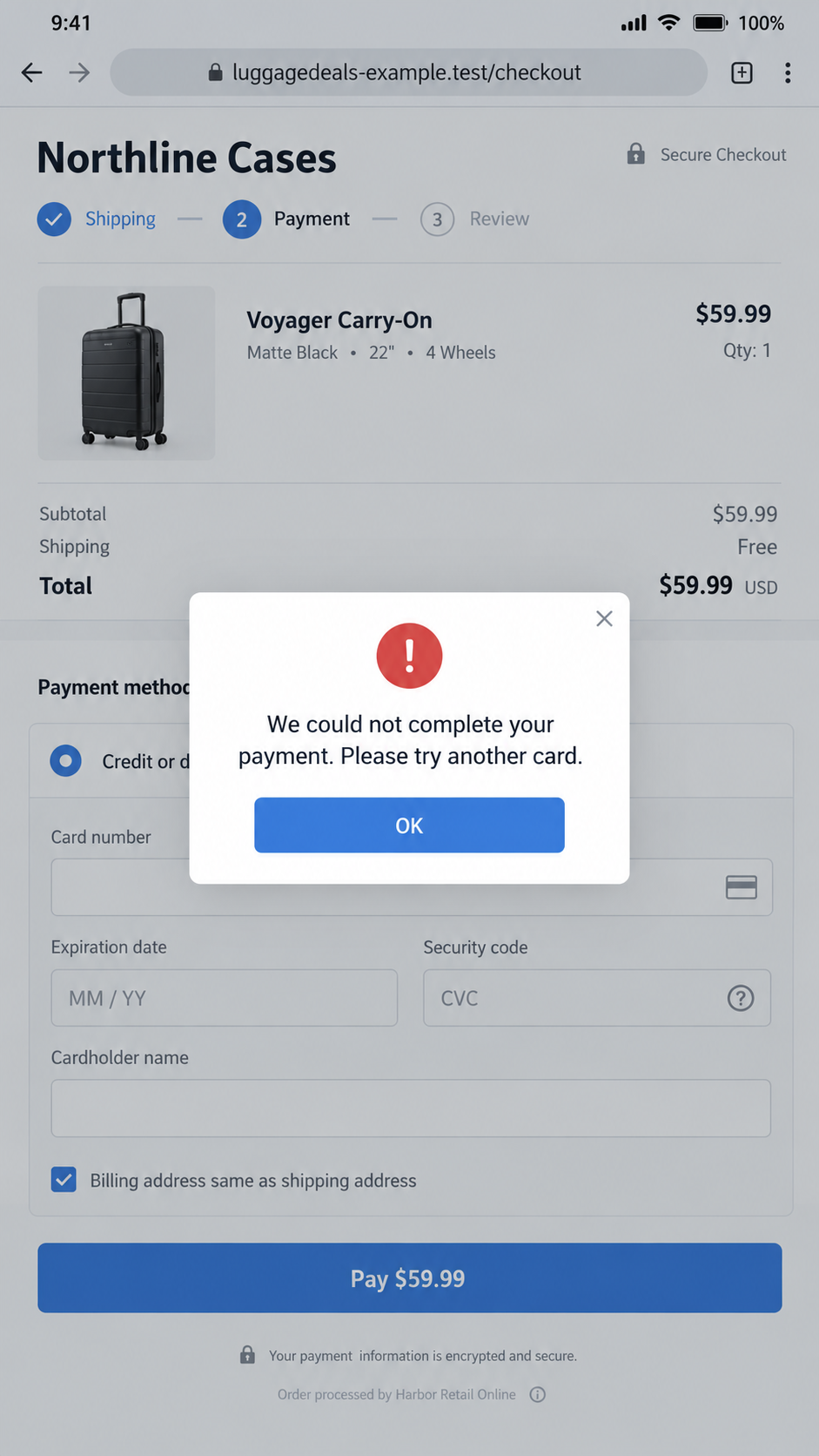
Step 6: An error can prompt a second card attempt
A shopper who sees “payment failed” may enter another card. That can expose two accounts to a page whose operator has not been verified.
The error could also be a routine processor problem on a real site. The response is not to diagnose from the message alone.
Close the page, check the registered domain, and inspect the card account directly. Never use the checkout’s reassurance as proof that nothing was submitted.
Step 7: The operator changes names or disappears
When complaints appear, a counterfeit store can move to a different domain and advertise another product category.
This is why the lasting story is the sponsored-result-to-cloned-checkout path, not the temporary product name in one advertisement.
The Real Brand Versus the Impersonator
Calpak, Pampered Chef, Brooklinen, Aeroflow, and other named retailers are real businesses. A store copying their products is not automatically connected to them.
Do not treat a search ad’s display name as proof of ownership. Open the brand’s known official site through a saved bookmark or independently verified address.
If the sale is genuine, the retailer should show it within its own website or verified account. A separate “outlet” domain needs independent confirmation.
Contact the company through the telephone number or contact form on its official site. Ask whether it owns the advertised domain and honors the specific offer.
Save a screenshot of the ad and address before reporting it. The retailer may be able to submit an impersonation complaint to the advertising platform.
A genuine retailer can have authorized resellers. The question is not whether every unfamiliar domain is fraudulent, but whether this seller’s identity and authority are verifiable.
If a third-party reseller is named, evaluate that seller on its own terms. A logo copied from a brand does not transfer the brand’s customer support or return policy.
How to Check a Store Before You Pay
Start with the entire address, including the part immediately before the first slash. Similar spelling matters more than the padlock or visual design.
Compare it with the official brand address found in your own records, a past receipt, an app, or a verified social profile.
Do not rely on a search result snippet to decide which site is official. A paid result can occupy that space, and snippets can be misleading.
Search the claimed retailer’s site for the advertised product and price. If the supposed 70% sale is absent, pause before assuming it is exclusive.
Read the contact, return, privacy, and shipping pages. Empty policies, mismatched company names, or copied text are reasons to investigate further.
Check whether the checkout changes the merchant name. A different billing descriptor can be legitimate, but the seller should explain that relationship before payment.
Look for the same product photographs on other sites. Copied imagery alone proves little, but identical descriptions and impossible prices across unrelated domains raise concern.
A domain-registration date may provide context, not a verdict. New legitimate stores exist, and older domains can be compromised or resold.
Read recent reviews carefully. A page full of perfect ratings written before the domain existed cannot establish that customers received the advertised goods.
Look at the advertised product on a second device or through the retailer’s official application. A legitimate promotion should not require an unfamiliar website to exist.
If the seller claims an exclusive clearance outlet, ask the retailer whether that outlet is authorized. Do not infer authorization from matching photographs.
Inspect the final amount before submitting payment. Shipping fees, currency conversion, and unfamiliar merchant names can change what looked like a simple sale.
Use the card issuer’s app to monitor authorization attempts after any suspicious checkout. A merchant can submit a transaction even when its own page displays an error.
Never enter a one-time bank code merely because the store asks. Read the bank’s message carefully; it may authorize a wallet enrollment or a separate transaction.
That bank-code scenario is a different mechanism, and MalwareTips covers it separately. The point here is to avoid letting a copied checkout decide what your bank alert means.
Finally, pause if customer support wants to move the conversation to an unrelated messaging app. A genuine retailer should be reachable through its established channels.
When uncertain, use a credit card with purchase protections. The FTC notes that credit cards generally provide stronger remedies when goods never arrive.
Do not send gift cards, wire transfers, cryptocurrency, or a payment-app transfer to unlock a “special” price. That removes ordinary buyer protections.
What to Do if You Have Fallen Victim to This Scam
- Stop entering information. Close the suspicious checkout and do not retry with a second card, even if the page claims the first attempt failed.
- Call the card issuer using the number on your card or inside its official app. Explain that card details were entered on a lookalike store.
- Ask whether the card should be frozen or replaced. Review pending and posted transactions, including small authorization attempts and unfamiliar merchant names.
- Dispute unauthorized charges promptly. Give the issuer the advertisement, domain, amount, time, and any checkout error you saw.
- Save evidence before the domain disappears. Keep screenshots, the full URL, order emails, card alerts, browser history, and any messages with the seller.
- Change any password reused on the fake store. If you created an account, update that password wherever else it appears and enable multifactor authentication.
- Report the ad through the search or social platform. Identify the specific advertisement and destination rather than reporting only the real brand name.
- Tell the impersonated retailer through its official contact page. Its abuse team may be able to seek removal and warn other customers.
- Report the attempt to the FTC and, in the United States, IC3. Preserve your report number for later disputes.
- If the page downloaded a file or installed an extension, stop using that device for banking and run a trusted security scan, including Malwarebytes if available.
An ad blocker such as AdGuard can reduce exposure to known malicious advertising destinations. It cannot reverse a card charge or verify a store on its own.
People who already paid may receive a second email offering a refund or recovery. Verify that contact independently before sharing another card or identity document.
Frequently Asked Questions
Does “Sponsored” mean the retailer was approved?
No. It means the placement was paid for. The advertiser may be an impostor, an authorized reseller, or an unrelated seller.
Are Calpak and the other named brands running this scam?
No evidence here implicates those legitimate brands. The warning concerns sites and ads that copy brand identities without verified authorization.
Should I replace my card if the fake checkout said payment failed?
Contact the issuer and explain what you entered. A failed message does not confirm that the page failed to capture your data.
Can a fake store appear above the real retailer in search?
Yes. Paid placements can appear before ordinary results. Compare the destination address with the retailer’s independently verified official site.
Does a padlock make the checkout safe?
No. Encryption protects the connection to that address. It does not establish that the seller owns the brand or will ship the goods.
What if I received an order confirmation?
Keep it as evidence, but verify the seller and monitor payment activity. A confirmation email can be generated without any genuine inventory.
The Bottom Line
A fake sponsored shopping result borrows a real product and a familiar storefront to get you to a checkout controlled by somebody else.
Verify the domain and the sale through the real retailer before paying. If you entered a card on a lookalike page, call your issuer immediately.

Join the discussion
0 commentsShare your experience or ask a question about this article.
Discussion
Start the conversation
Have a question or something useful to share? Add the first comment.