

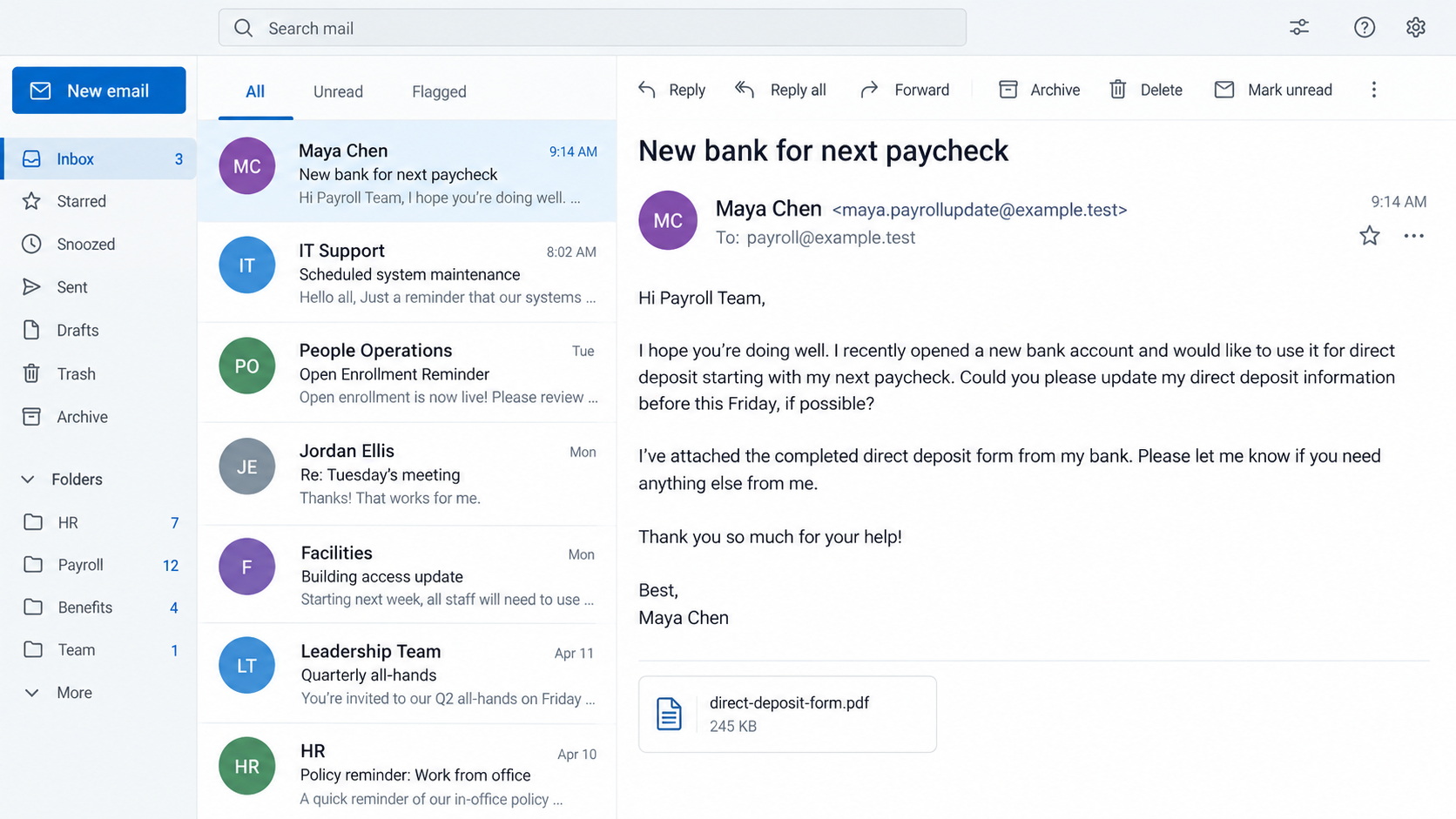
An email reaches payroll just before the next run. It appears to come from an employee who opened a new bank account.
The request is routine enough to process quickly. Before changing the destination, payroll needs to answer one question the email cannot settle.
Overview
The attacker impersonates the employee, not the payroll department
In this scam, an outsider writes to HR or payroll as if they are an employee. They ask that future wages go to a different bank account.
The employee may never receive a phishing link or lose a password. The fraud can begin and end as an email conversation with payroll.
The FBI’s Internet Crime Complaint Center specifically distinguishes this spoofed employee request from a separate attack involving stolen payroll-portal credentials.
That distinction matters. Advice limited to changing the employee’s password will not fix a payroll process that accepts unauthenticated banking changes by email.
A recent attempt was stopped by contacting the real worker
In a September 2026 report, an employer received an email using an employee’s identity and asking to change the bank for the next paycheck.
The address was not the employee’s usual address. The employer showed the message to the worker, who said they had not sent it.
The sender later provided a bank-information PDF. That detail makes the request look administratively complete, but it does not authenticate the person requesting payment.
GO2Bank, named in that account, is a real banking service. Its appearance on a purported form does not make the bank the scam operator.
The reported attempt was intercepted. We cannot claim a diverted paycheck in that case or identify who controlled the destination account.
This is a documented payroll-diversion pattern
The FBI documented more than 1,000 complaints about this BEC payroll-diversion variation during an 18-month period ending in June 2019.
Those figures are historical, not a measurement of the September 2026 case. They establish that the pattern is broader than one online complaint.
Current warning signs include:
- An employee name appears with a new, unfamiliar email address.
- The requested account is supplied as a PDF or bank letter by email.
- The sender stresses the next payroll cutoff.
- The request bypasses the employer’s normal self-service or signed process.
- The message says to use a new telephone number for confirmation.
- The worker cannot confirm the change through a number already on file.
Why a Voided Check or Bank Letter Is Not Identity Proof
Payroll staff understandably ask for documentation before changing direct deposit. A document can confirm the account information was typed consistently without proving who requested the change.
A criminal can create a PDF with an employee’s name and a routing number. The recipient account may be real and still be controlled by someone else.
The bank’s logo and address are not enough. Those details are public, and a document image can be altered.
Even a real account under an employee’s name would not establish that the employee authorized this specific payroll instruction.
The September employer noticed another mismatch: the targeted worker did not actually use direct deposit. That made the request easier to reject.
Other cases will not offer such an obvious clue. A worker who already receives deposits can plausibly switch banks.
The most reliable test is independent contact. Call a number previously recorded by the employer or speak to the employee in person.
Do not reply to the questionable email and ask “Is this really you?” The person controlling that mailbox or spoofed address can simply answer yes.
Do not use a new number printed on the attached form. That would let the same sender control both the request and the verification.
How the Employee Direct-Deposit Scam Works
Step 1: The attacker identifies a payroll contact
A company website, job posting, professional profile, or leaked directory can reveal who handles HR and payroll.
The attacker needs surprisingly little information. A worker’s name and employer may be enough to begin a believable request.
Step 2: An email claims to be from that employee
The display name may match the worker while the actual address is a new Gmail account or a lookalike company domain.
A compromised genuine mailbox is possible in some campaigns, but the September report did not establish that. Its sender used an unfamiliar address.
Step 3: The message asks about the next paycheck
The attacker says they opened a new account and want direct deposit moved before payroll closes. The request sounds like ordinary employee administration.
It may ask what form payroll needs, rather than supplying bank details immediately. That conversational opening can make the exchange feel cooperative.
Step 4: A bank form supplies the destination
The sender returns an account document or typed routing information. A real bank name can make the paperwork appear credible.
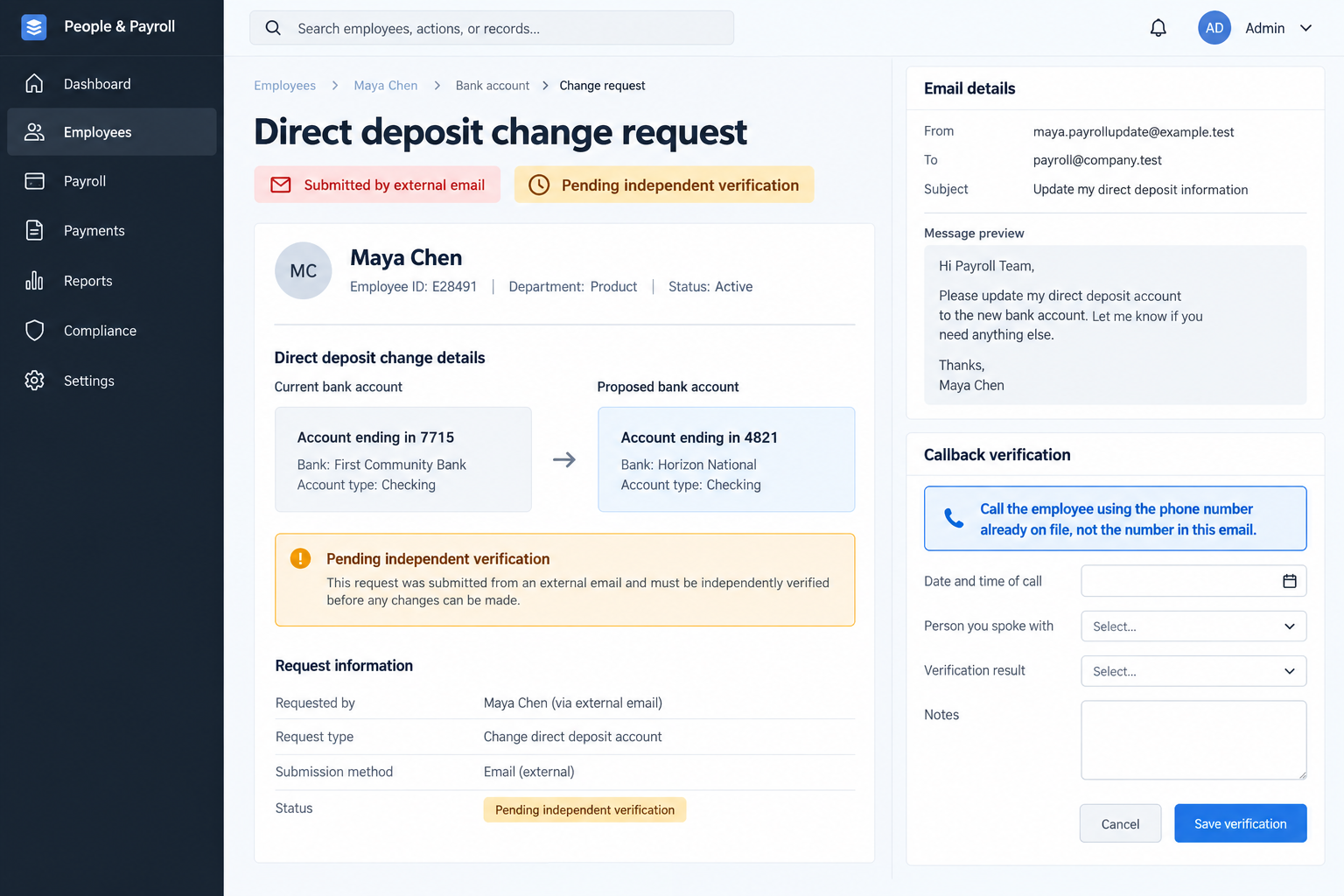
The document is not proof of authority. Payroll must verify the employee separately before moving wages.
Step 5: A hurried staff member may update the record
If the organization accepts email as sufficient authorization, the next payroll file can route earnings to the supplied account.
Many employers have a cutoff. The scammer may time the request so there is little room for a callback before processing.
Step 6: The missing deposit reveals the diversion
The legitimate worker expects pay as usual. They may learn something changed only when their normal account remains empty.
The employer may then need to contact its bank, payroll provider, and receiving institution quickly to request a recall or hold.
Step 7: The same script is tried again elsewhere
A failed attempt can be repeated with a different worker, employer, or bank document. A single intercepted email should trigger a review of similar requests.
The real employee should be notified. They may need reassurance that the employer did not change their pay instructions.
How This Differs From a Fake Payroll Login Email
Many payroll scams target employees directly with a false login page. The worker enters a password, and the intruder changes details inside the real payroll system.
This case targets the staff member authorized to make the change. The email itself is the instruction, and the payroll process is the target.
The FBI explicitly notes the difference. Conflating them can send victims toward the wrong response.
If no employee account was accessed, rotating that employee’s password may still be prudent when compromise is suspected, but it is not the primary control.
Payroll needs to freeze the proposed bank change, verify the worker, and examine whether other employee records were altered.
If a genuine mailbox was compromised, the employer also needs identity and email incident response. The investigation should determine that from logs, not assume it.
The bank destination is evidence, not a verdict on the bank. Financial institutions can be used by criminals without authorizing the fraud.
A Payroll Process That Breaks the Scam
Require a change through the established employee portal or a controlled form. Do not accept a new bank account solely because an email carries a familiar name.
Call the employee using a number already in the personnel record. If the number itself was recently changed, verify that change independently too.
For a small company, a brief in-person conversation can work. Record the confirmation and the person who performed it.
Use dual approval for changes close to a pay run. A second reviewer can catch an unfamiliar sender or an account changed outside policy.
Nacha recommends controls such as independently validating account changes and dual control for payroll origination.
Notify the worker through an existing channel when bank details change. A message to the new email address in the request is not sufficient.
Hold unusual requests that arrive just before the cutoff. A delayed change is inconvenient; a diverted paycheck is worse.
Train staff to see the complete email address, not only the display name. Mobile mail clients often hide the detail that matters.
Keep an audit trail of the old and new destination, request source, verification method, approver, and effective payroll period.
If the worker says no, document the attempt and report the destination account to the originating bank or appropriate fraud channel.
The Payroll Cutoff Is Part of the Pressure
A direct-deposit request arriving just before payday feels urgent for an understandable reason. Nobody wants to delay an employee’s wages.
The scammer can exploit that instinct by asking for the change “this pay period” while presenting the delay as a payroll problem.
A rushed approval, however, can send the full paycheck to an account the worker never named. The urgency should trigger verification, not bypass it.
Employers should tell workers how long genuine bank changes take. Clear expectations make an “emergency” exception less persuasive.
A request after the cutoff can be scheduled for a later payroll run. The staff member can explain that choice through a known channel.
Do not rely on a statement that the old account is closed. Confirm that claim with the employee; it may be the pretext for overriding controls.
If a worker truly has an urgent banking problem, the employer can use its established exception process. The stranger’s email should not invent one.
For larger payroll teams, flag destination changes inside the final payroll review. A second person should compare them against verified requests.
Reviewing only the total payroll amount will miss a diversion. The sum can remain unchanged while one employee’s destination changes.
A change report should include the prior account suffix, new account suffix, effective date, requester, verifier, and approval time.
That report should be retained securely. It helps the employer trace what happened if the worker calls after a missing deposit.
The same fraud can target bonuses or reimbursements, not only regular wages. Verification controls should cover every employee payment destination.
Pay attention to replies in an existing email thread as well. A compromised account can make the change look more familiar than a new Gmail message.
That possibility is why “company email only” is not a complete rule. A callback or authenticated self-service step remains valuable.
Do not blame the employee for having public job information. Professional profiles are normal; the payroll process must withstand a stranger knowing a name.
In the September example, the employer asked the worker directly before processing. That one independent step prevented the email from becoming a payment instruction.
What to Do if You Have Fallen Victim to This Scam
- Pause the requested change. If payroll has not run, freeze the bank update and call the real employee using a number already on file.
- If wages were sent to the wrong account, contact the employer’s bank and payroll processor immediately. Request a recall or reversal and preserve the payment trace.
- Tell the affected worker plainly what happened and when. Confirm where future wages will be sent and how the employer will address the missing pay.
- Preserve the email and headers, PDF, account details, approvals, logs, payroll file, and callback records. Do not keep the only evidence inside a personal inbox.
- Check for additional changes. Search recent payroll requests for the same wording, sender domains, bank details, or timing near pay cutoffs.
- Investigate whether an employee or payroll mailbox was compromised. A spoofed email and a genuine-account takeover require different technical containment.
- Report the receiving account and attempted fraud to the relevant financial institution. Share facts, not unsupported accusations about the bank or account holder.
- File a detailed complaint with IC3 in the United States and contact local law enforcement where appropriate.
- Close the process gap. Require independent verification and documented approval before accepting future direct-deposit changes.
If the email included a file and somebody opened it, security staff should evaluate that file. The documented September attempt does not itself prove malware delivery.
A recovery service claiming it can retrieve wages for an upfront fee should be treated with suspicion. Work through the employer and financial institutions.
Frequently Asked Questions
Can a scammer redirect pay without knowing the worker’s password?
Yes, if payroll accepts an impersonated email as authorization. The FBI distinguishes this from stolen-portal-credential payroll fraud.
Does a bank form prove the email came from the employee?
No. A document can contain real banking details while the instruction itself is fraudulent. Confirm the worker through an independent channel.
Was GO2Bank involved in the September attempt?
The reporter said the sender supplied a document naming GO2Bank. That does not establish bank involvement or identify who controlled the account.
Should payroll call the number in the request?
No. Use a telephone number already held in the employer’s personnel record, not one supplied in the suspicious email.
What if the payment has already been sent?
Contact the employer’s bank and payroll processor immediately to seek a recall, preserve the payment trace, notify the worker, and report the fraud.
Does an unfamiliar email address always mean fraud?
No. Employees can use personal addresses. For a bank change, unfamiliarity is a reason for independent confirmation, not an automatic accusation.
The Bottom Line
A fake employee email can turn a routine payroll change into a redirected paycheck. The September attempt was stopped because the employer checked with the real worker.
Verify every bank change through a channel the sender did not supply. If a payment has moved, speed and a complete record are essential.








