

Your documents still have their usual names, yet none of them opens. Then HOW_TO_DECRYPT.txt appears, and a small payment starts to look like an easy answer.
EniFrost ransomware creates a confusing first impression. Before troubleshooting each broken file, pause and look at the bigger picture.
Overview
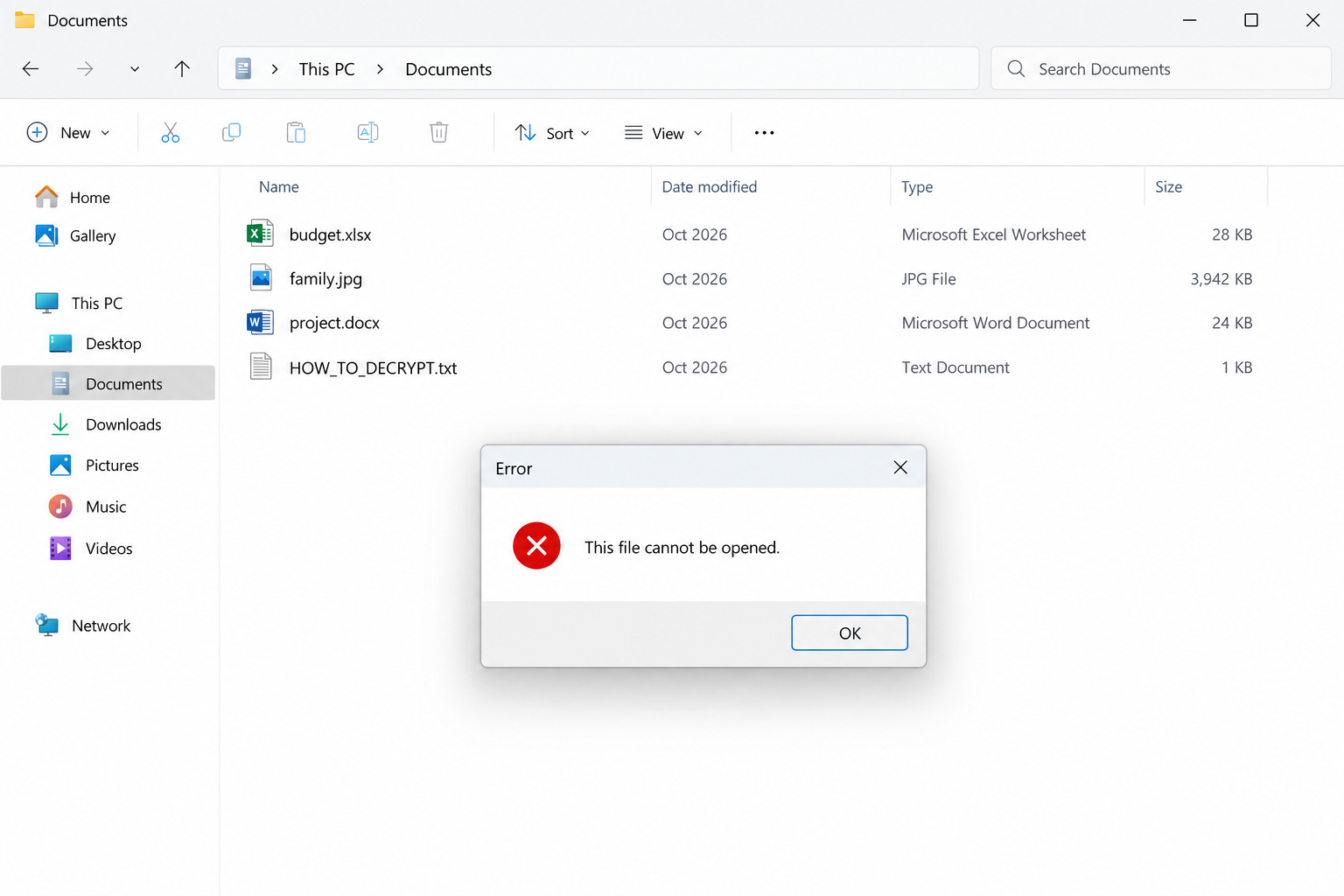
Ordinary filenames can hide encrypted contents
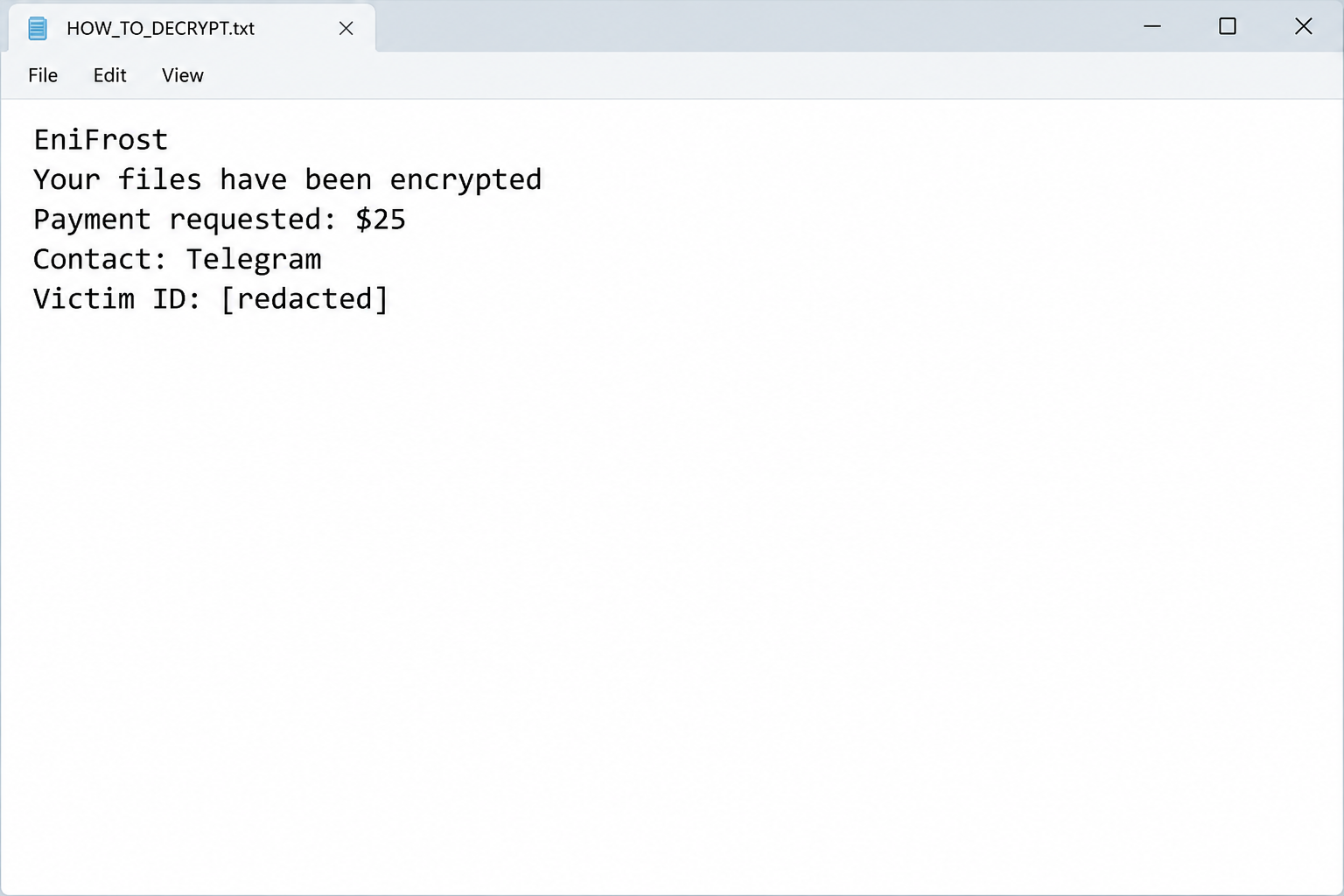
EniFrost is a ransomware threat whose documented specimen leaves original filenames and extensions unchanged. It creates a note named HOW_TO_DECRYPT.txt.
A spreadsheet can therefore still end in .xlsx while its contents are unreadable. An unchanged filename is not evidence that the file escaped encryption.
At the same time, an error opening one document does not diagnose ransomware. Look for a cluster of affected files and the matching note.
- Previously working files stop opening across different applications.
- The familiar extensions remain in place.
- HOW_TO_DECRYPT.txt introduces a payment demand.
- The note requests $25 and directs contact through Telegram.
The low price is not a safety signal
The documented demand asks for $25. A modest figure can make the choice feel less serious than the thousands often associated with ransomware.
But the purchase would still be a promise from the attacker who caused the loss. There is no ordinary seller, warranty, or dependable refund policy.
The note claims AES-256 encryption. That wording is part of its message, not an independently verified description of every affected file’s implementation.
The practical assessment
We did not find a verified EniFrost-specific public decryptor in the recognized catalog checked on October 6, 2026. Recovery claims require fresh verification.
Removing malicious software and restoring data are different jobs. A clean scan cannot make encrypted file contents readable by itself.
Do not let the small ransom distract from the larger question: whether the computer, its accounts, and any surviving copies are secure.
Why EniFrost Can Look Like Ordinary File Corruption
Many people expect ransomware to add an obvious new suffix. Here, looking only at names could send you down the wrong troubleshooting path.
You might reinstall an application, download a document-repair utility, or repeatedly save over a damaged file. None of those actions establishes what changed its contents.
Start with a comparison. Was the spreadsheet readable yesterday? Do photographs and text documents fail too? When did the note first appear?
A single damaged download may have a routine explanation. Multiple unrelated formats becoming unreadable alongside a ransom note call for incident response instead.
The images in this guide illustrate that contrast. They use example documents and abbreviated wording rather than claiming to show your machine or a new laboratory execution.
How EniFrost Ransomware Works
Step 1: A program gains the ability to alter your files
An attacker must first obtain a way to run malicious code. The final ransom note does not reveal the precise entry route.
Review the circumstances with a responder. Useful leads include a recent installer, an unexpected attachment, an account compromise, or remote access that should not have occurred.
Those are investigative possibilities, not confirmed EniFrost distribution methods. Blaming a particular download without evidence can leave the real weakness untouched.
Step 2: Contents change while the labels stay familiar
The reported specimen encrypts data without adding a fresh extension. Familiar icons and filenames can remain even after normal access is lost.
This is why recovery should focus on file contents and the matching incident, not a cosmetic rename.
If a helper asks for samples, provide copies under an agreed handling process. Keep your only originals out of experimental repair workflows.
Step 3: HOW_TO_DECRYPT.txt explains the attacker’s offer
The note presents a payment as the route back to your files. It also supplies an identifier for the attacker to associate with the request.
A victim ID helps organize a demand. It is not a transaction guarantee or proof that a working key will actually be delivered.
Keep the full note for analysis. Do not post private identifiers or sensitive filenames publicly simply because an online helper asks.
Step 4: Telegram moves the discussion into private contact
The documented contact is the Telegram handle @Mk0Baby. Treat that as an incident indicator, not a recommended recovery contact.
Telegram itself is a legitimate service. The problem is the criminal demand and any files or payment instructions delivered by its sender.
A friendly reply would not change that relationship. Be particularly cautious if the conversation introduces a new executable or asks you to weaken security settings.
Step 5: A $25 fee and alarming warnings narrow your choices
The note threatens consequences for outside assistance. Its assertions about permanent key deletion should be treated as coercive claims, not verified monitoring capabilities.
Nothing in those words proves the attacker can observe every conversation with law enforcement or a security specialist.
The low fee can encourage a hurried decision. Yet paying does not contain the infection, investigate other access, or establish that the offered software is safe.
Do Not Turn a $25 Demand Into a Larger Loss
Keep payment and computer safety separate
Even a working key would address only part of the problem. It would not explain how the program arrived or whether another malicious component remains.
That distinction matters when someone says paying is quicker than cleanup. Faster access to a document is not the same as regaining a trustworthy computer.
Ask what a repair tool actually does
A file-repair application may fix a damaged document structure. A decryptor needs to support the encryption and key conditions relevant to your incident.
Do not accept a search advertisement that treats those tasks as interchangeable. A believable product page is not evidence of EniFrost compatibility.
Preserve the files you cannot recover today
It is frustrating to store unreadable files. Keeping an untouched archive, however, leaves room for later technical assessment.
Deleting everything because the ransom seems inexpensive closes that option. Decide what to preserve before rebuilding the computer.
What to Do If EniFrost Is on Your Computer
Stop opening and resaving the affected collection. Disconnect the computer and protect any storage that has not yet been attached to it.
Retain HOW_TO_DECRYPT.txt and record which file types stopped working. Ask workplace IT to preserve evidence if business systems are involved.
Check independent copies before considering the demand. A colleague’s attachment or earlier cloud version may contain a usable document with the same ordinary filename.
Use a trusted malware-removal process, including Malwarebytes where appropriate. Never expect an antivirus scan to supply the missing decryption key.
If money or account information was shared, save the transaction details and contact the relevant provider. Report the incident without obeying the note’s intimidation.
Remove EniFrost From the Affected System
Contain the incident before running cleanup tools
Disconnect the affected computer from Wi-Fi and wired networks. Unplug external storage and leave backup drives disconnected while you assess what happened.
Pause synchronization from a clean device where possible. Otherwise, encrypted versions may replace usable cloud copies while you are trying to rescue them.
At work, contact your IT or incident-response team immediately. A ransomware screen on one computer may be the visible part of a larger intrusion.
Keep the ransom note, filenames, discovery time, and any security alerts. A specialist may need disk or memory evidence before cleanup changes the machine.
If you cannot isolate a computer and encryption is visibly continuing, seek immediate assistance about shutting it down. Powering off can lose volatile evidence.
Do not repeatedly restart, reinstall, or experiment with utilities. Those actions can overwrite recovery evidence without addressing the underlying access problem.
Use trusted scanners on an isolated personal computer
For a home computer, arrange cleanup after preserving the evidence you need. Obtain security tools through their official websites using an unaffected system.
Malwarebytes can scan for malicious programs and related unwanted software. It is an infection-removal tool, not a way to decrypt already encrypted documents.
Install a current copy, update its detection data when safely possible, and run the available comprehensive scan. Review detections before applying the recommended quarantine actions.
Keep the scan report. It can help distinguish the ransomware payload from another infection, a suspicious installer, or a remote-access program.
Windows Security also provides scan options. Microsoft Defender Offline restarts into an offline scanning environment, so save your work before starting it.
Follow Microsoft’s ransomware protection guidance rather than instructions in the criminal’s note. A note telling you to disable protection is not trustworthy advice.
If Windows will not start or the scanners cannot operate, stop improvising. Use reputable technical assistance instead of downloading a supposed one-click emergency decryptor.
Do not upload the executable to unfamiliar recovery websites or run it elsewhere for testing. A second execution can create another incident.
Verify the environment before restoring anything
A completed scan is useful, but it cannot establish that every account, remote session, or networked computer is safe.
Check for unauthorized remote-access software, suspicious accounts, changed security settings, and unknown scheduled tasks. Business environments require coordinated investigation beyond this home-computer checklist.
Change exposed passwords from a clean device. Prioritize email, cloud storage, administrator access, and any account whose credentials were saved on the affected system.
Enable multifactor authentication where supported and revoke suspicious sessions. Simply changing the password may leave an existing signed-in session active.
A trusted reinstall may be appropriate when system integrity remains uncertain. Preserve recoverable data first, and reinstall from authentic installation media.
AdGuard can help reduce exposure to malicious advertising during future browsing. It neither cleans an infected system nor reverses file encryption.
Keep backup media offline until cleanup and access checks are complete. Reconnecting your only good copy too early can turn a recovery opportunity into another loss.
Recover Data When Filenames Have Not Changed
Make a recovery copy, not another damaged original
Keep an untouched copy of the encrypted data whenever practical. Include the ransom note and retain the original directory structure.
Use a separate destination for recovery experiments. Never let a utility overwrite your only encrypted copy or replace an intact backup.
Before sharing samples, consider their sensitivity. Choose an ordinary, nonconfidential file and ask the service about handling rules if business or personal information is involved.
The note’s name, complete filename suffix, and contact details can help identify a variant. An extension alone is not enough to establish decryption compatibility.
For example, two infections can use the same suffix while generating different keys. A familiar family name can also hide a newer, unsupported version.
Record the exact error or result from each attempt. Keep a simple checklist so another helper does not repeat risky tests on the same files.
Check recognized decryption projects
Visit the No More Ransom decryption catalog from a clean browser. Look for the actual variant and read the tool’s requirements carefully.
A tool for a related family does not automatically unlock your files. Some decryptors support only older versions, certain keys, or specific encryption mistakes.
Download through the catalog’s trusted vendor link, not a sponsored search result or an unsolicited message offering guaranteed recovery.
Test only a duplicate sample first. Successful decryption should produce a usable document or image, not merely remove the added extension.
If the utility reports an unsupported file or key, stop. Changing the filename to resemble a supported variant does not change its encrypted contents.
When no compatible tool is available, preserve your encrypted archive. Researchers sometimes release new tools later, but future recovery cannot be promised.
Look for copies that existed before encryption
Check disconnected drives, backup software, cloud version history, another computer, and files previously sent to trusted contacts. You may have more copies than you remember.
Cloud synchronization is not automatically a backup. Confirm that an earlier usable version survives and that the account itself has not been compromised.
Restore into a cleaned environment. Open a selection of documents, photos, and project files before assuming the recovered collection is complete.
Compare important dates and contents. An older spreadsheet might open perfectly while still missing the transactions you needed to recover.
Windows Previous Versions or existing snapshots may offer additional copies. Availability depends on prior configuration and whether those snapshots survived the incident.
Do not create new restore points expecting them to contain yesterday’s files. Recovery depends on copies that already existed before the damage.
Deleted-file recovery utilities are a different category. They may locate unencrypted originals in some circumstances, but they do not mathematically decrypt overwritten data.
If you want a specialist to investigate that possibility, minimize writes to the affected storage. Continued installations can overwrite remnants that might otherwise be recoverable.
Evaluate recovery offers without surrendering control
Be wary of anyone who contacts you first, claims exclusive access to a secret decryptor, or requests an advance payment in cryptocurrency.
Ask a recovery provider what method it intends to use, what evidence supports success, and whether it would negotiate with the attacker.
Get the scope, fee, privacy terms, and limitations in writing. A legitimate assessment should distinguish a possibility from a demonstrated recovery result.
Do not provide remote administrator access to an unknown helper. Recovery desperation can make a second scam feel like the only remaining option.
If you already paid, retain receipts, transaction references, wallet addresses, and correspondence. Contact the payment provider promptly and report the extortion.
Recovery is sometimes partial. Prioritize irreplaceable files, verify them individually, and keep your evidence archive until the investigation and restoration decisions are settled.
Frequently Asked Questions
Can EniFrost encrypt a file without changing its name?
Yes. The documented specimen retains the original filename and extension. Whether contents are usable must be checked separately.
Does every file-opening error mean EniFrost?
No. Ordinary corruption, incomplete downloads, and application problems can cause errors. A matching ransom note and widespread failures are more meaningful clues.
Is paying $25 less risky than using recovery tools?
The price does not make the attacker trustworthy. Recognized tools should be assessed for compatibility and tested on copies; payment has no dependable outcome.
Can the attacker delete my key because I asked for help?
The note makes that threat, but its text does not establish such a monitoring capability. Do not treat intimidation as reliable technical guidance.
Will reinstalling Windows restore EniFrost files?
A reinstall can help rebuild a trusted system, but it cannot reverse encrypted contents. Preserve evidence and recoverable data before wiping storage.
Why keep HOW_TO_DECRYPT.txt after cleanup?
Its wording and identifiers can support variant identification, reporting, and later recovery checks. Preserve it as evidence without acting on its download or payment directions.
The Bottom Line
EniFrost ransomware can leave filenames looking normal while making their contents inaccessible. The $25 demand should not determine how carefully you handle the incident.
Preserve the evidence, clean the environment, and investigate usable copies. Treat promises and threats in HOW_TO_DECRYPT.txt as attacker claims, not instructions from a trusted technician.








