

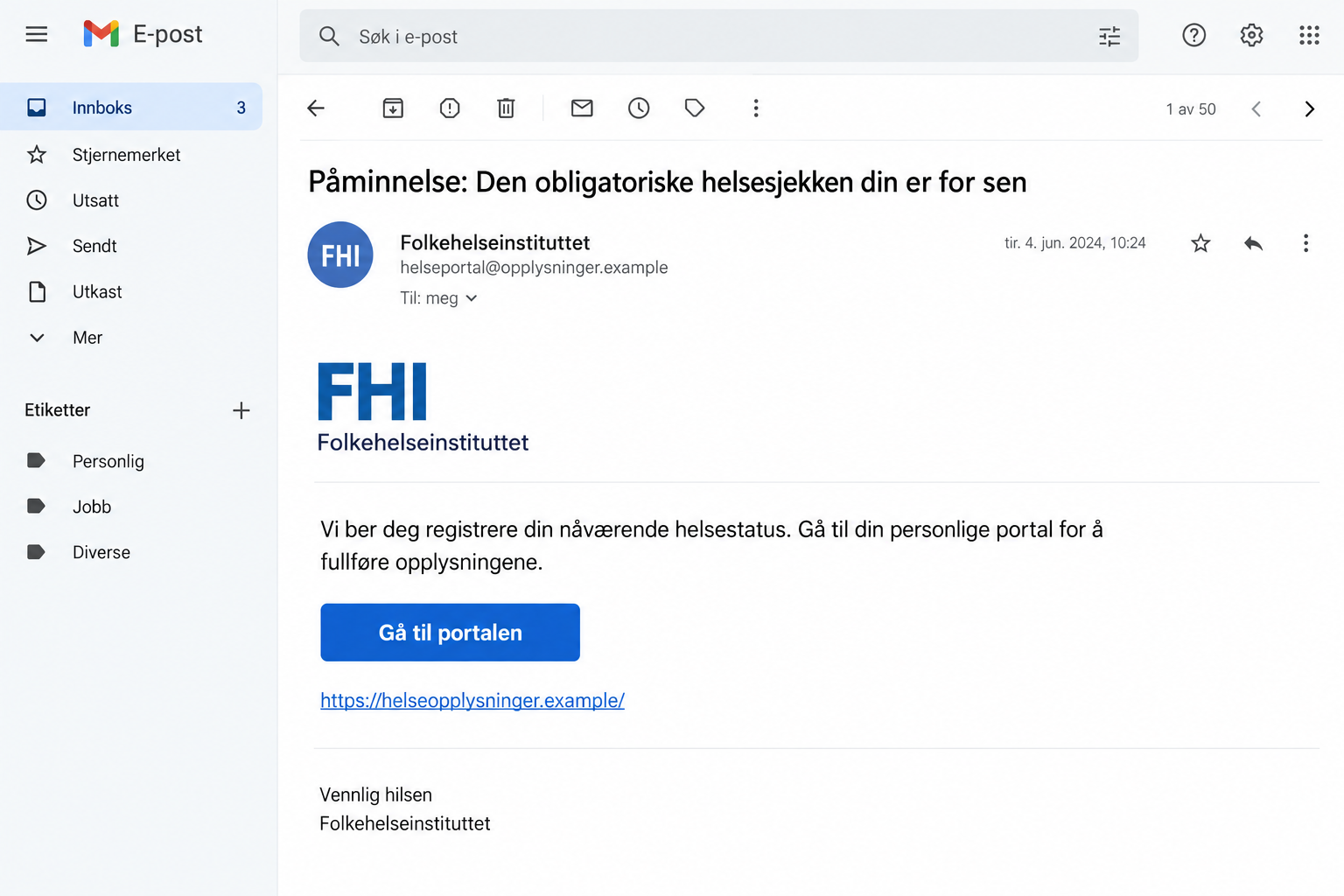
An email says your mandatory health check is overdue. It names Folkehelseinstituttet and offers a personal portal where you can put your information right.
That sounds like something you should not ignore. The FHI health check email scam takes advantage of that instinct before you examine the invitation.
Overview
The mandatory-check message is a confirmed FHI impersonation
Norway’s Folkehelseinstituttet, commonly called FHI, has warned about impostor emails asking people to enter information about their health status.
The official warning describes messages demanding completion of health information or claiming an obligatory health check is late.
It was first published in March 2026 and updated on May 5. That is the date of the documented warning, not proof of a new October outbreak.
FHI says it does not have the personal portal described in these emails for collecting residents’ health information. The institution’s name is being misused.
The image above is a fictional illustration of the reported lure. It is not an original email or evidence of the website’s exact appearance.
Health information is sensitive even without a payment
A request about your health can deserve scrutiny before a password or bank card appears. The information itself may be private and difficult to retrieve after disclosure.
The warning establishes impersonation and a false health-data collection pretext. It does not establish a specific malware attachment, card form, or medical-record breach in every case.
Keep the conclusion attached to what is known: an unsolicited message is directing people toward a supposed personal portal that FHI says it does not operate.
If you supplied information, your next steps depend on what it was. Health answers alone do not automatically mean someone gained access to your banking account.
If credentials or an authentication approval were also involved, that additional exposure needs its own urgent response through the genuine service.
Check real health communications through a route you control
- Do not assume the word mandatory establishes an actual healthcare obligation.
- Confirm the study or service through FHI’s official site rather than using the email’s portal button.
- Open Helsenorge independently to check messages relevant to your own healthcare.
- Review the full sender address, while remembering that a convincing display name is not authentication.
- Report exactly what was disclosed without posting private medical details in a public discussion.
You can investigate an unexpected request without rejecting legitimate healthcare or research. The aim is to confirm the sender and route before sharing information.
Why an Overdue Health Check Gets Your Attention
A health-related reminder can bring two worries at once: you may have neglected something important, and you may need to correct it before consequences follow.
The word mandatory gives the sender apparent authority. It encourages you to think about complying with a requirement rather than deciding whether the requirement exists.
A personal portal sounds organized and confidential. That description can make a collection form feel appropriate before you know who controls it.
The scam also benefits from ordinary uncertainty about institutions. Many people recognize a public health name without knowing which messages that organization normally sends.
That is why checking the service’s role matters. A real institution can be familiar while the particular process attributed to it is invented.
Do not interpret hesitation as neglecting your health. You can contact a genuine healthcare provider or open a verified health service without accepting the unsolicited instructions.
If the wording causes immediate anxiety, step away from the button and find the actual notice. A frightening subject line does not establish a medical emergency.
For an immediate health concern, use your normal healthcare route. An email demanding administrative information should not determine clinical decisions or delay appropriate medical contact.
How the FHI Health Check Email Scam Works
Step 1: A recognizable institution is attached to an unexpected requirement
The message presents itself as coming from Folkehelseinstituttet. Its subject suggests that information must be completed or that a compulsory check has been missed.
This changes the reader’s starting point. Instead of evaluating an unknown request, they may begin searching their memory for a missed appointment or form.
The email has not supplied independent proof of either. Its authority comes from the institution name and the urgency of the wording.
Check whether the actual institution describes that activity. A genuine study or service should have a verifiable purpose and an authentic contact route.
Step 2: The portal offers an apparently convenient correction
The invitation directs the recipient toward a supposed personal portal. This frames the next click as completing a task already associated with them.
Convenience makes the request easier to accept. You are offered somewhere to fix the issue immediately instead of having to identify which department might be responsible.
But the message is selecting the destination whose legitimacy you need to establish. Its button cannot be used as independent proof of that destination.
Close that route and consult FHI’s real website. If the communication appears healthcare-specific, inspect your messages through the genuine Helsenorge service.
Step 3: Health questions make the disclosure feel relevant
Once the reader accepts the health-check story, questions about current health status may seem logical. The original identity problem can fade from attention.
Relevance does not establish authorization. A question can fit a convincing story while still delivering sensitive information to an unrelated operator.
You should know which organization collects the information and why. A page’s privacy wording cannot substitute for verifying that the organization actually operates it.
Do not continue because you already answered the first question. Stopping limits additional disclosure even when earlier information may already have left your control.
Step 4: The information can outlast the email
Deleting an email removes a local message. It does not necessarily remove information sent to a website, attachment recipient, or reply address.
The practical concern is which details were disclosed and what further contacts they might support. Do not invent a broader breach without evidence.
An unexpected follow-up quoting your earlier answers still needs verification. Knowledge of those answers could come from the untrusted interaction itself.
If someone uses the information to demand a code, payment, or new documents, pause and reach the real institution independently before acting.
Genuine Research Invitations Are a Different Matter
FHI does conduct legitimate public health research. Recognizing these scam emails should not become a reason to dismiss every real study or official notification.
Its April 16, 2026 notice explains how invitations for the Vestland health survey were sent through Helsenorge.
Those notifications could arrive by app notification, SMS, or email. The notice distinguishes them from the false messages by explaining that SMS and email notifications did not contain links.
This is a specific documented example. It is not a promise that every study by every organization uses the same communication process.
For a different invitation, verify the study’s actual instructions through its genuine institution. Check the name, purpose, eligibility, and contact information before participating.
An old webpage about a real survey does not authenticate a new email. Match the invitation to the relevant study and dates, not just the institution’s logo.
If you want help confirming participation, ask the official contact you obtained independently. Do not send your full health history to the suspicious address while asking whether it is real.
Keep the research question separate from the alleged overdue obligation. A voluntary invitation should not become compulsory merely because a stranger uses threatening language.
What to Check in the Sender and the Destination
The sender’s displayed name can be Folkehelseinstituttet even when the underlying address is unrelated. Expand the sender details to inspect the actual address.
FHI’s warning says it does not send these messages from public email services such as Gmail or Hotmail. Such an address deserves particular attention.
That is an exclusion clue, not a complete authentication method. An address containing fhi in an unrelated domain can still be chosen by an impostor.
Check the destination separately. The text on a button or link does not necessarily reveal the complete website that would receive your information.
If you cannot examine it comfortably on a small screen, do not press it just to find out. Use the institution’s known website to investigate the alleged task.
Helsenorge’s security guidance tells users to open its genuine app or website rather than follow unsolicited login links.
It also distinguishes links in the authenticated inbox from links in unsolicited email. That context matters: where you read a link affects how it has been verified.
There is no universal conclusion that all healthcare links are fraudulent. The safer approach is to confirm the communication inside an authenticated service you opened yourself.
What to Do if You Have Fallen Victim to This Scam
-
Stop the interaction and list the information supplied. Separate health answers, name, contact details, identification numbers, passwords, and any financial information.
Write down the website or address used and the approximate time. This creates a useful record without assuming that every category was exposed.
-
Preserve evidence without circulating your medical information. Keep the email, sender details, subject, destination, and any screenshots already available.
If a screenshot includes health answers, keep the full version privately. Share redacted examples publicly, and use appropriate secure channels for sensitive incident records.
-
Tell the genuine institution about the false request. Use contacts reached from FHI’s official website, explaining that its name was used in an unsolicited health-check message.
Provide the link and type of information requested. Do not include an unnecessary copy of your complete medical history or identity documents.
-
Protect any account credentials separately. If you typed a password into an untrusted portal, change it through the authentic account and examine available session controls.
Address reused passwords on other important accounts. If email uses the same password, prioritize it because it may control recovery messages for other services.
-
Contact the bank if BankID or financial data was involved. Explain the exact authentication action, details entered, or approval completed.
Do not assume a health-status answer alone compromises banking access. Conversely, do not overlook an authentication step simply because the website called it a health check.
For money already sent, the Norwegian police’s fraud guidance recommends contacting the bank promptly about stopping the transfer.
-
Check genuine health messages independently. Open Helsenorge yourself and inspect relevant correspondence. Contact your actual healthcare provider if an appointment or medical obligation worries you.
Keep legitimate care moving while investigating the impersonation. You do not need the suspicious portal to ask a real provider about your own treatment.
-
Investigate installations or unusual device behavior. If you downloaded software during the interaction, examine that device and remove unwanted access using appropriate guidance.
Malwarebytes can help scan for unwanted software. AdGuard can reduce some exposure to malicious advertising and known risky destinations in future browsing.
A scan cannot retract health information already sent. Account security, document exposure, and device cleanup need attention according to what actually happened.
-
Be cautious with subsequent calls or emails. Someone referring to your disclosed condition or answers may sound informed without being an authorized healthcare contact.
Verify the person through your real provider before discussing further details. Report suspected misuse or fraud through the appropriate official route.
If You Are Helping a Relative Verify the Message
Ask what the email says they missed, then look for that task through the actual healthcare service. Keep the focus on checking the claim calmly.
Do not ask them to forward sensitive records into a family group. A redacted subject and sender can explain the concern without spreading private information.
If they already answered questions, help prepare a short exposure note. They may be embarrassed and less willing to describe the interaction if the conversation feels accusatory.
Ask specifically about passwords, codes, and approvals. People sometimes remember the questionnaire but not the sign-in step that seemed necessary to reach it.
If they entered no credentials, do not tell them that their whole digital identity is certainly compromised. Respond to the facts and any subsequent signs of misuse.
A verified bookmark or familiar official app can simplify future checks. Show how to reach the real inbox so the next unexpected reminder is easier to assess.
Frequently Asked Questions
Does FHI operate the personal portal described in these emails?
FHI says it does not have that portal for collecting residents’ health information. The reported mandatory-check messages misuse the institution’s identity.
Was this warning newly issued in October 2026?
No. The main FHI warning began in March and was updated in May 2026. We checked that published evidence, rather than claiming a newly documented October outbreak.
Are all FHI research invitations fraudulent?
No. Genuine studies exist. Verify the actual study through FHI and follow its official participation route, rather than trusting an unexpected email’s button.
What if I only supplied health answers?
Record the disclosure, report the false request, and verify later contacts carefully. That alone does not prove that banking credentials or official medical records were accessed.
Can a Gmail address really belong to this official request?
FHI says it does not send these messages from Gmail, Hotmail, or comparable public services. Confirm the alleged activity independently instead of relying on a display name.
Should I ignore a real healthcare concern because of the scam?
No. Use your established healthcare contact or the genuine health service to address the concern. Avoid letting the unsolicited portal determine what action you take.
The Bottom Line
The FHI health check email scam uses an invented obligation to make private disclosures feel necessary. A recognizable public health name does not authorize the portal.
Verify the task through the institution and your genuine health service. If information was supplied, protect the particular records or credentials involved and report the impersonation.








