

Your card has supposedly been locked after unusual activity. The text looks like a warning you should deal with before trying to pay for anything.
The TSB card locked scam text offers a convenient review link. Pause there, because restoring access should not begin with an unknown website.
Overview
The text pretends to protect you from a suspicious charge
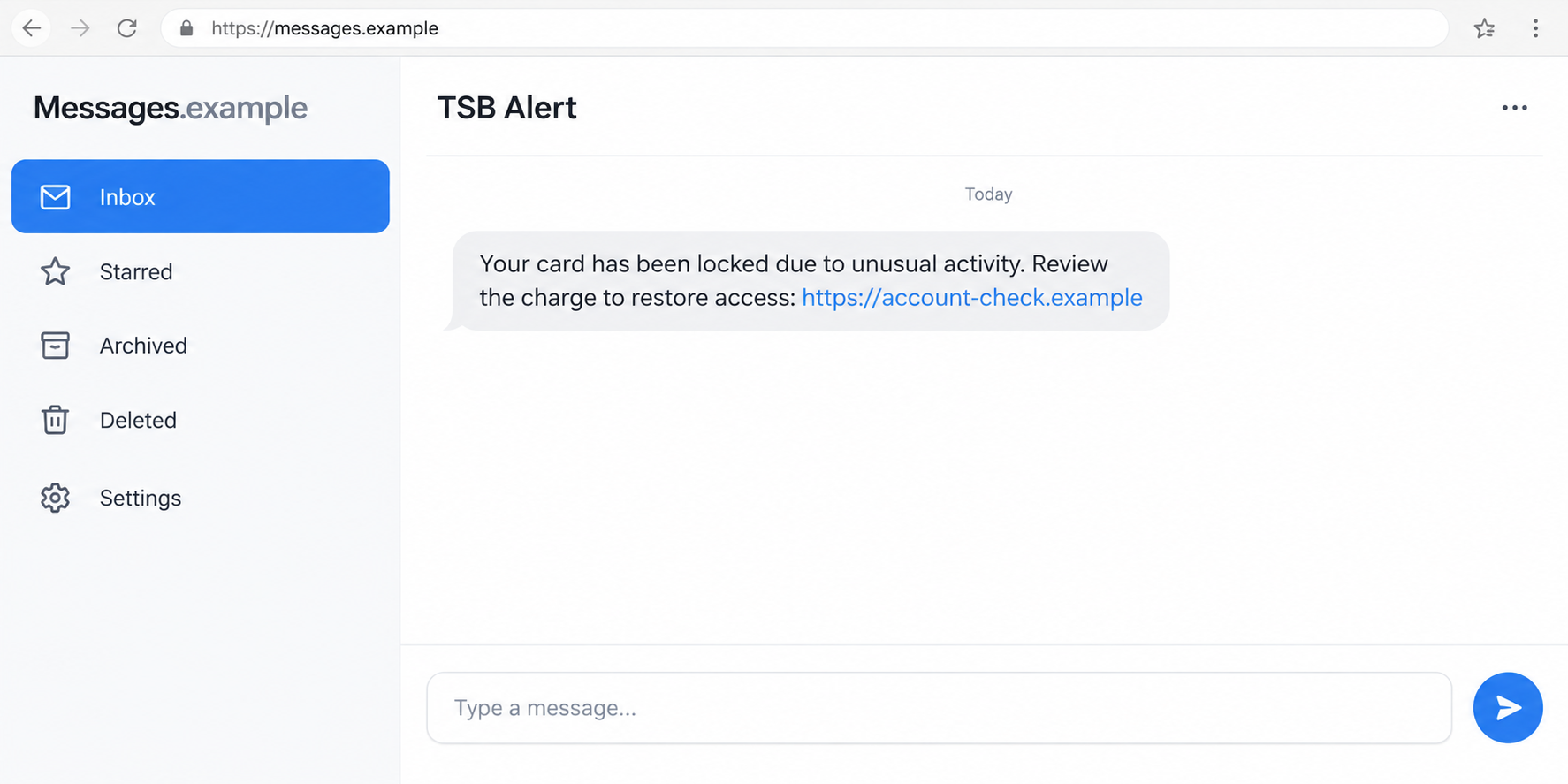
This phishing message claims a TSB card was locked because of unusual activity and directs the recipient to a fake banking website.
The site asks for information under a fraud-review pretext. Anything entered there goes to the operator, not to a trusted TSB account check.
The bank’s name supplies familiarity, while the alleged lock supplies urgency. Together, they make following the link feel like a responsible response.
TSB’s official guidance on recognizing fraud warns about text links that lead to websites stealing details.
A real bank alert and a fake review page are different things
Banks can contact customers about suspicious activity. You should not dismiss every warning, but you should verify it through a channel you selected independently.
Open the banking app you already use or reach TSB from its official website. Find out whether the account actually contains the claimed issue.
A genuine concern does not require giving an unknown caller your full password, PIN, or a new beneficiary payment.
TSB distinguishes legitimate identity checks during a call you make from demands for complete security information during unverified incoming contact.
The safest response keeps the investigation out of the text
Look at the requested action rather than trusting the sender label. Warning signs include:
- A card-lock notice that sends you to an unfamiliar bank-like domain.
- A request for full login information to review a charge.
- A security code requested without explaining its genuine purpose.
- An incoming caller telling you to move funds into a safe account.
- A review that turns into software installation or screen sharing.
The pictured message is a fictional illustration with a nonfunctional address. It is not a screenshot of TSB’s genuine alert system.
Why a Card-Lock Warning Can Make You Rush
You are being asked to prevent a loss, not make a purchase
A shopping offer gives you time to decide whether you want something. A fraud warning instead suggests a problem is already underway.
That changes the emotional calculation. You may feel that clicking quickly is safer than leaving the alleged transaction unchecked.
The better response is still prompt, but separate: check the real account and contact the bank directly. Speed should not hand control to the sender.
A precise time can make the invented event feel real
Some versions include a time for the supposed unusual activity. That detail suggests the bank has an exact record ready for you to review.
A timestamp can be invented as easily as the rest of the text. Match the alleged event with your actual transaction record before reacting to it.
If something unfamiliar really appears, report it through TSB. Do not assume the text’s destination becomes safe just because a separate account concern exists.
A familiar message thread is not a secure identity check
Sender labels and familiar presentation can make a text resemble earlier bank messages. The display is not the same as verifying who controls its link.
A convincing phishing page may also have good spelling, bank colors, and a working menu. None of those features needs access to your real account.
Checking the official app breaks that reliance on appearances. It gives you information from the account rather than from the person trying to direct you.
How the TSB Card Locked Text Scam Works
Step 1: A false alert announces an urgent account problem
The text says your card has been locked after unusual activity. You are instructed to review a charge through the address supplied in the message.
The operator does not need to have locked the actual card. The statement creates the concern that will motivate the next action.
A recipient without a TSB account can spot that mismatch immediately. A genuine customer still needs to check the claim outside the SMS.
Do not respond with a card number to ask which card the sender means. That gives information away before the conversation has been authenticated.
Step 2: The review link leads to a copied banking interface
The destination imitates a fraud-review or account-login page. It may include familiar navigation and wording about keeping your money safe.
Bank-related words in a domain are not enough. A website can sound like a fraud department while being completely unrelated to the institution.
Likewise, HTTPS protects the connection to whichever site you opened. A padlock does not grant that site’s operator permission to collect your banking information.
Leave the page rather than trying a fake login as a test. Testing a suspicious form is unnecessary, and accidental autofill can expose real data.
Step 3: The account check collects information it should not receive
The page asks for a user ID, password, memorable information, card details, or other data framed as necessary to identify the suspicious charge.
The story gives those requests an apparent purpose. That does not make the website part of the bank’s security process.
TSB’s security checklist says to protect your PIN and digital-banking credentials. Its official app or site is the appropriate place to access the account.
If you used a password stored in your browser, check what was submitted. A page that appeared to reject it may still have received it.
An error followed by a demand for additional details is not reassurance. Stop rather than supplying more ways to identify or access your account.
Step 4: A supposed verification can request a real authorization
The conversation may progress to a one-time code or banking approval. These requests need their own scrutiny, regardless of the text’s fraud-review label.
A bank message may describe a payment, sign-in, or other change. Read that actual description instead of relying on what the phishing page says it means.
A code can relate to an action initiated by somebody else. Receiving it does not mean you requested the action or should help complete it.
Do not approve something in order to make it disappear. Contact TSB directly and explain which genuine notification you received.
If no code was requested, say that when reporting. The bank needs the actions that actually occurred, not a guess about what the form might have done.
Step 5: A caller may reuse the information to direct your next move
A later caller can claim to be handling the suspicious charge. Details provided to the form may make their questions and explanations sound credible.
Be particularly wary if protection supposedly requires moving money, sharing a PIN, or giving someone access to your screen.
TSB warns that an instruction to transfer funds into a safe account is a scam. Do not create a payment because the caller describes it as protection.
End the call and reopen contact through the bank’s genuine channel. A transfer to a supervisor within the same unverified conversation is not independent confirmation.
How to Review the Alert Without Giving Away Access
Check the transaction where you normally bank
Use the installed TSB Mobile Banking app or your existing banking bookmark. Look for unfamiliar transactions, account messages, or genuine restrictions.
If the card does not work, avoid repeated tests on the suspicious page. A restriction can be checked with the real bank without that website.
Note the merchant description, amount, date, and whether the transaction is pending or completed. Those details help support distinguish the alert’s claim from your account record.
An unfamiliar statement description may belong to a purchase you recognize under another name. Check your receipts, and ask the bank about anything still unexplained.
For a joint or shared account, ask the authorized account holder about the transaction through your usual contact. Do not accept the sender’s account of their actions.
Start the support conversation yourself
Use contact details on your card or TSB’s independently reached contact page. Its fraud guidance also identifies 159 as a bank-contact route.
Describe the exact text and whether the claimed event appears in the account. Ask which protective action is necessary, rather than copying the SMS’s instructions.
If someone calls you first, end that conversation before checking. Caller ID and knowledge of the alleged charge do not replace independent contact.
Keep normal bank verification distinct from giving secrets to a stranger
TSB says a call you make may involve certain characters from memorable information. That is different from an incoming request for complete security information.
The context matters: who started the call, which number was used, and what action is being authorized. Do not apply one blanket rule to every interaction.
If you are uncomfortable with a question, ask verified support to explain the process. You do not have to continue through the original text.
What to Do if You Have Fallen Victim to This Scam
-
Tell TSB what happened as soon as possible.
Reach the bank through an independently obtained route. Explain whether you only opened the link or also typed details, shared a code, or approved a payment.
Give the approximate times so the bank can compare the interaction with account activity. Ask for a case reference and the next protective steps.
-
Secure the banking credentials that were entered.
Follow TSB’s guidance on changing exposed passwords or security details through the genuine service. Replace any matching password used on other accounts.
Ask about unfamiliar sessions or changes as well. A password reset should not be treated as proof that every unauthorized action has been stopped.
-
Identify genuine codes and approvals separately.
Save the bank’s original notification and tell support exactly what it described. Mention any merchant, payment, or account change involved.
You can explain the notification’s purpose without including an active code in an email or public screenshot. Keep authentication secrets out of the evidence you circulate.
Do not provide another code to the phishing sender to cancel the first request. Further approvals can create additional exposure.
-
Discuss card restrictions and unfamiliar transactions.
If a card number or security code was submitted, ask whether replacement is appropriate. If funds moved, request urgent review of the transaction.
Describe whether the payment was unauthorized or approved after deception. Recovery options depend on the circumstances and should be assessed by the bank.
-
Check devices if the page pushed downloads or unusual permissions.
Stop using an affected device for sensitive access until trusted support has assessed it. Keep the name of any installed application.
Malwarebytes may help investigate malicious software on supported devices. AdGuard can reduce unwanted advertising and some risky destinations, but neither restores a banking secret already disclosed.
-
Preserve the message without circulating private information.
Keep the sender information, visible link, time, screenshots, and relevant transaction records. Avoid opening the unsafe site again just to improve a screenshot.
Remove financial identifiers before warning others publicly. Never share an active banking code or password in a complaint thread.
A suspicious message can sit beside genuine bank notifications. Preserve the relevant records rather than deleting the whole thread and losing the authorization details.
-
Use the current reporting channels.
TSB lists emailscams@tsb.co.uk for suspicious material, including SMS screenshots. Suspicious texts can be forwarded to 7726.
If account information or money was exposed, contact the bank for urgent help as well. Forwarding a screenshot is not a substitute for that conversation.
Government fraud-reporting instructions explain additional channels for losses. Keep that report reference with the bank’s case record.
-
Stay alert to a second attempt disguised as recovery.
Someone may offer to reverse the transaction through a fee, a remote session, or another transfer. Do not accept that route from an unsolicited caller.
Continue with your established bank case and ask a trusted person to help review unfamiliar follow-ups. You can end a pressured conversation without explaining yourself.
Frequently Asked Questions
Does the text itself mean my TSB card has been locked?
No. A sender can invent the restriction. Check the real card status and any unusual transactions through your normal banking service.
Can TSB send genuine fraud warnings?
Yes, bank communications can be genuine. Verify the specific warning independently instead of concluding that every unexpected alert is false or every familiar-looking one is safe.
Would TSB ask for my full PIN or password on a call?
Its official guidance rejects full PIN, password, or memorable-information demands. A call you initiate can involve limited identity checks, which differ from an unverified incoming request.
Does a bank name in the web address make the link trustworthy?
No. Words suggesting TSB or fraud review can be included in an unrelated domain. Use the genuine app or an independently reached official website.
What if the card really declined after the text arrived?
Contact TSB about the actual restriction. A real account problem does not authenticate a separate message or make its phishing link an appropriate recovery route.
Should I move money if a caller says the account is unsafe?
No. TSB warns against safe-account transfer instructions. End the incoming call and ask the bank directly about protection and any transaction that already occurred.
The Bottom Line
Do not review a supposed TSB card lock through an unfamiliar text link. Use your normal banking app or contact the bank independently.
If you entered login details, shared a code, or moved money, tell TSB immediately. The right response depends on what happened, not the sender’s reassuring fraud language.








