

A small crypto giveaway arrives in your inbox, promising an easy claim without referrals. The next page sounds less like a promotion and more like protection.
Before trusting a service that says it can secure your wallet, look at what it wants from you. That request deserves a closer look.
Overview
The reward invitation changes into a wallet-security pitch
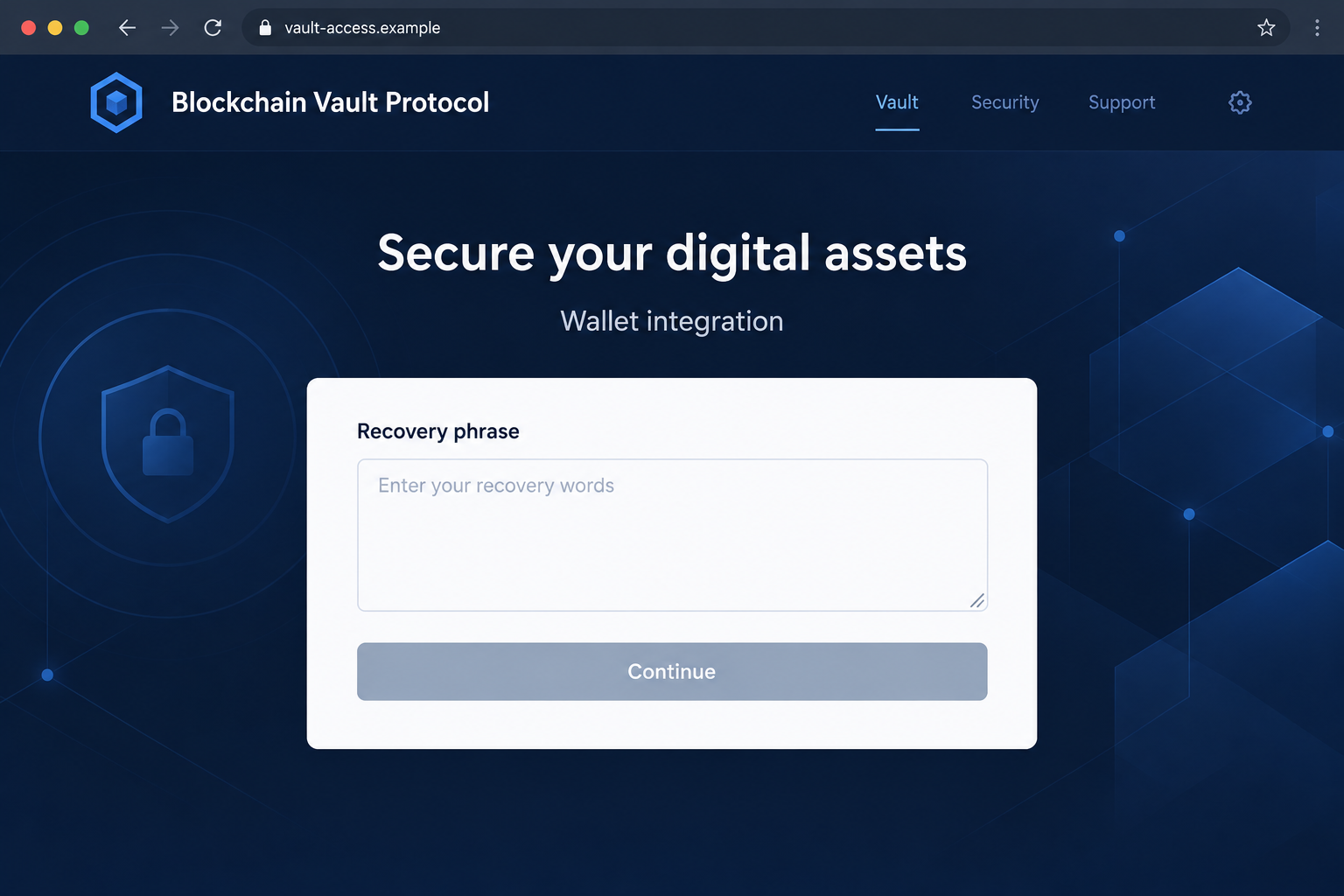
The Blockchain Vault Protocol scam starts with free-crypto bait, then uses a supposed security service to ask for a wallet’s recovery phrase.
The reported promotion offered $50 to $500 and led to cryptocurrencyairdrop-ama9.vercel[.]app. The page presented wallet integration as a protective measure.
Notice how much the request has changed. You arrived to collect a small reward, but now someone wants the secret that controls your assets.
A recovery phrase is control, not proof of eligibility
A wallet address lets someone identify an account. Its recovery phrase can let them restore access to accounts derived from that secret.
Giving those words to a website is therefore very different from showing a public address. The form is asking for far more than a claim identifier.
This warning concerns that secret-collection scheme. It does not mean every legitimate wallet, vault product, or airdrop uses the same process.
Don’t exchange a wallet secret for a promised benefit
If you have not supplied the phrase, stop before doing so. If you have, treat the secret as exposed even when no loss is visible.
- Do not enter recovery words into the alleged vault.
- Do not send a private key as an alternative way to verify ownership.
- Keep a public transaction reference separate from confidential recovery information.
- Use your wallet provider’s genuine compromised-wallet guidance after disclosure.
- Refuse unsolicited help that requires the same secret again.
Why the Word Vault Can Make the Request Feel Safer
A vault suggests keeping something valuable away from intruders. That makes it a reassuring name for a service appearing beside a financial account.
But the name doesn’t describe who controls the information you submit. A protective-sounding form can still hand its operator the means to use your wallet.
The giveaway provides a reason to begin. Security language provides a reason to cooperate when the request becomes more sensitive than expected.
You might believe the page needs to check your ownership before sending a reward. That explanation does not justify giving away the wallet’s recovery secret.
The useful question is simple: what could this person do with the information even if the promised benefit never arrives?
With an email address, they could contact you. With a recovery phrase, they may be able to restore the wallet without asking your permission again.
A professional interface does not narrow that access. Neither does a statement that the form is encrypted, private, or protected by enterprise security.
Encryption during transmission cannot make an untrusted recipient safe. The problem is handing the secret to the wrong party, not merely how it travels.
How the Blockchain Vault Protocol Scam Works
Step 1: A modest giveaway makes opening the offer feel worthwhile
The invitation promises an attainable amount rather than an unimaginable fortune. That can make the offer seem like a routine promotion you have not noticed before.
Reassurances about easy participation remove ordinary objections. Instead of deciding whether to invest, you may think you are simply collecting something available to wallet users.
That is still a decision about trust. A message does not become authorized because it asks for no initial purchase.
Nor does having a wallet make every reward invitation relevant to you. Check the project and its independently published claim process before interacting.
Do not reply with a list of the wallets you use. An unsolicited promoter does not need an inventory of your financial accounts to prove legitimacy.
Step 2: The destination introduces an apparently helpful security service
The landing story changes from receiving crypto to integrating or securing a wallet. The new task appears to support the reward rather than replace it.
A reader who is unsure how claims work may accept that change without much thought. Security can sound like a responsible prerequisite.
Pause when the purpose changes. Ask whether the action you are being asked to take is necessary for the original service.
A hosted webpage is not automatically a service from the hosting provider. A provider’s domain ending cannot establish who created a particular hosted project.
The reported deployment no longer shows the vault page. That limits current inspection; it does not erase the risk from a phrase already disclosed.
The hosting company is not identified as the operator of the scheme. Judge the particular page’s conduct rather than accusing every service using that infrastructure.
Step 3: The form asks for a secret instead of a normal connection
A recovery-phrase field is the decisive warning. It is not the same as a wallet asking whether a website may see your public address.
The page may describe the process as integration, synchronization, or validation. None of those words reduces what the submitted phrase can enable.
A website error doesn’t protect the information either. If you typed and submitted the words, don’t assume a rejected form means the secret was discarded.
Don’t provide missing words to correct an alleged verification failure. Completing the phrase can be exactly what the operator wants.
You also should not upload a screenshot of the wallet’s backup screen. A picture containing the words exposes the same secret in another format.
There is no benefit in testing the form with a wallet you plan to keep using. You cannot reliably make a disclosed secret private again.
Step 4: Someone with the phrase can act outside the original webpage
The risk continues after the browser tab closes. A person who obtained the secret does not need the fake vault to remain online.
Changing the local wallet password does not rewrite the recovery phrase. That password and the phrase protect different parts of the setup.
Disconnecting a website also doesn’t revoke knowledge of the secret. Connection management is useful for other situations, but it doesn’t solve this one.
Assets may need moving to a genuinely new wallet under new secrets, following the provider’s guidance. Do that from a trusted environment.
No particular theft transaction was reproduced for this report. Your response should be based on your actual disclosure and activity, not a fabricated loss amount.
Don’t wait for an attacker to demonstrate the problem by taking something. A known secret disclosure is already enough reason to seek appropriate containment.
Recovery Words, Passwords, and Public Addresses Are Not Interchangeable
Your public address can be shared to receive assets or inspect public activity. It is not designed to be the secret that protects spending.
A local app password helps protect access on that installation. Knowing it is not necessarily equivalent to possessing the wallet’s underlying recovery material.
The phrase is different again. MetaMask’s explanation of recovery phrases describes why control of those words is so consequential.
Other wallets can use different setups and recovery options. Follow the documentation for your actual wallet instead of assuming every product behaves identically.
Some accounts may have been imported separately using other keys. When investigating exposure, establish which secrets were disclosed and which accounts they govern.
Don’t publish a phrase to ask whether it is genuine. Someone who sees it may be able to use it, even if your intention was only verification.
Likewise, don’t send it to a person claiming they need it to inspect a public transaction. Reading a transaction does not require restoring your wallet.
If a genuine wallet must be restored, obtain its real software independently. A reward website’s embedded restore panel is not a trustworthy shortcut.
What Changes If You Already Shared the Phrase
The priority becomes securing remaining assets and preventing further exposure. It is no longer a question of whether the promised giveaway might still work.
MetaMask’s compromised-wallet guidance explains creating a new wallet and discontinuing use of the exposed recovery secret.
It also warns about sweepers. If funds vanish when added, repeatedly sending more crypto for transaction fees can create further losses.
Seek genuine provider guidance rather than improvising a rescue sequence from a stranger’s private message. A rushed extra deposit may not help.
Use new secrets, not another account generated from the same exposed phrase. A different-looking address does not necessarily solve the underlying exposure.
Before resetting or removing software, preserve the recovery information needed for accounts you still control. Do not turn a security response into accidental loss of access.
If a work or shared financial arrangement is involved, contact the authorized owner promptly. Don’t move organizational assets without the necessary authority.
Keep the incident record private and factual. You can share transaction identifiers with appropriate investigators without circulating recovery words.
What to Do if You Have Fallen Victim to This Scam
End the reward and vault interaction. Close the page and stop replying to the promoter. Reject any unfinished request rather than completing it to obtain a result.
If you merely viewed the page, record that limited exposure. Viewing it is not the same as sharing the phrase.
Identify exactly which secret left your control. Note whether you supplied recovery words, a private key, a local password, or only a public address.
Use that distinction when contacting genuine support. Don’t include the secret itself in a support message or public report.
Follow the wallet’s compromised-secret procedure. Use a trusted device and independently obtained provider guidance. Establish a new wallet with genuinely new recovery material where required.
Do not reuse an exposed phrase or blindly fund a wallet that may have a sweeper. Ask for qualified assistance if safe asset movement is unclear.
Check actual activity and preserve its references. Review relevant networks through your established wallet or independently reached explorers. Record confirmed transactions and approximate interaction times.
Separate the giveaway amount from any actual loss. Don’t enter another wallet secret to unlock a supposed incident history.
Report theft through appropriate channels. Notify relevant financial services or exchanges if their accounts were involved, and use the applicable local fraud-reporting process.
Finalized transfers cannot simply be canceled by the sender. Reporting may help an investigation, but no recovery outcome is guaranteed.
Investigate software if the interaction included installation. A suspicious extension, downloaded tool, or remote session creates a separate device issue. Use updated protection such as Malwarebytes.
Scanning does not make an exposed phrase safe to reuse. Keep wallet containment separate even when a device scan finds no threats.
Block repeat approaches without trusting a rescue offer. Review unwanted notification permissions and avoid promotional links from unknown accounts. AdGuard may reduce some misleading advertising.
It cannot authenticate a vault or recover assets. Refuse anyone who demands more recovery words or money to guarantee the original reward.
Is Your Device Infected? Run a Free Malware Scan
Slow performance, constant pop-ups, or strange behavior? These are classic signs of a malware infection. The fastest way to find out is to scan your device with Malwarebytes Free — one of the most trusted malware removal tools available.
The free version detects and removes the most common threats, including:
- Adware — the cause of those annoying pop-ups
- Browser hijackers — unwanted redirects and changed homepages
- Trojans and spyware — hidden programs stealing your data
- Potentially unwanted programs (PUPs) — software you never asked for
👉 Select your device below — Windows, Mac, or Android — then follow the simple steps to download Malwarebytes, scan your system, and remove any threats it finds. The scan usually takes 5 to 20 minutes.
Run a Malware Scan with Malwarebytes for Windows
Malwarebytes is one of the most popular and trusted anti-malware tools for Windows — and it’s completely free for removing infections. It catches threats that many antivirus programs miss, including adware, browser hijackers, and trojans. Follow the steps below to scan and clean your PC in just a few minutes.
Download Malwarebytes
Click the button below to download the latest version of Malwarebytes for Windows from the official source. The free version is all you need — it will scan your computer and remove adware, browser hijackers, and other malicious software at no cost.
Download MalwarebytesOfficial installer for Windows 11 and 10. Your download starts right away.Want real-time protection? See Malwarebytes Premium Malwarebytes Free for WindowsScans and removes malware at no cost
-
Install Malwarebytes
When the download finishes, open your Downloads folder and double-click the MBSetup file. If Windows shows a User Account Control pop-up, click “Yes” to allow the installation.

Follow the On-Screen Prompts to Install Malwarebytes
The setup wizard will walk you through a few quick screens:
-
Choose where you’re installing the program — “Personal Computer” or “Work Computer” — then click Next.

-
Malwarebytes will now install on your device. This usually takes under a minute.

-
When installation is complete, the “Welcome to Malwarebytes” screen will open automatically.

-
On the final screen, click Open Malwarebytes to launch the program.

-
Enable “Scan for Rootkits”
Before scanning, turn on rootkit detection so Malwarebytes can find even the most hidden threats. Click the Settings gear icon on the left side of the screen.

In the settings menu, find “Scan for rootkits” and click the toggle so it turns blue.

Done? Click “Dashboard” in the left pane to return to the main screen.
Start the Scan
Click the blue Scan button. Malwarebytes will automatically update its virus database and start checking your computer for malware.

-
Wait for the Scan to Finish
The scan checks your entire system for browser hijackers and other malicious programs, so it can take 5 to 20 minutes depending on your computer. Feel free to do something else — just check back occasionally to see the progress.

-
Quarantine the Detected Threats
When the scan is done, you’ll see a list of everything Malwarebytes found — malware, adware, and potentially unwanted programs. Click the “Quarantine” button to remove all of them at once.

Malwarebytes will now remove the malicious files and registry entries and move them safely into quarantine.

-
Restart Your Computer
Some threats can only be fully removed after a reboot. If Malwarebytes asks you to restart, click Yes. Once you’re logged back in, Malwarebytes has finished removing the threats it found.

That’s it — your Windows PC is now clean of trojans, adware, and other malware, and should be back to running smoothly.
If you are still having problems with your computer after completing these instructions, then please follow one of the steps:
- Run a computer scan with ESET Online Scanner
- Ask for help in our Windows Malware Removal Help & Support forum.
Run a Malware Scan with Malwarebytes for Mac
Malwarebytes for Mac is a free on-demand scanner that removes the malware other security software tends to miss — adware, browser hijackers, and unwanted programs included. Cleaning an infected Mac with Malwarebytes has always been completely free, and it’s our go-to recommendation. Follow the steps below to scan and clean your Mac in just a few minutes.
-
Download Malwarebytes for Mac
Click the button below to download the latest version of Malwarebytes for Mac.
Download MalwarebytesOfficial installer for macOS. Your download starts right away.Want real-time protection? See Malwarebytes PremiumMalwarebytes Free for MacScans and removes malware at no cost -
Open the Malwarebytes setup file
When the download finishes, open your Downloads folder and double-click the setup file to begin the installation.

-
Follow the On-Screen Prompts to Install Malwarebytes
The Malwarebytes for Mac Installer will guide you through a few quick screens. Click “Continue” and keep following the prompts until the installation completes.



When the installation is complete, Malwarebytes opens to the Welcome to Malwarebytes screen. Click “Get started“.
-
Select “Personal Computer” or “Work Computer”
Malwarebytes will ask what type of computer you’re installing it on. Click either Personal Computer or Work Computer, whichever applies.

-
Start the Scan
Click the “Scan” button. Malwarebytes will automatically update its detection database and begin checking your Mac for malware.

-
Wait for the Scan to Finish
Malwarebytes will scan your Mac for adware, browser hijackers, and other malicious programs. This can take a few minutes, so feel free to do something else — just check back occasionally to see the progress.

-
Quarantine the Detected Threats
When the scan is done, you’ll see a list of everything Malwarebytes found. Click the “Quarantine” button to remove all the threats at once.

-
Restart Your Mac
Malwarebytes will now remove all the malicious files it found. Some threats can only be fully removed after a reboot — if Malwarebytes asks you to restart, allow it. Once you’re logged back in, your Mac is clean.

That’s it — your Mac is now free of adware, rogue browser extensions, and other potentially harmful software.
If you are still experiencing problems while trying to remove a malicious program from your computer, please ask for help in our Mac Malware Removal Help & Support forum.
Run a Malware Scan with Malwarebytes for Android
Malwarebytes for Android automatically detects and removes dangerous threats like malware and ransomware so you don’t have to worry about your most-used device being compromised. Aggressive detection of adware and potentially unwanted programs keeps your Android phone or tablet running smooth.
-
Download Malwarebytes for Android.
You can download Malwarebytes for Android by clicking the link below.
Get Malwarebytes for AndroidOpens Google Play in a new tab.Want real-time protection? See Malwarebytes Premium for AndroidMalwarebytes for AndroidScans your phone and removes malware at no cost -
Install Malwarebytes for Android on your phone.
In the Google Play Store, tap “Install” to install Malwarebytes for Android on your device.

When the installation process has finished, tap “Open” to begin using Malwarebytes for Android. You can also open Malwarebytes by tapping on its icon in your phone menu or home screen.

-
Follow the on-screen prompts to complete the setup process
When Malwarebytes will open, you will see the Malwarebytes Setup Wizard which will guide you through a series of permissions and other setup options.
This is the first of two screens that explain the difference between the Premium and Free versions. Swipe this screen to continue.
Tap on “Got it” to proceed to the next step.
Malwarebytes for Android will now ask for a set of permissions that are required to scan your device and protect it from malware. Tap on “Give permission” to continue.
Tap on “Allow” to permit Malwarebytes to access the files on your phone.
-
Update database and run a scan with Malwarebytes for Android
You will now be prompted to update the Malwarebytes database and run a full system scan.

Click on “Update database” to update the Malwarebytes for Android definitions to the latest version, then click on “Run full scan” to perform a system scan.

-
Wait for the Malwarebytes scan to complete.
Malwarebytes will now start scanning your phone for adware and other malicious apps. This process can take a few minutes, so we suggest you do something else and periodically check on the status of the scan to see when it is finished.

-
Click on “Remove Selected”.
When the scan has been completed, you will be presented with a screen showing the malware infections that Malwarebytes for Android has detected. To remove the malicious apps that Malwarebytes has found, tap on the “Remove Selected” button.

-
Restart your phone.
Malwarebytes for Android will now remove all the malicious apps that it has found. To complete the malware removal process, Malwarebytes may ask you to restart your device.
That’s it — your Android phone is now clean — no more malicious apps, adware, or browser redirects.
If you are still having problems with your phone after completing these instructions, then please follow one of the steps:
- Restore your phone to factory settings by going to Settings > General management > Reset > Factory data reset.
- Ask for help in our Mobile Malware Removal Help & Support forum.
Stay Protected: Block Ads and Malicious Sites
Now that your device is clean, keep it that way. Most infections start with a malicious ad or a fake download button — so blocking them at the source is your best defense.
We recommend AdGuard, which blocks malicious ads, phishing pages, and dangerous redirects before they can reach you.
👉 Download AdGuard and browse safely
Why a Second Recovery Offer Can Be Just as Dangerous
After a loss, getting help can feel urgent. An unsolicited person offering a ready-made solution may seem more useful than slower official reporting.
But a public transaction gives strangers information they can use to sound informed. Knowing that a transfer happened does not give them special recovery powers.
Ask what authority they actually have and how you found them. Do not let a private message become your only source of instructions.
A demand to validate a wallet before rescue repeats the original problem. A promise of safety doesn’t justify handing over another secret.
Keep copies of relevant communications and payment demands. They may matter to an investigation even when the first page has disappeared.
You are allowed to stop cooperating after a mistake. Sending more information is not a requirement for obtaining help from a genuine provider.
Frequently Asked Questions
What is the fake Blockchain Vault Protocol trying to obtain?
The reported scheme seeks recovery phrases under a wallet-integration or security explanation. Those words can enable control of the associated wallet accounts.
Do not provide them to collect a giveaway.
Can changing my wallet password fix a leaked phrase?
Not by itself. A local password change does not replace the underlying recovery secret that another person may already possess.
Follow your wallet provider’s compromised-secret guidance.
Is a public address dangerous to share in the same way?
No. A public address and a secret phrase serve different purposes. Sharing an address alone does not give the same ability to restore a wallet.
Still consider privacy before posting financial activity publicly.
Does the hosting provider operate the scam?
A hosted project’s address does not establish that the infrastructure provider created or endorsed its content.
The accusation here concerns the particular deceptive page, not every website using that hosting service.
Will disconnecting remove the attacker’s access?
Disconnecting cannot erase a phrase the attacker already knows. It is not a substitute for addressing secret exposure.
If you only connected without disclosing secrets, assess the actual permissions or transactions involved instead.
Can a recovery service reverse the transfer?
No unsolicited service can guarantee that result. Finalized blockchain transfers are not normally reversible by the sender.
Use appropriate reporting and verified support, without paying another stranger for a guaranteed rescue.
The Bottom Line
Do not enter recovery words into this fake vault. A reward or security promise is not a reason to give someone control of your wallet.
If you already disclosed them, stop chasing the giveaway. Follow genuine compromised-wallet guidance and protect remaining assets using new secrets where required.

Join the discussion
0 commentsShare your experience or ask a question about this article.
Discussion
Start the conversation
Have a question or something useful to share? Add the first comment.