

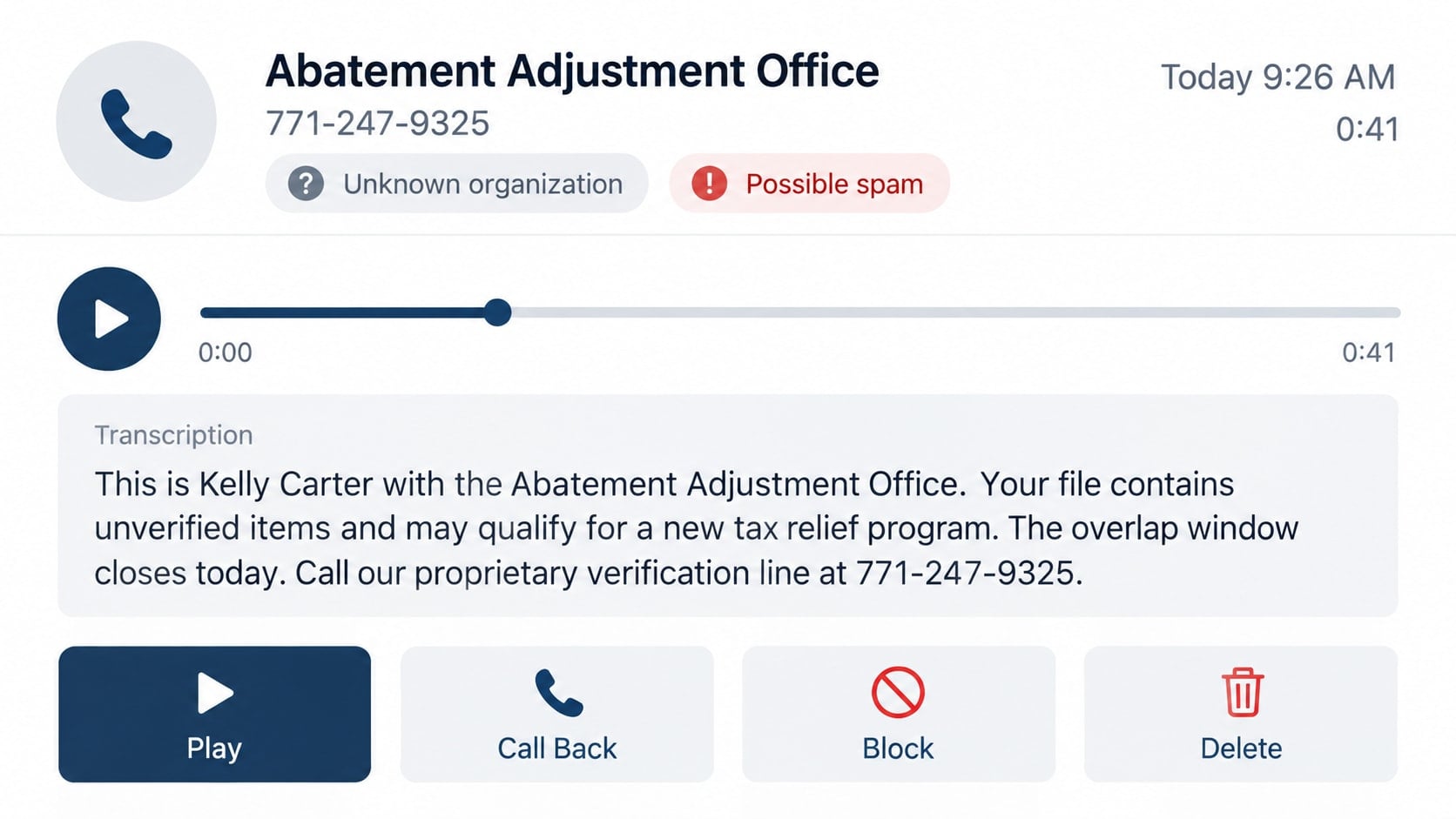
The message sounds formal enough to be important and vague enough to be worrying. A caller from an “abatement adjustment” department says a limited tax-relief window is closing and your file still shows unresolved penalties.
There may be no case, no special department, and no deadline. The unusual phrase is often used to make an ordinary sales or fraud call sound like a government process already underway.
Overview
The caller claims a tax relief or penalty reduction window is about to close
The abatement adjustment scam call usually mentions back taxes, penalties, a pending review, or a new relief program. The message asks the recipient to call a “resolution officer” before the file is closed.
Some campaigns target large lists and never identify a taxpayer, tax year, agency, or notice number. Others use a real name, address, or estimated debt obtained from public records and data brokers.
The official-sounding language hides who is actually calling
“Abatement” is a real tax term that can describe reducing certain penalties when legal requirements are met. “Adjustment” is also common in account correspondence. Placing the words together makes the call sound administrative without naming a verifiable office.
The operator may present itself as a government program, a national review center, or a private company working directly with tax agencies. Those claims should be checked independently before any personal information is shared.
The goal may be identity theft, advance fees, or an expensive service contract
A fraudulent caller can ask for a Social Security number, date of birth, income, employer, bank details, or copies of tax documents. That information can support identity theft and fraudulent tax filings.
Another version charges an upfront “enrollment,” “investigation,” or “release” fee. Some aggressive tax-relief marketers collect $2,000 or more for services that were misrepresented, unsuitable, or never meaningfully performed.
- The voicemail does not identify a real agency, notice, tax year, or balance.
- The caller says eligibility disappears within hours.
- A government connection is implied but never documented.
- You are asked for a Social Security number before the company is verified.
- The caller guarantees that penalties or debt will be erased.
- Payment is demanded through gift cards, cryptocurrency, wire transfer, or a payment app.
What Tax Abatement Actually Means
Tax authorities can reduce certain penalties or correct an account when a taxpayer qualifies under applicable rules. That does not mean everyone who owes tax is entitled to a secret program or a dramatic settlement.
For federal taxes, the IRS publishes information about penalty relief, payment plans, offers in compromise, and account notices. Eligibility depends on facts such as filing history, payment compliance, reasonable cause, income, assets, and the type of liability.
A legitimate resolution process begins with real account records. It should identify the tax period, amount, responsible agency, requested service, professional representing the taxpayer, and fees.
An unsolicited caller who only says “abatement adjustment” has not established any of those facts. The phrase should trigger verification, not an assumption that a case or benefit already exists.
How the Abatement Adjustment Scam Call Works
Step 1: A vague voicemail creates concern about a tax file
The recording says a previous notice was unanswered, the recipient’s file remains open, or a relief period is ending. It may refer to “your state and federal obligations” without identifying either agency.
Scammers keep the wording broad so it can apply to almost anyone. Even a recipient who owes nothing may wonder whether a return, identity problem, or old account created an issue.
Step 2: The callback reaches a screening agent
The agent asks for a name, estimated debt, filing status, income, and available cash. The questions resemble a financial intake and make the operation feel like a professional tax firm.
The caller may say a “senior resolution officer” can help only after basic eligibility is confirmed. In reality, the intake may be collecting valuable identity information or qualifying the victim for a high-pressure sale.
Step 3: The caller invents an urgent relief opportunity
The victim is told that a new program can reduce penalties, stop collection, protect wages, or settle the account for a small share of the balance. Approval is described as likely or guaranteed.
The supposed deadline may be tonight, the end of the month, or the close of a government “enrollment window.” Legitimate tax options have rules and filing dates, but they are not activated by paying an unknown caller during an unsolicited conversation.
Step 4: A verification page collects sensitive records
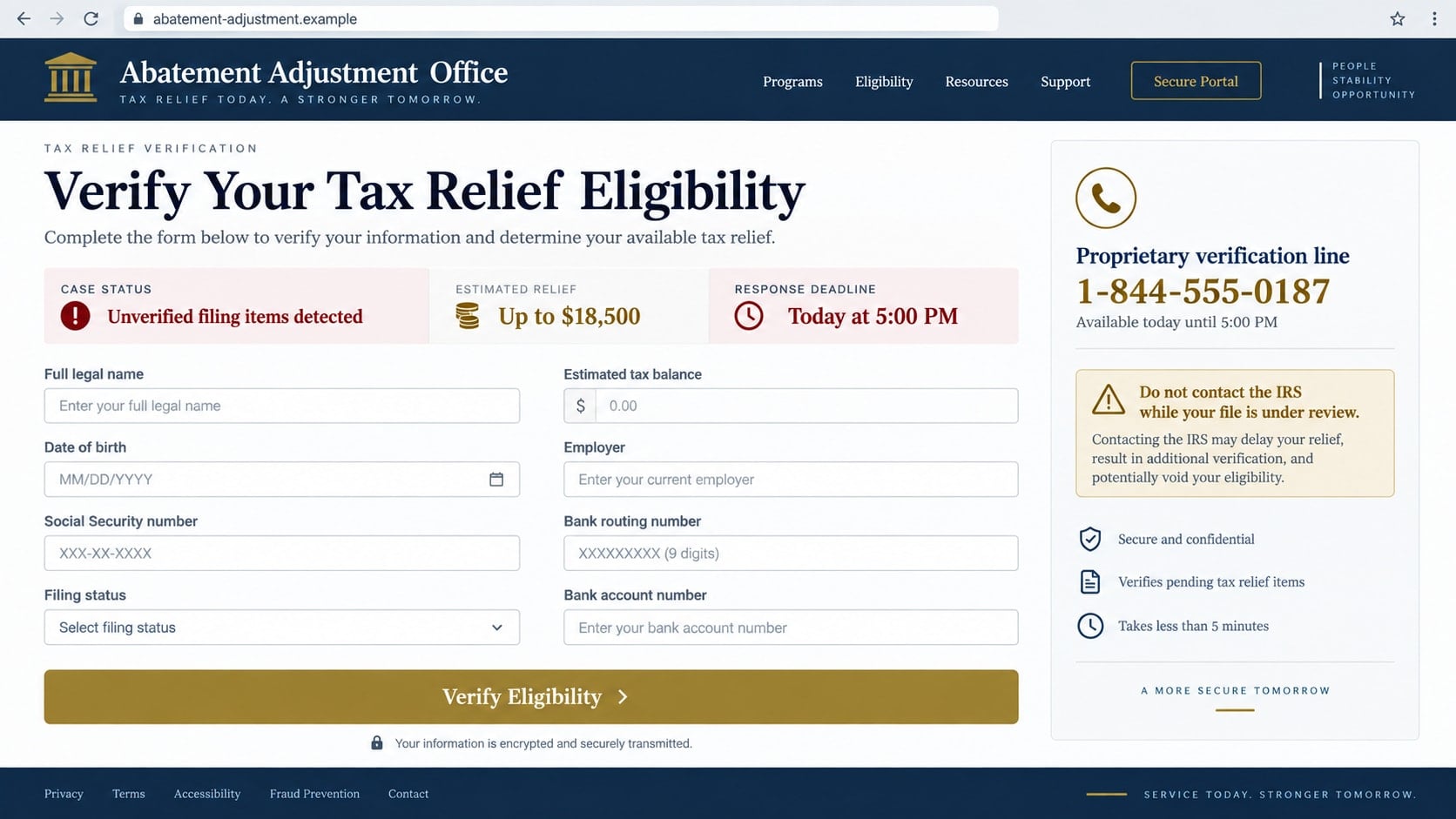
A text or email may direct the victim to a portal carrying seals, courthouse imagery, or government colors. The form requests a Social Security number, date of birth, driver’s license, tax return, bank statement, or IRS transcript credentials.
The page may say this information is needed to calculate an adjustment. If the domain is controlled by criminals, the documents become an identity-theft package rather than part of a tax case.
Step 5: An advance fee or contract is presented as mandatory
The victim is asked to pay for enrollment, case protection, a compliance bond, transcript access, or immediate representation. A criminal may demand an irreversible method and claim the funds go directly to a government account.
An aggressive private seller may instead push electronic signatures on a broad service agreement and arrange recurring withdrawals. The promised result can be much more certain in the sales pitch than in the written contract.
Step 6: The operator delays while collecting more money or data
After payment, the victim may receive generic status messages about reviews, officers, or documents. Requests for extra processing fees can follow whenever the supposed case reaches a new stage.
Meanwhile, real tax deadlines and notices continue. A victim who believes the caller is handling everything may lose valuable time, incur additional penalties, or miss a legitimate opportunity to respond.
Identity, Contact, and Payment Checks
Verify the tax issue through official account records
For a claimed federal debt, access the IRS account by independently navigating to IRS.gov or call a published IRS number. Compare balances, tax periods, notices, payment history, and authorized representatives.
The IRS says it generally contacts taxpayers first by mail and does not leave urgent or threatening prerecorded messages demanding immediate action. A vague voicemail is not an official tax record.
Identify the company and every professional involved
Ask for the company’s complete legal name, physical address, website, written engagement agreement, and the names and credentials of the people who will represent you. Verify those details outside the sales call.
Attorneys, certified public accountants, and enrolled agents have different licensing or credential records. A title such as “senior tax resolution officer” alone does not establish professional authority.
Read the scope, fee, and refund terms before signing
A legitimate firm should explain what it will do, what it cannot promise, what documents you must provide, and how fees are earned. Ask whether the quoted price covers analysis only or actual representation through resolution.
Do not rely on a telephone assurance that contradicts the agreement. Save a copy before authorizing payment and reject any pressure to sign while the representative remains on the line.
Use traceable payment methods and reject secrecy
Government tax agencies do not require gift cards, cryptocurrency, or a specific payment app. Official federal payment options can be verified on IRS.gov without following the caller’s instructions.
A private professional should provide an invoice naming the legal business and service. If the caller wants payment to an individual, unrelated merchant, wallet address, or retail card, stop.
Warning Signs in the Voicemail and Sales Pitch
Listen for missing specifics. A real account matter should connect to a taxpayer, agency, tax period, notice, or case. A recording that only mentions “your file” and “possible relief” is designed to create curiosity across a mass calling list.
Guarantees are another serious concern. No representative can promise that a tax authority will erase a particular debt before reviewing the account, financial disclosures, compliance history, and applicable rules.
Be cautious when the caller discourages direct contact with the IRS or says checking the official account will interfere with the case. Independent verification does not damage a legitimate representation.
Also watch for a sudden switch from a free evaluation to a financed contract. A small monthly payment can hide a large total fee, while the promised tax outcome remains conditional.
How to Check a Real Tax Relief Option Safely
Start with the account, not the sales pitch. Gather official notices, filed returns, payment history, and a current balance. Confirm that all required returns are filed before evaluating resolution options.
Review official descriptions of payment plans, penalty relief, currently not collectible status, and offers in compromise. A taxpayer may qualify for one option and not another.
If professional help is needed, compare more than one credentialed provider. Ask each one to explain the realistic strategy, required forms, likely timeline, total fee, and risks in plain language.
Never grant access to an IRS online account or share an identity-protection PIN with an unverified caller. Representation should use appropriate authorization forms and a documented professional relationship.
If a salesperson says direct verification will cancel your place in the program, treat that pressure as a warning. A genuine option should remain explainable after you review the account and written terms.
Keep control of original notices and returns. A professional may need copies, but an unsolicited caller should not become the only person who can see the records supposedly supporting your case.
What to Do if You Have Fallen Victim to This Scam
- End all contact and stop additional payments. Do not pay a new fee to release a refund, protect the case, or prevent an invented enforcement action. Block the numbers after preserving the messages.
- Contact the bank or payment provider. Describe the misrepresentation and ask about recalls, disputes, card replacement, recurring withdrawals, and any pending transaction that can still be stopped.
- Check official tax accounts directly. Review IRS and relevant state records for balances, notices, filings, payments, and representatives. Respond to real deadlines through the agency’s published instructions.
- Revoke unauthorized representation. If you signed a power of attorney or tax information authorization, ask the IRS or state agency how to revoke it. Notify any legitimate preparer involved with your returns.
- Protect your identity. If a Social Security number, driver’s license, or tax return was exposed, place fraud alerts or security freezes with the credit bureaus and follow the FTC identity-theft recovery process.
- Report possible tax identity theft. Contact the IRS if someone may file or act using your identity. Follow current official guidance, including Form 14039 when the IRS directs that it is appropriate.
- Secure email and financial accounts. Change reused passwords from a clean device, enable multi-factor authentication, review account recovery details, and watch for new payees or forwarding rules.
- Run a complete Malwarebytes scan. If the portal supplied a file, browser extension, or remote-support program, update Malwarebytes and scan the device. Remove confirmed threats before opening sensitive tax or bank accounts again.
- Use AdGuard as an additional web defense. AdGuard can block many known phishing pages, malicious advertising links, and redirect domains used by scam campaigns. It cannot evaluate a tax contract, so independent identity checks remain essential.
- Preserve and report the evidence. Save contracts, recorded voicemails, URLs, emails, payment records, names, and claimed credentials. Report suspected impersonation or fraud to the FTC, the Treasury Inspector General for Tax Administration when relevant, state authorities, and local police for documented loss.
Frequently Asked Questions
Is tax penalty abatement a real process?
Yes. Tax authorities can reduce certain penalties when eligibility requirements are met. A real process does not validate an unsolicited caller, a guaranteed outcome, or a fee demanded before the account is reviewed.
Does the IRS call about an abatement adjustment deadline?
The IRS generally begins contact through official mail and does not use urgent threatening robocalls demanding immediate action. Verify any claimed deadline through IRS.gov and actual account notices.
Why does the voicemail avoid naming a tax agency?
Vague language allows one recording to target many people across different locations. It also makes the caller harder to challenge about a specific notice, balance, or legal authority.
Can a tax relief company guarantee a settlement?
No provider can guarantee a particular result before the tax authority examines eligibility and financial facts. Ask for a written analysis of realistic options and read every limitation in the contract.
What if I only gave the caller my Social Security number?
That is still a serious exposure. Follow identity-theft steps, consider credit freezes, monitor tax and financial accounts, and notify the IRS if there is a risk of fraudulent filing.
Should I ignore a real tax notice because the call was fake?
No. Separate the scam from any genuine obligation. Review official accounts and mailed notices, then respond directly or through a verified credentialed professional.
The Bottom Line
The abatement adjustment scam call borrows real tax terminology to create an imaginary deadline, collect identity information, or sell an unverified service. A formal tone and knowledge of personal details do not establish government authority.
Check the actual tax account, identify the business and professional, and insist on written fees and realistic terms. If the caller demands immediate payment or sensitive data before those checks, end the conversation.

Join the discussion
0 commentsShare your experience or ask a question about this article.
Discussion
Start the conversation
Have a question or something useful to share? Add the first comment.