

A routine invoice notification lands in the inbox, carrying a folio number, a date, and a document link. Nothing about it initially feels dramatic.
That restrained presentation is exactly why the Administrative Document email deserves a closer look before anyone opens the supposed PDF or signs in.
Overview
The message borrows the language of ordinary office work
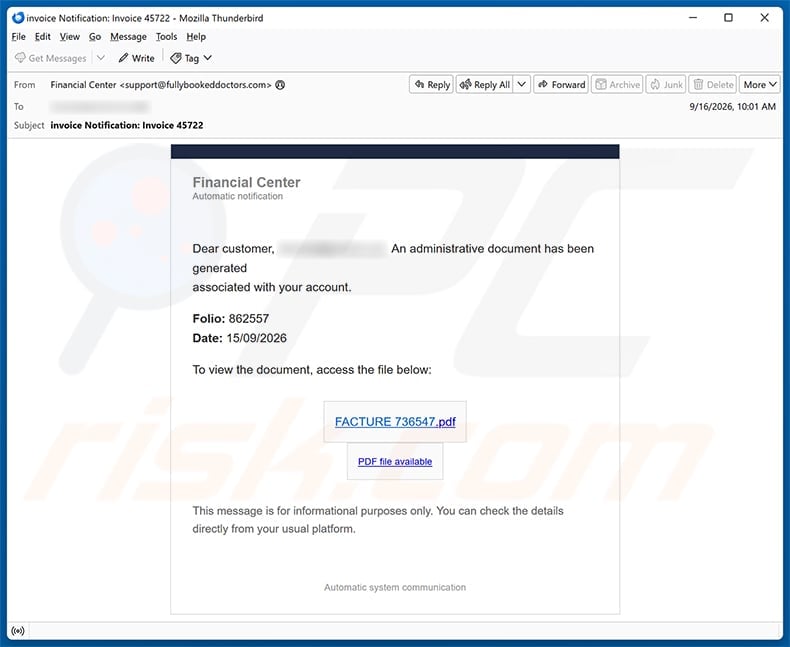
The email says an administrative document has been generated and associated with the recipient’s account.
It identifies itself only as “Financial Center,” a vague label that could sound familiar to employees, customers, suppliers, or accounting staff.
The examined copy used the subject “invoice Notification: Invoice 45722” and displayed folio 862557 with a date of September 15, 2026.
A button labeled “FACTURE 736547.pdf” suggests that an invoice is waiting behind one simple click.
The body even says the details can be checked through the usual platform, although it never identifies that platform.
Those small administrative details create context without providing anything the recipient can independently verify.
The document link does not open a real invoice
The captured link led to obw3sixfive[.]cc, a domain unrelated to an employer, accounting system, bank, or recognized document service.
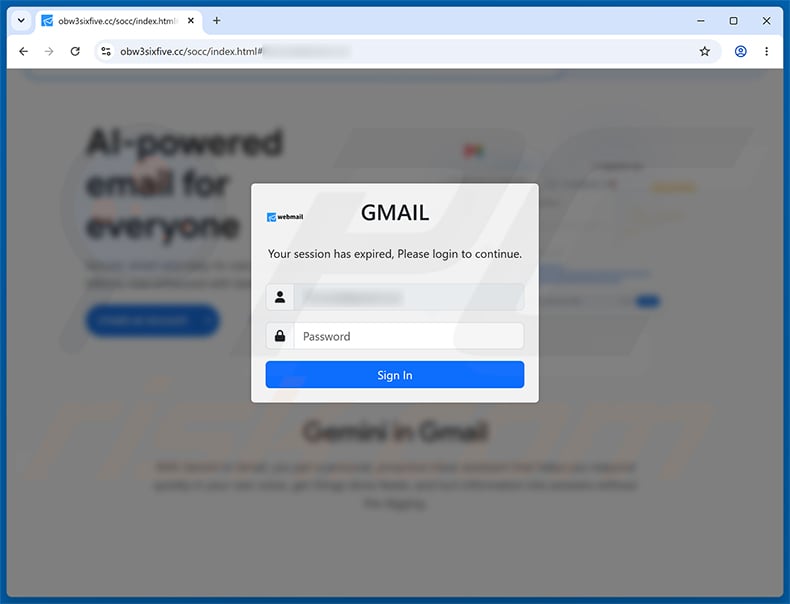
Instead of displaying a PDF, the site produced a session-expired message and asked for an email password.
The page adapted its appearance to the address supplied in the link. In the examined case, it displayed Gmail branding.
That behavior reveals the real purpose. The document story creates curiosity, while the login form collects mailbox credentials.
The invoice number, folio, and French word “facture” are props. They do not establish that a payable document exists.
The risk depends on what the recipient did
Receiving or reading the email does not automatically expose a password.
Clicking the link confirms that someone interacted, but the most serious credential risk begins when information is submitted to the counterfeit page.
If a password was entered, the mailbox should be treated as potentially compromised even when the page showed an error afterward.
If a file downloaded or unfamiliar software ran, the device needs additional inspection rather than password recovery alone.
The observed campaign impersonates email services. Google and other legitimate providers did not create or authorize the fraudulent page.
- The sender uses a broad “Financial Center” identity.
- The invoice story arrives without recognizable business context.
- The displayed PDF label is actually a web link.
- The destination domain has no connection to the claimed service.
- A document request unexpectedly becomes an email login.
- The page can change branding for different recipients.
- Entering credentials creates account-takeover risk.
- The genuine mail provider is not responsible for the imitation.
How the Administrative Document Email Scam Works
Step 1: A generic invoice reaches a broad mailing list
The operator sends the same office-themed message to many addresses rather than researching a real transaction for every recipient.
Invoices work well as bait because individuals and businesses routinely receive documents they were not personally expecting.
Accounts teams may assume another department ordered something. Home users may wonder whether the notice concerns banking, insurance, taxes, or a subscription.
The sender needs only enough ambiguity to make the reader ask, “What is this?”
That question encourages a click before the recipient verifies the sender, vendor, purchase order, or account portal.
The odd capitalization in “invoice Notification” is a warning, but hurried readers often focus on the amount or attachment label instead.
Step 2: Fabricated reference numbers manufacture legitimacy
Folio 862557 and Invoice 45722 look specific, yet a random number is easy to generate and difficult for the recipient to challenge immediately.
The message supplies no supplier name, billing address, product, amount, tax identifier, purchase order, or responsible employee.
Real financial documents usually connect reference numbers to a known commercial relationship.
Here, the numbers create visual weight while avoiding the details that would let an accounts team reconcile the alleged transaction.
The date helps the notice feel current. It does not prove the document was created by any genuine system.
A polished template can make invented data look official, especially when the surrounding text stays calm and procedural.
Step 3: A PDF-looking label hides an ordinary web destination
“FACTURE 736547.pdf” appears to describe a file, but link text does not determine what opens after a click.
Any sender can write a filename on a button while directing the browser somewhere completely different.
Hovering over the link on desktop would reveal the actual destination. The captured route pointed toward obw3sixfive[.]cc.
That hostname does not resemble a known accounting platform, the sender’s displayed organization, or the recipient’s email provider.
On mobile, the address may be harder to inspect, which makes independent verification more important.
The safer approach is to open the known billing platform directly and search for the invoice there.
Step 4: The site changes the task from reading to authentication
A genuine PDF viewer would display or download a document. It would not normally demand the recipient’s email password on an unrelated domain.
The phishing page claims the session has expired, turning the unexpected login into a familiar inconvenience.
The recipient’s email address may already appear in the username field because it was encoded in the original link.
That prefilled value can feel like recognition, but the attacker already possessed the address to send the email.
It does not prove the site communicated with Gmail, Microsoft, a workplace directory, or any other real identity provider.
The only meaningful identity in the browser is the registered domain receiving the information.
Step 5: Copied Gmail styling lowers the final hesitation
The captured page placed a Gmail label over a blurred background and asked the user to sign in again.
Logos, fonts, colors, and account labels are public visual material. Copying them requires no relationship with the company being imitated.
The address bar remained on obw3sixfive[.]cc, which is the stronger signal than everything drawn inside the page.
A password manager may refuse to autofill because the saved Gmail credential belongs to a different domain.
That refusal should be treated as a warning, not an inconvenience to bypass by pasting the password manually.
Even HTTPS would only encrypt the connection to the phishing host. It would not make that host Google.
Step 6: Mailbox access opens several routes for follow-on fraud
After submission, the operator can test the credentials against the real provider almost immediately.
A successful login exposes correspondence, contacts, invoices, travel plans, identity records, and password-reset messages.
The intruder may add forwarding rules, register an app password, change recovery details, or approve another device.
Business mailboxes can reveal supplier relationships and payment routines that support convincing invoice fraud.
Personal inboxes can expose shopping, banking, cloud, and social accounts that accept email-based resets.
The compromised address may then send fresh lures to people who recognize and trust the owner’s name.
Why the Email Can Feel Believable
It avoids an unbelievable windfall or threat
Many people expect scams to promise prizes or threaten arrest. This message instead sounds like a dull automated workflow.
Routine language fits the way accounting platforms announce generated statements, receipts, and shared documents.
The absence of drama can prevent the emotional alarm that a louder scam would trigger.
Curiosity replaces fear as the pressure mechanism. The reader clicks because an unexplained invoice feels irresponsible to ignore.
It gives just enough detail to invite investigation
A folio, date, and invoice label suggest a record exists somewhere, although none of those details connect to a verifiable transaction.
The recipient may believe opening the file is the fastest way to identify the sender.
That reverses the safe order. Identity and context should be confirmed before an unknown document route is used.
One telephone call to a known vendor or one search inside the real portal can resolve the uncertainty without touching the email link.
The destination imitates a common interruption
Expired sessions are normal, so a fresh password prompt rarely feels as strange as it should.
Attackers exploit that learned behavior by placing authentication between the victim and the promised content.
The crucial question is not whether sessions expire. It is whether the current domain is authorized to receive that password.
When the answer is unclear, close the page and start from the provider’s official application or a trusted bookmark.
How to Check the Notice Without Using Its Link
Reconcile the alleged invoice first
Search purchasing, accounting, and subscription records for the displayed reference, date, supplier, or expected document.
Ask the employee or family member who might recognize the transaction. Do not forward the suspicious message with an active link unless your security process permits it.
A legitimate vendor should be able to identify the invoice using contact information already stored in your records.
No matching transaction means the recipient has less reason, not more reason, to authenticate through the message.
Examine the sender beyond the display name
“Financial Center” is not a legal entity or a complete service identity.
Read the full From, Reply-To, and Return-Path values when the mail client exposes them.
An unrelated sender domain, free mailbox, or mismatch between those fields supports the phishing assessment.
Authentication results in the message headers can help an administrator, although a passing result only authenticates the sending domain that was actually used.
It does not prove that a vague Financial Center has a legitimate relationship with the recipient.
Use the real service through an independent route
Open the accounting platform from a bookmark, approved company portal, or manually typed address.
Check notifications and pending documents inside the authenticated account.
For workplace mail, contact the help desk using the internal directory, not an address or telephone number introduced by the questionable email.
Support staff can inspect the link safely and determine whether other recipients received the same campaign.
Never provide a current password to someone claiming they need it to locate an invoice.
What Information Could Be Exposed
Email content creates a map of the owner’s life
Inbox searches can reveal bank names, employers, utilities, insurers, medical providers, retailers, and government correspondence.
Even without opening every message, subject lines and sender names identify promising accounts for takeover.
Attachments may contain contracts, identity documents, tax forms, receipts, or addresses useful for impersonation.
This intelligence allows later messages to reference real relationships instead of relying on generic bait.
Recovery access can be more valuable than the mailbox itself
Many services send password-reset links to email and treat inbox control as proof of identity.
An intruder can reset another account, intercept the confirmation, then delete the evidence from the mailbox.
Accounts without independent multi-factor protection are particularly exposed.
Reused passwords make the problem wider because the original email-password pair can be tested automatically across popular services.
Business conversations can redirect real money
A criminal reading an active invoice thread can learn who approves payments and how suppliers normally phrase requests.
They may wait for the right moment, then substitute bank details or create an urgent duplicate payment instruction.
Because the message comes from a real compromised account, familiar sender checks may not expose the deception.
Payment changes should therefore be confirmed through a separate, previously established channel.
What to Do if You Have Fallen Victim to This Scam
- Close the phishing page. Do not retry the password, approve prompts, download the promised invoice, or continue through any error screen.
- Change the mailbox password from a trusted route. Use the genuine application or typed provider address and choose a unique credential used nowhere else.
- Revoke sessions and unfamiliar access. Sign out other devices, remove unknown app passwords, and disconnect third-party applications you did not authorize.
- Inspect recovery and mail settings. Check backup addresses, telephone numbers, forwarding rules, inbox filters, delegates, signatures, and automatic replies for unauthorized changes.
- Enable strong multi-factor authentication. Prefer a passkey, hardware key, or authenticator application, then store recovery codes somewhere outside the inbox.
- Replace reused passwords. Prioritize banking, payments, cloud storage, shopping, social media, and workplace services connected to the exposed address.
- Review security and financial activity. Look for unfamiliar logins, password resets, sent mail, deleted alerts, purchases, transfers, and changed payment instructions.
- Scan when the interaction went beyond typing. If anything downloaded or ran, use Malwarebytes and the built-in security tools. AdGuard can block many later malicious routes.
- Notify the right people. Tell workplace security, affected contacts, banks, or vendors if the mailbox could have sent messages or exposed payment conversations.
- Preserve evidence and report the lure. Save the original email, full headers, destination, screenshots, and account alerts before deleting the message.
Preventing Similar Invoice Phishing
Make invoice ownership visible
Businesses should route bills through a known purchasing process instead of relying on whichever employee first receives an email.
Purchase orders, approved vendor records, and named owners make anonymous “Financial Center” notices easier to reject.
A shared rule should require independent confirmation whenever bank details, contact addresses, or payment timing changes.
Let password managers enforce domain boundaries
A password manager associates credentials with the legitimate site where they were saved.
When it refuses to fill a familiar-looking form, inspect the address rather than forcing the credential into the page.
Passkeys and security keys add stronger origin checks because a counterfeit domain cannot request them as if it were the real service.
These protections work best when deployed first on email, identity, banking, and administrative accounts.
Give employees a quick reporting route
A visible phishing-report button or known security mailbox lets a recipient ask for help without replying to the sender.
Fast reporting also helps administrators remove similar messages before another employee interacts.
Training should use realistic routine lures, not only spectacular prize scams.
The most dangerous message may look like one more invoice waiting in a crowded morning inbox.
Frequently Asked Questions
Is the Administrative Document Has Been Generated email genuine?
The examined version is fraudulent. Its supposed PDF leads to obw3sixfive[.]cc and a counterfeit session-expired email login rather than an administrative document.
Is “FACTURE 736547.pdf” an actual PDF attachment?
No. In the captured message, that text labels a web link. Visible filenames can hide destinations that have nothing to do with document storage.
Does a prefilled email address mean the page recognized my account?
No. The sender already knew the delivery address and can place it inside the link. Prefilling does not prove contact with the real provider.
Am I compromised if I only read the email?
Reading the message alone does not reveal a password. Risk increases after clicking, submitting information, approving permissions, or running anything downloaded.
What if I typed the password but the page rejected it?
Treat the password as stolen. Fake forms often display errors after recording an entry, and some deliberately request a second password.
Should I run a malware scan after clicking?
Scan if a file downloaded, software ran, permissions changed, or the device behaves unusually. For a password-only submission, account recovery remains the first priority.
The Bottom Line
The Administrative Document email scam turns an unexplained invoice into a route toward a fake Gmail-style login.
Its reference numbers and PDF label provide atmosphere, not verification. The unrelated obw3sixfive[.]cc domain reveals where the promised document story breaks.
Verify invoices through known records and portals. If credentials reached the form, secure the mailbox, connected accounts, settings, contacts, and payment conversations immediately.

Join the discussion
0 commentsShare your experience or ask a question about this article.
Discussion
Start the conversation
Have a question or something useful to share? Add the first comment.