

A viral message claiming Amazon accounts have been “hacked” recently spread like wildfire on social media, alarming customers. The warning stated that hackers added Amazon Hub locker addresses to accounts in order to intercept packages. However, both Amazon and fact-checking sites have confirmed this was not a data breach. The additional addresses were added in error internally by Amazon, not by outside hackers. Still, the rapid circulation of this false claim serves as a reminder to always verify security warnings before spreading them further and to closely monitor your account activity regardless.
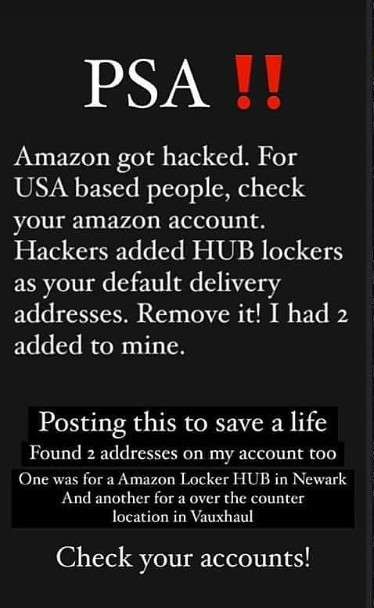
What’s the message saying
Amazon customers have been seeing a concerning message spreading on social media platforms recently. Most versions of the message look something like this:
“PSA!! Amazon got hacked. For USA based people, check your Amazon account. Hackers added HUB lockers as your default delivery addresses. Remove it! I had 2 added to mine.”
Or this one:
“PSA: check your saved addresses on Amazon. Amazon got hacked and a lot of people (including me) have random “Amazon lockers” saved in their addresses – which are not actual lockers. If you do use Amazon lockers, be sure to verify that the locker you’re sending it to is an actual locker.”
The messages claim that Amazon accounts have been hacked and fake delivery addresses added, specifically Amazon Hub lockers. These are secure locations where people can pick up their Amazon orders instead of having them left on their doorstep.
So understandably, these messages have caused alarm among Amazon customers who are worried their accounts have been compromised.
What Amazon and fact checkers say
However, Amazon and independent fact checkers like Snopes have confirmed this viral hack warning is false.
According to an Amazon spokesperson:
“This isn’t a data security matter and our systems are secure. Amazon pickup locations were added to a small number of customer accounts in error, and we are working to fix the issue. We apologize for any inconvenience this may have caused, and customers with questions about their account are welcome to contact customer service.”
So while some customer accounts did have Amazon Hub locker addresses added, this was due to an internal Amazon error. Their systems were not hacked.
How false warnings spread so quickly
This situation shows how quickly false alarms can spread through social media. The messages often ask people to forward them to as many contacts as possible “to spread the word”.
And without confirming whether the warning is real, many will pass it on out of genuine concern for others. So within hours, thousands of people could receive the false warning.
This rapid, unchecked spread of misinformation is an increasing issue in the social media age. Even tech-savvy companies like Amazon aren’t immune.
What customers should do
If you receive messages warning of an Amazon hack, first check with credible sources before forwarding. Sites like Snopes provide reliable fact checks on these viral claims.
You should also:
- Review your Amazon account delivery addresses and remove any unfamiliar ones
- Check your order history for unauthorized purchases
- Confirm the payment methods saved in your Amazon account
While Amazon maintains their systems were not hacked in this case, regular account monitoring is always wise.
Frequently Asked Questions
Was Amazon really hacked?
No, Amazon has confirmed that while some customer accounts had Amazon Hub locker addresses added incorrectly, this was due to an internal error and not a hack or data breach. Amazon states that their systems remain secure.
How did the false warning start spreading?
The “Amazon got hacked” warning messages began circulating on social media, especially Facebook, Instagram, Twitter, and WhatsApp. People shared the messages, likely out of concern for others without first verifying if the claims were true. This allowed misinformation to spread rapidly in a short time.
What should I do if I received the warning message?
First check whether the claim has been verified as true or false by credible sources like Snopes. Do not simply forward on viral messages without confirmation. You should also review your Amazon account delivery addresses and order history for anything suspicious. Enable two-factor authentication as an extra account security safeguard.
Could my Amazon account still be at risk?
While this specific hack warning was false, customers should always monitor their accounts regularly for unauthorized changes or activity just to be safe. Use strong unique passwords, enable two-factor authentication, and do not use public Wi-Fi for shopping.
What is Amazon doing to address this issue?
Amazon says they are fixing the account address errors that seem to have triggered this whole incident. They may also directly communicate with impacted customers and provide an FAQ page explaining the situation. Going forward, more rigorous cybersecurity measures are needed to avoid internal errors causing customer confusion.
What can I do to stay secure when shopping online?
Carefully checking your account settings, order history and payment methods regularly is vital for all ecommerce sites. Also use strong unique passwords, enable two-factor authentication where possible, avoid clicking suspicious links in emails, and stick to secure home Wi-Fi for purchases.
Key takeaways
While account security should always be taken seriously, not every warning message is real. When faced with an alarming security notice regarding Amazon or any other company, remember to:
- Cross check the information with credible sources before forwarding warnings
- Review your account settings and order history for any signs of unauthorized changes
- Have strong unique passwords and two-factor authentication enabled
- Report legitimate security issues to the company for investigation
With hackers growing ever more sophisticated, we must remain vigilant. But spreading false alarms helps no one. Verify first, share later.

Join the discussion
0 commentsShare your experience or ask a question about this article.
Discussion
Start the conversation
Have a question or something useful to share? Add the first comment.