


A sales email reaches you at work and lists a job title you stopped using years ago. The sender tells you they found the contact in Apollo.io.
You can ask Apollo to take down its own profile. The harder question is what to do when your information has already been copied into another company’s sales system.
Overview
Apollo’s form is for removing its directory record
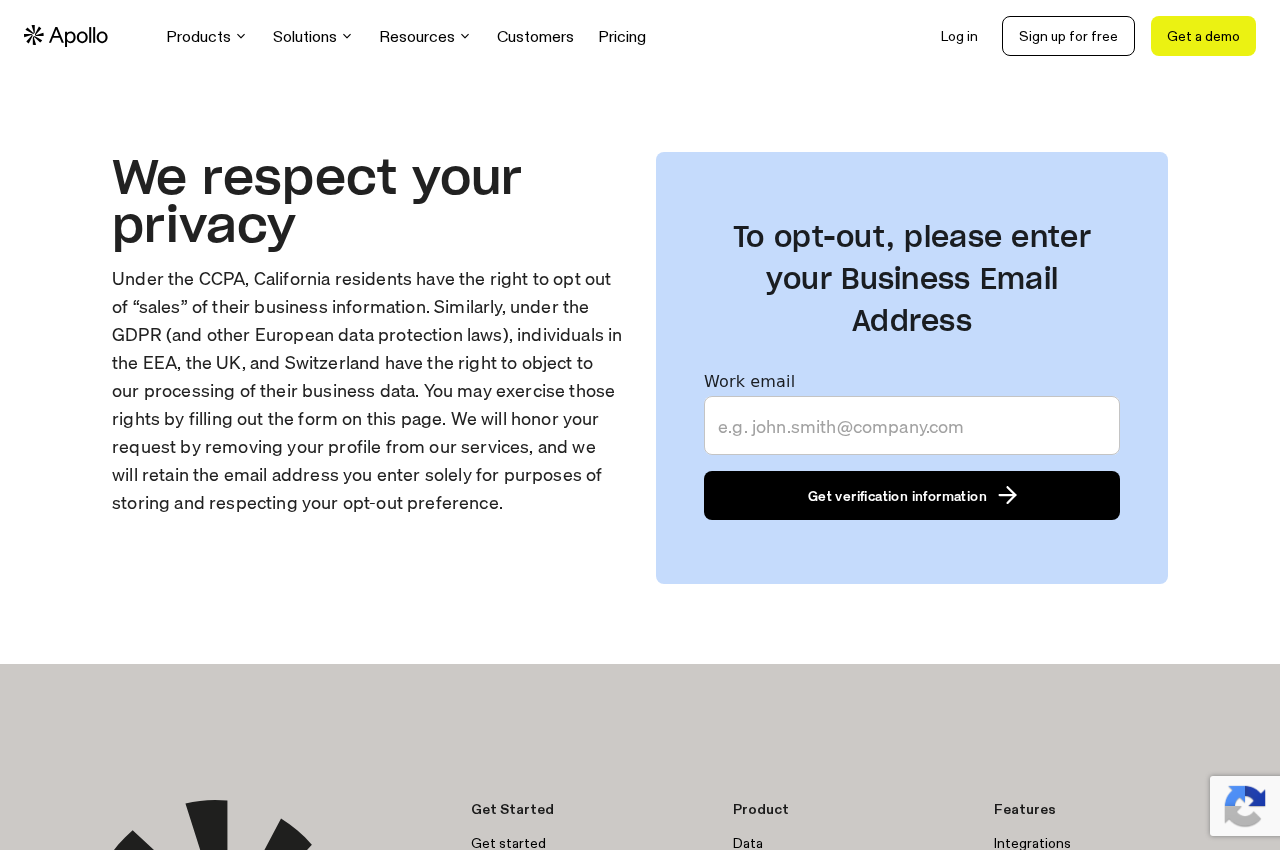
Apollo’s public removal page starts with a business email address. It explains that Apollo keeps the address to record and respect the opt-out preference.
The suppression record is there to prevent reappearance
Apollo’s Privacy Center distinguishes making your profile unavailable in its products from retaining a limited record to prevent it from reactivating.
Follow the information after it leaves Apollo
- Use the removal form for an address you control, and the published privacy contact for an old inbox you cannot open.
- Save the confirmation and distinguish a removed match from an address that was suppressed without an existing profile match.
- If contact continues, ask the verified sender to stop and address any copy they already hold independently of Apollo.
Start with the address in the record
Apollo compiles business contact information, not just details you submitted to it directly. Its privacy policy describes sources including public sites, professional directories, government records, and third-party data providers.
That is why closing an account on a professional network or leaving a job may not be enough to stop an old contact record from circulating.
Check which address was used before you submit anything. A message sent to a forwarded address can look like a message sent to your current employer’s domain.
A name alone is not a reliable match. Note the company, title, and observed contact address if you have those details, without looking up anyone else’s information.
If a sender gives you an Apollo result, do not follow their login link to verify it. Open Apollo’s official Privacy Center independently and use the route it identifies.
You do not need to buy access to an Apollo customer account simply to submit an opt-out. The public business-email form exists separately from its paid sales products.
When you can receive messages at that address
Go to the official form and enter the address that belongs to the relevant listing. Apollo’s page asks for a work email and starts a verification process.
Check the inbox for the request you just initiated. If the instructions require a final confirmation, finish it before treating the original form submission as a completed removal request.
Check the destination of the verification link before continuing. A message that mentions privacy does not need your mailbox password, payment details, or an unrelated account’s verification code.
Save the date, verified address, and result privately. The result matters because a submitted form, an address placed on a suppression list, and a completed profile removal are different events.
If email filters catch the verification message, search the folders on your own system.
If a company administrator blocks the message, use the published privacy contact instead of changing workplace protections.
Do not assume a missing email means the address is not listed. It only tells you that the expected verification message has not reached the inbox you checked.
When you cannot access an old work email
The address may belong to a company you left or it may have been retired. Do not attempt to sign in to an old employer’s email account to complete verification.
Apollo’s privacy policy provides another route through its privacy team. Ask how to verify a request about that address when you no longer control the mailbox.
Provide the minimum facts needed to identify what you want removed. An earlier employer and the exact address can be useful, while a personal address book is not.
If the issue is a work profile associated with a phone number, state that specifically. Do not assume an email form lets you enter a phone number instead.
A former company might still forward messages or recycle a mailbox. That makes independent privacy verification safer than asking whoever receives the mail to forward the confirmation.
When the lookup finds no matching profile
One address may not be the one used in Apollo’s records. The system can retain an address to honor an opt-out without first finding a profile under it.
Do not read the outcome as evidence that every variation of your contact details is absent. A record tied to an old company or alias can require a separate check.
Keep a short list of addresses that you actually used and can associate with the request. Do not submit addresses owned by other people because your names are similar.
If you have no sign of another profile, do not search for every possible variation. Use the exact evidence that prompted your request before sending more identifiers.
What happens to copies that already left Apollo
Apollo’s customer guidance says the service removes profiles from its prospecting database after removal requests. It also describes information previously saved in other systems.
A salesperson may have exported contact records to a spreadsheet. A sales team might have synchronized the same record with its customer relationship management system, usually called a CRM.
Apollo says it cannot automatically update every downstream system where a customer previously used its data. That makes the customer and the directory two different sources to address.
Apollo separately documents how it shows removal requests to customers. The existence of a notice does not establish that a particular customer already read it or removed a saved record.
If you have an actual business relationship with a sender, they may hold a record independently of Apollo.
Ask what they will remove or suppress rather than assuming all their records have one source.
A deletion request is also different from telling a sender to stop marketing. Depending on the sender and purpose, stopping promotional contact may be the immediate action you actually need.
Understand why suppression can involve retaining an address
A suppression list records enough information to recognize the preference later. The purpose is to avoid treating a recently removed contact as a new entry when data is refreshed.
That is different from an address still being offered to customers as a prospect. If you want details about retained information, ask through the policy’s applicable access or privacy request.
A single suppression record does not cover a work address you have not used yet.
If you change companies and see a new profile, treat it as a separate identification issue.
You may also be listed in unrelated sources. A message that keeps arriving after your Apollo request could come from older data, another provider, or an existing account relationship.
If business messages continue after an opt-out
A company confirms the address came from Apollo
Save that confirmation and the recipient address. Ask the verified company for its marketing opt-out or privacy route, and identify the record it has without forwarding unnecessary documents.
You can ask whether the address came from a one-time export or a live tool. Do not assume whichever source they name is the only copy in their system.
If the company says it has a separate reason to retain customer records, clarify the distinction between its retained record and future sales outreach.
Not every request has the same scope.
The sender cannot tell you where it got the details
If the message looks genuine, open the company’s site independently and use a published contact preference or privacy channel. Avoid giving new details just to check an old record.
If the message appears deceptive or includes unexpected attachments, use your mail provider’s reporting tools. Do not visit an untrusted unsubscribe page solely to find out who sent it.
Even a convincing job title or accurate workplace detail does not authenticate an email. The information can circulate through directory records and sales tools.
You receive a different kind of business email
Separate a sales pitch from an invoice, security alert, or account message you actually need. Blocking every email from a domain can hide something legitimate without deleting a directory record.
Use the account’s official contact settings when it concerns a service you already use. Keep your own opt-out confirmation separate from any changes to mail delivery rules.
Cases where the next step changes
A delegated inbox is still receiving verification mail
If you use a shared work address, first find out whether the record is for you or for the team.
The owner of a personal record is not always the inbox administrator.
Do not complete an identity request on behalf of a coworker just because you can see the same messages.
Ask the privacy team about authorization when the request is not yours.
If you are the person listed but a shared mailbox complicates verification, describe that constraint through Apollo’s privacy route. Use an address where you can safely receive the response.
Keep the record separate from the company’s administrative work. A request to remove a sales contact does not give anyone permission to change a mailbox or company directory.
An old pitch is getting forwarded to a new address
Look at the original recipient, not just the inbox where you read it. A forwarded copy may show why your new company account receives mail intended for your old address.
If you can no longer control the forwarding rule, speak to the relevant administrator. The setting belongs to the mailbox service rather than to Apollo.
Once you identify the original address, ask Apollo about the old record and ask the sender to stop using its copy. Neither action requires posting your current work address publicly.
If you repeatedly receive a pitch about an active contract, find the account and talk to the organization through its established contact. Some contact may not be marketing.
Your current details are correct, but you still want them removed
An opt-out does not depend on showing a factual error in your profile. You can ask to be removed even if the title and employer shown are current.
By contrast, correcting an inaccurate title may preserve a visible profile with the corrected information. Decide whether you want less exposure or a more accurate listing before you ask.
What to Do After Finding Your Contact Details in Apollo
- Identify the observed business email and any specific profile details without submitting guesses, someone else’s address, or unrelated identity information.
- Use the official Apollo removal form for an inbox you control, or its policy contact if the address cannot receive verification.
- Complete the requested confirmation and save the result, then distinguish actual profile removal from suppression without an identified match.
- If a verified sender still uses a saved copy, ask that organization to address its own records and stop unwanted marketing through its established channels.
- Review new messages or distinct addresses separately, and report phishing rather than using a questionable link to request removal.
A simple record can include the source, address, action date, and response. That is enough to see which parts of the problem you still need to address.
Frequently Asked Questions
Do I need an Apollo account to opt out?
Apollo provides a public removal form that starts with a business email address. It is separate from the account customers use to find contacts.
Open the form through the official Privacy Center. A payment request or a request for your mailbox password is not a normal part of finding that route.
Why does Apollo keep my email after removing my profile?
Apollo says it retains limited information for suppression so it can honor the request and avoid reactivating the profile. That is distinct from keeping it available in prospect searches.
If you need to know what is retained, use the policy’s privacy contact. Do not send a new identity document to an unsolicited sender offering to check.
Does this delete a salesperson’s exported contact list?
The opt-out applies to Apollo’s own records and products. Apollo says some saved copies in external systems cannot automatically be changed by its service.
Contact the verified sender about its own use of the data. Save any response so you can distinguish a stopped pitch from deletion of a saved record.
What if I cannot open my old work inbox?
Use the privacy channel listed in Apollo’s policy and explain that the old inbox is no longer yours to access. Ask how to verify the request without using that inbox.
Do not try to sign in after leaving an employer. Identify the record by the work details you already have, not by collecting new credentials.
What if an opt-out page says it did not find my address?
The result concerns the submitted identifier, not every possible contact record. Save what the page said and verify which address appeared in the message or listing.
If you have evidence a different address is listed, address that record separately. Do not infer a second profile from an unrelated marketing campaign.
Is an Apollo opt-out the same as asking a sender to unsubscribe me?
An opt-out with Apollo changes what the directory does. An unsubscribe or marketing objection directed to a verified sender concerns its own outreach.
You may need both if a sender already saved the contact. Use independent verification if a message looks like a phishing attempt.
The Bottom Line
Use Apollo’s official removal route for the exact work address in question. Save the result and use the published privacy contact if you cannot complete verification.
If a company still contacts you using a saved copy, handle that copy with the company. Suppressing a directory record cannot recall every contact export that preceded it.

Reviews & discussion
0 commentsShare a firsthand experience, or ask a question.
Community reviews
apollo.io
Moderated reader experiences, not an editorial verdict.
Start the conversation
Have a question or something useful to share? Add the first comment.