

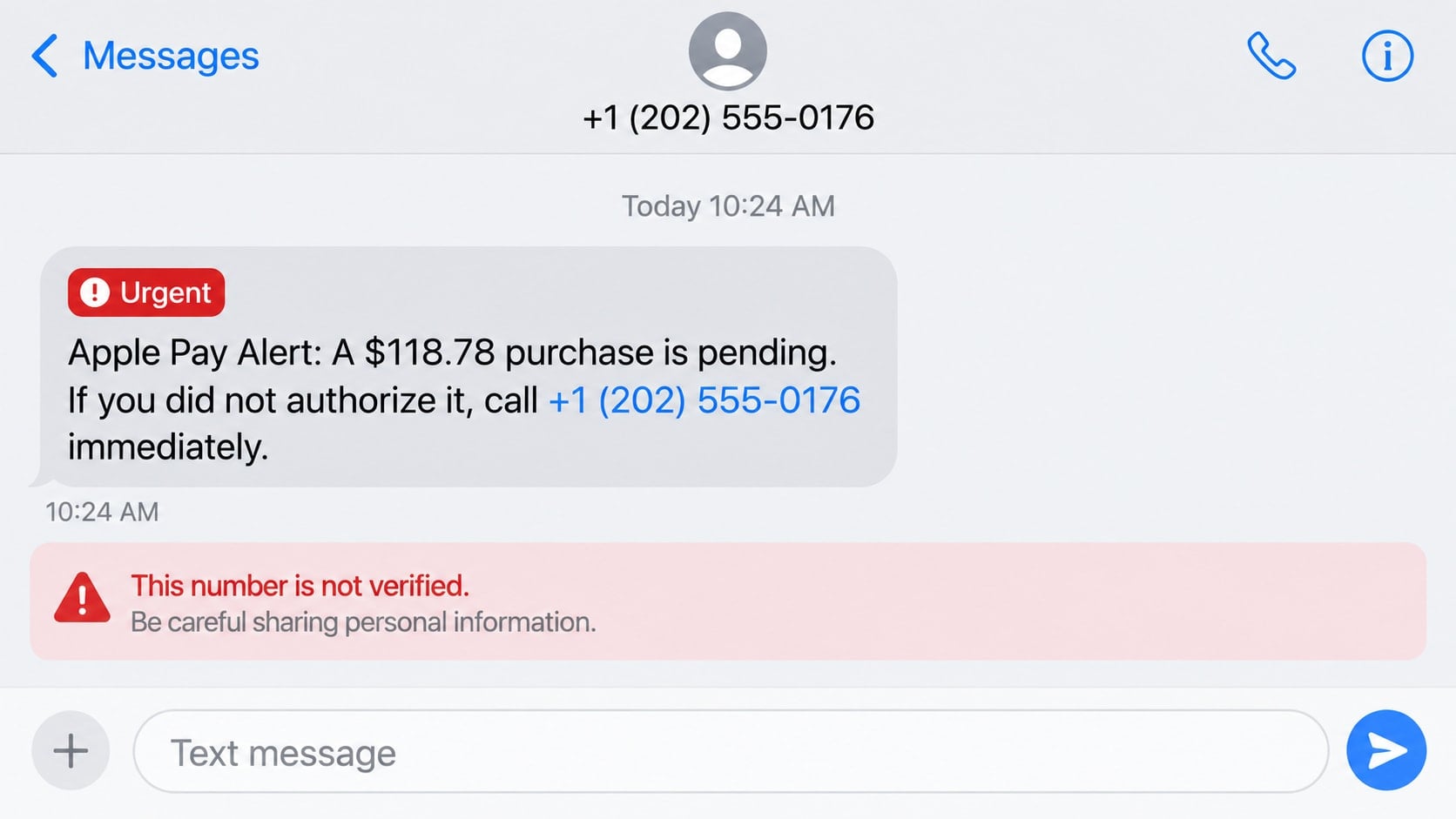
A text says an Apple Pay purchase for $118.78 is pending and includes a number to call if you do not recognize it. The amount is specific, the warning feels immediate, and calling seems safer than ignoring a possible charge.
That phone number is the trap, not the solution.
Overview
The text invents an unauthorized Apple Pay purchase
The Apple Pay scam message impersonates an Apple security or payment alert. It claims a transaction is pending, an unfamiliar device was added, or the recipient’s Apple Account has been temporarily restricted.
A callback number or cancellation link is presented as the fastest way to stop the purchase. The sender wants the recipient to use that private contact route before checking Wallet, the bank, or Apple independently.
The fake support conversation collects access and money
A caller may be asked for an Apple Account password, security code, card information, or device passcode. Another version sends the victim to a cloned cancellation page that requests the same details.
The scam can expand into remote access, gift card payments, or a transfer to a supposed safe account. The original $118.78 charge may never have existed.
The campaign combines phishing with social engineering
The text supplies the fear; the fake support agent turns it into action. The agent can adjust the story as the conversation develops and use each detail the victim reveals to sound more knowledgeable.
- The purchase alert arrives unexpectedly from an unverified sender.
- The message insists that a supplied number must be called immediately.
- The transaction does not appear in Wallet or the card account.
- The caller requests passwords, codes, remote access, or payment.
- The linked page uses a domain outside Apple’s official websites.
- The victim is told to keep the call or transfer secret.
Why a Specific Amount Makes the Alert Feel Real
An odd amount such as $118.78 resembles a real total after tax. It gives the recipient something concrete to fear and shifts attention away from the sender’s identity.
The message may mention a recognizable product, retailer, or city. Those details can be invented in seconds. A transaction description inside an unsolicited text is not evidence that a payment network processed it.
Criminals also use the Apple Pay name because it sits between the device, Apple Account, card issuer, and merchant. A worried recipient may be unsure which organization to contact and accept the phone number offered by the scammer.
Apple’s guidance on social engineering and phishing specifically notes that scammers may claim there is unauthorized Apple Pay activity. Apple advises users not to share passwords, security codes, or other sensitive account information.
How the Apple Pay Scam Message Works
Step 1: A fake purchase alert creates immediate concern
The text says a payment is pending, completed, or under review. It may include a case number and a short deadline for cancellation.
The message is written to make inaction feel dangerous. In reality, taking a minute to inspect the card account is safer than contacting an unverified number.
Step 2: The victim calls or opens the supplied link
On the phone, an agent answers with a polished Apple-style greeting. On the web, a copied page offers to cancel the transaction after the visitor “verifies” the account.
Both routes keep the victim inside an environment controlled by the criminal. Every confirmation comes from the same source that made the original claim.
Step 3: The scammer performs a fake security review
The agent asks for the recipient’s name, email, billing address, or card ending. Some details are framed as harmless identity checks, but together they support account recovery attempts and payment fraud.
The caller may claim that several devices or transactions are linked to the account. These statements cannot be verified through the call and are used to increase urgency.
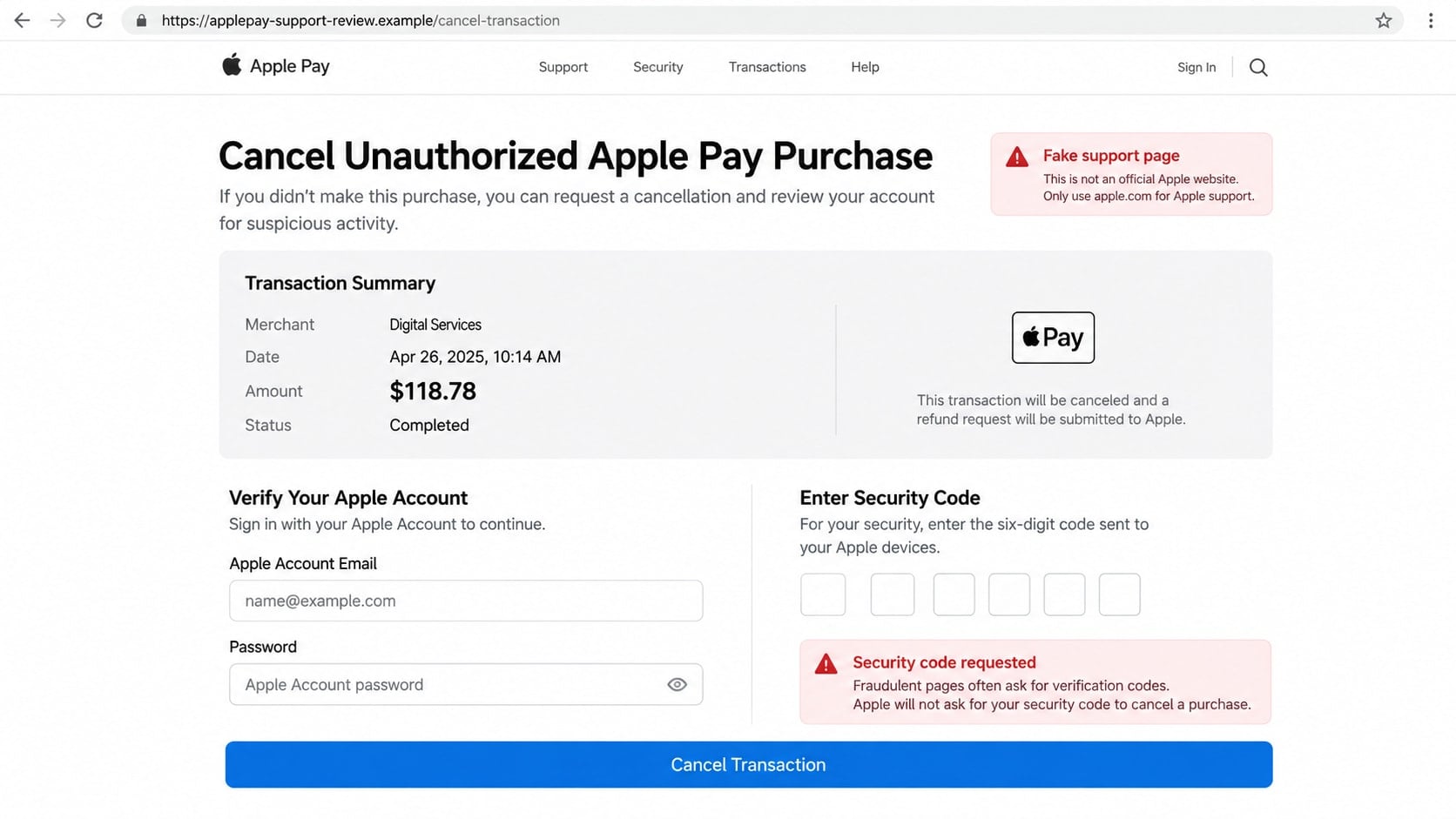
Step 4: A password or security code is requested
The criminal may start a real Apple Account login or password reset while speaking with the victim. That action sends a genuine code or approval notification to a trusted device.
The caller says the code cancels the transaction or confirms the victim’s identity. Sharing it can instead approve the attacker’s access or a sensitive account change.
Step 5: The conversation moves toward money or device access
A fake refund process may require screen sharing or remote-control software. The agent can then watch the victim enter credentials, manipulate what appears on screen, or instruct the victim through a bank transfer.
Another script claims that gift cards are needed to reverse the purchase. Gift card numbers transfer value directly to the criminal and have no legitimate role in cancelling Apple Pay activity.
Step 6: The scammer creates a reason for continued secrecy
The victim may be told that bank employees are involved in the fraud, that speaking to family will compromise an investigation, or that the case must remain open until money is moved.
Secrecy keeps helpful people from interrupting the scheme. A genuine fraud investigation does not require a customer to lie to a bank or remain connected to an unsolicited caller.
How to Check the Alleged Purchase
Open Wallet directly and review recent activity for the relevant card. Then check the issuer’s official app or website, where pending and posted transactions can be confirmed.
The absence of a matching $118.78 entry is a strong sign that the text invented the purchase. Do not allow the caller to explain why the charge is supposedly hidden or delayed.
If an unfamiliar transaction is present, contact the card issuer using the number printed on the card or the official app. The bank can explain the transaction and begin a dispute without asking for an Apple Account code.
Apple Account activity should also be reviewed from Settings or Apple’s official account site. Remove devices you do not recognize, but do not follow account links included in the text.
Identity, Contact, and Payment Checks
Inspect the message without trusting its label
A sender name such as “Apple Security” can be spoofed, and ordinary numbers can be used for mass texts. Read the content as an unverified claim.
Misspellings can reveal a scam, but their absence proves nothing. Well-written messages can still route every response to a criminal.
Verify the transaction with the card issuer
Use the bank’s app or the number on the physical card, not the contact information in the text. Ask specifically about the amount, merchant, status, and digital-wallet token if a real entry appears.
Do not share a code with an incoming caller. A bank can discuss activity after completing its own secure verification process.
Reach Apple through an official route
Use the Support app or type Apple’s support address yourself. End the incoming conversation before starting a separate one.
A genuine support representative will not need an Apple Account password or the device passcode. Those secrets belong only in the appropriate trusted interface.
Reject alternative payment and safe-account stories
No Apple Pay cancellation requires gift cards, cryptocurrency, cash, or a transfer to a newly supplied account. Those methods remove normal purchase protections.
A “safe account” controlled by someone else is not safe. Contact the bank directly if a transfer has already been requested or sent.
Common Variations of the Message
One version says a new card was added to Apple Pay. Another claims an expensive device was purchased using Apple Pay and is ready for pickup. Both include a phone number or link for cancellation.
A fake Apple receipt can arrive by email instead of text. It may show an app purchase, subscription, or gift card and direct the recipient to a refund form.
Some campaigns use a group-message thread or send repeated alerts from different numbers. Blocking one sender may not stop the campaign, because the criminal can rotate numbers and domains.
A later caller may pose as the bank rather than Apple. The change in identity does not make the request legitimate. Security codes, remote access, and transfers remain clear boundaries.
What the Scammer May Try After the First Call
The first conversation may end without a payment, yet the information collected can make a second attempt more dangerous. A later caller may know the name, email address, card ending, or exact amount discussed.
The criminal can switch identities and claim to represent the card issuer, a merchant, law enforcement, or Apple’s fraud team. A new caller does not mean an independent organization confirmed the story.
If an Apple Account password was captured, the attacker may send repeated approval requests and hope one is accepted accidentally. Deny unfamiliar prompts and change the password from a trusted device.
If card details were captured, small test charges may appear before a larger attempt. Alerts should be reviewed through the bank’s app, not through another number supplied by text.
Remote access creates a separate risk. Even after the visible session ends, unattended-access settings or startup software may let the attacker reconnect. Removal and account review should happen before normal banking resumes.
Finally, ignore anyone promising guaranteed recovery for a fee. Recovery impersonators often target people whose details were already collected by the first scam.
Keep a short timeline of the incident, including the original text, call time, information disclosed, software installed, and payments attempted. A clear timeline helps the bank distinguish the invented $118.78 alert from any real transaction the criminal later created. It also prevents a follow-up caller from rewriting what happened.
Check the device’s call blocking and message filtering options only after saving the evidence. Blocking reduces interruptions, but it should not erase the record needed for a dispute or report.
What to Do if You Have Fallen Victim to This Scam
- End the conversation immediately. Hang up, close the page, and stop replying. Deny new sign-in prompts and disconnect the device if the caller has remote access.
- Secure the Apple Account from a trusted device. Change the password, review trusted phone numbers and devices, remove anything unfamiliar, and confirm that account recovery information is correct.
- Contact the card issuer. Use the official app or number on the card. Report exposed card information, review pending and posted transactions, and ask whether the card or digital-wallet token should be replaced.
- Explain any code you shared. Tell Apple or the bank exactly what the notification said. A code may have approved an account login, password reset, card enrollment, or payment.
- Remove remote-access applications. Uninstall software requested by the caller, disable unattended access, and inspect startup items. If online banking was open during the session, tell the bank.
- Change other reused passwords. Begin with email and financial accounts. Use unique passwords and enable multifactor authentication while rejecting unexpected approval prompts.
- Run a Malwarebytes scan. Update Malwarebytes and perform a complete scan if a file was downloaded or remote software was installed. Remove detected threats and seek help if the device remains unusual.
- Use AdGuard as an added safeguard. AdGuard can block many known phishing pages, malicious advertisements, and tracking links. It cannot reverse a transfer or account takeover, so complete the recovery steps first.
- Preserve and report the evidence. Screenshot the message, save the number, URL, call log, receipts, and transaction details. Send a screenshot of suspicious texts to
reportphishing@apple.comand report financial fraud to the appropriate authorities. - Be cautious with recovery contacts. Scammers may return pretending to have recovered the money. Do not pay an upfront fee or share another password, passcode, or verification code.
Frequently Asked Questions
Does Apple send Apple Pay fraud alerts by text?
Account and payment notifications can occur, but a text should not be used as the only proof. Check Wallet and the card issuer independently, and never use an unverified callback number.
Can a pending Apple Pay charge be hidden?
Processing times vary, but a caller cannot prove a transaction by claiming it is hidden. The card issuer can check authorizations and pending activity through its own systems.
Will Apple ask for my security code to cancel a purchase?
No legitimate agent should ask you to reveal an Apple Account verification code or device passcode. Those secrets may authorize access rather than cancel it.
What if I called but did not share information?
End the call and block further contact. Review Wallet and the Apple Account directly. The immediate risk is lower if no credentials, codes, remote access, or payment information were provided.
Can I get money back after a transfer or gift card payment?
Recovery is not guaranteed, but report it immediately. Contact the bank, payment service, or gift card issuer and retain every receipt and communication. Speed can preserve options that disappear later.
How do I report the scam message to Apple?
Apple advises sending a screenshot of a suspicious text to reportphishing@apple.com. Also use the phone’s junk-reporting feature and notify the carrier when available.
The Bottom Line
The Apple Pay scam message uses a precise purchase amount to start an unverified support conversation. The transaction story is only bait for passwords, security codes, remote access, or irreversible payments.
Check Wallet and the bank directly, then contact Apple through a route you choose yourself. If anything was shared, secure the account and payment method before answering another message.

Join the discussion
0 commentsShare your experience or ask a question about this article.
Discussion
Start the conversation
Have a question or something useful to share? Add the first comment.