

An email says you must declare cryptocurrency immediately. It sounds official, mentions compliance, and makes a quiet afternoon feel like a tax emergency.
Before you call anyone, take a closer look. The ATO crypto declaration scam borrows language that can worry even people who have never owned cryptocurrency.
Overview
The urgent declaration demand is a confirmed impersonation scam
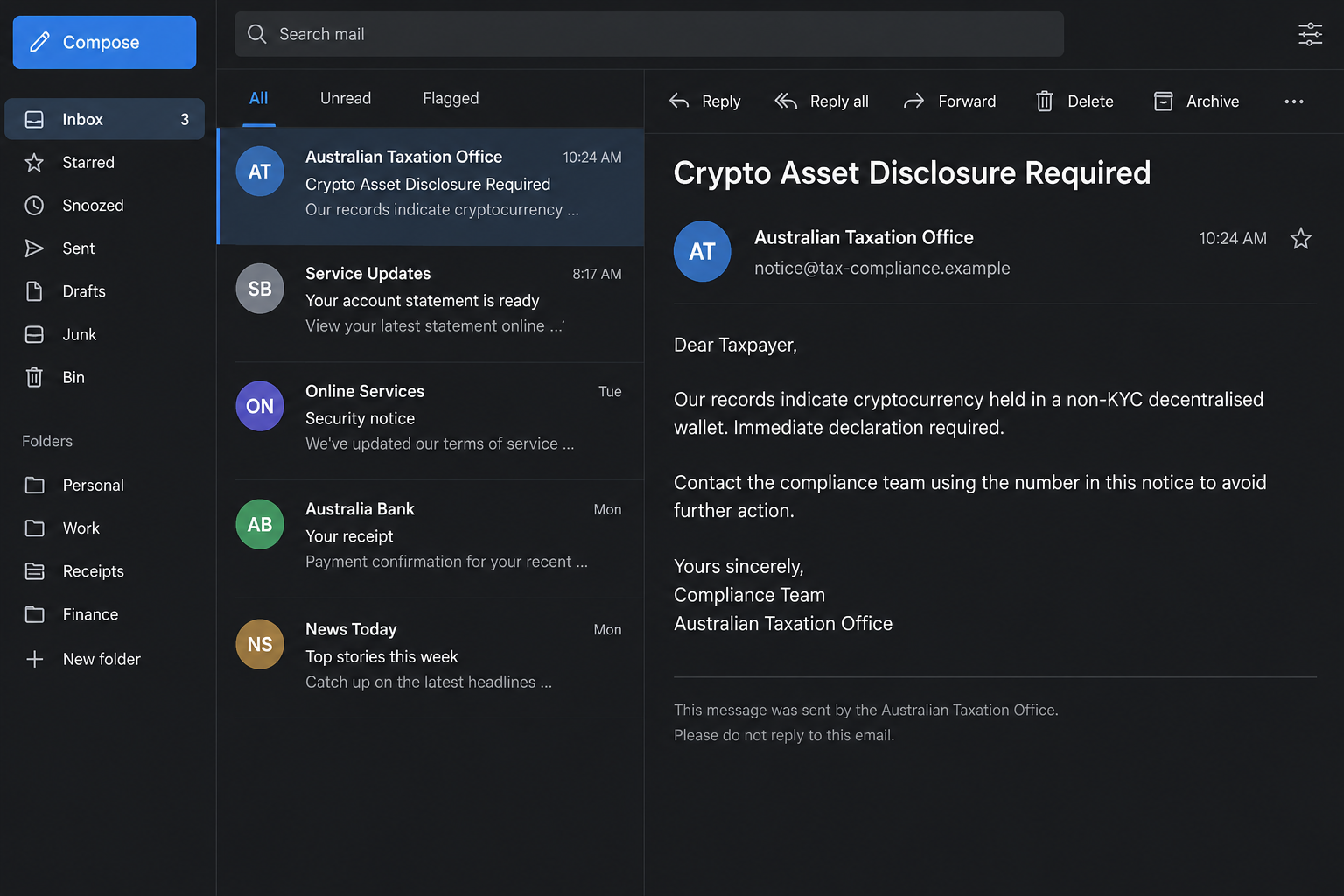
The Australian Taxation Office has confirmed fraudulent emails accusing recipients of holding cryptocurrency in a non-KYC decentralized wallet and demanding an immediate declaration.
In the documented callback version, the recipient is told to phone a number inside the email to avoid further action. Some messages include small attachments.
The scam is the impersonation and pressure to use the sender’s contact route. The ATO and myGov are legitimate government services, not the perpetrators.
Stop before replying or calling. An unsolicited demand does not become a valid tax notice because it includes a reference number or familiar government styling.
The wording makes a private wallet sound like evidence against you
KYC means know your customer, a term used for identity checks. Scammers turn that ordinary financial language into an accusation that feels technical and difficult to challenge.
A person who has traded crypto may worry about forgotten transactions. Someone who has not may fear that an account was opened in their name.
Both reactions serve the sender. You are pushed toward the same instruction: contact the supposed compliance office through details supplied by the threatening message.
- A claim that undeclared cryptocurrency has been detected.
- References to decentralized wallets, disclosure, reporting, or compliance.
- A deadline that encourages immediate contact rather than independent checking.
- A callback number, document, or link presented as the way to resolve the issue.
- A warning about further action if you ignore the request.
Real crypto tax obligations do not authenticate this email
Cryptocurrency can create genuine tax questions. This article is not a finding about your return, transactions, wallet, or whether you need professional tax advice.
It addresses the fraudulent contact. The ATO says it will not email demands for immediate asset disclosure or threaten arrest, prosecution, or legal action by email.
You can check the agency’s current scam alerts independently. Do not use the threatening email as your directory.
The screenshots here are illustrative reconstructions with fictional contact details. They explain the lure, rather than documenting a particular person’s tax account or an official assessment.
Why This Message Feels More Serious Than a Refund Scam
A fake refund offers something pleasant. A crypto disclosure demand suggests you have already done something wrong, even before you understand what the accusation means.
That change matters. Instead of asking whether you want a reward, the email asks how quickly you can prevent trouble.
You might reread the message looking for the fastest solution, rather than questioning why an unknown sender is directing your next move.
The sender also gives you a task that sounds responsible. Calling a compliance officer feels more cautious than clicking an obvious payment button.
But a phone conversation is not independent verification when the number came from the same suspicious notice. You may simply be moving into another part of the scam.
Legal-looking references can deepen that impression. A document may cite tax rules, show a notice identifier, or use headings that resemble government correspondence.
Those details can be copied. Their appearance does not show that the agency created the message, reviewed your records, or authorized its deadline.
Scammers do not need to know your tax history to make a broad accusation. A vague warning lets the recipient supply the worrying details themselves.
If you tell the caller about a wallet, exchange, previous transaction, or accountant, you may be helping them personalize a story that began without that knowledge.
How the ATO Crypto Declaration Scam Works
Step 1: A tax-themed email claims there is a compliance problem
The message introduces cryptocurrency as something you must address now. Its display name may suggest the ATO, myGov, or an official compliance team.
It can arrive regardless of whether you actually hold crypto. Receiving the email does not establish that the sender has accessed a wallet or tax record.
The first aim is attention. A subject about mandatory reporting or undisclosed assets is harder to dismiss than a routine advertisement.
Check the claim against your own records later, through a trusted route. Do not provide a personal explanation to the unsolicited sender while trying to establish who they are.
Step 2: The notice makes delay sound dangerous
The email calls for immediate disclosure or suggests further action will follow. That urgency discourages the simple checks you would normally make.
Even without an explicit arrest threat, formal wording can create the impression that silence will be interpreted as wrongdoing.
The pressure is part of the deception, not a reason to abandon verification. A frightening allegation deserves a more reliable check, not a faster response.
You can close the message and consult your registered tax agent. A stranger cannot establish authority by insisting that you keep the matter between yourselves.
Step 3: The sender supplies the supposedly safe contact route
In the ATO’s confirmed crypto-email warning, the immediate declaration is made through a phone number included in the message.
Other tax-themed lures use links or attachments. Do not assume every version follows the same path, or that an email without a link must be harmless.
A callback lets an impersonator speak with you directly. The email has already supplied a believable reason for that conversation.
Calling the listed number to ask whether the email is genuine only gives the sender a chance to confirm their own story.
Use independently published ATO contact information instead. The difference is not whether you make a call, but whose directory you trust.
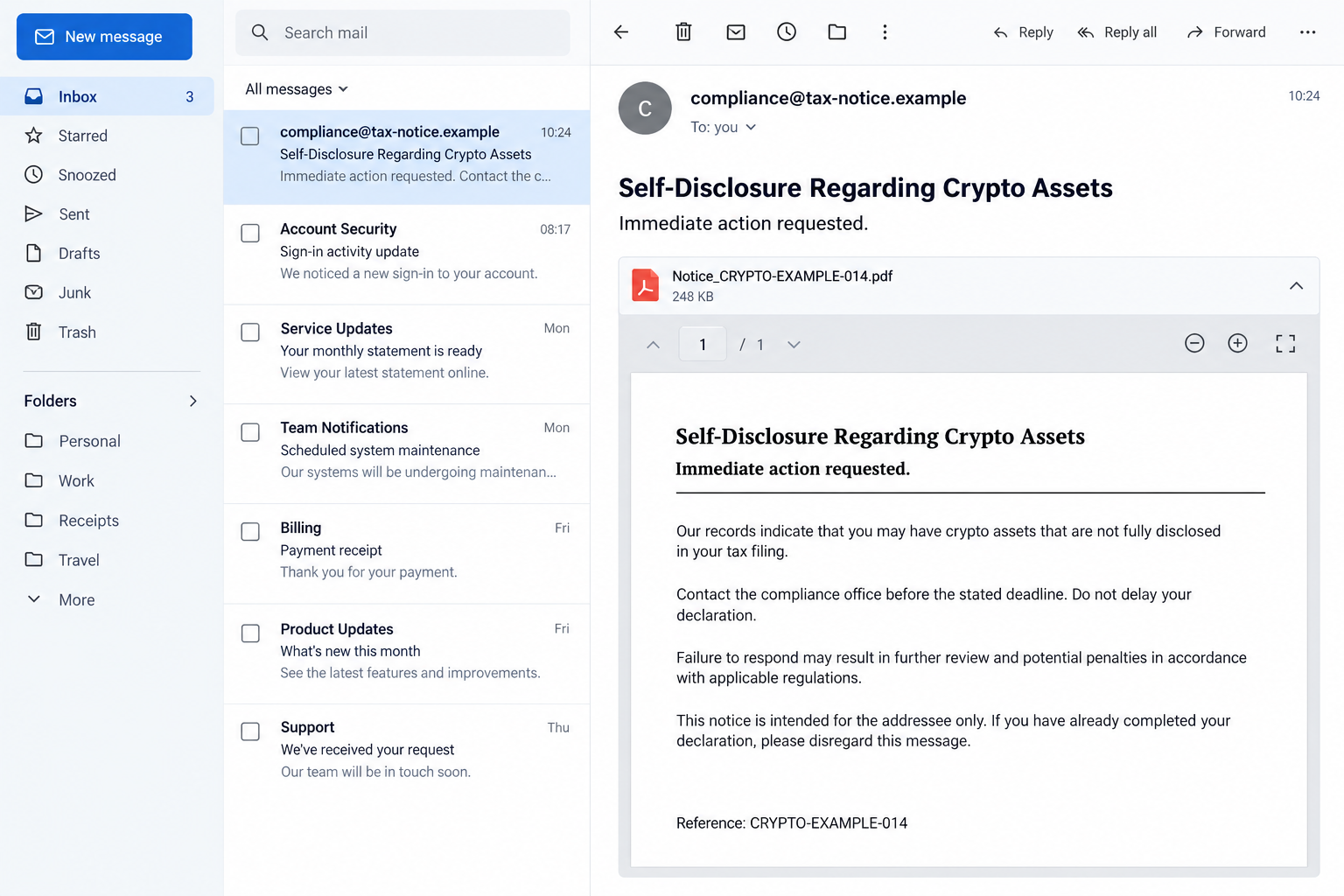
Step 4: The conversation can expose information the sender did not have
A person who believes they are resolving a tax issue may share identifying details, account information, or an explanation of their financial activity.
That is a risk, not proof that every recipient was asked for the same information. The published alert does not establish a single script for every call.
The safest boundary is clear: do not provide sensitive information to an unverified caller or through a route introduced by an unsolicited warning.
A wallet recovery phrase, private key, bank password, or login code must not be supplied to establish that you are cooperating with a tax inquiry.
If the conversation shifts toward payments or software installation, end it. That request needs separate verification, not acceptance because the earlier tax discussion sounded convincing.
Step 5: Further contact may reuse the details you revealed
After you engage, another message may sound more specific. It can repeat facts you supplied and present them as proof of official access.
A claimed supervisor, investigator, or account specialist may appear to continue the same case. A different voice does not provide independent confirmation.
Do not keep discussing the issue to recover your confidence. Break the contact route and check the matter with the real agency.
Save what happened. The email, conversation timeline, and any transaction records are more useful to legitimate responders than further arguments with the impersonator.
Check the Sender, Number, and Claim Separately
A government display name is not a verified sender
Your inbox may show the agency name more prominently than the actual email address. Expand the sender details without opening attachments.
A personal address or unrelated domain is a warning. However, a familiar-looking address alone is not enough to authenticate the contents.
Do not treat the email signature as an independent source. A logo, address, privacy statement, and reference number can all be assembled by the person sending it.
A local number can still lead to an impersonator
A phone number is not safe merely because it has an Australian format. Compare it with the agency’s contact page, opened independently.
Caller ID is also not a guarantee. A later incoming call displaying a familiar number should not override a suspicious request.
The ATO currently lists 1800 008 540 for checking suspected scams. Verify the number on its website before using it, especially if your situation involves sensitive information.
Check your tax position without using the notice
Open myGov through your usual trusted method and review the linked ATO service. Ask your registered agent about anything you do not understand.
If you cannot find matching correspondence, do not resolve the gap by returning to the suspicious link. Ask the agency to verify the contact itself.
A real question about crypto records and a false email can exist at the same time. Handle the real question through the proper channel.
Do Not Let a Wallet Question Become a Login or Payment Request
A scammer may describe an unusual instruction as verification. That word does not explain why they need access to an account or control over your device.
Connecting a wallet to an unfamiliar site is not the same as showing a tax agent transaction records. Signing a request can have consequences beyond viewing information.
Likewise, a recovery phrase is not a harmless wallet identifier. Treat requests for it as a stop signal, regardless of the sender’s claimed position.
Do not send a test payment to prove ownership or cooperation. A small transfer can still be a real transfer, and a promised return is only a promise.
This does not mean the confirmed email always leads to wallet draining. The documented warning establishes the impersonation and declaration demand, not every possible downstream outcome.
Keeping that distinction helps you respond proportionately. Report what you actually shared or did, rather than guessing that every account has been emptied.
What to Do if You Have Fallen Victim to This Scam
-
Stop the contact before explaining further. End the call, avoid the supplied links, and do not open additional documents to prove your identity or resolve the alleged deadline.
You do not need the impersonator’s permission to check their claim. If they keep calling, record the contact details and block them after preserving evidence.
-
Tell the real ATO what happened. Use the independently verified scam contact route. Explain whether you replied, phoned, shared identifying information, entered credentials, or paid anything.
Ask what protective steps are appropriate for the information exposed. Do not rely on a case number provided by the suspicious caller.
-
Protect accounts you actually exposed. If you entered myGov or email credentials, change them through the official service on a trusted device.
Review recovery details, sessions, and account activity. Keep multifactor authentication enabled, and do not approve unexpected sign-in requests while completing the recovery.
-
Contact the relevant financial provider promptly. If you shared banking details or sent funds, tell the bank or exchange exactly which information and transactions were involved.
Ask about account protection, dispute options, or a possible transfer recall. Recovery depends on the payment and timing; nobody can guarantee it.
-
Handle wallet exposure as a separate emergency. If you disclosed a recovery phrase, private key, or approved an unfamiliar request, consult the wallet provider’s official security guidance.
Do not enter the phrase into a website suggested by a recovery helper. Avoid further transactions until you understand the exposure and a safe protection route.
-
Report the original message with its context. The ATO lists ReportScams@ato.gov.au for scam emails. Forward the whole message rather than just copying its threatening paragraph.
Keep a private copy of relevant evidence and report cybercrime through the appropriate Australian channel. Do not post tax numbers, wallet secrets, or identity documents publicly.
-
Check the device if you opened risky files. Malwarebytes can help inspect a supported device after a suspicious download or installation. A scan does not repair exposed account credentials.
AdGuard’s browsing protections may reduce exposure to known malicious destinations. They are an additional layer, not permission to open the notice or trust its callback number.
-
Keep your genuine tax affairs on track. Save a timeline and ask your registered tax agent whether any legitimate correspondence needs attention.
Reject anyone demanding a recovery fee or claiming to clear your tax record through private payment. The original scam does not authorize a second stranger.
Frequently Asked Questions
Is the ATO crypto declaration email a real notice?
The immediate declaration and callback demand described here is a confirmed impersonation pattern. Check genuine tax correspondence independently, rather than assuming every email mentioning cryptocurrency is fraudulent.
What does non-KYC decentralized wallet mean in this scam?
It is financial terminology used to make the accusation feel credible. Its presence does not prove the sender knows your wallet, holdings, identity, or tax obligations.
Can I receive the message without owning cryptocurrency?
Yes. An unsolicited accusation is not proof that you own assets or someone opened an account for you. Verify concerns through official services before supplying any information.
Should I call the number to explain the mistake?
No. Use the ATO’s independently published contact details. Calling the number inside the warning lets the sender control the conversation and authenticate their own claim.
Does opening the email mean my wallet is compromised?
Not by itself. The response should depend on whether you followed a link, opened a file, disclosed secrets, approved a request, or made a payment.
Should I ignore all crypto tax correspondence now?
No. Separate genuine recordkeeping and tax questions from the fraudulent contact. Use your established ATO access or registered agent to check what actually needs attention.
The Bottom Line
The ATO crypto declaration scam uses a serious-sounding allegation to turn an unsolicited email into a phone conversation you might otherwise question.
Do not call its number, open its attachments, or disclose wallet and account information. Check the contact with the real ATO, then handle genuine tax matters independently.

Join the discussion
0 commentsShare your experience or ask a question about this article.
Discussion
Start the conversation
Have a question or something useful to share? Add the first comment.