

A new cryptocurrency scam is making the rounds online, and it’s targeting unsuspecting users interested in blockchain voting incentives. Promising free $AVAIL tokens for participating in a fake vote, the so-called “$AVAIL Vote Rewards” scheme has been exposed as a dangerous crypto drainer.
If you’ve come across a site claiming to offer $AVAIL token rewards for voting in a proposal—especially under the domain asset-availfoundation[.]net—stop right there. It’s not legitimate. Despite appearances, it’s not associated with the real Avail Network.
Keep reading to understand exactly how this scam works, how to spot similar schemes, and what to do if you’ve already interacted with the site.
Scam Overview
The “$AVAIL Vote Rewards” scam is a cleverly crafted fraud targeting cryptocurrency users, especially those who are familiar with or actively follow blockchain development and airdrops. It masquerades as an initiative of Avail, a legitimate project focused on providing scalable blockchain solutions for interoperability.
The fraudulent website imitates availproject.org, the official domain for Avail. In this instance, scammers launched asset-availfoundation[.]net—a visually similar site with deceptive features and fake incentives.
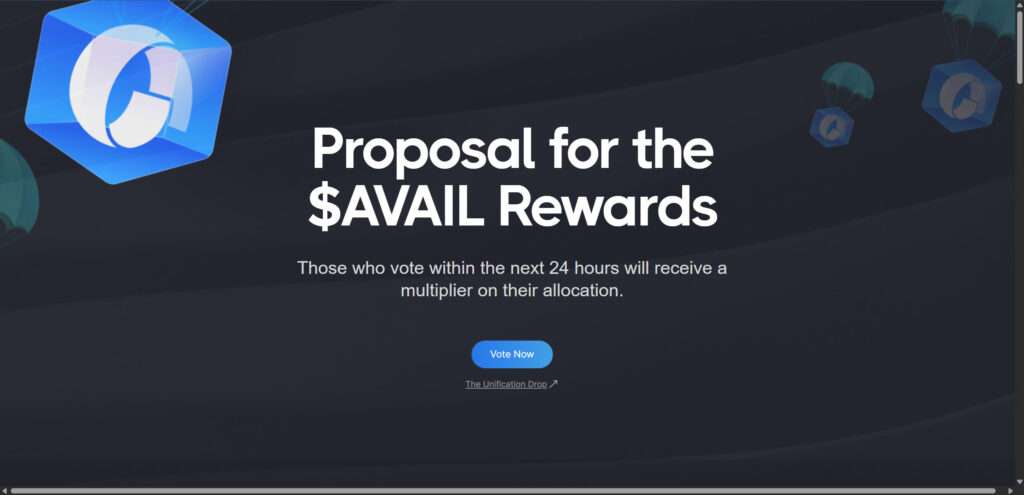
The site appears polished and professional. It includes branding elements like the Avail logo, terminology relevant to blockchain enthusiasts, and references to legitimate Avail-related events like “Clash of Nodes” and “Light Client Lift-Off.”
Key Elements of the Scam Website:
- Claim: “Those who vote within the next 24 hours will receive a multiplier on their allocation.”
- Action Prompt: A large “Vote Now” button encourages users to participate.
- Verification Messaging: Users are told they must “verify eligibility” for AVAIL tokens.
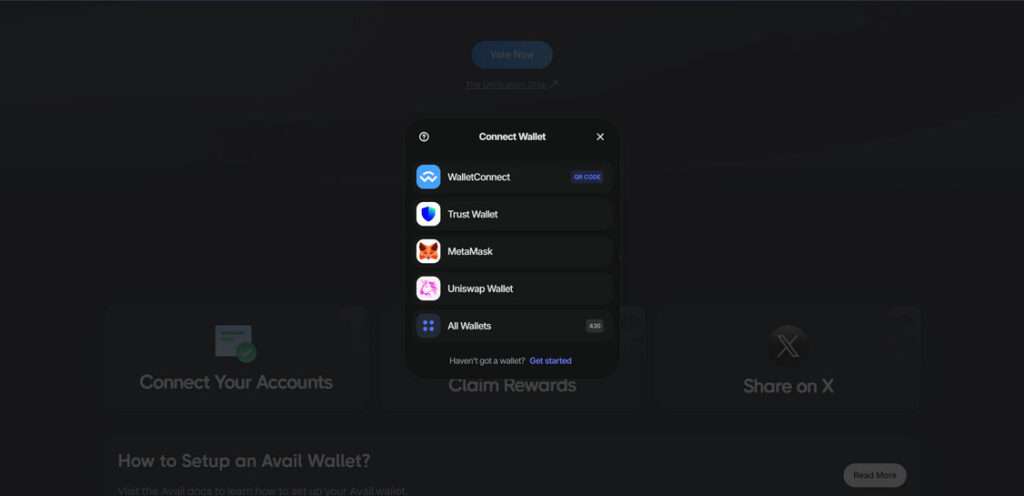
- Wallet Connection: Visitors are urged to connect wallets via MetaMask, WalletConnect, Trust Wallet, or Uniswap Wallet.
- Countdown Timer: A ticking timer creates a sense of urgency, pushing users to act without thinking.
- Rewards Claim Page: Offers fake confirmation that rewards will be delivered after connecting a wallet.
The sophistication of the scam lies in its design. It targets crypto users who might already expect an AVAIL token airdrop or incentive, giving the scam more legitimacy.
But here’s the truth: this site has no connection to the actual Avail project.
The Real Avail Network
Avail is an open and scalable data availability layer designed to help various blockchains interoperate more efficiently. It is associated with Polygon, a well-known Ethereum scaling solution. The official website is availproject.org, and the project has no current initiative offering AVAIL tokens through polls or voting multipliers.
The scam abuses this familiarity, mimicking the Avail ecosystem to target users and drain their crypto wallets.
How the $AVAIL Vote Rewards Scam Works
Understanding how this scam operates is essential to protecting yourself and others. Here’s a breakdown of how it works, step-by-step.
Step 1: Discovery Through Social Media or Search
Scammers promote the fraudulent site through:
- Sponsored posts on X (formerly Twitter)
- Discord groups
- Telegram channels
- Reddit threads
- Fake Google search ads
The messaging emphasizes limited-time rewards for participants who engage quickly.
Step 2: Landing on the Scam Site
Once you click on a post or link, you arrive at asset-availfoundation[.]net or a similar phishing domain. The site looks legitimate, often borrowing design elements and even code from the real Avail website.
Step 3: The Bait — Vote and Claim Rewards
The scam centers around a voting process. You’re told:
- You’re eligible for $AVAIL token rewards.
- You must vote within 24 hours.
- Rewards will be sent on the Mainnet launch.
This is designed to mimic real blockchain initiatives, many of which involve community votes and token distributions.
Step 4: Urgency and Wallet Connection
A ticking timer adds pressure. Beneath it, you see buttons to connect your wallet:
- MetaMask
- Trust Wallet
- WalletConnect
- Uniswap Wallet
Once you click “Connect Wallet,” you’re presented with standard options but behind the scenes, things are far from normal.
Step 5: Signing a Malicious Smart Contract
After connecting your wallet, you’re asked to sign a contract to “verify eligibility” or “cast your vote.” What you’re really doing is authorizing a malicious smart contract that allows the scammers to:
- Transfer tokens and NFTs out of your wallet.
- Drain liquidity from DeFi positions.
- Approve unlimited access to your assets.
The entire transaction is automated. Within seconds, your funds can be emptied into the scammer’s wallet.
Step 6: Disappearing Act
Once the scam is successful, the site might:
- Go offline.
- Change domain names.
- Redirect to a fake “Thank You” page.
Meanwhile, the funds are sent to untraceable wallets and possibly converted through crypto mixers.
What To Do If You’ve Fallen Victim to the $AVAIL Rewards Scam
If you’ve interacted with a site like asset-availfoundation[.]net and connected your wallet, act fast. Here’s what you should do:
1. Revoke Permissions Immediately
Go to Revoke.cash or Etherscan Token Approvals:
- Connect your wallet.
- Revoke any suspicious smart contract permissions.
This limits further access the scammer might have.
2. Transfer Remaining Funds to a New Wallet
Even after revoking, your wallet might be compromised.
- Create a brand new wallet.
- Transfer all remaining assets (tokens, NFTs, etc.) to the new address.
Avoid sending everything at once; test with a small transaction first.
3. Report the Scam
- Report the site to Google Safe Browsing and PhishTank.
- Report the wallet address (if known) to platforms like Etherscan, Binance, Chainalysis, and MetaMask support.
- Report the scam on social platforms to warn others.
4. Notify Your Community
If you’re part of crypto communities on Discord, Reddit, or Twitter:
- Share the scam details.
- Post screenshots and URLs (with [.] instead of . to prevent clicks).
- Let moderators know to pin warnings.
5. Monitor Your Wallet
Keep an eye on your old wallet:
- Use services like Debank or Zapper to monitor changes.
- Set up alerts for any transactions.
6. Enhance Security
- Avoid connecting your wallet to unknown sites.
- Use cold storage for significant assets.
- Double-check URLs manually, not from social media posts.
- Use browser extensions like PhishFort or Web3 Antivirus.
FAQ: Understanding the $AVAIL Vote Rewards Scam
What is the $AVAIL Vote Rewards scam?
The $AVAIL Vote Rewards scam is a fraudulent scheme posing as an official Avail Network initiative. It promises users free AVAIL tokens for participating in a vote. In reality, the site is designed to trick users into connecting their wallets and signing a malicious contract, which allows scammers to drain their cryptocurrency.
Is this scam affiliated with the real Avail Network?
No. This scam is in no way affiliated with the legitimate Avail Network or its official website, availproject.org. The scammers use similar branding and terminology to impersonate the real project and deceive users.
How does the scam steal your crypto
When users click the “Vote Now” button and connect their wallet, they are asked to sign a smart contract. This contract is malicious—it grants the scammers permission to access and withdraw funds or tokens from the user’s wallet without any further input.
What website is part of this scam?
One known domain used in this scam is asset-availfoundation[.]net. However, scammers often create and promote similar sites under different names. Always double-check URLs and only trust information from the official Avail project.
What should I do if I connected my wallet to the scam site?
If you connected your wallet, take the following actions immediately:
Revoke permissions via a tool like Revoke.cash.
Transfer remaining funds to a new wallet address.
Report the incident to relevant platforms (e.g., Etherscan, MetaMask support).
Warn others by posting in community forums and social platforms.
Can I recover stolen funds?
Unfortunately, in most cases, stolen cryptocurrency is not recoverable due to the decentralized and anonymous nature of blockchain transactions. However, acting quickly to revoke permissions and moving remaining assets can prevent further loss.
How can I avoid scams like this in the future?
- Only visit official project websites (double-check the domain)
- Never sign transactions unless you fully understand what they
- Avoid connecting your wallet to unfamiliar or unverified sites.
- Use browser extensions like AdGuard to catch phishing attempts.
- Stay informed by following trusted sources in the crypto community.
The Bottom Line
The “$AVAIL Vote Rewards” scam is a textbook example of how scammers exploit real blockchain projects to deceive users. While the site mimics the look and feel of the Avail network, it’s nothing more than a high-tech heist.
If it sounds too good to be true—especially in crypto—it probably is.
Stay skeptical, stay secure, and always verify before connecting your wallet to any online service. The more educated the community becomes, the harder it will be for these scams to succeed.
Share this article to help protect others. Knowledge is your best defense.

Join the discussion
0 commentsShare your experience or ask a question about this article.
Discussion
Start the conversation
Have a question or something useful to share? Add the first comment.