

After buying tickets, a page offers $20 cashback for completing one more step. The reward appears connected to the purchase, but the form can enroll you in a FansClub trial that renews as a monthly membership.
FansClub operates a real perks and rebate program. The concern is whether the post-checkout offer makes the recurring commitment clear. A reward is not free when claiming it authorizes charges of roughly $24 to $25 every month.
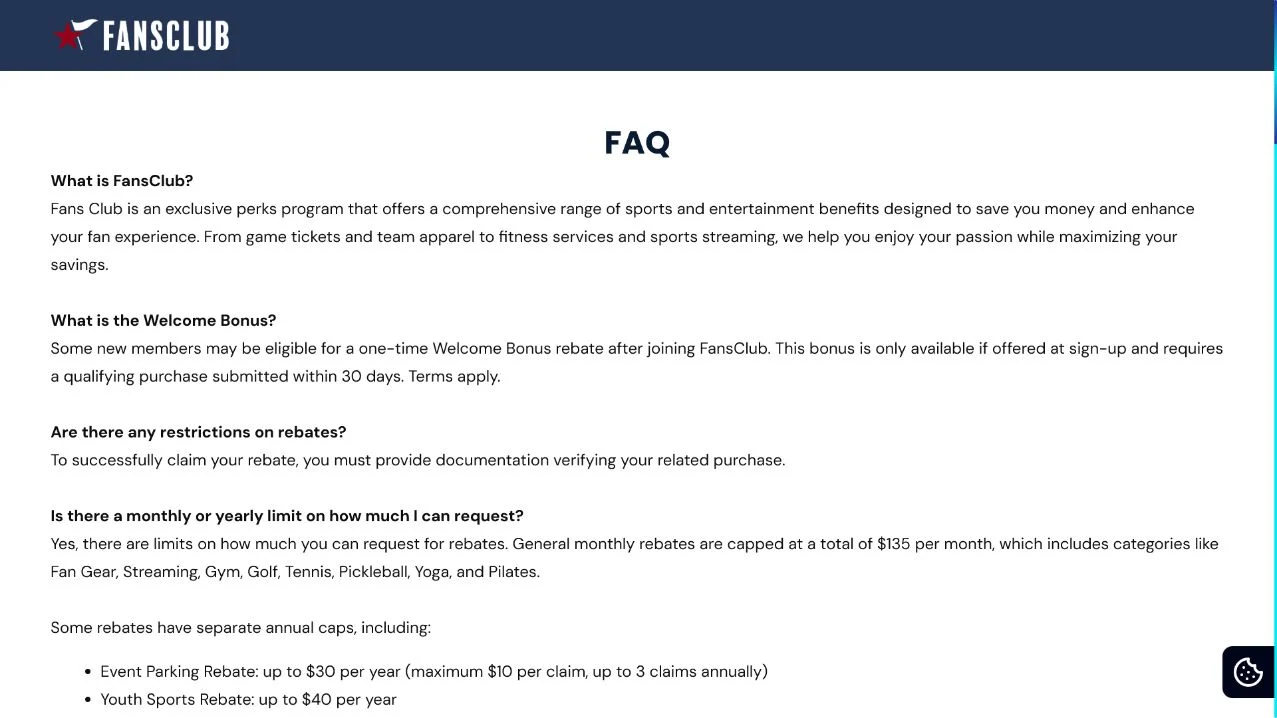
FansClub Membership Review: Detailed Overview
The membership exists, but the offer can feel like part of another purchase
FansClub describes a program with sports, entertainment and lifestyle benefits. Its FAQ discusses rebates and a welcome bonus. The problem begins when the offer appears immediately after checkout on another ticket or entertainment site. The customer may believe the page belongs to the merchant just paid rather than a separate membership company.
The pitch emphasizes a $15 or $20 reward and a low-cost or short trial. Under the terms, the membership can renew at the standard monthly rate if not canceled. Some terms also say canceling during a trial may trigger the full trial price. Those details materially change the value of the offer and should be understood before enrollment.
How to judge the value of the rebate and renewal
Some members may use the benefits and receive rebates after submitting required purchase documentation. Others report unexpected enrollment, missing rewards or cancellation difficulty. The exact outcome depends on the offer, qualification rules and whether the customer understood that a separate subscription was being created.
- Real program: FansClub publishes a membership FAQ and terms.
- Acquisition concern: the offer can appear as a continuation of ticket checkout.
- Reward condition: documentation and deadlines may be required for a rebate.
- Billing concern: a short trial can renew around $24 to $25 per month.
- Best defense: save the entire offer, terms and cancellation confirmation.
Do not judge only from whether the first reward eventually arrives. Calculate the membership cost over several months and compare it with benefits you will realistically claim. A $20 rebate is poor value if it leads to multiple unwanted monthly charges.
The offer should state whether the ticket merchant shared information with FansClub or whether the customer is entering it again for a separate company. That distinction affects privacy, support responsibility and which merchant appears on the card statement.
Warning Signs in a FansClub Cashback Offer
The rebate is immediate in your mind, while the subscription is delayed
Post-purchase pages catch customers when they believe checkout is already complete. A large reward button can look like a merchant thank-you rather than a new contract.
Read the legal business name, standard price and first renewal date before entering information again.
Red Flags at a Glance
- The page appears after another purchase. The relationship between the merchant and membership is unclear.
- $20 cashback dominates the screen. The monthly price receives less attention.
- A short trial renews automatically. The deadline can pass before the reward is processed.
- Documentation is required later. The rebate is not simply credited to the original ticket purchase.
- Canceling may affect trial pricing. The terms can charge the full trial amount after cancellation.
- The account is hard to recognize. The statement descriptor does not match the ticket seller.
- Support proof is missing. A call or form submission does not produce written cancellation.
How the FansClub Welcome Bonus and Membership Differ
A rebate is a separate claim
The welcome bonus may require a qualifying purchase, submission of documentation and compliance with a deadline. It is not necessarily an instant discount on the ticket order that preceded the offer. Read which purchase qualifies and how the rebate is delivered.
Keep the ticket receipt and confirmation. If a claim is rejected, ask which condition was not met. Do not send a full payment-card image, bank password or unnecessary identity document to prove a purchase.
The membership continues beyond one reward
FansClub promotes ongoing perks across entertainment and other categories. If you enroll, the recurring fee pays for continued access, not only the welcome bonus. Review the benefit limits, exclusions and claim caps to determine whether they fit your spending.
Set a reminder several days before the trial ends. Waiting for the rebate to arrive can push cancellation past the renewal date, especially when processing takes longer than expected.
A post-checkout page is still a new purchase decision
The fact that the offer appears after a trusted ticket transaction does not mean the ticket seller will handle billing or cancellation. Look for a new merchant name and privacy policy. Close the page if the relationship is unclear. The original purchase should remain complete.
Never re-enter card information merely to receive money unless the page clearly explains the separate product. A genuine cashback program should not require bank login credentials, gift cards or a transfer to verify the account.
How To Calculate the Real Cost of a FansClub Offer
Compare guaranteed fees with benefits you will claim
Multiply the monthly rate by the time you expect to remain enrolled, then subtract only rebates you are confident you can qualify for. Do not count every advertised maximum as money you will receive. Limits, categories and documentation requirements reduce practical value.
Include the time needed to locate receipts, submit claims and follow up. A membership that requires frequent administration may not save money for someone who rarely uses eligible services.
Treat the welcome bonus as conditional
Read whether a qualifying purchase must occur before or after enrollment, which categories count and when documentation expires. The ticket that led to the offer may not qualify automatically. Obtain any promised exception in writing before relying on it.
Set the cancellation reminder before the expected rebate-processing date. Waiting for a claim decision can push the account beyond its trial deadline and create a monthly charge.
Protect private details on uploaded receipts
Uploaded documents can expose names, addresses, partial card numbers, ticket barcodes and order references. Redact information not required for the rebate while preserving the purchase data needed to validate it. Never share passwords or full security codes.
Keep a copy of every submission and confirmation number. If the portal later shows no claim, you can prove what was sent and when without uploading broader financial records.
Review whether automatic renewal remains worthwhile after the bonus is resolved. A rebate received once does not make future monthly fees valuable.
How the FansClub Cashback Subscription Funnel Works
Step 1: A ticket purchase creates a trusted moment
The customer completes payment for an event and expects only confirmation or delivery details.
Attention is focused on the tickets, not another contract.
Step 2: A cashback page appears immediately
A $15 or $20 reward looks like a benefit from the completed transaction.
Brand separation may be less memorable than the reward amount.
Step 3: A short trial lowers resistance
The enrollment cost appears small and the form promises access to the rebate.
The standard monthly price and renewal date may receive less emphasis.
Step 4: The user must claim the reward separately
Receipts or other purchase documentation may need to be submitted within a set period.
Missing a condition can delay or prevent the welcome bonus.
Step 5: Automatic renewal starts monthly billing
If the account is not canceled in time, the stored payment method is charged around $24 to $25.
The statement charge may not be associated mentally with the earlier ticket purchase.
Step 6: Cancellation and rebate questions overlap
The member may fear losing the reward by canceling or discover a trial charge in the terms.
Support discussions become complicated when billing and rebate eligibility are treated separately.
Step 7: Fake support can target confused members
Unofficial numbers in search results may claim to cancel FansClub or guarantee refunds.
The impostor asks for remote access, card data or an advance processing fee.
How To Review a FansClub Offer Before Joining
Treat it as a subscription, not a checkout reward
Open the FansClub FAQ and current terms independently. Compare them with the exact offer page because trial prices and bonuses can vary.
Write down the trial length, standard monthly rate, first billing date, rebate requirements and cancellation route.
A Safer Verification Sequence
- Identify the merchant. Confirm that FansClub is separate from the ticket seller.
- Calculate several months. Compare total fees with the welcome bonus and likely benefits.
- Read rebate conditions. Know the receipt, deadline and qualifying purchase rules.
- Read trial cancellation terms. Check whether canceling changes the trial charge.
- Capture the offer. Save the page before submitting payment details.
- Set an early reminder. Do not wait until the final trial day.
What To Do If FansClub Is Charging You
Cancel membership and handle the rebate as a separate issue
Sign in through the official FansClub site and locate membership controls. Cancel future renewal and save the confirmation page and email.
Gather the original ticket receipt, offer screenshot, trial confirmation, rebate submission and card statement. This shows whether the charge matches the displayed terms.
Contact official support in writing and request a clear response on both cancellation and any promised rebate.
Recovery Checklist
- Confirm the exact date on which membership and billing end.
- Ask whether another charge is pending and whether access continues through the paid period.
- Submit any valid rebate documentation without exposing unnecessary financial data.
- Request a refund with the transaction date, amount and reason for the dispute.
- Contact the card issuer if charges continue after confirmed cancellation or were unauthorized.
- Check several statements for earlier trial and monthly charges.
- Change a reused password and secure the email account tied to membership.
- Avoid unofficial cancellation agents and guaranteed-refund advertisements.
Do not rely on a card dispute alone
A card issuer may reverse one charge without closing the membership. Obtain written confirmation from FansClub that the subscription will not renew.
If the post-checkout presentation obscured the separate membership, report the advertisement with screenshots to consumer authorities and the original ticket merchant. Specific evidence helps both investigate the funnel.
Frequently Asked Questions
Is FansClub a real membership?
Yes. FansClub publishes a perks and rebate program. The risk is misunderstanding a post-checkout trial and its recurring monthly price.
Is the $20 cashback automatic?
Not necessarily. The welcome bonus can require a qualifying purchase, documentation and compliance with the offer terms.
How much can FansClub renew for?
Offers vary, but complaints commonly describe monthly charges around $24 to $25. Check your current checkout and confirmation.
Does disputing a charge cancel FansClub?
Not automatically. Cancel through official membership controls and keep explicit confirmation that renewal is stopped.
The Bottom Line
FansClub is a real membership, but a real program can still be a bad and unexpected purchase when a cashback page hides the recurring commitment.
Treat the offer as a separate subscription, calculate the full cost and keep proof of cancellation. The reward should never be the only price you notice.

Join the discussion
0 commentsShare your experience or ask a question about this article.
Discussion
Start the conversation
Have a question or something useful to share? Add the first comment.