

A Best Buy survey invitation promises more than a feedback form. A tempting Samsung prize is waiting behind a few questions.
Before starting, check what the invitation promises. A quick questionnaire can look convincing while you are clearing your inbox.
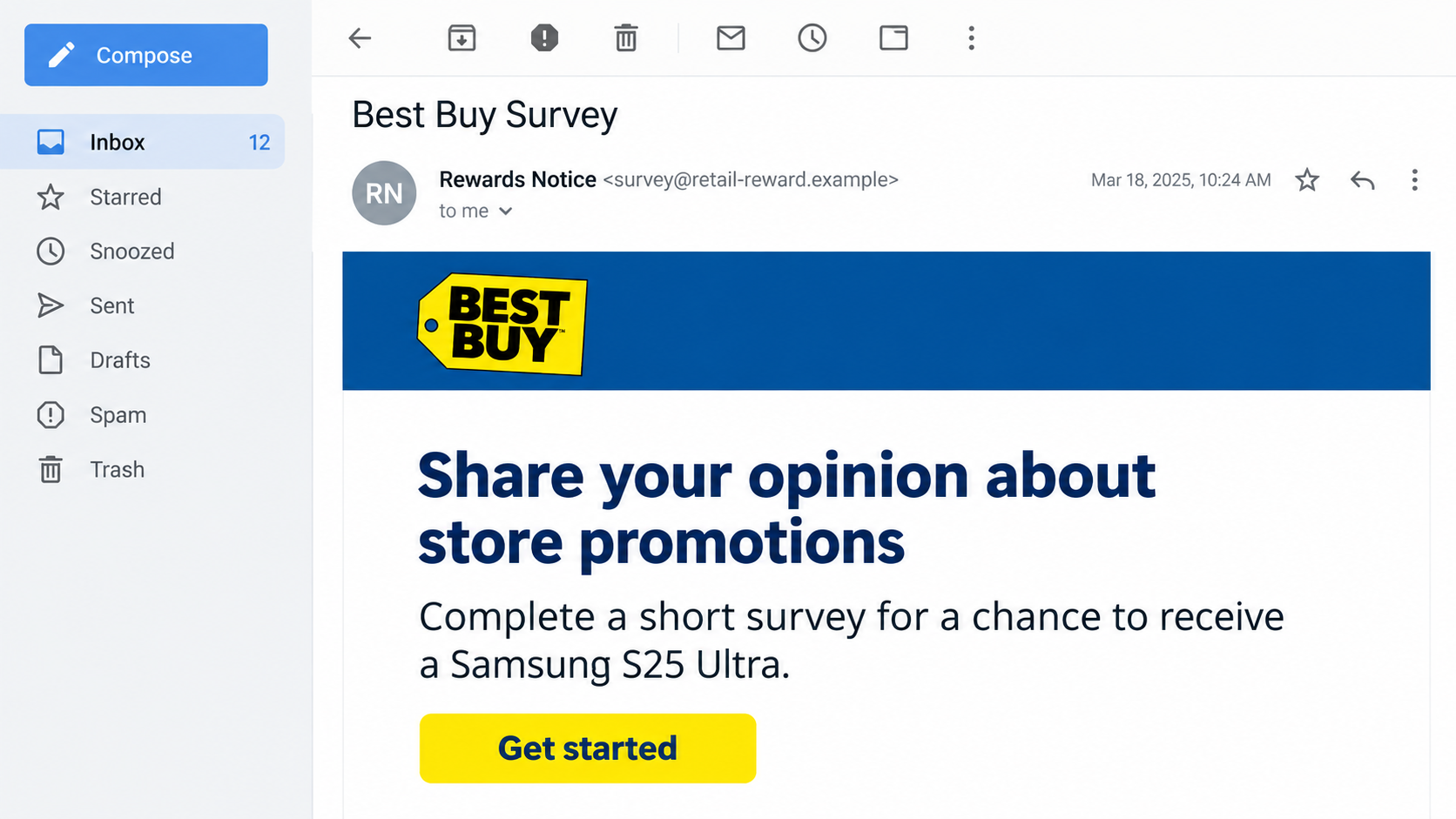
Overview
A retail survey is the cover for an unrelated prize offer
The Best Buy survey scam uses the retailer’s identity to promote a counterfeit reward page. Best Buy and Samsung are not established as participants in the scheme.
The reported email invites feedback about store promotions and points to a page advertising a Samsung S26 Ultra or another reward.
A documented address is kikane.myridianprizes[.]com. It is not authenticated as a Best Buy promotion simply because the email or page displays familiar retail branding.
The prize creates a reason to keep following instructions
A short questionnaire can make the reward feel earned. The danger is the next request for information, payment, or another action through an unverified claim process.
The counterfeit page was also described as displaying fabricated reviews. Comments inside a prize page are not independent confirmation that anyone received its advertised reward.
- The famous store name makes an unfamiliar sender seem recognizable.
- Simple questions make participation feel low-risk.
- The advertised prize encourages completion of later conditions.
- Contact details and card information can be more valuable than the survey answers.
Separate the recorded lure from possible later charges
The documented case establishes the fake survey and reward presentation. It does not establish a fixed shipping charge, subscription price, or completed loss for every visitor.
Any later fee or enrollment should be assessed from the actual screen and receipt. A generic survey scam does not prove that a particular recurring contract was created.
The email pictured here is an original illustration with a fictional sender. It depicts the invitation, not an authenticated message or a verified prize shipment.
Why a Few Survey Questions Can Make the Prize Feel Real
You appear to be doing something in exchange
An outright gift can sound suspicious. A reward for feedback seems more like a transaction: the retailer receives opinions, and the customer receives something in return.
That explanation can make a very valuable prize feel less surprising. The reader starts evaluating whether the questions are worth answering instead of checking who organized the promotion.
For example, someone who recently visited a store may assume the invitation follows their purchase. The email does not establish that connection merely by mentioning store experience.
Look for a genuine relationship before taking part. Your memory of a real shopping trip should not supply missing evidence for an unrelated sender.
The meaning of “win” can shift as you continue
A promotional email may suggest you have been chosen, while the next screen describes only a chance to receive a reward. Those are different promises.
Pay attention to that distinction. Completing a form does not make a displayed prize your property, and a celebratory screen does not establish a legitimate competition.
A genuine promotion should identify its organizer and provide understandable rules. Eligibility, selection, dates, and any conditions should not emerge only after personal information is submitted.
Do not treat vague wording as harmless enthusiasm. If the offer changes from a prize to required commercial offers, the decision you are being asked to make has changed.
Reviews can keep you moving when the details stop making sense
Photos, first names, star ratings, and short success stories can make a reward page feel busy and successful. They are easy for a page operator to display.
A comment claiming delivery does not provide a verifiable order history. Nor does a reply asking whether the offer still works establish that an ordinary customer wrote it.
Read the offer without those endorsements. Who promises the reward, what exactly must you do, and which company would receive any payment?
If those answers are missing, a collection of enthusiastic comments cannot fill the gap.
How the Best Buy Survey Scam Works
Step 1: The invitation pairs a familiar retailer with an attractive reward
The email presents a short survey about store promotions. Its recognizable brand and desirable prize provide reasons to open the message and use its button.
The invitation may feel relevant even without a recent purchase, since large retailers run many ordinary promotions. Familiarity with the company lowers the reader’s guard.
However, a brand named in an email is not necessarily its sender. Expand the address and compare the destination with the promotion’s independently verified organizer.
A message landing in the main inbox is not a certificate of authenticity. Mail filters can miss deceptive offers, just as legitimate mail can sometimes be filtered incorrectly.
Step 2: The survey page borrows the look of a store promotion
The linked page carries the reward story into a more convincing setting. A recognizable name, straightforward questions, and retail styling can resemble a campaign landing page.
Read the registered domain rather than concentrating on the page heading. A subdomain containing a plausible word still belongs to the domain beneath it.
In the reported example, the myridianprizes address needs its own explanation. Best Buy branding does not turn that address into an official retail service.
Do not submit a password to check whether a survey is genuine. Verification should come before disclosure, through the real retailer’s established channels.
Step 3: Small answers create momentum toward the claim
Questions about shopping preferences can feel ordinary. After answering several, you may feel that you have nearly finished and should complete the final step.
That momentum matters when the task changes. A request for a delivery address, card, account login, or paid offer is a new decision, not merely another survey answer.
Pause whenever a different kind of information is requested. Consider what the recipient could do with it and whether the original invitation explained that requirement.
Time already spent is not a reason to continue. Leaving before the final screen is better than exposing payment information to justify the effort.
Step 4: The prize story can turn into a fee or information request
Fake-prize schemes often ask for shipping, processing, or another payment before delivering the supposed reward. That is a common pattern, not a verified price in this case.
The FTC’s prize-scam warning explains that being asked to pay to obtain a prize is a major danger sign.
A small charge can expose a full payment-card number and security details. The visible amount is not the only information at risk.
If an enrollment or subscription appears, examine its actual terms and preserve them. Do not assume a one-time-looking payment excludes later charges, or invent recurring billing without evidence.
Step 5: The expected reward can distract from the actual outcome
Someone waiting for a prize may overlook a receipt from an unfamiliar merchant or dismiss a charge as part of delivery. Check what actually happened.
Did the process produce an order confirmation, an enrollment notice, no receipt, or only another promise? Each calls for a different question to the payment provider.
Do not use a second payment to investigate the first. A request for another charge to validate, release, or cancel a prize deserves no automatic trust.
If the page disappears, retain the records you already have. A missing website does not explain whether card information or personal details were previously collected.
How to Check a Best Buy Promotion Independently
Ask the retailer, not the survey’s support box
Open Best Buy’s genuine website yourself and use its established support route. Describe the offer and destination without submitting information through the suspected page.
Best Buy’s Protect Yourself guidance includes an abuse-reporting contact for suspicious offers using the retailer or Geek Squad name.
Do not call a “prize department” number supplied solely by the invitation. That would ask the same unverified party to certify its own story.
A real feedback request and a fake reward page can exist at the same time. The existence of genuine customer surveys does not validate this particular offer.
Before accepting any prize terms, identify who selects the winner and who supplies the item. Those may be different organizations, and both roles should be understandable.
Check whether participation is a drawing entry, an advertised purchase, or an enrollment. A button cannot turn those different arrangements into the same promise.
If the organizer cannot explain the arrangement without collecting your card first, leave. You should not have to pay for the information needed to evaluate the offer.
Read payment records as evidence, not promotional copy
If you already entered a card, write down the merchant name, amount, date, and any recurring language visible in the confirmation.
Compare those records with what you believed you accepted. An unfamiliar descriptor is worth asking the issuer about, but the descriptor alone does not establish who operates the website.
Keep screenshots or saved terms privately. Do not post a full card number, address, or confirmation email while warning others about the offer.
Report exact observations. “I entered my card but saw no charge” is more useful than assuming the entire sequence produced the same result for everyone.
What to Do if You Have Fallen Victim to This Scam
You do not need to finish the survey or wait for a delivery deadline to act. Start with the information you actually supplied.
Leave the claim process and preserve the invitation.
Save the sender details, page address, messages, and any confirmation already received. Do not revisit the site to complete a missing requirement.
Tell anyone you forwarded the offer to that it was not verified. They should avoid using the same invitation.
Contact your card issuer after card disclosure.
Explain whether you entered the number, authorized a charge, or supplied a verification code. Use the issuer’s app or the number printed on your card.
Ask about protection, replacement, and dispute options appropriate to the situation. Do not wait for a large charge before reporting exposed payment details.
Check for actual enrollments or recurring payments.
Review receipts, statements, and any terms you saved. If a real subscription was created, request cancellation through a verified merchant route and keep written confirmation.
Tell the issuer about unwanted future payments. A card replacement and cancellation of a merchant agreement are not always the same administrative task.
Replace a password if the page requested one.
Change it through the authentic service, then change it anywhere else it was reused. Review account activity and available multifactor authentication.
A shipping address alone does not require changing every password. Keep the response specific to the credentials or identity information exposed.
Remove permissions or software introduced by the offer.
Revoke unwanted browser-notification permissions. If you installed an application or extension, stop using it and assess the device before entering more sensitive information.
Malwarebytes can help check for unwanted or malicious software. It does not cancel subscriptions, recover prize fees, or retract information sent through a form.
Report the fake promotion through genuine channels.
Use Best Buy’s official reporting guidance, your email provider’s phishing tools, and the appropriate consumer-fraud reporting service in your country.
Include the actual destination and any payment reference. Keep private documents out of public review posts or social-media warnings.
Expect more offers if contact details were collected.
Be skeptical of a later delivery agent, refund helper, or another reward sender who repeats details you supplied. Personal knowledge does not prove legitimacy.
AdGuard may reduce exposure to some malicious advertising. It cannot authenticate a survey invitation or make a payment request trustworthy.
Is Your Device Infected? Run a Free Malware Scan
Slow performance, constant pop-ups, or strange behavior? These are classic signs of a malware infection. The fastest way to find out is to scan your device with Malwarebytes Free — one of the most trusted malware removal tools available.
The free version detects and removes the most common threats, including:
- Adware — the cause of those annoying pop-ups
- Browser hijackers — unwanted redirects and changed homepages
- Trojans and spyware — hidden programs stealing your data
- Potentially unwanted programs (PUPs) — software you never asked for
👉 Select your device below — Windows, Mac, or Android — then follow the simple steps to download Malwarebytes, scan your system, and remove any threats it finds. The scan usually takes 5 to 20 minutes.
Run a Malware Scan with Malwarebytes for Windows
Malwarebytes is one of the most popular and trusted anti-malware tools for Windows — and it’s completely free for removing infections. It catches threats that many antivirus programs miss, including adware, browser hijackers, and trojans. Follow the steps below to scan and clean your PC in just a few minutes.
Download Malwarebytes
Click the button below to download the latest version of Malwarebytes for Windows from the official source. The free version is all you need — it will scan your computer and remove adware, browser hijackers, and other malicious software at no cost.
Download MalwarebytesOfficial installer for Windows 11 and 10. Your download starts right away.Want real-time protection? See Malwarebytes Premium Malwarebytes Free for WindowsScans and removes malware at no cost
-
Install Malwarebytes
When the download finishes, open your Downloads folder and double-click the MBSetup file. If Windows shows a User Account Control pop-up, click “Yes” to allow the installation.

Follow the On-Screen Prompts to Install Malwarebytes
The setup wizard will walk you through a few quick screens:
-
Choose where you’re installing the program — “Personal Computer” or “Work Computer” — then click Next.

-
Malwarebytes will now install on your device. This usually takes under a minute.

-
When installation is complete, the “Welcome to Malwarebytes” screen will open automatically.

-
On the final screen, click Open Malwarebytes to launch the program.

-
Enable “Scan for Rootkits”
Before scanning, turn on rootkit detection so Malwarebytes can find even the most hidden threats. Click the Settings gear icon on the left side of the screen.

In the settings menu, find “Scan for rootkits” and click the toggle so it turns blue.

Done? Click “Dashboard” in the left pane to return to the main screen.
Start the Scan
Click the blue Scan button. Malwarebytes will automatically update its virus database and start checking your computer for malware.

-
Wait for the Scan to Finish
The scan checks your entire system for browser hijackers and other malicious programs, so it can take 5 to 20 minutes depending on your computer. Feel free to do something else — just check back occasionally to see the progress.

-
Quarantine the Detected Threats
When the scan is done, you’ll see a list of everything Malwarebytes found — malware, adware, and potentially unwanted programs. Click the “Quarantine” button to remove all of them at once.

Malwarebytes will now remove the malicious files and registry entries and move them safely into quarantine.

-
Restart Your Computer
Some threats can only be fully removed after a reboot. If Malwarebytes asks you to restart, click Yes. Once you’re logged back in, Malwarebytes has finished removing the threats it found.

That’s it — your Windows PC is now clean of trojans, adware, and other malware, and should be back to running smoothly.
If you are still having problems with your computer after completing these instructions, then please follow one of the steps:
- Run a computer scan with ESET Online Scanner
- Ask for help in our Windows Malware Removal Help & Support forum.
Run a Malware Scan with Malwarebytes for Mac
Malwarebytes for Mac is a free on-demand scanner that removes the malware other security software tends to miss — adware, browser hijackers, and unwanted programs included. Cleaning an infected Mac with Malwarebytes has always been completely free, and it’s our go-to recommendation. Follow the steps below to scan and clean your Mac in just a few minutes.
-
Download Malwarebytes for Mac
Click the button below to download the latest version of Malwarebytes for Mac.
Download MalwarebytesOfficial installer for macOS. Your download starts right away.Want real-time protection? See Malwarebytes PremiumMalwarebytes Free for MacScans and removes malware at no cost -
Open the Malwarebytes setup file
When the download finishes, open your Downloads folder and double-click the setup file to begin the installation.

-
Follow the On-Screen Prompts to Install Malwarebytes
The Malwarebytes for Mac Installer will guide you through a few quick screens. Click “Continue” and keep following the prompts until the installation completes.



When the installation is complete, Malwarebytes opens to the Welcome to Malwarebytes screen. Click “Get started“.
-
Select “Personal Computer” or “Work Computer”
Malwarebytes will ask what type of computer you’re installing it on. Click either Personal Computer or Work Computer, whichever applies.

-
Start the Scan
Click the “Scan” button. Malwarebytes will automatically update its detection database and begin checking your Mac for malware.

-
Wait for the Scan to Finish
Malwarebytes will scan your Mac for adware, browser hijackers, and other malicious programs. This can take a few minutes, so feel free to do something else — just check back occasionally to see the progress.

-
Quarantine the Detected Threats
When the scan is done, you’ll see a list of everything Malwarebytes found. Click the “Quarantine” button to remove all the threats at once.

-
Restart Your Mac
Malwarebytes will now remove all the malicious files it found. Some threats can only be fully removed after a reboot — if Malwarebytes asks you to restart, allow it. Once you’re logged back in, your Mac is clean.

That’s it — your Mac is now free of adware, rogue browser extensions, and other potentially harmful software.
If you are still experiencing problems while trying to remove a malicious program from your computer, please ask for help in our Mac Malware Removal Help & Support forum.
Run a Malware Scan with Malwarebytes for Android
Malwarebytes for Android automatically detects and removes dangerous threats like malware and ransomware so you don’t have to worry about your most-used device being compromised. Aggressive detection of adware and potentially unwanted programs keeps your Android phone or tablet running smooth.
-
Download Malwarebytes for Android.
You can download Malwarebytes for Android by clicking the link below.
Get Malwarebytes for AndroidOpens Google Play in a new tab.Want real-time protection? See Malwarebytes Premium for AndroidMalwarebytes for AndroidScans your phone and removes malware at no cost -
Install Malwarebytes for Android on your phone.
In the Google Play Store, tap “Install” to install Malwarebytes for Android on your device.

When the installation process has finished, tap “Open” to begin using Malwarebytes for Android. You can also open Malwarebytes by tapping on its icon in your phone menu or home screen.

-
Follow the on-screen prompts to complete the setup process
When Malwarebytes will open, you will see the Malwarebytes Setup Wizard which will guide you through a series of permissions and other setup options.
This is the first of two screens that explain the difference between the Premium and Free versions. Swipe this screen to continue.
Tap on “Got it” to proceed to the next step.
Malwarebytes for Android will now ask for a set of permissions that are required to scan your device and protect it from malware. Tap on “Give permission” to continue.
Tap on “Allow” to permit Malwarebytes to access the files on your phone.
-
Update database and run a scan with Malwarebytes for Android
You will now be prompted to update the Malwarebytes database and run a full system scan.

Click on “Update database” to update the Malwarebytes for Android definitions to the latest version, then click on “Run full scan” to perform a system scan.

-
Wait for the Malwarebytes scan to complete.
Malwarebytes will now start scanning your phone for adware and other malicious apps. This process can take a few minutes, so we suggest you do something else and periodically check on the status of the scan to see when it is finished.

-
Click on “Remove Selected”.
When the scan has been completed, you will be presented with a screen showing the malware infections that Malwarebytes for Android has detected. To remove the malicious apps that Malwarebytes has found, tap on the “Remove Selected” button.

-
Restart your phone.
Malwarebytes for Android will now remove all the malicious apps that it has found. To complete the malware removal process, Malwarebytes may ask you to restart your device.
That’s it — your Android phone is now clean — no more malicious apps, adware, or browser redirects.
If you are still having problems with your phone after completing these instructions, then please follow one of the steps:
- Restore your phone to factory settings by going to Settings > General management > Reset > Factory data reset.
- Ask for help in our Mobile Malware Removal Help & Support forum.
Stay Protected: Block Ads and Malicious Sites
Now that your device is clean, keep it that way. Most infections start with a malicious ad or a fake download button — so blocking them at the source is your best defense.
We recommend AdGuard, which blocks malicious ads, phishing pages, and dangerous redirects before they can reach you.
👉 Download AdGuard and browse safely
Frequently Asked Questions
Is the Best Buy Samsung survey reward genuine?
The counterfeit offer described here is not an authenticated Best Buy promotion. Do not provide payment or account information through its claim process.
A genuine promotion should be confirmable outside the invitation, through the retailer or a clearly identified authorized organizer.
Does answering a survey mean I won the advertised prize?
No. Questions, congratulations, and a product picture do not establish a legitimate drawing or an entitlement. Read the actual rules before participating.
Is every survey mentioning Best Buy a scam?
No. This warning concerns an impersonating prize offer. Judge the specific sender, organizer, destination, and conditions rather than the brand name alone.
Is a shipping fee safe if it is only a small amount?
The small amount does not protect your card details. A demand to pay before receiving a supposed prize is a strong reason to stop.
No fixed shipping price has been verified for the historical page covered here. Respond to the actual payment or disclosure that occurred.
Does this offer definitely create a subscription?
That is not established. Check the screen you used, any enrollment terms, the merchant receipt, and your statements before describing a charge as recurring.
What if I completed questions but entered no sensitive information?
Stop, report the invitation, and avoid follow-up links. Survey participation alone is not proof that a bank account or device was compromised.
If you also installed software, allowed notifications, or entered credentials, address those additional actions separately.
The Bottom Line
Do not claim the advertised Samsung reward through this fake Best Buy survey. Verify promotions directly with the retailer before sharing information or authorizing a payment.
If you already entered card details or accepted an enrollment, contact the issuer and check the actual records. More survey steps will not make the promise reliable.

Join the discussion
0 commentsShare your experience or ask a question about this article.
Discussion
Start the conversation
Have a question or something useful to share? Add the first comment.