

Fake Lululemon $500 gift card sites are designed to look quick, simple, and trustworthy.
They often appear through ads, pop-ups, redirects, emails, or text messages, then guide users through a short series of steps that seem harmless at first glance. The branding feels familiar, the reward sounds valuable, and the process looks easy enough to finish in just a few minutes.
That first impression is exactly what makes these pages effective.
This guide explains how fake Lululemon gift card scam sites operate, why so many people get pulled in, what warning signs matter most, and what to do if you already entered information or started completing the required “deals.”
Scam Overview
What the fake Lululemon $500 gift card pages usually promise
Most fake Lululemon gift card scam sites follow the same broad script.
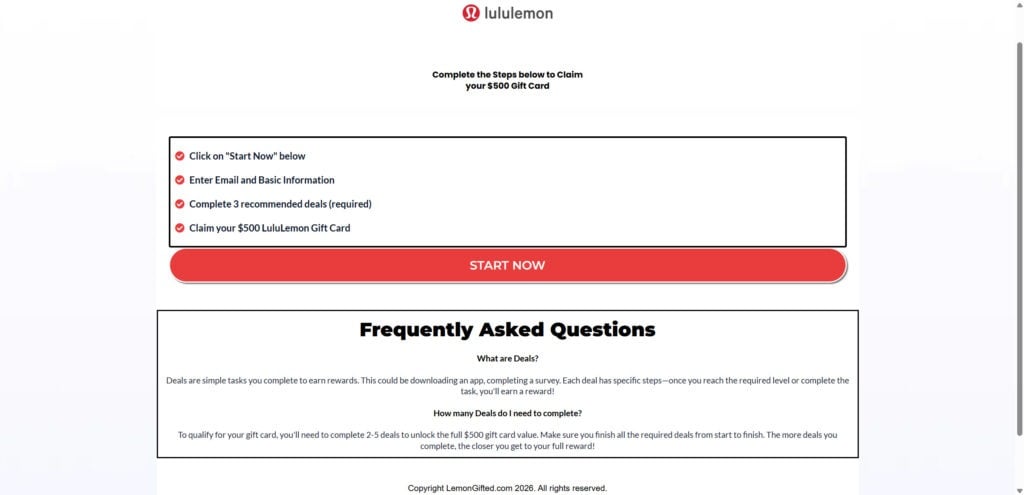
They promise a $500 Lululemon gift card and present the offer as a simple reward claim process. The page often says something like:
- Start now
- Enter your email and basic information
- Complete a few required or recommended deals
- Claim your $500 gift card
The layout is usually clean and stripped down. There is often a recognizable Lululemon logo, a big call-to-action button, and a short FAQ meant to answer objections before you even ask them.
That is not accidental.
The page is not trying to educate you. It is trying to move you from curiosity to compliance as quickly as possible.
Why Lululemon is a strong lure for scammers
Lululemon is a valuable brand to imitate because it combines recognition, desirability, and premium pricing.
A fake page offering a $500 Lululemon gift card can feel believable for a few reasons:
- The brand is well known.
- Its products are considered premium.
- A large gift card fits the brand’s upscale image.
- People are used to seeing brands run giveaways, rewards, and seasonal promotions.
That combination lowers skepticism. A user may pause and think, “This could be real,” especially if the page looks polished and the steps seem simple.
Scammers and deceptive affiliates know this. They pick brands that make people stop doubting and start clicking.
What these scam sites are really doing
These pages are rarely true “gift card claim” websites.
In most cases, they are better understood as affiliate reward funnels. That means the site operator earns money when visitors complete certain actions for third-party advertisers.
Those actions can include:
- Entering an email address
- Filling out lead forms
- Signing up for trial offers
- Installing apps
- Joining membership programs
- Submitting phone numbers
- Starting subscriptions that later renew automatically
The gift card is the bait.
The real product is your attention, your personal data, and your willingness to complete monetized offers.
The biggest red flag: “required deals” or “recommended deals”
The single most important sign that you are not dealing with a normal brand giveaway is the requirement to complete deals.
The wording varies. Some pages say:
- Complete 3 recommended deals
- Complete 2 to 5 deals to unlock the full reward
- Complete required partner offers
- Finish sponsor tasks to qualify
- Complete deals from start to finish
This language matters because real brand promotions do not usually require you to complete unrelated third-party offers in order to receive a gift card.
If the reward depends on signing up for external subscriptions, downloading apps, or filling out advertiser forms, you are almost certainly looking at a monetization funnel.
That is the center of the scam.
Why the design looks professional
People still imagine scams as badly written pages full of broken English and obvious pop-ups.
That is not how many of these gift card scam sites work today.
Modern scam and scam-adjacent funnel pages often look polished because polished pages convert better. The design is built to reduce friction and build instant trust.
Common visual patterns include:
- Minimalist layout
- Clean fonts
- Familiar brand colors
- Large buttons
- Short checklists
- “Start now” language
- Small FAQs explaining how easy the process is
- Reassuring wording like “simple,” “quick,” or “secure”
A clean design is not evidence of legitimacy.
In many cases, it is evidence that the page was built by someone who understands marketing psychology.
Why the reward amount is often $500
The $500 figure is carefully chosen.
It is high enough to feel exciting, but not so high that it sounds obviously absurd. A fake promise of $10,000 would trigger more skepticism. A promise of $20 would not motivate enough people.
At $500, the reward feels meaningful. It sounds large, but still plausible enough to push someone to try “just a few steps.”
That is exactly the point.
The entire structure is designed to make the effort seem low and the reward seem high.
What “deals” usually turn into in practice
When people start following the steps on these sites, they are often introduced to offers that may look harmless on the surface.
Examples include:
- A free trial that requires a card “just for verification”
- An app install that later asks for a subscription
- A product sample that charges a small shipping fee
- A survey that leads to multiple marketing signups
- A discount club or savings program
- A streaming or wellness membership trial
- A mobile game or service with in-app subscription prompts
Some deals are just lead generation traps.
Others can lead directly to recurring charges.
That is why these scam sites are more dangerous than they initially appear. They are not only wasting your time. They can create real financial and privacy consequences.
Why people so often fail to receive the gift card
Many victims say the same thing after going through these pages: they completed what the site asked for, but the reward never appeared.
This happens because the system is built to keep the reward vague.
Common explanations given by these funnels include:
- Your deal is pending
- Your completion did not credit
- You must complete more deals
- You did not finish all required steps
- Verification is still in progress
- One of your deals did not qualify
This creates a moving finish line.
The user keeps thinking the reward is close, while the funnel keeps pushing more actions.
That dynamic is not accidental. It is what makes the funnel profitable.
How “tracking issues” protect the scam
Most of these reward pages rely on affiliate tracking systems.
That means the page can claim an offer only “counts” if the tracking system confirms you completed it correctly. Tracking may rely on cookies, browser behavior, device information, referral parameters, and other conditions the average user cannot see.
This gives the site a powerful excuse.
If you do not get credited, the page can blame:
- Cookies being blocked
- Clearing your browser
- Using private mode
- Switching from phone to laptop
- Ad blockers
- VPN use
- Failing to complete every hidden sub-step inside the offer
Maybe some of those technical issues are real in some cases.
But in a deceptive reward funnel, they also serve another purpose: they make it easy to deny the reward while still encouraging the user to complete more offers.
Why so many users keep going even after the first warning signs
From the outside, it might seem easy to ask, “Why didn’t they just leave?”
But these scam funnels are built around a few powerful psychological triggers.
Small commitments lead to bigger ones
First, you click a button.
Then, you enter an email.
Then, you answer a few questions.
Then, you do one deal.
Each step feels small on its own.
By the time the process starts feeling suspicious, many users have already invested time and energy, which makes quitting feel like “wasting” what they already did.
The finish line always feels close
The page rarely says, “This will take a long time.”
It says things like:
- Just a few steps left
- Complete 2 to 5 deals
- You are almost there
- Start now
- Finish from start to finish
That structure creates urgency and momentum.
Even if the process starts becoming annoying, it also feels close enough to finish.
The brand lowers your guard
Because the page uses a familiar brand name like Lululemon, users may interpret confusing steps as part of a legitimate promotion instead of a trap.
That brand halo effect is one of the scam’s strongest tools.
Where people usually encounter these fake Lululemon gift card pages
Most users do not search for these pages intentionally.
They tend to encounter them through:
- Social media ads
- Pop-up ads on low-trust websites
- Redirects after clicking a fake button
- Push notification spam
- Spam emails
- Text messages with short links
- “Congratulations” pages after visiting random websites
This matters because the context is already fast and impulsive.
If a user sees the page unexpectedly, they are more likely to react emotionally instead of stopping to verify the domain or the legitimacy of the offer.
The real risks behind the fake reward
The biggest mistake is assuming the only risk is “I probably won’t get the gift card.”
That is only part of the story.
Financial risk
Some of the required deals involve trials or signups that can convert into paid subscriptions. That can lead to:
- Surprise charges
- Monthly billing
- Confusing merchant names on your statement
- Hard-to-cancel subscriptions
The cost may not show up immediately. That delay makes the problem worse because many users do not connect the later charge to the earlier click.
Privacy risk
Even if you never enter payment information, the site can still profit from your personal data.
Email addresses and phone numbers are especially valuable. After using one of these pages, many people notice:
- More spam emails
- More robocalls
- More marketing texts
- More scam messages involving other brands or fake rewards
Security risk
Once you show that you respond to gift card offers, you may become a stronger target for future scams.
The next message might say:
- Your gift card is pending
- Finish your verification
- Confirm your identity
- Pay a small fee to release your reward
That second-wave scam can be even more convincing because it references your earlier activity.
The simplest truth about these pages
If a page offers a Lululemon $500 gift card but requires you to complete third-party deals to “unlock” it, the page is not operating like a straightforward brand promotion.
It is operating like a reward funnel that makes money from your participation.
That is the core issue.
How The Scam Works
Step 1: You are pulled in by the promise of a high-value reward
The process usually begins with a link, ad, pop-up, or redirect that promises a large reward.
Common bait includes:
- Claim your $500 Lululemon gift card
- Exclusive gift card offer
- Limited-time member reward
- Start now to unlock your reward
- Complete steps to claim your gift card
The wording is short, direct, and urgent.
It does not ask you to think. It asks you to act.
Step 2: The landing page creates a false sense of structure
When the page loads, it looks like a clean claim portal.
It usually shows a brand name, a short instruction block, and a big button like START NOW. This matters because structured pages feel more legitimate than chaotic ones.
The page might include a checklist such as:
- Click Start Now
- Enter email and basic information
- Complete 3 recommended deals
- Claim your $500 gift card
That layout turns skepticism into a process.
You are no longer asking whether the page is real. You are following steps.
Step 3: The first click creates psychological commitment
The first click is more important than it looks.
Before clicking, you are observing.
After clicking, you feel like a participant.
That small change in mindset makes people more likely to continue. Once you begin a process, you naturally want to finish it, especially when the reward seems close.
Reward funnels are designed around this principle.
Step 4: Email capture happens early because it is valuable
One of the next steps is usually to enter your email and basic information.
This is framed as necessary for:
- Sending the reward
- Confirming eligibility
- Providing updates
- Completing registration
But the email step also serves the site operator.
It creates:
- A lead that can be monetized
- A way to retarget you later
- A way to connect your future offer completions to an affiliate account
- A way to send follow-up messages that keep you in the funnel
Even if you stop there, the operator may still benefit.
Step 5: The site introduces “deals” as a required part of the process
This is the turning point.
What looked like a simple gift card claim suddenly depends on completing outside tasks.
The page may present these tasks as:
- Recommended deals
- Required deals
- Sponsored offers
- Partner offers
- Steps to unlock your reward
This is where many users start feeling uncertain, but they often continue because they already invested time.
Step 6: You are redirected to an offer wall or a sequence of advertiser pages
Once you move past the basic info stage, you are usually sent to a list of third-party offers.
This is where the funnel starts making real money.
The offers may include:
- App installs
- “Free” trials
- Surveys
- Sweepstakes entries
- Membership signups
- Product sample pages
- Service registrations
The variety is intentional. It gives the impression that there are many “paths” to qualifying, while also maximizing the chance you will complete something profitable.
Step 7: Easy offers are used to build compliance
The first offers are often low-friction.
They may ask you to:
- Enter an email
- Create an account
- Download an app
- Fill out a form
These early offers are there to get you moving.
Once you have completed one or two, the next offers feel less intimidating. You are already in the system. You already spent time. That makes you more likely to keep going.
Step 8: Higher-paying offers often require payment information
After the easy offers, the funnel usually starts surfacing more valuable conversions.
These may include:
- Trial subscriptions
- Streaming or wellness plans
- Product samples with shipping fees
- Discount clubs
- Membership offers
This is the point where the user is most vulnerable.
The gift card still feels close, so a person may think, “I’ll just do this last one.” But that “last one” may be the offer that creates recurring charges.
Step 9: The reward stays just out of reach
Even after completing deals, the site often does not release the reward.
Instead, it introduces one of several delay tactics:
- Your completion is pending
- One offer did not credit
- You must finish more deals
- You need to wait for verification
- You did not fully complete an offer
This keeps the user in limbo.
And a user in limbo is easier to monetize than a user who receives a clear “no.”
Step 10: Tracking becomes the excuse for failure
Because affiliate tracking is invisible to the average user, it becomes a perfect shield.
The site can blame almost anything:
- Browser settings
- Device changes
- Cookie issues
- VPN use
- Not following the deal exactly
- Closing a page too early
Whether those claims are accurate or not, the practical result is the same: the user is encouraged to do more.
Step 11: Follow-up messages keep the funnel alive
After the initial visit, many users start receiving:
- Reminder emails
- Reward follow-ups
- New gift card offers
- “Finish your registration” messages
- Notification spam
The first scam page may be gone from memory, but the data trail remains active.
This is why the funnel can keep generating value after the original visit ends.
Step 12: Some users get drawn into even more offers through retargeting
Once the system knows you clicked on one reward offer, it can retarget you with similar promotions using other brands or slightly different formats.
You may start seeing:
- Amazon gift card offers
- Costco reward pages
- Lululemon survey claims
- “Exclusive member” promotions
- Other premium-brand gift card traps
That is why one interaction can turn into a long stream of scam exposure.
Step 13: The domain itself may change, but the structure stays the same
One of the reasons these scams persist is that the domain can change quickly.
Today it may be one URL. Tomorrow it may be another.
But the pattern stays nearly identical:
- Premium brand
- High-value gift card
- Minimal design
- Start button
- Required deals
- Vague reward delivery
The names change.
The playbook does not.
What To Do If You Have Fallen Victim to This Scam
- Stop the process immediately.
Do not keep completing deals in the hope that the reward will finally unlock. The more offers you complete, the more risk you create. - Take screenshots and save evidence.
Capture the page, the domain, the promised reward, and any screens showing the required deals or your progress. Save emails and texts connected to the offer. - Make a list of every offer you interacted with.
Search your email inbox for terms like “welcome,” “trial,” “subscription,” “membership,” “invoice,” “receipt,” and “billing.” Write down every brand or service involved. - Cancel any trials or subscriptions right away.
If you entered payment information, do not wait. Log into the service, cancel immediately, and save the cancellation confirmation. - Check your Apple and Google subscription settings.
If any app installs were involved, review your mobile subscriptions and cancel anything you did not intend to keep. - Review your bank and card statements carefully.
Look for small charges and unfamiliar merchant names. Monitor your account for at least 30 days because some offers bill later. - Call your card issuer if you see suspicious charges.
Ask about disputing charges, blocking merchants, and replacing your card number if needed. If you used your card on multiple offers, a replacement may be the safest option. - Secure your email account.
Change your email password and enable 2-factor authentication. Your email is the central recovery point for many of your accounts. - Change any reused passwords.
If you used a password on the reward site or any related offers that you also use elsewhere, change it on your banking, shopping, social, and other important accounts. - Expect more spam and treat follow-up reward messages as suspicious.
Messages that ask you to finish steps, verify your reward, or pay a small fee are often part of the same scam ecosystem. - Disable push notifications from unknown sites.
If you started seeing browser notifications after visiting the page, remove notification permissions for any suspicious site in your browser settings. - Run a device and browser check.
Remove unknown browser extensions, uninstall suspicious apps, and run a reputable security scan if redirects or pop-ups continue. - Report the scam source.
Report the ad, email, social post, or redirect that led you to the page. In the United States, you can also report the scam to the FTC at ReportFraud.ftc.gov. - Stay alert for second-stage scams.
Once you have interacted with one of these pages, be extra cautious about any message that references a pending reward, a verification issue, or a small processing fee.
Is Your Device Infected? Run a Free Malware Scan
Slow performance, constant pop-ups, or strange behavior? These are classic signs of a malware infection. The fastest way to find out is to scan your device with Malwarebytes Free — one of the most trusted malware removal tools available.
The free version detects and removes the most common threats, including:
- Adware — the cause of those annoying pop-ups
- Browser hijackers — unwanted redirects and changed homepages
- Trojans and spyware — hidden programs stealing your data
- Potentially unwanted programs (PUPs) — software you never asked for
👉 Select your device below — Windows, Mac, or Android — then follow the simple steps to download Malwarebytes, scan your system, and remove any threats it finds. The scan usually takes 5 to 20 minutes.
Run a Malware Scan with Malwarebytes for Windows
Malwarebytes is one of the most popular and trusted anti-malware tools for Windows — and it’s completely free for removing infections. It catches threats that many antivirus programs miss, including adware, browser hijackers, and trojans. Follow the steps below to scan and clean your PC in just a few minutes.
Download Malwarebytes
Click the button below to download the latest version of Malwarebytes for Windows from the official source. The free version is all you need — it will scan your computer and remove adware, browser hijackers, and other malicious software at no cost.
Download MalwarebytesOfficial installer for Windows 11 and 10. Your download starts right away.Want real-time protection? See Malwarebytes Premium Malwarebytes Free for WindowsScans and removes malware at no cost
-
Install Malwarebytes
When the download finishes, open your Downloads folder and double-click the MBSetup file. If Windows shows a User Account Control pop-up, click “Yes” to allow the installation.

Follow the On-Screen Prompts to Install Malwarebytes
The setup wizard will walk you through a few quick screens:
-
Choose where you’re installing the program — “Personal Computer” or “Work Computer” — then click Next.

-
Malwarebytes will now install on your device. This usually takes under a minute.

-
When installation is complete, the “Welcome to Malwarebytes” screen will open automatically.

-
On the final screen, click Open Malwarebytes to launch the program.

-
Enable “Scan for Rootkits”
Before scanning, turn on rootkit detection so Malwarebytes can find even the most hidden threats. Click the Settings gear icon on the left side of the screen.

In the settings menu, find “Scan for rootkits” and click the toggle so it turns blue.

Done? Click “Dashboard” in the left pane to return to the main screen.
Start the Scan
Click the blue Scan button. Malwarebytes will automatically update its virus database and start checking your computer for malware.

-
Wait for the Scan to Finish
The scan checks your entire system for browser hijackers and other malicious programs, so it can take 5 to 20 minutes depending on your computer. Feel free to do something else — just check back occasionally to see the progress.

-
Quarantine the Detected Threats
When the scan is done, you’ll see a list of everything Malwarebytes found — malware, adware, and potentially unwanted programs. Click the “Quarantine” button to remove all of them at once.

Malwarebytes will now remove the malicious files and registry entries and move them safely into quarantine.

-
Restart Your Computer
Some threats can only be fully removed after a reboot. If Malwarebytes asks you to restart, click Yes. Once you’re logged back in, Malwarebytes has finished removing the threats it found.

That’s it — your Windows PC is now clean of trojans, adware, and other malware, and should be back to running smoothly.
If you are still having problems with your computer after completing these instructions, then please follow one of the steps:
- Run a computer scan with ESET Online Scanner
- Ask for help in our Windows Malware Removal Help & Support forum.
Run a Malware Scan with Malwarebytes for Mac
Malwarebytes for Mac is a free on-demand scanner that removes the malware other security software tends to miss — adware, browser hijackers, and unwanted programs included. Cleaning an infected Mac with Malwarebytes has always been completely free, and it’s our go-to recommendation. Follow the steps below to scan and clean your Mac in just a few minutes.
-
Download Malwarebytes for Mac
Click the button below to download the latest version of Malwarebytes for Mac.
Download MalwarebytesOfficial installer for macOS. Your download starts right away.Want real-time protection? See Malwarebytes PremiumMalwarebytes Free for MacScans and removes malware at no cost -
Open the Malwarebytes setup file
When the download finishes, open your Downloads folder and double-click the setup file to begin the installation.

-
Follow the On-Screen Prompts to Install Malwarebytes
The Malwarebytes for Mac Installer will guide you through a few quick screens. Click “Continue” and keep following the prompts until the installation completes.



When the installation is complete, Malwarebytes opens to the Welcome to Malwarebytes screen. Click “Get started“.
-
Select “Personal Computer” or “Work Computer”
Malwarebytes will ask what type of computer you’re installing it on. Click either Personal Computer or Work Computer, whichever applies.

-
Start the Scan
Click the “Scan” button. Malwarebytes will automatically update its detection database and begin checking your Mac for malware.

-
Wait for the Scan to Finish
Malwarebytes will scan your Mac for adware, browser hijackers, and other malicious programs. This can take a few minutes, so feel free to do something else — just check back occasionally to see the progress.

-
Quarantine the Detected Threats
When the scan is done, you’ll see a list of everything Malwarebytes found. Click the “Quarantine” button to remove all the threats at once.

-
Restart Your Mac
Malwarebytes will now remove all the malicious files it found. Some threats can only be fully removed after a reboot — if Malwarebytes asks you to restart, allow it. Once you’re logged back in, your Mac is clean.

That’s it — your Mac is now free of adware, rogue browser extensions, and other potentially harmful software.
If you are still experiencing problems while trying to remove a malicious program from your computer, please ask for help in our Mac Malware Removal Help & Support forum.
Run a Malware Scan with Malwarebytes for Android
Malwarebytes for Android automatically detects and removes dangerous threats like malware and ransomware so you don’t have to worry about your most-used device being compromised. Aggressive detection of adware and potentially unwanted programs keeps your Android phone or tablet running smooth.
-
Download Malwarebytes for Android.
You can download Malwarebytes for Android by clicking the link below.
Get Malwarebytes for AndroidOpens Google Play in a new tab.Want real-time protection? See Malwarebytes Premium for AndroidMalwarebytes for AndroidScans your phone and removes malware at no cost -
Install Malwarebytes for Android on your phone.
In the Google Play Store, tap “Install” to install Malwarebytes for Android on your device.

When the installation process has finished, tap “Open” to begin using Malwarebytes for Android. You can also open Malwarebytes by tapping on its icon in your phone menu or home screen.

-
Follow the on-screen prompts to complete the setup process
When Malwarebytes will open, you will see the Malwarebytes Setup Wizard which will guide you through a series of permissions and other setup options.
This is the first of two screens that explain the difference between the Premium and Free versions. Swipe this screen to continue.
Tap on “Got it” to proceed to the next step.
Malwarebytes for Android will now ask for a set of permissions that are required to scan your device and protect it from malware. Tap on “Give permission” to continue.
Tap on “Allow” to permit Malwarebytes to access the files on your phone.
-
Update database and run a scan with Malwarebytes for Android
You will now be prompted to update the Malwarebytes database and run a full system scan.

Click on “Update database” to update the Malwarebytes for Android definitions to the latest version, then click on “Run full scan” to perform a system scan.

-
Wait for the Malwarebytes scan to complete.
Malwarebytes will now start scanning your phone for adware and other malicious apps. This process can take a few minutes, so we suggest you do something else and periodically check on the status of the scan to see when it is finished.

-
Click on “Remove Selected”.
When the scan has been completed, you will be presented with a screen showing the malware infections that Malwarebytes for Android has detected. To remove the malicious apps that Malwarebytes has found, tap on the “Remove Selected” button.

-
Restart your phone.
Malwarebytes for Android will now remove all the malicious apps that it has found. To complete the malware removal process, Malwarebytes may ask you to restart your device.
That’s it — your Android phone is now clean — no more malicious apps, adware, or browser redirects.
If you are still having problems with your phone after completing these instructions, then please follow one of the steps:
- Restore your phone to factory settings by going to Settings > General management > Reset > Factory data reset.
- Ask for help in our Mobile Malware Removal Help & Support forum.
Stay Protected: Block Ads and Malicious Sites
Now that your device is clean, keep it that way. Most infections start with a malicious ad or a fake download button — so blocking them at the source is your best defense.
We recommend AdGuard, which blocks malicious ads, phishing pages, and dangerous redirects before they can reach you.
👉 Download AdGuard and browse safely
The Bottom Line
Fake Lululemon “$500 Gift Card” scam sites are designed to look simple and legitimate while pushing users into required third-party deals that monetize clicks, signups, and personal data.
The core warning sign is always the same: the gift card is not directly awarded. It is locked behind outside offers that generate revenue for the operator while the reward remains vague, delayed, or never delivered.
If you land on one of these pages, do not continue. And if you already interacted with one, focus on cleanup right away: cancel subscriptions, monitor your statements, secure your accounts, and ignore follow-up messages trying to pull you back in.
FAQ
Are the Lululemon $500 gift card sites legit?
Most are not. If a site promises a $500 Lululemon gift card and requires you to complete third-party deals, surveys, app installs, or trial offers, it is usually a scam funnel or deceptive reward site, not an official Lululemon promotion.
Is LemonGifted.com an official Lululemon website?
No. LemonGifted.com is not an official Lululemon domain. Real Lululemon promotions should be clearly tied to official brand channels and include verifiable terms, rules, and support.
Why do these sites ask me to complete “deals” first?
Because that is how they make money. Each completed deal can generate affiliate commission for the operator, especially when users sign up for trials, subscriptions, or third-party services.
What are the “required deals” on these gift card pages?
They are usually third-party offers such as:
- Free trials that require a credit card
- Subscription services that auto-renew
- App installs with paid upsells
- Sample offers with shipping fees
- Survey and sweepstakes signups that collect personal data
Will I actually get the $500 Lululemon gift card?
Most people do not. Many users report that the reward stays “pending,” requires more offers, or is denied because one of the deals did not track or did not “qualify.”
Why does the site say my deal is “pending” or “not credited”?
That is a common tactic. The site may blame cookies, VPN use, switching devices, ad blockers, or incomplete steps inside the offer. In practice, this often keeps users doing more deals without ever receiving the reward.
Can these fake gift card sites cause charges on my card?
Yes. Some offers involve free trials or low-cost signups that turn into recurring monthly charges. The billing name may not clearly match the offer you remember completing.
I only entered my email. Is that still a problem?
It can be. Even without entering payment details, you may start getting more spam, scam emails, marketing texts, and follow-up messages asking you to “finish” the process.
I entered my phone number. What should I expect?
You may receive scam texts, robocalls, or marketing calls. Be cautious with any message that asks you to verify your reward, click a link, or pay a fee.
I entered payment information for one of the offers. What should I do now?
Take these steps right away:
- Cancel any trials or subscriptions you started
- Check your bank or card statements for pending or posted charges
- Contact your card issuer if you see suspicious billing or cannot cancel
- Consider replacing your card if you used it on multiple offers
How can I tell a Lululemon gift card page is fake?
Look for these red flags:
- The site is not on an official Lululemon domain
- The reward is locked behind third-party deals or offers
- The page uses vague “claim now” or “start now” language
- The reward stays “pending” or unclear
- There are no clear official rules or direct support from Lululemon
Where should I report a fake Lululemon gift card scam site?
You can report it to:
- The platform where you saw the ad or link
- Your browser’s phishing or deceptive site reporting tool
- Your email provider or mobile carrier if it came through spam
- The FTC at ReportFraud.ftc.gov if you are in the United States
- Lululemon customer support to report brand impersonation








