

Have you received an email claiming you are owed a payout from BlockFi’s bankruptcy proceedings? If so, you’re not alone. Many users are being targeted by an increasingly sophisticated scam pretending to offer refunds from BlockFi. With convincing email addresses, fake payout platforms, and seemingly legitimate instructions, it’s easy to get tricked. In this article, we’ll break down everything you need to know about the BlockFi Bankruptcy Distribution Email Scam, how it works, what to do if you’ve been targeted, and how to stay safe.
Scam Overview
The BlockFi Bankruptcy Distribution Email Scam is a phishing attack designed to trick recipients into revealing personal and financial information. Scammers impersonate Kroll Restructuring Administration LLC, BlockFi’s real claims administrator, and pretend to coordinate remaining payouts through a third-party payment processor called “Digital Disbursements.”
The scam email typically contains the following elements:
- Subject Line: Final BlockFi Bankruptcy Distribution Instructions
- Sender Name: Kroll Inc
- Sender Email: Spoofed addresses like agourahillscity@public.govdelivery.com
- Main Message: Claims you are eligible to receive $4,163.71 from BlockFi
- Instructions: Tells you to look for a follow-up email and visit a payout platform
- Call-to-Action: Click on a link to “verify” your wallet and email address
The email appears professional and credible at first glance, even referencing legitimate entities like Kroll and Digital Disbursements. However, several glaring red flags expose its fraudulent nature:
Identical Payout Amounts
Everyone reportedly receives the same payout amount of $4,163.71, regardless of whether they had a BlockFi account, made a claim, or lost money.
Suspicious Sender Domains
Instead of official BlockFi or Kroll domains (e.g., info@blockfi.com or noreply@kroll.com), the emails often come from sketchy domains like public.govdelivery.com or other unofficial sources.
Unverified Payout Platforms
Legitimate payout processes do not ask users to link wallets, verify email addresses through unsecured platforms, or provide sensitive information like seed phrases. The real BlockFi payout communications only come through official, secure channels.
No Verification Process
The fake payout platform allows anyone to “claim” funds by entering random information, confirming it is merely a data collection trap.
Requests for Wallet Information
In some versions of the scam, users are even asked for their wallet seed phrases. No legitimate company will ever ask for your seed phrase. Giving it away is equivalent to handing over your entire cryptocurrency balance.
Mass Targeting
Users who never had BlockFi accounts also report receiving the scam emails. Scammers appear to be using leaked data or mass emailing lists to cast a wide net.
These tactics show the scam’s goal is simple: harvest valuable information, steal crypto assets, and exploit vulnerable victims.
How The Scam Works
Let’s walk through exactly how the BlockFi Bankruptcy Distribution Email Scam operates:
Step 1: Initial Phishing Email
Victims receive an email that appears to be from Kroll Inc., BlockFi’s legitimate claims agent. The email states you are eligible to receive a payout of $4,163.71 as part of BlockFi’s Chapter 11 bankruptcy resolution.
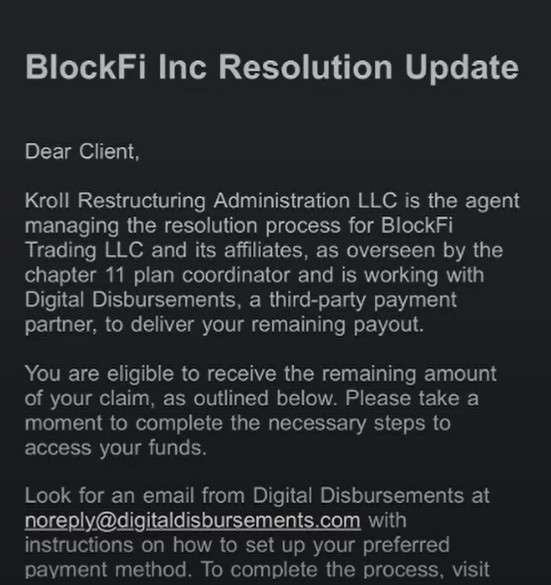
Here is how the email scam might look:
BlockFi Bankruptcy Distribution Instructions
BlockFi Inc Resolution Update
Dear Client,
Kroll Restructuring Administration LLC is the agent managing the resolution process for BlockFi Trading LLC and its affiliates, as overseen by the chapter 11 plan coordinator and is working with Digital Disbursements, a third-party payment partner, to deliver your remaining payout.
You are eligible to receive the remaining amount of your claim, as outlined below. Please take a moment to complete the necessary steps to access your funds.
Look for an email from Digital Disbursements at with instructions on how to set up your preferred payment method. To complete the process, visit the payout platform, link your wallet, and verify the email address tied to your account.
Remaining Payout: $4,163.71
Payee ID: 9QFM-QXWN-YMTE-S5Q4
Step 2: Urging Immediate Action
The email urges you to “take a moment to complete the necessary steps to access your funds.” This builds a sense of urgency to prevent you from thinking carefully or verifying the source.
Step 3: Follow-Up Email
You are instructed to expect a follow-up email from “Digital Disbursements” (noreply@digitaldisbursements.com), a real service, but spoofed here. This second email contains a link to a “Payout Platform.”
Step 4: Payout Platform Landing Page
Clicking the link brings you to a website that looks professional and similar to legitimate financial service sites. Here, you’re prompted to:
- Enter your email address
- Confirm your “Payee ID”
- Link your crypto wallet
- Provide personal identifying information
In some cases, they even request wallet seed phrases under the guise of “verifying your account.”
Step 5: Data Harvesting
Once you submit the information, scammers now have access to:
- Your email address (for future phishing)
- Your crypto wallet details
- Potentially your seed phrase (if given)
- Other personal information
If a seed phrase was entered, the scammers immediately access and drain the crypto assets tied to that wallet.
Step 6: Continued Exploitation
Even if you don’t provide a seed phrase, your compromised email and wallet info could be used for future scams, identity theft, or targeted attacks. The scammers may also sell your data on dark web marketplaces.
This scam is particularly dangerous because it exploits trust during a sensitive time when many users are anxiously awaiting refunds from real bankruptcy proceedings.
What To Do If You Have Fallen Victim
If you suspect you have fallen victim to the BlockFi Bankruptcy Distribution Email Scam, act immediately. Here’s a detailed list of steps you should take:
1. Disconnect Your Wallet
- If you linked your crypto wallet to any suspicious site, immediately disconnect it.
- Check if your wallet has any permissions set to the scam site (using tools like Etherscan Token Approval Checker) and revoke them.
2. Move Your Funds
- Immediately transfer all assets from the compromised wallet to a new, secure wallet.
- Create a new wallet with a freshly generated seed phrase.
3. Report the Scam
- File a report with the Federal Trade Commission (FTC) at reportfraud.ftc.gov.
- Report the phishing email to your email provider.
- If the scam impersonated a government entity, also report it to the Internet Crime Complaint Center (IC3).
4. Freeze Affected Accounts
- If you entered personal identification information, consider freezing your credit with major credit bureaus (Experian, TransUnion, Equifax).
- Monitor your credit report for unusual activity.
5. Scan Devices
- Run a full malware and antivirus scan on your devices.
- Ensure no spyware or keyloggers were installed while interacting with scam links.
6. Notify Crypto Exchanges
- If your wallet was linked to major crypto exchanges (like Coinbase, Binance, Kraken), notify them immediately.
- They might be able to flag suspicious transactions or freeze accounts if unauthorized actions occur.
7. Educate Yourself and Others
- Inform family, friends, and online communities about the scam.
- Sharing awareness helps prevent others from falling for similar attacks.
Frequently Asked Questions (FAQ) About the BlockFi Scam Email
1. Is this email legitimate?
No. Although it uses real names like “Kroll Restructuring Administration” and “Digital Disbursements,” scammers often impersonate official organizations to trick victims into clicking malicious links.
2. How can I tell this is a scam?
Several warning signs indicate a scam:
- Urgency to act quickly and claim funds.
- Suspicious links to unfamiliar payout platforms.
- Requests to “link your wallet” directly via email.
- Generic greetings like “Dear Client” instead of your real name.
3. What should I do if I received this email?
Do not click any links or provide any information. Mark the email as spam or phishing in your email client and delete it.
4. What happens if I click the link?
Clicking the link could lead to phishing websites that steal your personal information, login credentials, crypto wallet access, or install malware on your device.
5. I think I entered information. What should I do now?
Immediately:
- Disconnect your device from the internet.
- Change all passwords, especially for your email, financial accounts, and crypto wallets.
- Enable two-factor authentication where possible.
- Contact your bank or crypto platform for further advice.
- Monitor your accounts for suspicious activity.
6. How can I verify real communications about BlockFi bankruptcy?
Official updates about BlockFi’s bankruptcy process are posted publicly by Kroll Restructuring Administration on their official website. Always access important links by typing official URLs directly into your browser, not through email links.
7. Why are scammers targeting BlockFi clients?
Because of the real bankruptcy situation, many people expect communications about their claims. Scammers exploit this expectation by sending convincing fake messages.
8. Who can I report this scam to?
You can report phishing scams to:
- The Federal Trade Commission (FTC)
- The Anti-Phishing Working Group (APWG) at reportphishing@apwg.org
- Your country’s cybercrime agency
The Bottom Line
The BlockFi Bankruptcy Distribution Email Scam is a dangerous and highly convincing phishing attack that preys on uncertainty and financial stress. By mimicking real bankruptcy communications and offering fake payouts, scammers aim to steal sensitive information and cryptocurrency assets.
Stay vigilant: Never click on links from unsolicited emails, never provide your wallet seed phrase, and always verify through official company websites.
If something feels even slightly off, take a step back, double-check the source, and when in doubt, contact the legitimate company directly through verified channels.
Stay safe, stay smart, and protect your digital assets.

Join the discussion
0 commentsShare your experience or ask a question about this article.
Discussion
Start the conversation
Have a question or something useful to share? Add the first comment.