

A $750 Costco gift card for a few minutes of online activity sounds like a lucky break. BulkSaved presents the offer with calm instructions and familiar retail branding.
The page looks simple, but the important details sit beyond its bright button. Following that path reveals a very different transaction from the one most visitors expect.
Overview
This is not a Costco promotion
BulkSaved uses Costco’s name as the attention magnet, yet its own disclaimer says Costco does not sponsor, authorize, endorse, or operate the promotion.
The domain is not Costco.com. The button also does not lead to Costco. It sends visitors through a third-party affiliate tracking address.
The advertised task is only the doorway
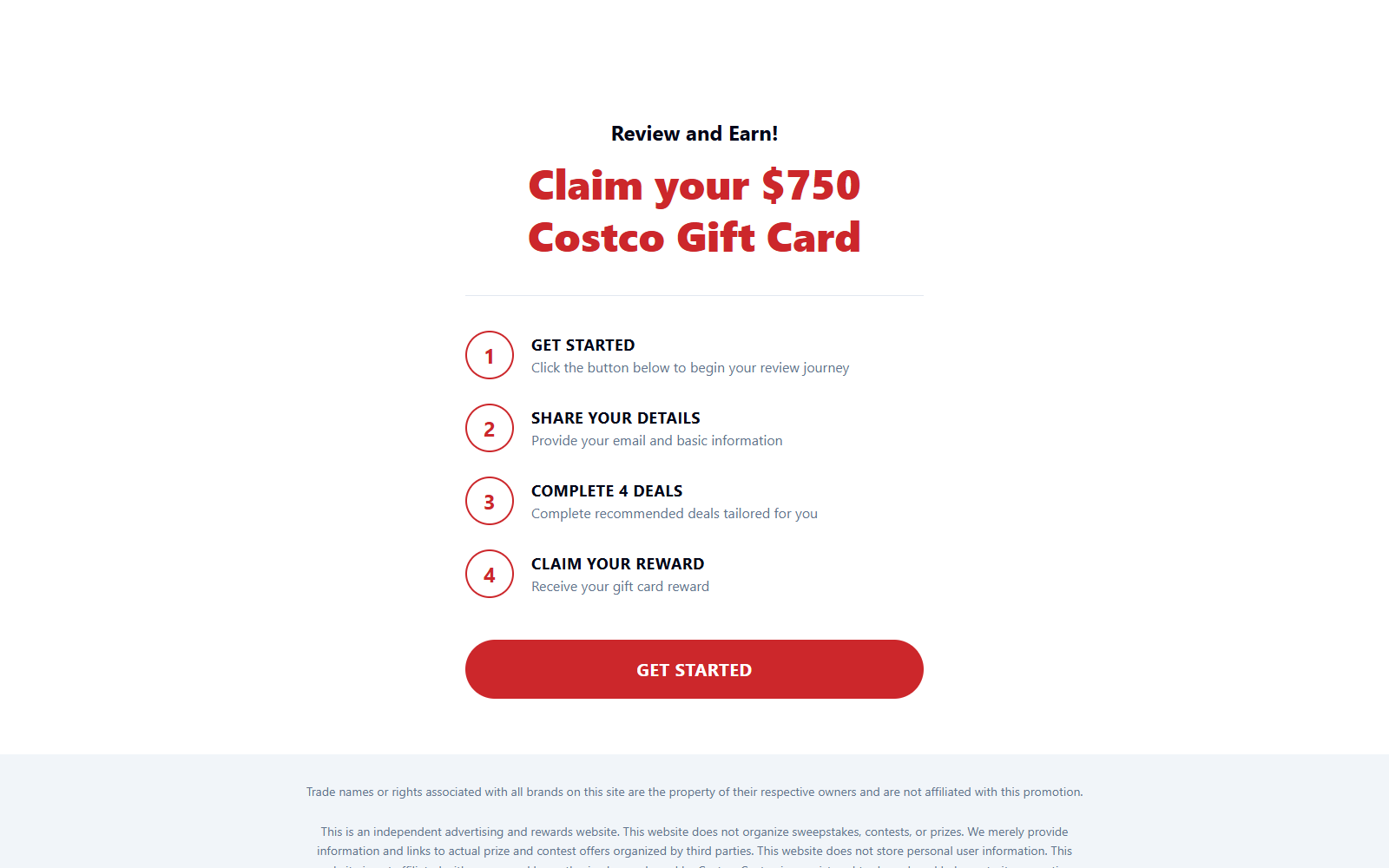
The front page says users can claim a $750 reward after providing basic details and completing four recommended deals. That summary omits crucial practical conditions.
Sponsored deals may involve trials, purchases, apps, subscriptions, eligibility checks, or separate companies. Each offer can carry its own price, cancellation rules, and data collection.
The real value is your conversion
BulkSaved discloses that it may receive compensation when visitors sign up or complete offers. The prominent reward claim therefore feeds an affiliate marketing funnel.
Before entering information, understand the warning signs:
- BulkSaved is not affiliated with Costco
- The reward button opens a third-party tracking domain
- The homepage does not identify the eventual offer operator
- Separate deals may require money or continuing commitments
- The site provides no visible company address or telephone number
- The promise is far larger than the explanation beside it
We found enough evidence to treat the BulkSaved $750 Costco gift card pitch as deceptive. Nobody should assume the headline describes a free, guaranteed Costco card.
What BulkSaved Says in Its Own Fine Print
The page initially tells a reassuring four-step story: begin, share basic information, complete four deals, then receive the reward. The visual sequence makes fulfillment appear automatic.
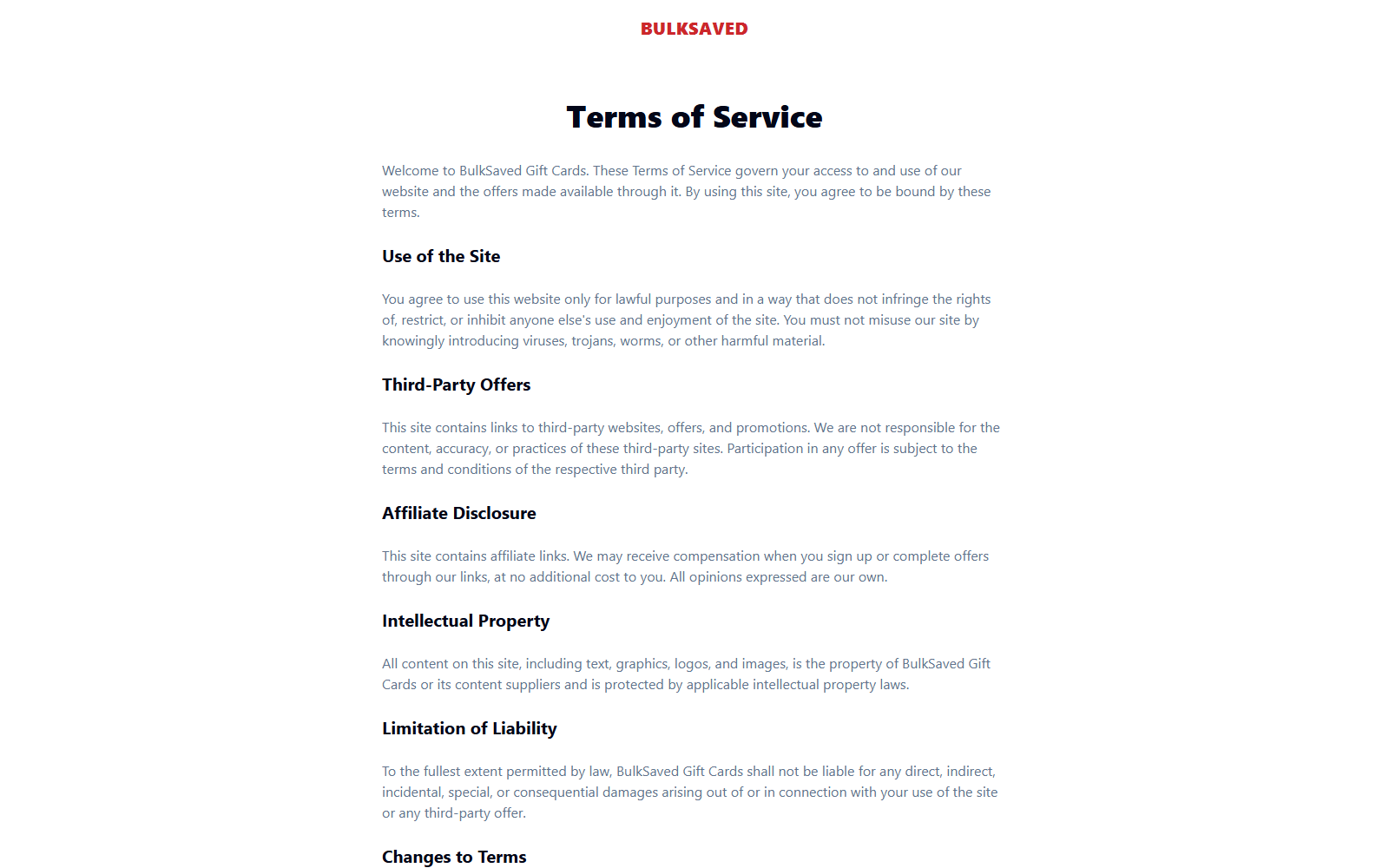
Scroll lower and the language changes. BulkSaved calls itself an independent advertising and rewards website that merely provides links to offers organized by third parties.
That distinction is substantial. A visitor is not joining a promotion run by the warehouse retailer whose name dominates the screen.
The site also says it may earn compensation from signups or completed offers. This explains why sending traffic onward has immediate commercial value.
Its terms disclaim responsibility for third-party accuracy, content, and practices. Participation becomes subject to conditions controlled by whichever operator receives the click.
In plain English, the welcoming page markets the destination while distancing itself from what happens there. Consumers carry the risk after leaving BulkSaved.
The terms do not identify a legal company, mailing address, support telephone number, or named officer. The contact paragraph simply references appropriate channels on the website.
We found no meaningful support channel displayed on the captured pages. That makes ordinary questions difficult before a visitor supplies information elsewhere.
How the BulkSaved $750 Costco Gift Card Scam Works
Step 1: A valuable retail reward wins the click
The campaign leads with a number large enough to interrupt scrolling. Costco’s familiar name supplies trust that an unknown rewards domain could not build quickly.
Visitors naturally compare the promised $750 with the few easy-looking steps. The apparent imbalance makes continuing feel rational before any costs become visible.
Step 2: The page makes the process look finite
Four numbered instructions suggest a short path with a clear ending. “Complete four deals” sounds measurable, modest, and easier than a complicated reward program.
That front-page wording cannot guarantee what the next operator requires. The receiving platform may classify deals by levels, impose timing rules, or reject incomplete tracking.
Step 3: Personal details begin the lead funnel
The page tells users to provide an email address and basic information. After the redirect, additional forms may request a name, phone number, address, demographics, or purchasing interests.
Every answer can improve a marketing lead’s value. Even someone who abandons the reward may later receive promotional messages from participating companies.
Step 4: The button crosses into an affiliate network
The call-to-action points to trksy.org with an offer identifier, affiliate identifier, and source code. Those parameters attribute the visitor and any resulting conversion.
This is not inherently malicious technology. Affiliate tracking is common. Here, however, it proves the click is monetized and does not travel into Costco’s systems.
Step 5: Sponsored deals create obligations
Individual offers can include paid trials, discounted subscriptions, financial applications, games, surveys, or purchases. Some become expensive if cancellation deadlines pass unnoticed.
A person may complete several activities yet still fail a qualification rule. Browser blocking, cookies, duplicate participation, location, age, or missing proof can affect tracking.
Step 6: The reward becomes harder than the advertisement implied
High-value reward programs often require more effort, money, verification, and documentation than their first advertisement communicates. Some users stop only after multiple commitments.
If a reward claim fails, BulkSaved’s terms point responsibility toward third parties. The consumer may then struggle to identify which company controls the record.
Why the Costco Name Changes the Decision
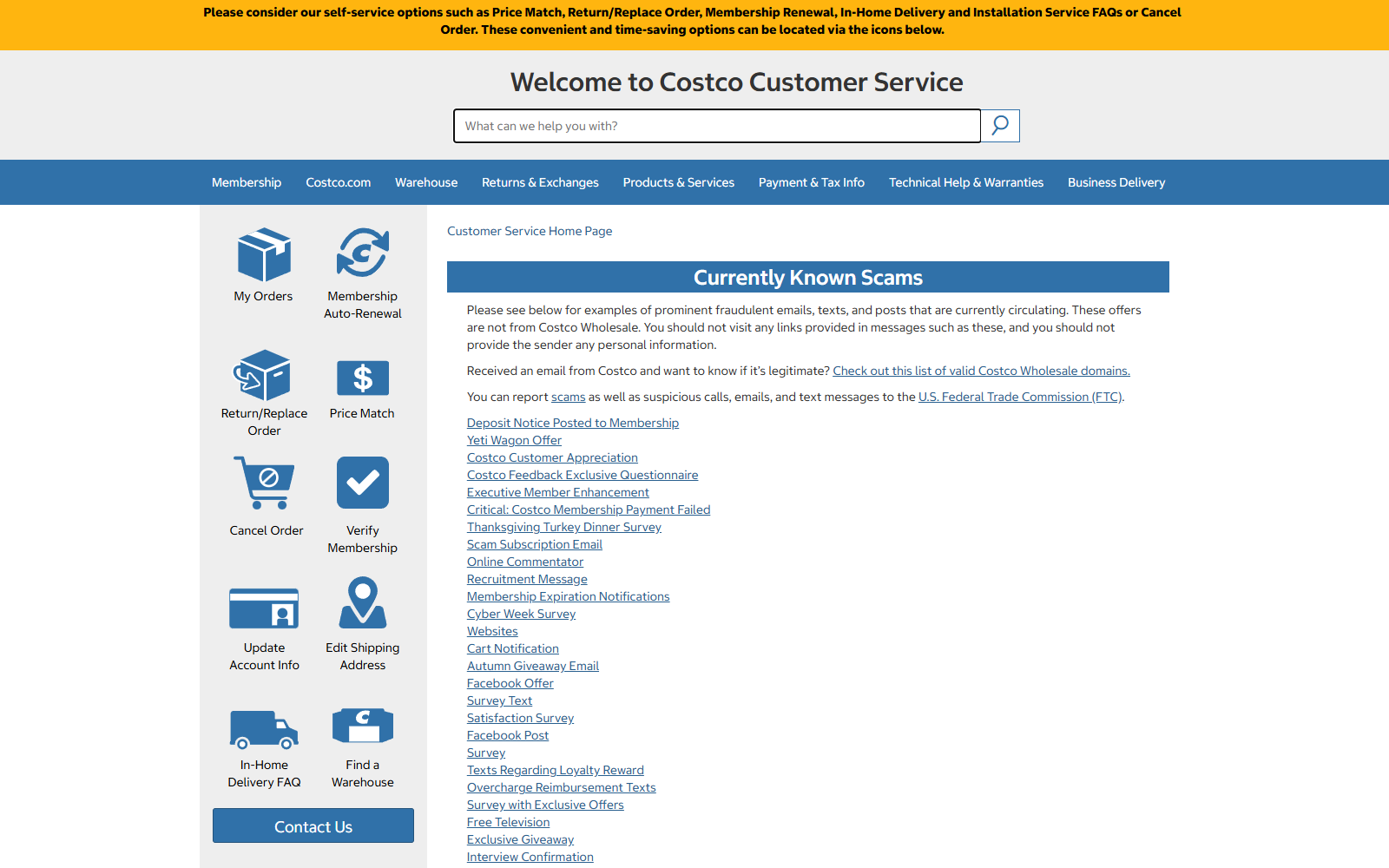
Costco publishes warnings about fraudulent emails, posts, surveys, and reward messages using its identity. It advises people not to provide information through suspicious links.
BulkSaved includes a non-affiliation disclaimer, but it appears beneath the much larger Costco reward promise. Legally careful wording does not neutralize the page’s first impression.
A reasonable visitor can still believe Costco supplied the card, approved the deal, or stands behind delivery. None of those assumptions follows from BulkSaved’s disclosures.
Real Costco pages use Costco-controlled domains. A separate domain displaying a retail logo or name should be evaluated as an unrelated advertiser until independently confirmed.
Never use a brand’s presence in a headline as proof. Check the browser address, destination link, named promoter, complete rules, and genuine brand communications.
The Financial and Privacy Risks
The most obvious risk is spending money on sponsored offers without receiving a reward. Small trial costs can accumulate when several deals must be completed.
Recurring billing deserves special attention. A discounted subscription can renew at its normal price, sometimes before the shopper finishes the remaining reward requirements.
There is also a data cost. Reward funnels commonly ask questions that classify households, interests, income ranges, shopping habits, insurance needs, or financial intentions.
That information can trigger calls, texts, and emails. Consent language on later pages may authorize marketing from partners that BulkSaved never names upfront.
Possible consequences include:
- Charges for products or trials chosen only to qualify
- Automatic renewals attached to sponsored offers
- Increased spam, telemarketing, and promotional messages
- Disputes over missing affiliate tracking
- Requests for identity documents during reward verification
- Difficulty locating one accountable support team
Not every third-party deal is necessarily fraudulent. The deception lies in presenting a difficult affiliate journey like a simple, nearly guaranteed Costco giveaway.
How to Evaluate a Reward Offer Before Participating
Begin with the retailer whose name appears in the advertisement. Search its official fraud, promotion, and customer-service pages without using the advertisement’s links.
A genuine partner campaign should be confirmable from the retailer or a clearly named promoter. Silence from both is a serious reason to avoid it.
Next, identify the organization legally responsible for the reward. A domain name, logo, or marketing label does not answer that question.
Read three separate documents: the landing-page terms, the reward-program rules, and every sponsored merchant’s billing agreement. None can safely replace the others.
Calculate the worst-case cost, not the cheapest advertised route. Include purchases, shipping, trial renewals, taxes, return postage, and time spent resolving missing credit.
Ask whether free activities alone can unlock the advertised tier. If paid offers are necessary, the word “reward” can disguise an expensive acquisition process.
Check the completion window and claim window separately. A participant can finish tasks but still lose eligibility by missing a later documentation deadline.
Look for exclusions involving previous participation, shared households, device changes, cookie blockers, virtual cards, cancellations, and geographic location.
Inspect consent boxes before submitting information. A short survey may authorize contact from numerous marketing partners through calls, texts, email, or postal mail.
Test support with a precise question before enrolling. Ask who issues the $750 card and who decides a disputed completion.
A useful reply should name companies and cite rules. A generic response about exciting rewards does not resolve accountability.
Finally, imagine the gift card disappears from the calculation. If the underlying offers are not worth their normal costs, do not complete them.
This simple test removes the jackpot effect. Each purchase should make sense independently, because payout is never certain until the claim is accepted.
Company, Address, and Fulfillment Checks
No legal operator is clearly named
The terms refer to “BulkSaved Gift Cards” without identifying a corporation, limited company, owner, or registration number. A brand label is not a legal identity.
Consumers need that identity for complaints, privacy requests, and disputes. Its absence leaves visitors dependent on whichever unrelated company appears after the redirect.
No physical business address is displayed
We did not find a street address on the homepage or terms page. There is therefore no visible headquarters, correspondence address, or jurisdiction to verify.
A legitimate rewards promoter should explain who operates the program and where formal notices can be sent. A polished page cannot replace those basics.
The contact route is effectively missing
The terms invite questions through “appropriate channels” supposedly provided on the website. The captured material does not show a telephone number, postal contact, or useful support address.
That vagueness matters before entering data. If tracking fails or marketing becomes intrusive, the visitor may have no direct BulkSaved representative to contact.
There is no gift-card fulfillment operation to inspect
BulkSaved says it does not organize prizes. It redirects users to outside offers, so it is not presented as the company issuing or shipping a Costco card.
The eventual reward handler, eligibility administrator, and deal providers must be identified on later pages. Do not assume one company’s policy binds another.
Take screenshots before participating. Record every domain, offer requirement, payment, confirmation, cancellation rule, and deadline while the information remains available.
If a page will not state the legal promoter before collecting data, stop. A promised reward is not valuable enough to accept unknown contractual partners.
What to Do if You Have Fallen Victim to This Scam
- Stop completing additional deals. Do not spend more money trying to rescue earlier effort. A sunk cost does not improve later eligibility or tracking.
- List every company involved. Review browser history, confirmation emails, and card statements. Write down BulkSaved, the tracking domain, reward operator, and each offer provider.
- Cancel trials individually. Contact every merchant through its official policy. Request written cancellation confirmation and save the date, case number, and representative’s name.
- Contact your card issuer. Explain any charge you did not knowingly authorize. Ask about blocking future recurring payments and disputing transactions under the issuer’s rules.
- Secure exposed accounts. Change reused passwords, enable multifactor authentication, and watch email accounts for password-reset attempts or convincing follow-up phishing.
- Reduce marketing contact. Use unsubscribe tools cautiously, block persistent callers, revoke consent where possible, and register complaints with relevant privacy or consumer authorities.
- Scan the device. Run Malwarebytes if any downloaded app, browser extension, or file came from the funnel. Remove anything the scan identifies as unsafe.
- Block malicious advertising. AdGuard can reduce dangerous pop-ups and known tracking pages. It cannot cancel subscriptions, so complete the financial steps separately.
- Report the promotion. Send evidence to the advertising platform, the FTC, Costco’s fraud channel, and your local consumer-protection authority.
- Monitor statements for several months. Some trial renewals appear later under unfamiliar billing descriptors. Challenge questionable entries promptly rather than waiting for another cycle.
Frequently Asked Questions
Is BulkSaved really giving away a $750 Costco gift card?
BulkSaved advertises that outcome, but it does not issue the reward itself. Its page redirects to third-party sponsored offers with separate requirements and eligibility decisions.
Is BulkSaved affiliated with Costco?
No affiliation is claimed. The site’s own disclaimer says Costco does not sponsor, authorize, endorse, or operate the promotion.
Why does the offer ask me to complete deals?
Completed deals can generate affiliate compensation. Some participating merchants also gain a customer, subscriber, application, or qualified marketing lead.
Can a reward program ever be legitimate?
Yes, but legitimate does not mean easy or free. Read the named promoter’s complete rules, costs, verification process, exclusions, and reward-delivery conditions first.
What if I entered my email but paid nothing?
Expect possible promotional contact. Strengthen account security, avoid follow-up links, block suspicious messages, and never provide verification codes to an unexpected caller.
Will deleting my browser history cancel an offer?
No. Browser cleanup removes local records but does not end a contract. Cancellation must be completed with every merchant that accepted an enrollment or payment.
The Bottom Line
The offer’s small disclaimer cannot carry the full weight of a headline engineered around Costco and a life-sized household reward.
BulkSaved uses a $750 Costco headline to send visitors into an affiliate deal funnel. Its own disclosures confirm that Costco is uninvolved and third parties control the offers.
Skip the promotion. The potential reward does not justify unclear obligations, fragmented accountability, payment exposure, or the personal information required to chase it.

Join the discussion
0 commentsShare your experience or ask a question about this article.
Discussion
Start the conversation
Have a question or something useful to share? Add the first comment.