

If you are a parent or expecting a baby, you might be familiar with buybuy BABY, a popular retailer of baby products and accessories. The company has over 100 stores across the US and Canada, and also operates an online store. However, you might not be aware that there are also scam websites that use the buybuy BABY name and logo to trick unsuspecting customers into buying fake or nonexistent products.
In this article, we will explain what are the buybuy BABY scam websites, how they work, how to spot and avoid them, and what to do if you have fallen victim to them. We hope that by reading this article, you will be able to protect yourself and your family from these online fraudsters.
What are the buybuy BABY scam shopping sites?
The buybuy BABY scam websites are fake online stores that pretend to be affiliated with the legitimate buybuy BABY company. They use the same name, logo, and domain name as the real company, but with slight variations. For example, they might use “buybuybaby.com” instead of “buybuybaby.ca” or “buybuybaby.co” instead of “buybuybaby.com”. They might also use hyphens, underscores, or extra letters in the domain name.
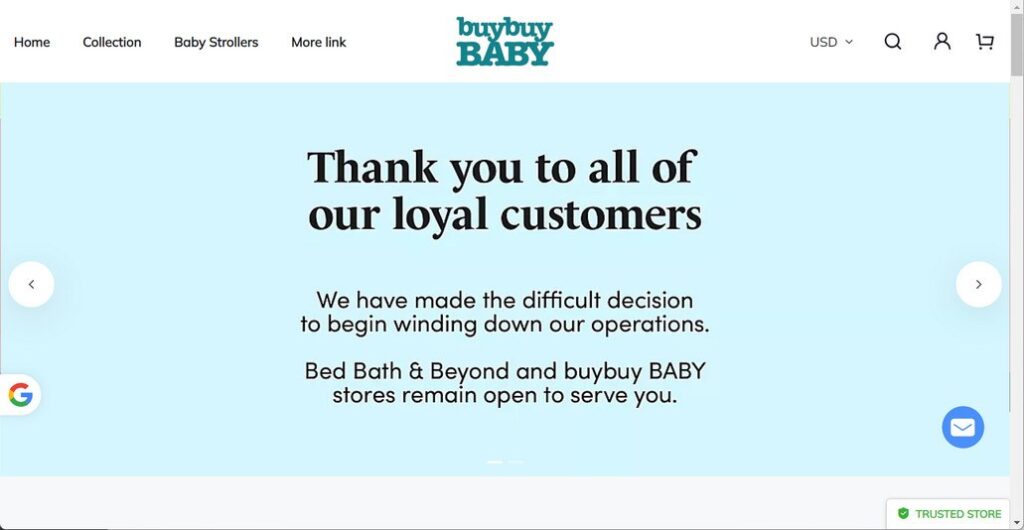
These scam websites claim that buybuy BABY is closing all its stores and liquidating its inventory. They offer huge discounts of up to 90% on various baby products, such as strollers, car seats, cribs, toys, clothing, and more. They also use fake reviews, testimonials, and social media posts to make their offers seem more credible and attractive.
However, these websites are not authorized by buybuy BABY and have no connection to the real company. They are run by scammers who want to steal your money and personal information. If you order from these websites, you will either receive nothing at all, or receive a low-quality or counterfeit product that does not match the description or image on the website. You will also risk exposing your credit card details, bank account information, or identity to the scammers.
How do the buybuy BABY scam shopping sites operate?
The buybuy BABY scam websites use various methods to lure customers into their trap. They might send you unsolicited emails, text messages, or phone calls claiming that you have won a gift card or a coupon from buybuy BABY. They might also create fake ads or pop-ups on social media platforms, such as Facebook, Instagram, or Twitter. They might also use search engine optimization (SEO) techniques to rank high on Google or Bing when you search for buybuy BABY products or deals.
Once you click on their link or visit their website, you will see a convincing replica of the real buybuy BABY website. You will see the same logo, colors, layout, and products as the original website. You will also see banners or messages announcing the closing sale and the huge discounts. You might also see fake customer reviews or ratings praising the products and the service.
If you decide to order from these websites, you will be asked to provide your personal information, such as your name, address, phone number, email address, and credit card details. You might also be asked to create an account or sign up for a newsletter. You might also be offered free shipping or a money-back guarantee to entice you further.
However, once you complete your order and pay for it, you will not receive any confirmation email or tracking number. You will not be able to contact the customer service or cancel your order. You will either receive nothing at all after waiting for weeks or months, or receive a product that is different from what you ordered or expected. You will also notice unauthorized charges on your credit card statement or bank account statement. You might also receive phishing emails or calls from the scammers asking for more information or money.
What to do if you have fallen victim?
If you have fallen victim to a buybuy BABY scam shopping site, you should take the following steps as soon as possible:
- Contact your bank or credit card company and report the fraudulent transaction. Ask them to cancel your card and issue you a new one. You may also be able to dispute the charge and get your money back.
- Contact buybuy BABY’s customer service at 1-877-3-BUY-BABY (1-877-328-9222) or email them at customer.service@buybuybaby.com and inform them of the scam website. They may be able to help you with your situation or take action against the scammers.
- Report the scam website to the Federal Trade Commission (FTC) at https://reportfraud.ftc.gov/. You can also file a complaint with your state attorney general’s office or consumer protection agency.
- Warn your friends and family about the scam website and advise them not to shop there. You can also share your experience on social media platforms or online forums to raise awareness and prevent others from falling victim.
- If you suspect your device is infected with malware, you should run a scan with Malwarebytes Anti-Malware Free.
Conclusion
The buybuy BABY scam shopping sites are a serious threat to online shoppers who are looking for quality baby products at reasonable prices. They use deceptive tactics to trick customers into buying fake or low-quality products or stealing their money and personal information. To avoid falling victim to these scams, you should always shop from the official buybuy BABY website at https://www.buybuybaby.com/ or from authorized retailers. You should also be wary of any website that offers unrealistic discounts, free shipping, or no contact information. If you have been scammed by a buybuy BABY scam shopping site, you should report it immediately and take steps to protect yourself from further harm.

Join the discussion
0 commentsShare your experience or ask a question about this article.
Discussion
Start the conversation
Have a question or something useful to share? Add the first comment.