

A card-lock alert can make even a careful person react quickly. The Capital One Card Is Locked Email Scam exploits that exact moment, turning a believable fraud warning into a route toward a counterfeit banking login.
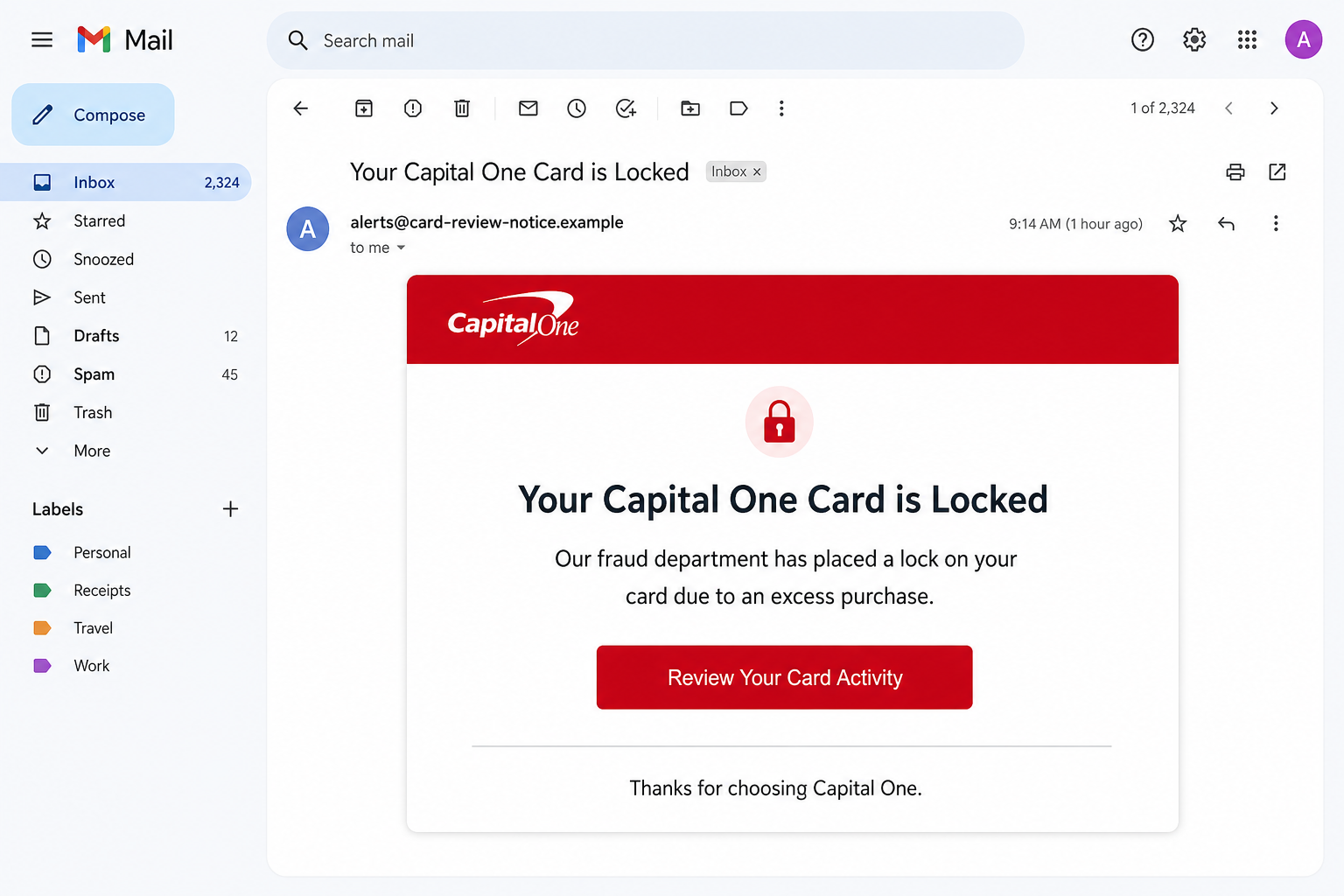
The message claims an unusually large or excessive purchase caused the bank’s fraud department to restrict the card. A button labeled Review Your Card Activity appears to offer the fastest way to confirm the transaction and remove the lock.
Nothing in the email proves that a real card was restricted. The warning is a social-engineering device: fear of a declined payment or stolen card makes the recipient more likely to use the embedded button instead of opening the banking app independently.
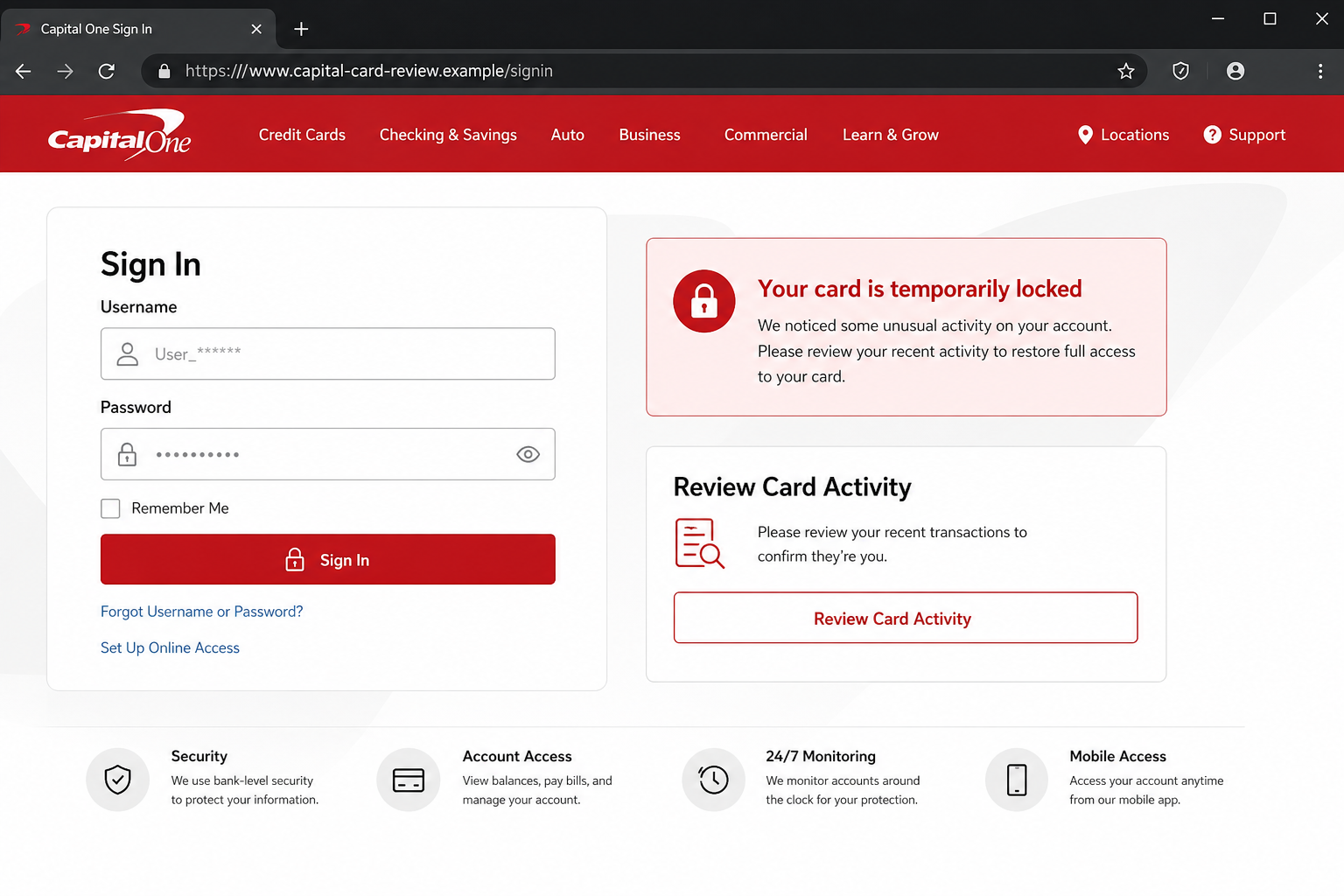
The destination imitates an online banking portal and may request a username, password, card number, security code, personal details, or a one-time verification code. Every field gives the attacker another piece of the account takeover puzzle.
Overview
A Fraud Alert That Creates Its Own Emergency
The Capital One Card Is Locked Email Scam presents itself as a protective notice, not a prize or an obvious sales pitch. That framing matters because genuine banks do send alerts about unusual card activity, so the basic story feels plausible before the details are checked.
The observed version said an excess purchase caused a lock and urged the recipient to complete verification. Its language is awkward in places, but a hurried reader may focus on the bank name, red warning design, and implied risk of losing access to the card.
The Button Leads Away From the Real Bank
The Review Your Card Activity button is the point where a familiar banking story becomes credential phishing.
Instead of opening a known Capital One app or a page reached through capitalone.com, it directs the visitor to infrastructure controlled or selected by the scammer.
A copied logo and a padlock icon do not validate the destination. Modern phishing pages can reproduce colors, navigation labels, sign-in boxes, and security language closely enough to look convincing on a phone, where the full web address is easy to miss.
The Real Objective Is Account Access
The fake page is built to collect whatever the attacker believes will unlock the banking profile.
A username and password may be followed by card details, billing address, Social Security number fragments, security questions, or a code sent by the legitimate bank.
Stolen information can support unauthorized purchases, transfers, profile changes, identity fraud, or resale to other criminals. The email itself does not lock a card; it attempts to make the victim hand over the information needed to compromise one.
- Fake claim: a recent excessive purchase forced the bank to lock the recipient’s card.
- Primary lure: a red Review Your Card Activity button promising immediate restoration.
- Destination: a lookalike online-banking sign-in page outside the official bank route.
- Information at risk: login credentials, card data, identity details, and one-time codes.
- Likely damage: banking account takeover, unauthorized payments, and follow-up impersonation.
Why the Capital One Card Lock Story Does Not Hold Up
The Sender Identity Is Not Enough
A display name can say Capital One while the underlying mailbox belongs to an unrelated domain. Attackers can also spoof visible sender information, so the From line should be treated as a claim rather than proof.
Capital One advises customers not to reply to suspicious messages or use their embedded links.
A concerned customer can open the official app, type the bank address manually, or call the number printed on the physical card without relying on anything supplied by the email.
The Message Uses Pressure Instead of Verifiable Detail
The email refers to an excess purchase but may omit a useful merchant name, amount, location, time, or masked account reference. That vagueness lets the same template reach thousands of people without knowing whether they hold a Capital One card.
Even when a message includes transaction details, they may come from an earlier data breach or a compromised mailbox. The decisive check is whether the same alert appears inside the genuine account after the customer signs in independently.
The Verification Request Keeps Expanding
A real fraud review may ask a customer to confirm whether a transaction is recognized. A phishing flow often expands from that simple question into a full credential and identity harvest, requesting information the bank already has.
Requests for a complete password, PIN, card security code, or one-time code should trigger an immediate stop. A code sent by the real bank may be authorizing a sign-in or payment initiated by the attacker, not verifying the email.
How the Capital One Card Is Locked Email Scam Works
Step 1: The Fake Fraud Alert Reaches the Inbox
The campaign begins with a subject similar to Your Capital One Card is Locked. The subject is written to look like a time-sensitive account event, so it competes successfully with ordinary mail and encourages immediate opening.
The sender may use a bank-themed display name while hiding an unrelated address. Logos, footers, and familiar colors are copied because visual recognition often happens before a person inspects the technical details.
Step 2: A Supposed Excess Purchase Explains the Lock
Inside, the recipient is told that a large or unusual purchase caused the fraud department to restrict the card. The story offers both a threat and a reassuring explanation: the bank noticed a problem and is supposedly protecting the customer.
That balance is deliberate. Pure panic can look suspicious, but a protective tone makes the email feel like routine banking security. The scammer needs only enough credibility to move the reader toward the button.
Step 3: The Activity Review Button Becomes the Only Route Forward
The email presents Review Your Card Activity as the required step for removing restrictions. It may claim the account will return to normal automatically after all verification steps are completed.
This removes the safest alternatives from the reader’s attention. There is no reason to use that button when the same account can be checked through the official app or a manually typed address.
Step 4: A Lookalike Banking Page Requests Credentials
The linked page recreates a bank sign-in with familiar colors, username and password fields, and locked-card language. The browser address, however, does not belong to Capital One, and the page may be hosted on a disposable or compromised domain.
On mobile, the form can occupy nearly the entire screen while the address bar is minimized. That visual effect is why the domain should be inspected before any field is completed, not after a password has already been submitted.
Step 5: Additional Forms Collect Card and Identity Data
After the first login, the site may report an error or claim that more verification is required. It can ask for the card number, expiration date, security code, billing address, telephone number, or personal identifiers.
Each extra field increases the attacker’s options. Card data supports unauthorized purchases, identity information supports impersonation, and contact information helps the criminal prepare convincing follow-up calls.
Step 6: A One-Time Code Can Complete the Takeover
The attacker may immediately try the stolen password on the real banking site. If Capital One sends a security code, the fake page or a follow-up caller can ask the victim to enter or read that code.
That code may approve a new device, password reset, transfer, or profile change. Sharing it defeats the protection it was designed to provide and can give the criminal a live authenticated session.
Step 7: The Victim Sees a Delay While the Criminal Acts
The fake page may show a spinner, success message, or promise that the review is complete. That quiet ending reduces the chance that the victim calls the bank while the attacker is testing credentials and changing settings.
If the first attempt fails, the same data can be sold or reused in another message. A later call may pretend to be the fraud department and cite information submitted on the phishing page to sound legitimate.
Company, Address, and Fulfillment Checks
Bank Identity: Start Outside the Email
Open the Capital One app from the device or type capitalone.com yourself. Do not trust a search advertisement or telephone number copied from the message. The account dashboard is the authoritative place to see card status and alerts.
Domain: Read From Right to Left
The meaningful part of a web address is the registered domain immediately before the first slash. Words such as capital, card, secure, review, or activity placed elsewhere in a long address do not make the site part of Capital One.
Support: Use the Number on the Card
If the card might genuinely be locked, call the number printed on its back. A real representative can inspect the account without asking the customer to return to an email link or move money to a so-called safe account.
Account Trace: Compare Alerts and Transactions
Review recent purchases, pending authorizations, new payees, contact changes, and sign-in notifications inside the real account. A genuine fraud event leaves records that can be discussed with the bank; a fabricated email often exists only in the inbox.
Warning Signs in a Fake Capital One Card Lock Email
No single formatting mistake proves fraud, but several inconsistencies together make the Capital One Card Is Locked Email Scam easier to identify.
- The sender address is unrelated to capitalone.com even though the display name uses the bank.
- The message mentions an excess purchase without a useful merchant, amount, or masked card reference.
- The email insists that an embedded button is the only way to restore the card.
- The link preview points to a newly registered, shortened, or unrelated domain.
- The landing page asks for a full password, PIN, security code, or one-time code.
- The wording contains odd phrases such as complete all verification process.
- The alert does not appear after signing in through the official app or website.
A polished design should never outweigh an unrelated destination. When the message involves banking, one independent check through the real app is faster and safer than trying to decide whether every logo looks perfect.
What to Do if You Have Fallen Victim to This Scam
Act quickly, but work through official channels. The goal is to stop active access, preserve useful evidence, and protect every account that may be affected by the information entered.
- Call Capital One immediately. Use the number on the physical card or inside the official app. Explain exactly what was entered, whether a one-time code was shared, and when the interaction happened so the fraud team can secure the profile.
- Change the online-banking credentials from a clean device. Replace both the username and password if the bank recommends it. Remove unfamiliar devices, telephone numbers, email addresses, payees, and transfer destinations.
- Lock or replace the affected card. Ask the bank whether a new card number is necessary and review pending authorizations. A card can need replacement even when no completed fraudulent charge is visible yet.
- Review every recent banking event. Check purchases, transfers, bill-pay instructions, cash advances, contact changes, and login alerts. Report unfamiliar activity promptly and keep the case number and representative’s instructions.
- Secure the connected email account. Change its password, enable a passkey or authenticator app, end other sessions, and remove unknown forwarding rules. Banking reset links are valuable to an intruder.
- Protect reused credentials elsewhere. If the same password was used for shopping, payment, cloud, or work accounts, replace it with a unique one on each service. Start with accounts that store cards or identity records.
- Scan the device if anything was downloaded. Run a full Malwarebytes scan if the phishing flow installed an app, browser extension, remote-support tool, or document. Malwarebytes helps identify unwanted software that a password change alone cannot remove.
- Add a preventive blocking layer. AdGuard can block some known phishing hosts, malicious advertising, and tracking redirects used by scam campaigns. Continue checking domains because a brand-new page may not yet be listed.
- Preserve and report the evidence. Save the email with headers, screenshots, domains, telephone numbers, and transaction records. Report the impersonation through Capital One’s suspicious communications form and use official fraud-reporting channels where appropriate.
- Reject recovery and safe-account calls. A criminal may call after the phishing attempt and claim money must be moved for protection. Do not send gift cards, crypto, wire transfers, or another fee to recover funds.
Frequently Asked Questions
Is the Capital One Card Is Locked email real?
The campaign described here is not a Capital One message. Check the account through the official app or a manually typed address; do not use the review button in the email.
Does clicking the link automatically compromise my bank account?
A click alone does not necessarily expose credentials, but the page may track the visit or attempt a download. Close it, do not submit information, and scan the device if anything opened or installed.
What if I entered my password but no one-time code?
Change the banking password immediately and call the bank. The attacker may still access the account, reuse the password elsewhere, or trigger a later code request.
Can a real Capital One alert say my card is locked?
Banks can send genuine fraud alerts, but the safe response is independent verification. Open the official app or call the number on the card and compare the account status there.
Why does the fake page look so convincing?
Phishing kits copy public logos, colors, layouts, and wording from real sites. Visual similarity is easy to reproduce; control of the official domain is much harder to fake.
Where should I report the phishing email?
Use Capital One’s official suspicious communications form and preserve the original message. If money or identity information was lost, also report through the appropriate bank, police, and government fraud channels.
The Bottom Line
The Capital One Card Is Locked Email Scam turns a familiar security alert into a credential theft funnel. The lock, excess purchase, and urgent review button are claims created by the sender, not proof of a real banking event.
Ignore the embedded route. Check the account through the official app or the number on the card, and treat any password or one-time code entered on the fake page as compromised.

Join the discussion
0 commentsShare your experience or ask a question about this article.
Discussion
Start the conversation
Have a question or something useful to share? Add the first comment.