

Thirty-three guests, 19 rooms, and a company dinner can sound like welcome business to a hotel. That is exactly why this unexpected enquiry deserves a careful look.
The Company’s Annual Dinner Email Scam disguises malware as a document preview inside an ordinary quotation request.
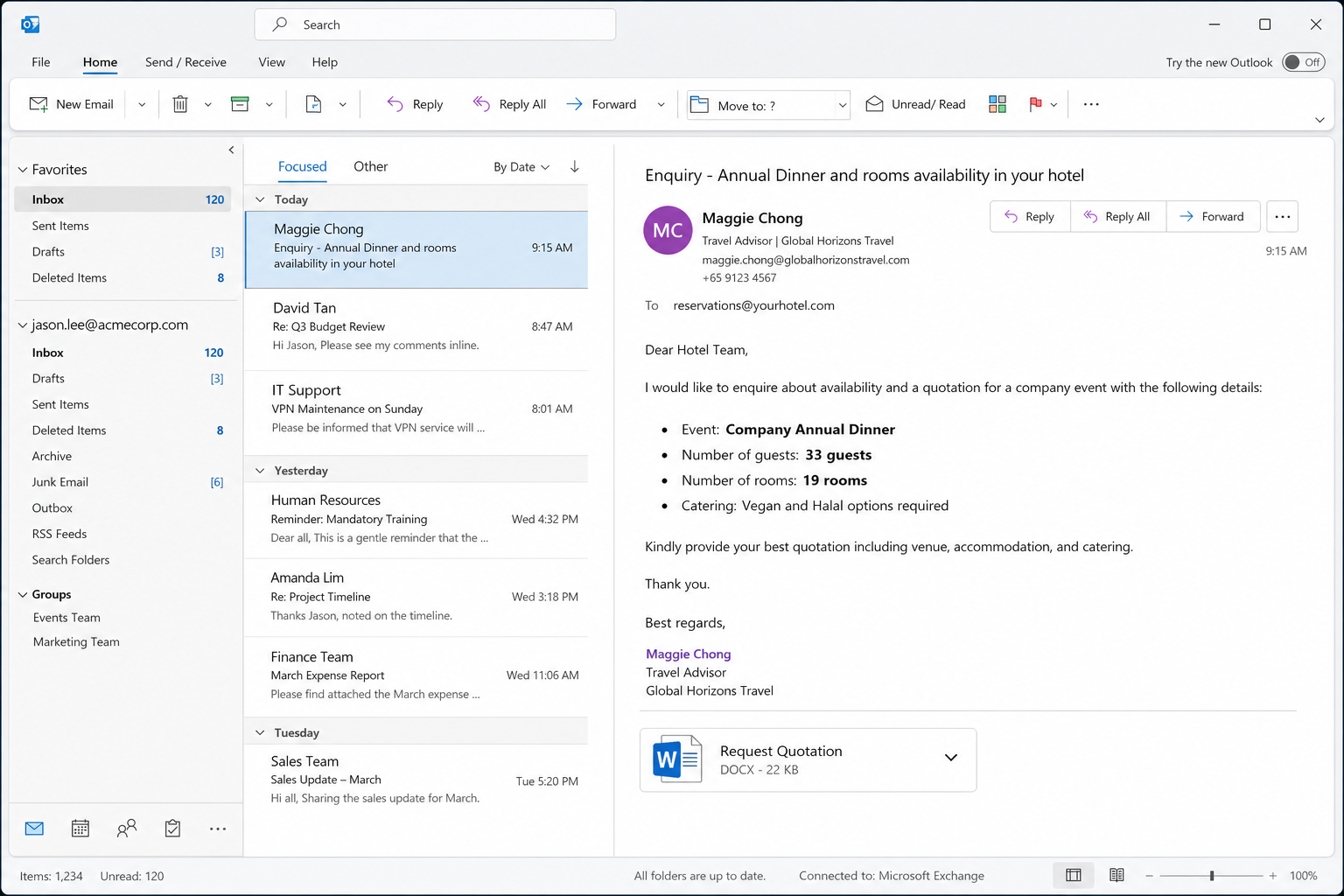
The message introduces a supposed travel adviser and asks about rooms, catering, and event availability. These practical details make the conversation feel ready for a sales response.
A clickable image appears to hold the requirements or supporting paperwork. It is not a harmless preview, and selecting it can start a ZIP archive download.
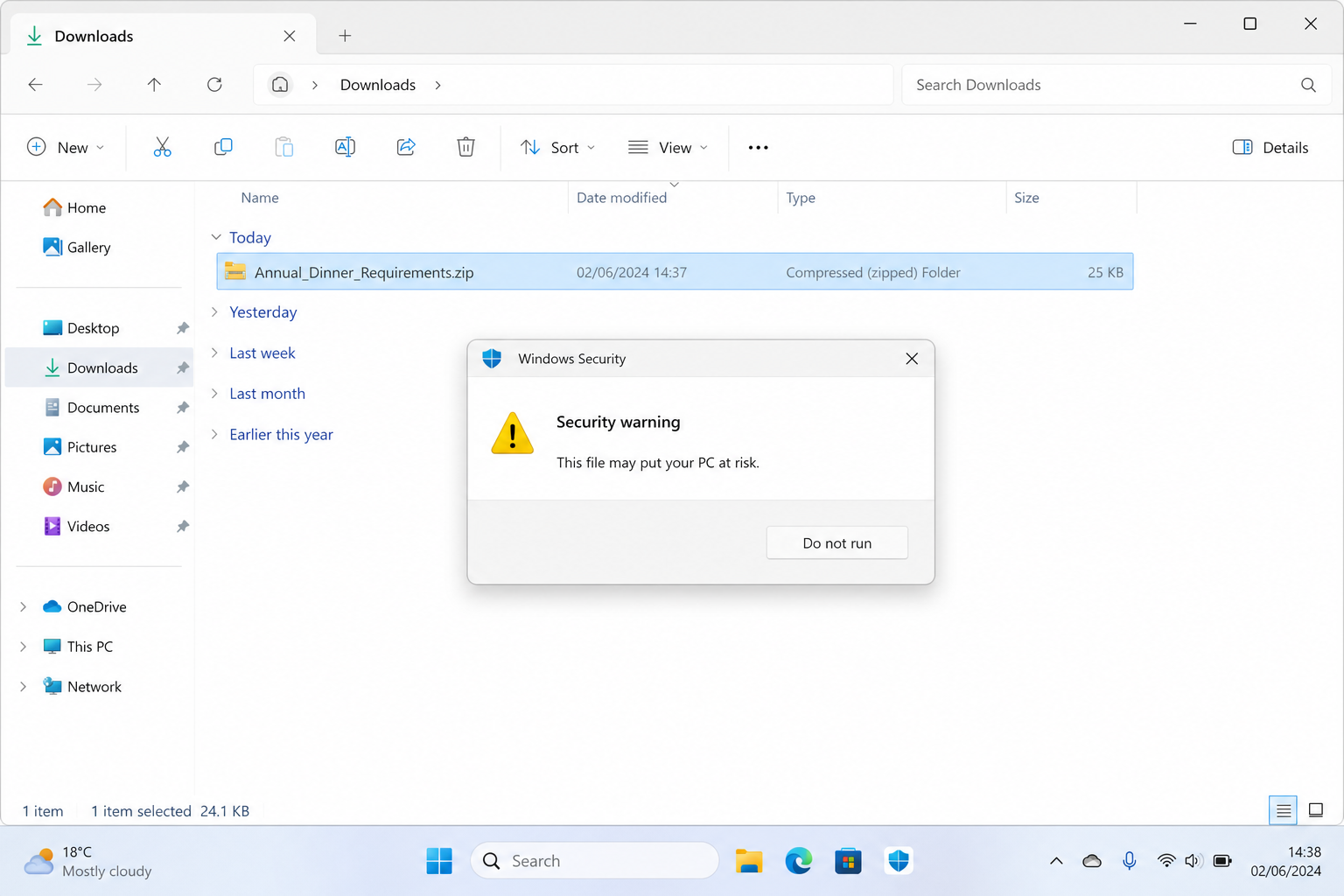
Inside the archive is a JavaScript file. Running that script can begin a hidden infection chain, even though the email never openly asks the recipient to install software.
Overview
A believable hotel enquiry hides the real objective
The lure is written for reservations, events, and sales staff who routinely receive requests from unfamiliar planners. A new sender is therefore not unusual by itself.
The observed message asks whether a hotel can accommodate an annual dinner, 33 guests, 19 rooms, and vegan and halal catering.
Those specifics help it resemble genuine procurement work.
- The sender presents herself as a travel and tour adviser arranging a corporate event.
- The recipient is encouraged to prepare a quotation quickly, which makes opening supporting material feel necessary.
- The email contains a document-style image that behaves as a download link rather than a normal attachment.
- The downloaded archive contains script content that should never be run on a business computer.
The clickable image is a delivery mechanism
Many workers know to inspect unexpected attachments, but a picture embedded in the message can feel less dangerous.
Attackers exploit that distinction by placing the download behind the image.
The resulting ZIP file separates the suspicious script from the original email. That extra step can make the recipient believe the archive came from a document portal or booking system.
- An image can contain a hyperlink even when it resembles a static purchase order preview.
- A ZIP archive can hide a file extension until the recipient opens it.
- A JavaScript file is executable code, not a rooming list, menu, PDF, or quotation form.
- The infection requires interaction, but one double-click may be enough to launch the script.
The final malware may vary between deliveries
The observed script was detected as a downloader, but the final payload was not reliably identified. It is safer to describe the possible outcome than to invent a specific family.
A downloader can retrieve credential stealers, remote access tools, ransomware, or other programs chosen by the operator.
The payload may also change while the email wording remains identical.
- A stealer may collect browser passwords, cookies, wallet data, and saved form entries.
- A remote access trojan may give an intruder continuing control over the workstation.
- Ransomware may encrypt shared business files and interrupt hotel operations.
- Additional malware can be installed after the first script establishes access.
Why Hotel and Events Teams Are Attractive Targets
Unfamiliar customers are part of normal work
Reservations staff cannot reject every first-time sender.
Hotels depend on enquiries from travelers, agencies, wedding planners, conference organizers, and companies they have never handled before.
Attackers use that openness to bypass the instinct that an unknown address is automatically suspicious. The message only needs to resemble the first step of a plausible sale.
Group bookings create financial pressure
Nineteen rooms plus an event can represent meaningful revenue. A salesperson may worry that a slow response will send the booking to another property.
That pressure encourages quick action before a manager, travel agency, or telephone number has been verified. The criminal benefits from the hotel’s own service standards.
Dietary questions make the request sound researched
Vegan and halal requirements feel operational rather than dramatic. They suggest the writer understands event planning and has already discussed the needs of the group.
Specificity is not authentication. A scammer can add guest counts, menu requests, addresses, and job titles to the same template sent to hundreds of properties.
A Document Preview Can Be as Dangerous as an Attachment
The picture may have a hidden destination
Email clients allow an image to link anywhere on the web. The visible picture does not reveal whether the click opens a PDF, a website, or an executable download.
Hovering over the image on a desktop can expose the target. If the address does not belong to a known document service or verified sender, do not follow it.
File extensions explain what will actually run
A legitimate booking request might include PDF, DOCX, or XLSX material, although those formats still require caution. A .js file is a script and is inappropriate for hotel requirements.
Windows may hide known extensions, making a dangerous file appear to have a friendly name. Configure business systems to show extensions and block scripts arriving from internet downloads.
How the Company’s Annual Dinner Email Scam Works
Step 1: Attackers collect hotel and hospitality addresses
Property websites publish reservations, events, sales, and front-desk addresses so real customers can make contact. The same visibility gives criminals a ready target list.
A campaign can focus on shared mailboxes because several employees may open them. The attacker needs only one person to interact with the supposed requirements.
Step 2: A corporate dinner enquiry establishes credibility
The email opens politely and describes a future annual dinner. It supplies room and guest numbers that make the sender sound like someone comparing venues.
The named travel role creates apparent authority. Staff may assume an agency is gathering quotations for a client and avoid asking who the underlying company is.
- A professional signature supplies a name, role, telephone numbers, and business-style address.
- A request for prompt quotation creates a mild deadline without an obviously threatening warning.
- Catering questions encourage the hotel to concentrate on service details instead of sender verification.
Step 3: The requirements image invites a low-friction click
Rather than attaching an executable, the message presents a familiar document image. The recipient may click to enlarge it or learn what must be priced.
That click leaves the email client and contacts infrastructure controlled or abused by the attacker. The image is the first stage of the delivery chain.
Step 4: A ZIP archive conceals the script
The linked page delivers a compressed archive. ZIP files are common in business, but they also prevent some recipients from seeing the final filename immediately.
Opening the archive is not always the infection point. The decisive risk comes when the enclosed JavaScript file is launched and allowed to execute commands.
- Do not extract or run files merely because an archive opened without a warning.
- A document request should not require JavaScript, VBS, EXE, SCR, LNK, or other executable formats.
- Upload suspicious material to the organization’s security team instead of experimenting on the reception computer.
Step 5: The script contacts attacker-controlled systems
Once executed, a downloader can reach an external server for commands or a second payload.
Network security tools may block this stage, but they are not guaranteed to stop every variant.
The script may also use built-in Windows components to reduce visible signs. A quiet screen does not prove that nothing happened after the file ran.
Step 6: Malware searches for valuable business access
An infected hotel computer may contain browser sessions, booking platforms, payment correspondence, guest details, supplier invoices, and access to shared drives.
Each can support additional fraud, identity theft, and payment redirection.
The criminal may steal credentials immediately or maintain access for later use. Compromised email threads are especially useful for convincing payment-change requests.
Step 7: The original enquiry becomes a wider incident
A single workstation can provide a path into cloud accounts or other systems when passwords are reused. Contacts may then receive malicious messages from a genuine hotel address.
If ransomware or remote access follows, normal reservations and operations can be interrupted. The impact is no longer limited to the employee who opened the archive.
Company, Address, and Fulfillment Checks
The travel-company name does not authenticate the sender
The message borrows the style of a travel adviser, but a typed company name can be copied by anyone. It does not establish employment or authorization.
Compare the full sender domain with the organization’s official website. Contact the company through a separately obtained number before trusting the enquiry or opening its files.
A detailed address can still be copied
Postal addresses, office suites, and telephone numbers are easy to collect from public listings. Their presence proves only that the template contains real-looking data.
Search each contact independently and check whether it belongs to the named business. Never call only the number supplied inside the suspicious email.
Support should survive independent verification
A real planner can confirm the client, event date, venue requirements, and procurement process through a normal conversation.
A criminal may avoid calls or push the recipient back toward the file.
Ask for a plain-text summary or a PDF sent through a verified channel. Refusal to provide safe documentation is a strong reason to end the exchange.
The download chain must match the business purpose
A rooming list should not arrive as executable script content. The file type, hosting domain, and requested action must make sense for an ordinary hotel quotation.
If the chain moves from email image to unknown site, ZIP archive, and JavaScript file, the business explanation has collapsed. Isolate the message and report it.
Warning Signs Hotel Staff Can Check Quickly
Pause before opening the supposed requirements
A brief verification call costs less than a compromised reservations workstation.
Staff should know that embedded pictures can be links and compressed archives can carry executable code.
- The sender is new, yet the message expects immediate handling of a valuable group booking.
- The company represented in the signature is not clearly linked to the sender’s domain.
- The document preview points to an unfamiliar host rather than a recognized business portal.
- The download produces a ZIP file when the email implies an ordinary document or image.
- The archive contains JavaScript or another executable file instead of readable event requirements.
- The sender resists a telephone confirmation or cannot identify the client and event date.
Build a safer quotation workflow
Hotels can route new group enquiries through a sandboxed document process, restrict script files, and require callback verification for unfamiliar agencies.
These controls preserve sales speed without trusting every attachment.
Shared inbox training should use examples involving real hotel tasks.
Employees are more likely to remember a dangerous rooming-list image than a generic warning about suspicious links.
What to Do if You Have Fallen Victim to This Scam
- Disconnect the affected computer from networks. If the JavaScript file was run, unplug Ethernet or disable Wi-Fi without continuing to browse. Isolation can interrupt command traffic and reduce access to shared drives while the incident is assessed.
- Tell the security or IT team exactly what happened. Provide the original email, download time, filename, link, and every action taken. Do not delete the archive before responders preserve evidence, unless company policy specifically instructs you to do so.
- Run a complete Malwarebytes scan. Malwarebytes can look for known malicious scripts, downloaders, stealers, and persistence on the workstation. Use an approved business edition where applicable, and do not treat one clean quick scan as the entire investigation.
- Reset exposed credentials from a clean device. Change passwords used on the affected computer, beginning with email, hotel systems, remote access, and financial services. Revoke active sessions and rotate any shared credentials handled by that workstation.
- Inspect browser and mailbox activity. Review saved passwords, extensions, forwarding rules, OAuth applications, recent logins, and sent messages. Attackers may use stolen sessions even after the original script is removed.
- Check payment and booking systems. Look for altered supplier details, unusual refunds, exported guest data, or new administrative users. Notify payment processors and affected partners promptly when evidence supports exposure.
- Deploy AdGuard where appropriate. AdGuard can block many malicious advertising and known scam destinations before they load. It is an additional web-filtering layer, not a replacement for email filtering, endpoint protection, or staff verification.
- Report the campaign and warn neighboring properties. Send indicators to the email provider, hosting service, relevant authorities, and industry security contacts. Ignore anyone who later promises guaranteed recovery for an upfront fee.
Is Your Device Infected? Run a Free Malware Scan
Slow performance, constant pop-ups, or strange behavior? These are classic signs of a malware infection. The fastest way to find out is to scan your device with Malwarebytes Free — one of the most trusted malware removal tools available.
The free version detects and removes the most common threats, including:
- Adware — the cause of those annoying pop-ups
- Browser hijackers — unwanted redirects and changed homepages
- Trojans and spyware — hidden programs stealing your data
- Potentially unwanted programs (PUPs) — software you never asked for
👉 Select your device below — Windows, Mac, or Android — then follow the simple steps to download Malwarebytes, scan your system, and remove any threats it finds. The scan usually takes 5 to 20 minutes.
Run a Malware Scan with Malwarebytes for Windows
Malwarebytes is one of the most popular and trusted anti-malware tools for Windows — and it’s completely free for removing infections. It catches threats that many antivirus programs miss, including adware, browser hijackers, and trojans. Follow the steps below to scan and clean your PC in just a few minutes.
Download Malwarebytes
Click the button below to download the latest version of Malwarebytes for Windows from the official source. The free version is all you need — it will scan your computer and remove adware, browser hijackers, and other malicious software at no cost.
Download MalwarebytesOfficial installer for Windows 11 and 10. Your download starts right away.Want real-time protection? See Malwarebytes Premium Malwarebytes Free for WindowsScans and removes malware at no cost
-
Install Malwarebytes
When the download finishes, open your Downloads folder and double-click the MBSetup file. If Windows shows a User Account Control pop-up, click “Yes” to allow the installation.

Follow the On-Screen Prompts to Install Malwarebytes
The setup wizard will walk you through a few quick screens:
-
Choose where you’re installing the program — “Personal Computer” or “Work Computer” — then click Next.

-
Malwarebytes will now install on your device. This usually takes under a minute.

-
When installation is complete, the “Welcome to Malwarebytes” screen will open automatically.

-
On the final screen, click Open Malwarebytes to launch the program.

-
Enable “Scan for Rootkits”
Before scanning, turn on rootkit detection so Malwarebytes can find even the most hidden threats. Click the Settings gear icon on the left side of the screen.

In the settings menu, find “Scan for rootkits” and click the toggle so it turns blue.

Done? Click “Dashboard” in the left pane to return to the main screen.
Start the Scan
Click the blue Scan button. Malwarebytes will automatically update its virus database and start checking your computer for malware.

-
Wait for the Scan to Finish
The scan checks your entire system for browser hijackers and other malicious programs, so it can take 5 to 20 minutes depending on your computer. Feel free to do something else — just check back occasionally to see the progress.

-
Quarantine the Detected Threats
When the scan is done, you’ll see a list of everything Malwarebytes found — malware, adware, and potentially unwanted programs. Click the “Quarantine” button to remove all of them at once.

Malwarebytes will now remove the malicious files and registry entries and move them safely into quarantine.

-
Restart Your Computer
Some threats can only be fully removed after a reboot. If Malwarebytes asks you to restart, click Yes. Once you’re logged back in, Malwarebytes has finished removing the threats it found.

That’s it — your Windows PC is now clean of trojans, adware, and other malware, and should be back to running smoothly.
If you are still having problems with your computer after completing these instructions, then please follow one of the steps:
- Run a computer scan with ESET Online Scanner
- Ask for help in our Windows Malware Removal Help & Support forum.
Run a Malware Scan with Malwarebytes for Mac
Malwarebytes for Mac is a free on-demand scanner that removes the malware other security software tends to miss — adware, browser hijackers, and unwanted programs included. Cleaning an infected Mac with Malwarebytes has always been completely free, and it’s our go-to recommendation. Follow the steps below to scan and clean your Mac in just a few minutes.
-
Download Malwarebytes for Mac
Click the button below to download the latest version of Malwarebytes for Mac.
Download MalwarebytesOfficial installer for macOS. Your download starts right away.Want real-time protection? See Malwarebytes PremiumMalwarebytes Free for MacScans and removes malware at no cost -
Open the Malwarebytes setup file
When the download finishes, open your Downloads folder and double-click the setup file to begin the installation.

-
Follow the On-Screen Prompts to Install Malwarebytes
The Malwarebytes for Mac Installer will guide you through a few quick screens. Click “Continue” and keep following the prompts until the installation completes.



When the installation is complete, Malwarebytes opens to the Welcome to Malwarebytes screen. Click “Get started“.
-
Select “Personal Computer” or “Work Computer”
Malwarebytes will ask what type of computer you’re installing it on. Click either Personal Computer or Work Computer, whichever applies.

-
Start the Scan
Click the “Scan” button. Malwarebytes will automatically update its detection database and begin checking your Mac for malware.

-
Wait for the Scan to Finish
Malwarebytes will scan your Mac for adware, browser hijackers, and other malicious programs. This can take a few minutes, so feel free to do something else — just check back occasionally to see the progress.

-
Quarantine the Detected Threats
When the scan is done, you’ll see a list of everything Malwarebytes found. Click the “Quarantine” button to remove all the threats at once.

-
Restart Your Mac
Malwarebytes will now remove all the malicious files it found. Some threats can only be fully removed after a reboot — if Malwarebytes asks you to restart, allow it. Once you’re logged back in, your Mac is clean.

That’s it — your Mac is now free of adware, rogue browser extensions, and other potentially harmful software.
If you are still experiencing problems while trying to remove a malicious program from your computer, please ask for help in our Mac Malware Removal Help & Support forum.
Run a Malware Scan with Malwarebytes for Android
Malwarebytes for Android automatically detects and removes dangerous threats like malware and ransomware so you don’t have to worry about your most-used device being compromised. Aggressive detection of adware and potentially unwanted programs keeps your Android phone or tablet running smooth.
-
Download Malwarebytes for Android.
You can download Malwarebytes for Android by clicking the link below.
Get Malwarebytes for AndroidOpens Google Play in a new tab.Want real-time protection? See Malwarebytes Premium for AndroidMalwarebytes for AndroidScans your phone and removes malware at no cost -
Install Malwarebytes for Android on your phone.
In the Google Play Store, tap “Install” to install Malwarebytes for Android on your device.

When the installation process has finished, tap “Open” to begin using Malwarebytes for Android. You can also open Malwarebytes by tapping on its icon in your phone menu or home screen.

-
Follow the on-screen prompts to complete the setup process
When Malwarebytes will open, you will see the Malwarebytes Setup Wizard which will guide you through a series of permissions and other setup options.
This is the first of two screens that explain the difference between the Premium and Free versions. Swipe this screen to continue.
Tap on “Got it” to proceed to the next step.
Malwarebytes for Android will now ask for a set of permissions that are required to scan your device and protect it from malware. Tap on “Give permission” to continue.
Tap on “Allow” to permit Malwarebytes to access the files on your phone.
-
Update database and run a scan with Malwarebytes for Android
You will now be prompted to update the Malwarebytes database and run a full system scan.

Click on “Update database” to update the Malwarebytes for Android definitions to the latest version, then click on “Run full scan” to perform a system scan.

-
Wait for the Malwarebytes scan to complete.
Malwarebytes will now start scanning your phone for adware and other malicious apps. This process can take a few minutes, so we suggest you do something else and periodically check on the status of the scan to see when it is finished.

-
Click on “Remove Selected”.
When the scan has been completed, you will be presented with a screen showing the malware infections that Malwarebytes for Android has detected. To remove the malicious apps that Malwarebytes has found, tap on the “Remove Selected” button.

-
Restart your phone.
Malwarebytes for Android will now remove all the malicious apps that it has found. To complete the malware removal process, Malwarebytes may ask you to restart your device.
That’s it — your Android phone is now clean — no more malicious apps, adware, or browser redirects.
If you are still having problems with your phone after completing these instructions, then please follow one of the steps:
- Restore your phone to factory settings by going to Settings > General management > Reset > Factory data reset.
- Ask for help in our Mobile Malware Removal Help & Support forum.
Stay Protected: Block Ads and Malicious Sites
Now that your device is clean, keep it that way. Most infections start with a malicious ad or a fake download button — so blocking them at the source is your best defense.
We recommend AdGuard, which blocks malicious ads, phishing pages, and dangerous redirects before they can reach you.
👉 Download AdGuard and browse safely
Frequently Asked Questions
Is the Company’s Annual Dinner email a real hotel booking request?
The observed message is a malware lure, not an authenticated booking.
A legitimate group enquiry should withstand callback verification and should not require staff to run JavaScript from a ZIP archive.
Can clicking the email image infect the computer immediately?
The click initiates the download chain, while infection generally requires the downloaded script to be opened.
Treat any downloaded archive as suspicious and ask security staff to examine it safely.
What if I opened the ZIP but did not run the JavaScript file?
Opening an archive alone is less serious than executing its contents, but preserve the evidence and scan the device.
Do not assume nothing else occurred without checking browser and endpoint logs.
What malware does the annual dinner scam install?
The final payload may change and was not reliably established for every delivery.
The script should be treated as capable of installing credential theft, remote access, ransomware, or another malicious program.
Does the named travel company send this scam?
There is no reliable evidence connecting the legitimate business name used in the lure to the campaign.
Criminals routinely copy public company and employee details to make unsolicited messages look credible.
How should a hotel verify a large unfamiliar booking?
Use contact details obtained independently, confirm the client and event dates, and request safe documentation through an approved channel.
Never let the value of a possible booking override file-type and domain checks.
The Bottom Line
The Company’s Annual Dinner Email Scam succeeds because it looks like work, not because its technology is sophisticated.
A detailed hotel enquiry lowers the recipient’s guard before the dangerous download appears.
Treat embedded document images as links, inspect every resulting filename, and never run JavaScript to read booking requirements.
A genuine planner can confirm the request without asking a hotel employee to execute code.
If the script already ran, isolate the computer and begin incident response immediately. Fast containment protects guest data, business accounts, and the rest of the hotel network.

Join the discussion
0 commentsShare your experience or ask a question about this article.
Discussion
Start the conversation
Have a question or something useful to share? Add the first comment.