


You disconnected a site from your wallet, then found its name beside a token allowance. Those two screens can both be right about what happened.
Before trying to revoke crypto token approvals, find the exact permission behind the warning. Otherwise, you may change the wrong account and leave the original question unanswered.
Overview
The website connection and the spending instruction live in different places
A wallet connection lets a website interact with the accounts you chose to share. Disconnecting can end that relationship without erasing a separate instruction already recorded on a blockchain.
Start with two questions about your own experience: What did the site ask you to do, and which record are you looking at now?
Imagine canceling a shop’s access to your customer profile while leaving an earlier authorization in another system. Removing the profile connection does not rewrite that other record.
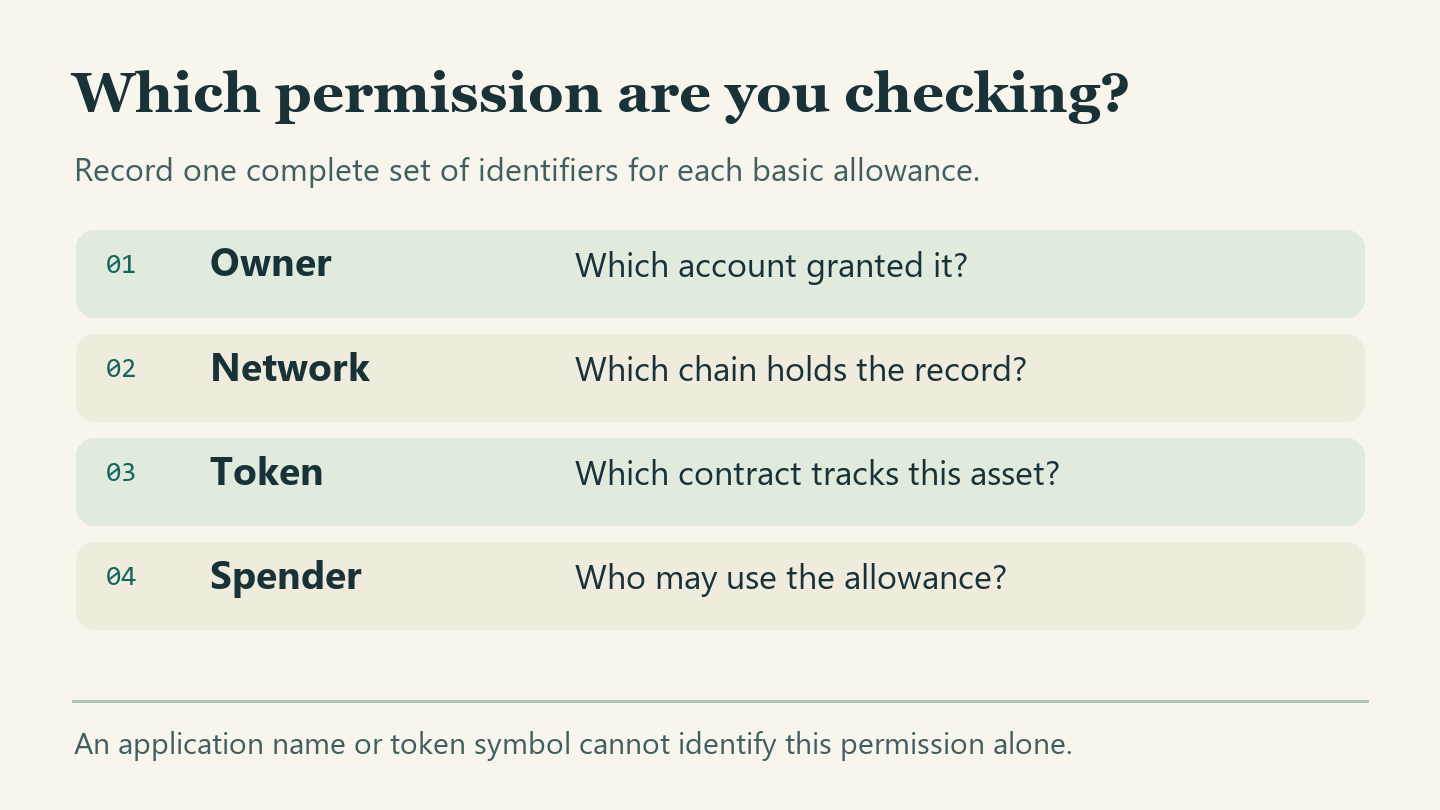
Four details identify the permission you mean
The most useful part of an allowance review is a row that another person could interpret without guessing. A friendly application name is not enough to identify it.
- Which of your accounts did you have open?
- Where does the original confirmation identify the network?
- Where did you obtain the asset’s complete contract address?
- Can you match the recorded spender to your earlier confirmation?
Beside each entry, record where you found it and when. Do not silently fill an empty field with information from a different session.
The stopping point depends on what you find
An unwanted connection with no evidence of an allowance presents a different problem from a confirmed, active allowance. Losing control of your signing secret changes the problem again.
Decide what evidence would settle this particular case before you change anything. You should be able to explain what the proposed action will affect and what it will leave untouched.
Build your permission inventory without approving anything
Step 1: Establish the account and network independently
Start in the wallet you already use, not a link from the suspect application. Find the public receiving account associated with the activity and record its network separately.
If you have several accounts, give each a private working label. “Shopping account” and “savings account” are easier to keep straight than two addresses with similar endings.
Use your label only to navigate the list. Match the full public address before assigning evidence to a row, rather than copying a lookalike from a recent message.
Multiple accounts can share one wallet interface. Seeing the correct application icon does not tell you that the selected account is the one that granted the original permission.
The same address text can also appear on different compatible networks. A screen showing no allowance on one chain does not answer a question about another chain.
Keep your working inventory in a private place. A public address isn’t a secret, but adding your name, labels and activity history can disclose more than you intended.
Step 2: Identify what the site can still see through the wallet
In MetaMask’s guide to dapp permissions, the wallet menu leads to Permissions. Selecting a connected site shows which accounts that site can access.
If one account should stay connected, review the account selection for that site. To remove the site entirely, use the disconnect option rather than expecting an empty selection to save.
Record the resulting state narrowly: the site no longer appears as connected to this account in this wallet. That observation says nothing yet about the token contract.
Nor does disconnecting erase public history. A website that already knows an address can still read public blockchain information without a fresh connection to your wallet.
If the suspicious request was declined, describe that fact separately. Declining today’s request does not erase a permission granted last month during a genuine swap.
Step 3: Look up the current spending allowance
Open an explorer through your wallet’s documented network information or a bookmark you established independently. Do not use a purported approval-warning link as your starting point.
Etherscan explains the difference between reading public records and connecting a wallet. Looking up an address or reading contract data does not require granting signing authority.
For a conventional Ethereum account, use the network explorer’s token approval checker and search the owner’s public address. Select the fungible-token category for an ERC-20 allowance.
Match the asset contract and spender against the original authorization where available. A recognized service name can help locate a candidate, but the identifier determines which permission you found.
Look for a current allowance, not just the list of historical approval transactions. An older transaction might accurately show a higher limit that has since been spent or replaced.
When a checker lists original rather than remaining limits, do not call that number current. Use a documented read-only allowance view for the matching owner and spender instead.
The ERC-20 standard defines allowance as a spender’s remaining limit for an owner. Compare today’s reading with your note.
Readers unfamiliar with contract details can stop here and ask official wallet support how to interpret the record. Do not experiment with write controls to discover what they do.
Step 4: Decide whether to revoke crypto token approvals
Compare the four identifiers and the remaining amount with what you intended. A familiar token and an unfamiliar spender are not a match simply because the logo looks reassuring.
For a row you previously marked resolved, check its identifiers against your notes. If today’s record confirms the earlier result, date the entry and leave it alone.
If a positive permission is no longer wanted, follow the wallet provider’s documented revocation route independently. Ordinary on-chain revocation is a transaction, unlike viewing the inventory.
For example, the MetaMask Portfolio spending-cap guide places Spending Caps under Overview and provides a revoke action beside a selected cap on supported networks.
Check the account and network again before considering the wallet prompt. A request to grant a fresh spending limit or send assets to support does not match the intended action.
The ordinary network fee for changing an allowance goes with the transaction. It is not a payment to a stranger who promises to activate a wallet security service.
If a prompt describes something you cannot reconcile with the row, stop. You can retain the public details and seek help without authorizing the unexplained action.
Step 5: Read the changed state rather than trusting the button
Save the transaction reference provided by your trusted wallet and look it up independently. A submitted request, pending transaction and successful transaction are not interchangeable stages.
A pending operation is not proof that the permission changed. An unsuccessful attempt cannot serve as the evidence of revocation you were looking for.
After confirmation, inspect the same owner, network, token and spender again. For a normal complete revocation of this basic allowance, the remaining amount should read zero.
If the checker hides zero balances or removed rows, an empty filtered list is weaker evidence. Prefer an explicit current reading for the same pair when available.
Record the reference, observation time and result. This establishes the observed state of that permission, not that no subsequent authorization could change it again.
Two reviews that end with different answers
The shop connection disappears and there was no spending authorization
Imagine that a fictional gallery asked to display the artwork held by your browsing account. You connected the account but declined a later request for spending authority.
The gallery no longer appears among connected sites after disconnection. Your independent check of the identified token and spender shows no remaining allowance for the browsing account.
There is no reason in those findings to buy a “wallet cleaner.” Note the scope of the check rather than claiming that every asset, network and past interaction was examined.
The public address remains visible in records from earlier transactions. That ordinary visibility is not evidence that the gallery regained permission to move funds.
The exchange screen closes but an earlier allowance remains
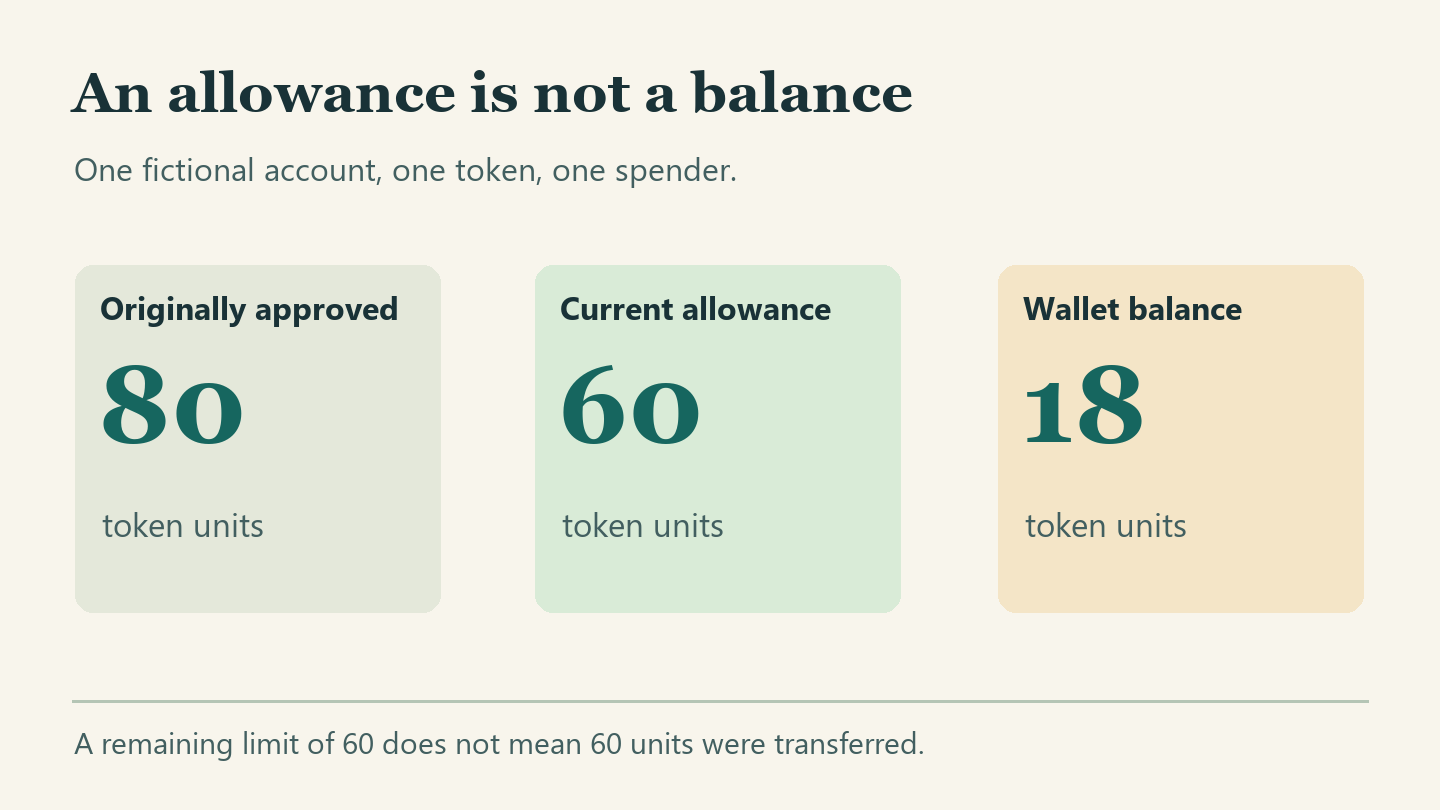
Now imagine you once authorized a fictional swap service to spend 80 units of a particular token. You still hold 18 units and have stopped using the service.
Your review now shows 60 in the allowance column. Write the earlier 80 beside its own date so nobody mistakes the older observation for today’s result.
Suppose a helper says those 60 units have already left. Ask which transfer supports that statement; the three numbers on your sheet do not identify one.
If you revoke the allowance for your second account by mistake, the confirmation there may be entirely genuine. It still does not change the first account’s token authorization.
Return to the original inventory row. Once the recorded change succeeds there, compare the earlier 60 with the present zero for the same token, spender, account and network.
These examples deliberately use simple labels. In a real review, save the complete identifiers privately so that a shortened display does not hide a mismatch.
What does the follow-up check actually establish?
Choose the observation you have, not the result the website promised.
The connected-site list is empty
You have evidence about a wallet connection. You still need the relevant network and token records to answer a question about a spending allowance.
The transaction record still says pending
Keep the inventory row open until the change is confirmed. A request waiting to be processed cannot establish a new remaining amount.
The exact allowance now reads zero
Record the account, network, token contract and spender alongside the result. Do not apply that finding to unrelated permissions or another account.
When the basic allowance does not tell the whole story
A signature can matter even without an immediate outgoing payment
Some signed permissions can be used later. A wallet showing no immediate debit doesn’t tell you that a message you signed was harmless.
Classify the request you actually remember: connection, transaction approval, message signature, or recovery-secret disclosure. If the description is uncertain, retain the original prompt or wallet activity, not the site’s interpretation.
Do not paste signed material into a public forum to ask what it means. Use the official support channel and share only the information needed to identify the request.
MetaMask also documents advanced permissions that can set conditions such as amount, frequency or expiration on supported smart accounts. Those are not interchangeable with a conventional ERC-20 allowance.
If you remember authorizing a recurring amount, inspect the corresponding feature in the wallet that presented it. Looking only at an ordinary allowance checker can miss the relevant question.
A lost signing secret is not a spending-cap problem
An unknown spender uses permission from the owner. Someone who controls the owner’s signing secret can act as the owner, which puts the problem on a different level.
Canceling one grant cannot prevent someone with the signing secret from issuing other instructions. Do not describe a zero allowance as restored account security after secret exposure.
Use your wallet maker’s established compromise guidance and seek specialist assistance if valuable assets remain. Never disclose the secret to someone offering to diagnose the incident.
A transferred token is not returned by revocation
If you see an unfamiliar transfer, preserve its record as a separate event. An allowance change governs future authorized spending under that permission, not a completed transfer.
Likewise, revocation can interrupt a service you still intend to use. If a legitimate application later needs a permission again, evaluate that new request on its own merits.
What to do when the results disagree
- Keep the old and new observations together with the exact account, network and token. A screenshot from the wrong account can look perfectly convincing.
- Remove filters that hide the relevant asset or spender, where the tool permits. Record whether the view is historical, current or limited to tokens with positive balances.
- Check whether you reviewed the correct class of permission. A fungible-token allowance does not settle questions about collectible operators or a newer smart-account feature.
- Compare the status of the intended change with its actual result. If it failed, keep the failure information instead of treating repeated attempts as evidence of success.
- If the remaining amount still looks wrong, pause further approvals and use independently located wallet support. Keep your recovery words, private keys and unrelated financial records private.
- If funds already moved without your consent, document the transfer and report promptly through appropriate channels. Do not pay anyone who guarantees recovery or asks for another signature.
Frequently Asked Questions
Should the permission inventory contain any passwords?
Keep passwords and recovery words out of your notes. An account nickname, public address, network and observation time can identify the entry without exposing sign-in information.
What should I do if two checkers disagree?
Write down which filters, network and observation time each checker used. Keep both records until you identify the difference instead of discarding the less reassuring one.
Should I redact the notes before asking for help?
Make a copy and remove unrelated accounts, personal labels and order details. Keep the unedited version privately so you can still reconstruct what you personally observed.
Is a successful transaction enough to close my review?
Confirm that the successful transaction addressed the permission you meant. Then read its current allowance on the same network instead of relying on a success notification alone.
Does a network fee prove the revocation request is legitimate?
A fee can accompany a real change, but its presence does not authenticate a website. Compare the operation with the exact change you intended.
Will a zero allowance protect me if someone has my recovery words?
No individual allowance limits someone who controls the signing account itself. Treat secret exposure as an account compromise and consult the official wallet provider’s recovery guidance.
The Bottom Line
Revoke crypto token approvals you no longer intend to grant using a trusted route, then verify the exact permission that changed. Disconnection alone does not supply that evidence.
If the record instead points to secret exposure or an actual transfer, change your response accordingly. Keep the evidence and do not authorize another transaction simply to test your wallet.

Join the discussion
0 commentsShare your experience or ask a question about this article.
Community experiences
Did this happen to you?
Your experience could help someone recognize the same scam. Submit a private report for our team to review.
I experienced this tooReports are reviewed before publication. Sharing publicly is always your choice.
Discussion
Start the conversation
Have a question or something useful to share? Add the first comment.