


A buyer says their token payment went through and sends a convincing receipt. The page may show a successful transaction while leaving one important question unanswered.
To verify an Ethereum token payment, you need more than a green checkmark. You can investigate without connecting your wallet, following the link or sending anything back.
Overview
Write down what you actually agreed to receive
To verify an Ethereum token payment, start with the agreement rather than the screenshot. Which network, token, amount and receiving address did you give the sender?
For this guide, imagine a payment of 48 units of a fictional ERC-20 token on Ethereum Mainnet. The letters on a token badge are not its unique identity.
Keep these details alongside one another before opening an independent explorer:
- The network you and the sender agreed to use.
- The exact token contract identified by the genuine issuer for that network.
- Your intended receiving address from your own trusted records.
- The amount expected, measured in token units.
The distinction between those last two addresses matters. One identifies the software that keeps the token’s balances; the other identifies the account that should receive the payment.
An explorer shows a public record, not an invoice marked paid
A block explorer presents activity recorded on a network. A seller’s agreement, the identity of the person in a chat and a custodial account credit are different records.
A sender can give you a perfectly real transaction reference that belongs to somebody else. Verifying that a transaction exists is only the beginning of the comparison.
Think of a shipping receipt with the correct weight but a different destination. It could be genuine while offering no evidence that your own order was delivered.
Keep the lookup separate from control of your funds
Reading a public Ethereum record does not require proving ownership. A demand to connect, sign, disclose a secret or pay to display the receipt changes the task.
Use an explorer you reach independently through trusted documentation or a bookmark. If a sender provides a transaction identifier, use the identifier as data rather than following their link.
Read the transaction without opening the sender’s page
Step 1: Find the correct transaction on the agreed network
Ask for the transaction hash as plain text if the sender supplied only an image. The hash identifies a particular transaction rather than your account or its balance.
Use a public explorer for Ethereum Mainnet if that is the network on your invoice. A record on another compatible chain is not the Mainnet payment you specified.
MetaMask’s explorer guidance describes opening account details and selecting the appropriate network. You can also open the explorer separately without connecting a wallet.
Enter the transaction identifier into the explorer’s search field. If an account overview appears, check whether you received a public address instead of a transaction hash.
A provider’s reference number can be genuine without being a blockchain transaction hash. Ask which type of payment the provider recorded rather than trying different networks at random.
When no record appears, note what you checked and when. A typo, wrong network or transfer not yet visible is possible; a missing result alone doesn’t establish fraud.
Step 2: Read status before interpreting the numbers
A pending entry is not evidence of a completed transfer. A failed transaction may cost the sender a network fee without delivering the token the recipient expected.
A successful transaction means the outer operation succeeded. You still need to establish whether that operation actually moved the right token to you in the expected amount.
Ethereum’s proof-of-stake documentation distinguishes execution from finality. A successful transaction can appear in a block before the network finalizes that block.
Before releasing goods, apply your agreed acceptance policy to the matching transfer. If you require finality, wait for that state instead of treating success as a shipping instruction.
Etherscan explains the transaction hash and receipt fields. The record’s time, status and block help locate the event; none individually identifies your invoice.
A transaction that predates your newly created invoice may reveal a mismatched reference. The timestamp alone cannot establish what either party intended.
Step 3: Distinguish the transaction destination from the token receiver
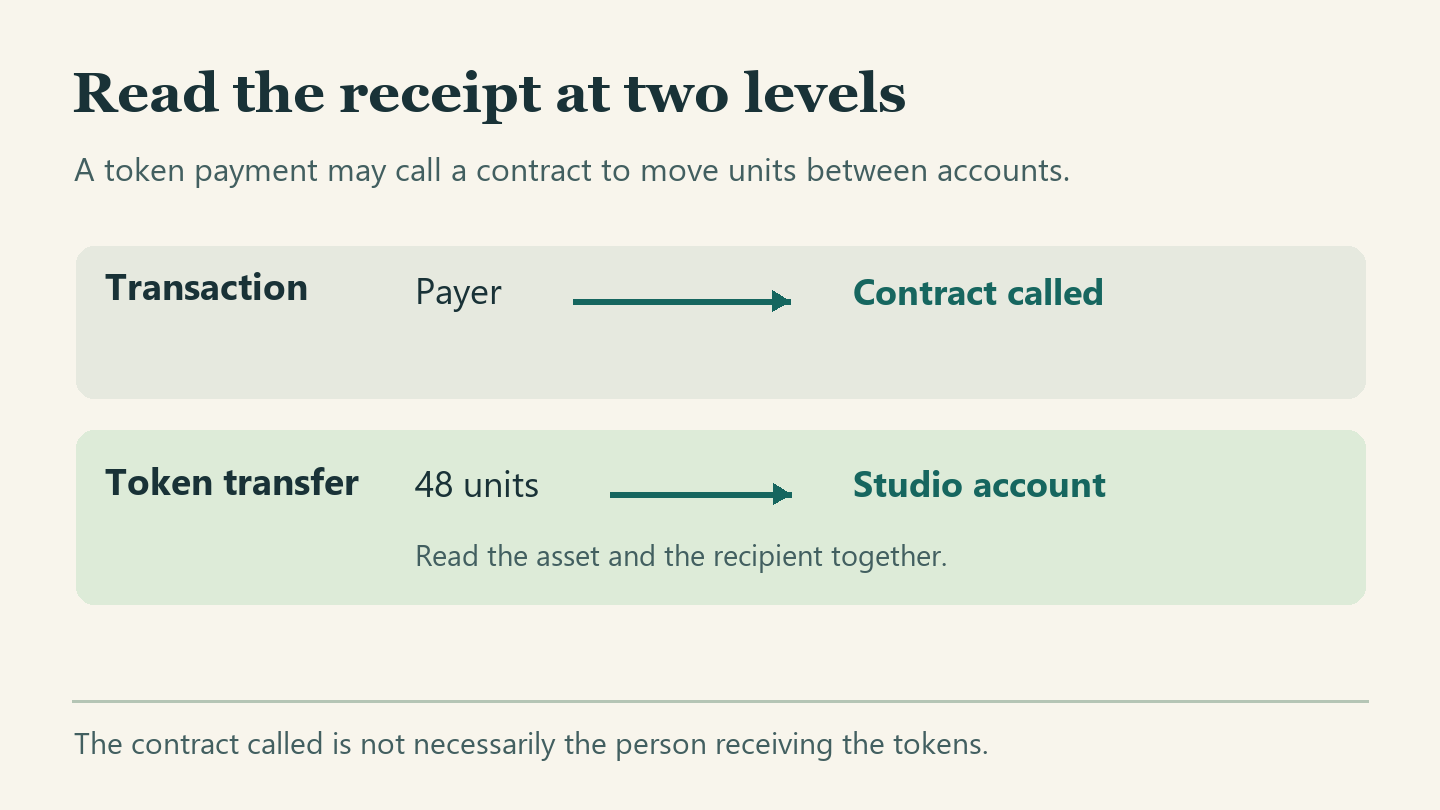
A straightforward token payment commonly involves a transaction addressed to a contract. The contract records the movement of tokens from one holder to another.
Consequently, the big transaction-level To field may correctly identify the token contract instead of your receiving account. That difference alone does not mean your payment went to the wrong place.
Conversely, treating that contract address as your own account would be a serious misreading. For the payment itself, locate the token transfer associated with this transaction.
The ERC-20 standard describes a Transfer event with a sender, recipient and value. Those fields concern the token movement and must be read with the issuing contract.
Some transactions involve a routing contract or more than one asset. Do not assume the outer destination must always be the token contract, or that the first transfer is yours.
In that situation, start from your expected token and receiving account. Find a transfer line matching both within the same transaction, then inspect the amount on that line.
Step 4: Match the exact token and recipient
Compare the token contract for the transfer with the contract the genuine issuer identifies for Ethereum Mainnet. Obtain that reference outside the sender’s message or supplied website.
MetaMask’s token contract guide distinguishes the token’s identity from your receiving account. A similar name or symbol cannot make a different contract equivalent.
An explorer may show a token icon, market price or familiar label. Those conveniences are not substitutes for the contract comparison, especially when two tokens can share a symbol.
Next compare the full recipient on the relevant transfer with the full receiving address in your trusted records. Truncated text on two different screens is not a full comparison.
Keep a private copy of the original invoice or order. If you change the expected address to match the screenshot, you lose the independent reference needed to check it.
Step 5: Reconcile the amount and who should credit it
Use the human-readable token amount when the explorer supplies it, not the network fee or the transaction’s separate native-asset value. The fee pays for processing, not your invoice.
If working from raw token units, use the correct token’s documented decimals. A raw integer does not tell you the displayed number of units unless you know the scale.
Suppose an example token uses two decimals. A raw value of 4,800 represents 48 units; another token using four decimals would display the same integer as 0.48 units.
Check the transfer amount against the original agreement, including any separately agreed treatment of fees. Do not assume an unexpected difference is acceptable simply because the transaction succeeded.
When you control the receiving wallet, compare the movement with your account activity. If a service supplied the deposit address, it also has to credit the correct customer account.
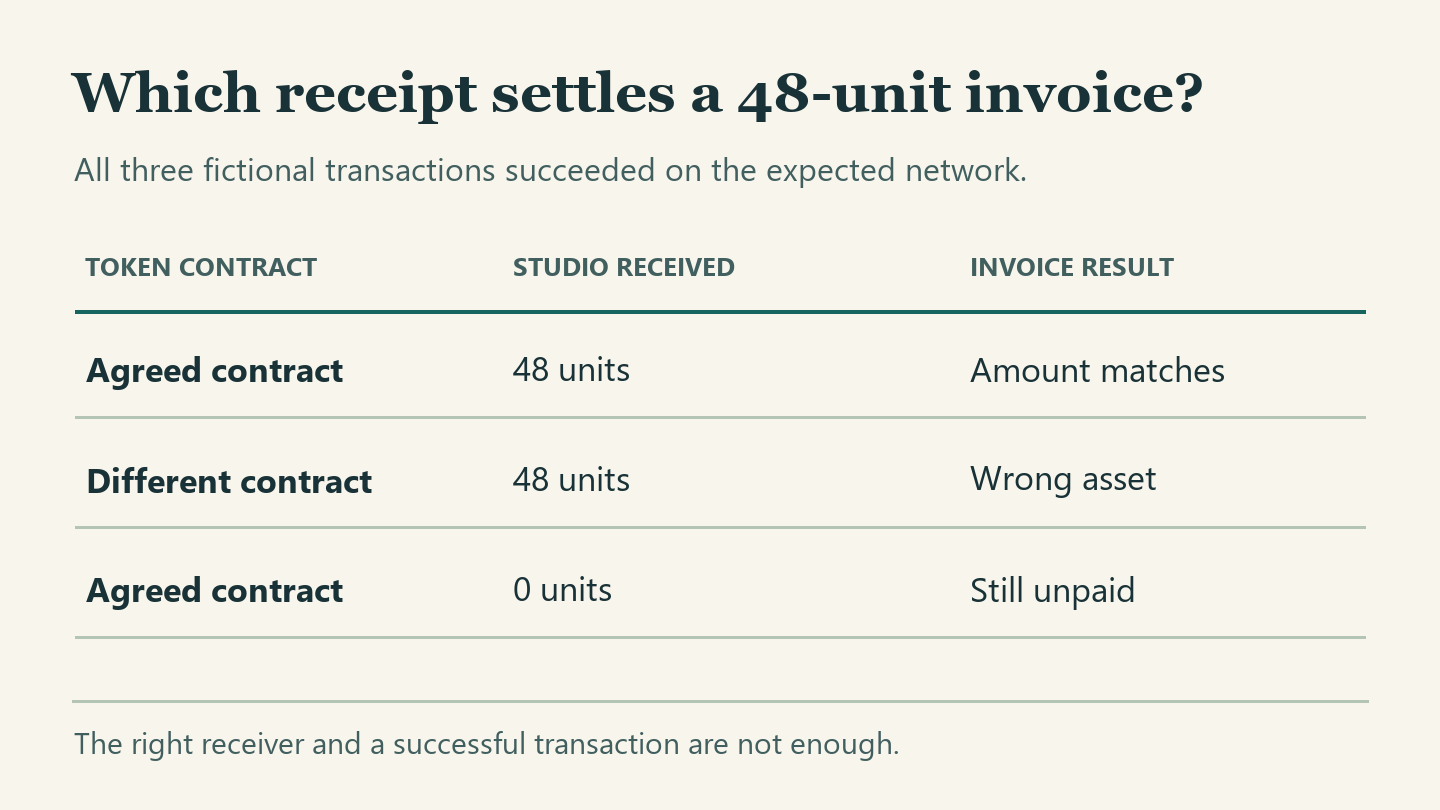
Three receipts for the same hypothetical invoice
Receipt one: a genuine match with a confusing To field
Your fictional invoice says 48 units of Orchard Token, Ethereum Mainnet, payable to your studio account. You keep the issuer’s contract reference and your studio address in your own records.
The transaction details show success and name a contract as the destination. Its token-transfer section shows the agreed Orchard contract moving 48 units to the studio account.
Here, the outer destination does not invalidate the payment. The matching movement identifies the actual token, amount and recipient, while the status confirms the relevant transaction did not fail.
Keep the transfer reference attached to the invoice. If custody is through a platform, record the on-chain finding separately from when that platform marks your deposit available.
Receipt two: the name matches but the asset does not
Another successful transaction shows 48 Orchard units reaching the correct account. This time the issuing contract differs from the one in the agreed terms.
The awkward conclusion is also the accurate one: a movement is visible, but the record doesn’t show receipt of the agreed asset. Matching names and amounts cannot close that gap.
Do not add an unknown token, trade it, or visit a website embedded in its description to investigate. You already have enough information to withhold acknowledgment of this invoice.
Receipt three: the transfer exists but the amount is zero
The final record has the expected network, token contract and recipient. The sender highlights a Transfer entry, but its value is zero rather than 48.
A zero-value transfer can produce a genuine Transfer event without paying this 48-unit invoice.
No second transaction or “activation fee” is needed to demonstrate the mismatch. Keep the record and tell the sender exactly which agreed figure is missing.
Which record is missing from this invoice?
Use the first unresolved comparison to identify what you need next.
Only a picture or account address arrived
Request the transaction reference as text and look it up yourself. A picture cannot identify a matching public record by itself.
One matching field belongs to another line
Keep token, recipient and amount together on one transfer line before crediting the invoice. Adjacent information may describe a different movement.
The transfer matches but the deposit is missing
Preserve the independently checked transaction record. Ask the custodial provider to reconcile its own account ledger through its established support channel.
Handle the gray areas without declaring success too early
One transaction includes several transfer lines
Suppose one successful transaction sends 48 units to someone else and one unit to you. Both transfer rows belong to the same operation.
A screenshot cropping the first amount beside the second recipient could look persuasive. The comparison only works when the contract, amount and recipient come from the same transfer.
Sometimes several payments settle a single invoice. Match each separately, record the references and total only verified amounts you and the payer agreed to combine.
Do not credit a transaction twice. If a payer presents a reference for a second order, check the invoice where that same movement was already applied.
An account balance changed for more than one reason
A balance after the event can reflect earlier deposits, later transfers or different tokens shown together in a portfolio. It is not automatically the amount somebody just paid.
Instead of subtracting the current total from a remembered total, locate the particular transfer. Then reconcile the account history if you still need to explain the balance difference.
A quoted currency value introduces another variable: market prices can change while the token balance stays the same. An invoice for token units should be reconciled in those units.
The service shows a pending or missing deposit
An incoming transfer to a platform-controlled address can appear on-chain before the platform credits the customer’s internal balance. Its deposit conditions may also differ by network and asset.
Check the provider’s deposit instructions for that asset and network. Use its authenticated support channel for a missing credit rather than a contact the sender recommends.
Provide the public transaction reference, network, amount and relevant time privately to the provider. It can investigate its own records; the explorer cannot change a customer ledger.
Etherscan explains why it cannot recover a transfer. It displays blockchain information but cannot move your funds into a private account on request.
Avoid publishing a bundle of personal details beside a public wallet address. An exchange may need account information through its authenticated support process, but strangers in a chat do not.
What to do if a receipt does not match
- Keep the invoice, the sender’s claim and the independent transaction reference together. Separate what you agreed before the payment from what the sender says happened afterward.
- Write down the first mismatch precisely, such as a different network, contract, receiver or amount. That is more useful than saying the whole receipt looks suspicious.
- Do not release goods or mark the order paid solely from the screenshot. A credible explanation can wait while you obtain evidence of the correct movement.
- If the transfer matches but the custodial credit does not, open a deposit inquiry with the genuine provider. Include only the information appropriate to its authenticated process.
- If someone claims to have overpaid, reconcile the original obligation and all verified receipts before considering any response. Do not send money to a new destination under pressure.
- If you already shipped goods, preserve order and carrier records alongside the payment evidence. Contact the relevant marketplace or carrier promptly through a channel you locate independently.
Frequently Asked Questions
Can I verify an Ethereum token payment without connecting a wallet?
Yes, public explorer records can be read independently. You do not have to authorize spending, sign a message or disclose recovery information to inspect a transaction.
Why does the top-level destination show a contract instead of my address?
A token transaction may call a contract that records movements between holders. Read the recipient on the relevant token transfer rather than assuming the outer destination is the beneficiary.
Does the same symbol mean I received the same token?
No, the name and symbol alone are not unique identifiers. Match the actual contract on the agreed network against the issuer’s independently obtained reference.
How many confirmations prove that my exchange credited my account?
There is no universal confirmation count that proves an internal credit. Check the provider’s specific deposit policy and the actual status inside your own account.
Can one blockchain reference serve as proof for two invoices?
A single transaction can include multiple movements, but the same transfer should not be counted twice. Match each invoice to the actual amount, recipient and payment agreement.
Does the public record tell me who sent the chat message?
A matching movement can substantiate receipt without establishing who controlled a messaging account. Keep identity verification separate when the transaction, contract or marketplace rules require it.
The Bottom Line
Verify an Ethereum token payment against your own records: the network, token contract, receiving account and amount must fit the transaction you agreed to accept.
If an important field fails that comparison, keep the invoice open and retain the evidence. If the transfer matches but your exchange hasn’t credited it, contact the exchange directly.

Join the discussion
0 commentsShare your experience or ask a question about this article.
Community experiences
Did this happen to you?
Your experience could help someone recognize the same scam. Submit a private report for our team to review.
I experienced this tooReports are reviewed before publication. Sharing publicly is always your choice.
Discussion
Start the conversation
Have a question or something useful to share? Add the first comment.