

A DHL message lands in your inbox just as you are waiting for a package. It says the delivery failed, the address needs attention, and a small fee will put the parcel back on the road.
That timing can make the email feel routine. Yet the smallest payment request may be the doorway to a much larger theft.
Overview
The message borrows the urgency of a real delivery problem
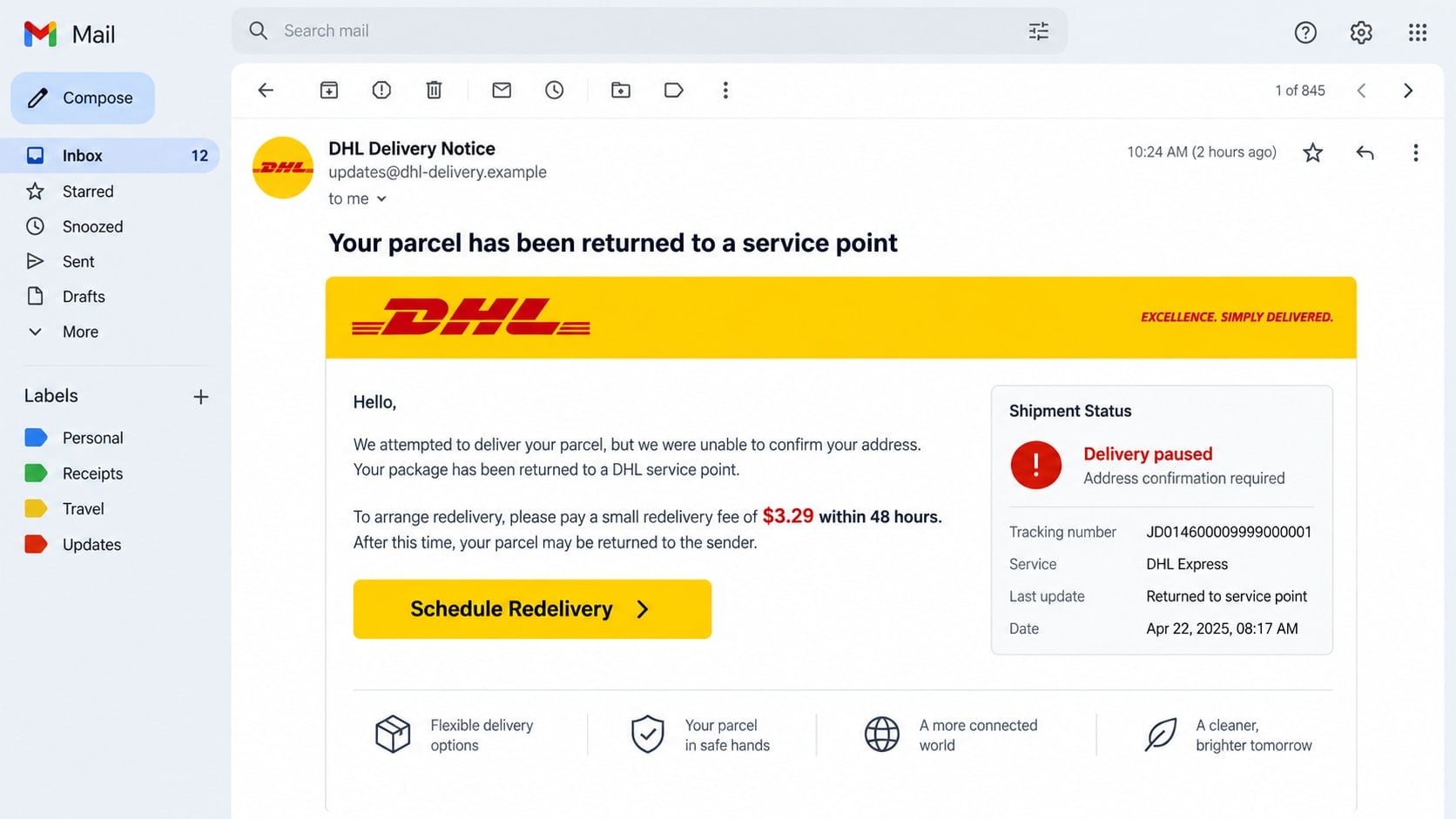
A DHL scam email pretends that a parcel is delayed, held at a service point, missing an address, or waiting for a customs or redelivery payment. The recipient is told to act before the shipment is returned, destroyed, or charged additional storage fees.
Because online orders are common, scammers do not need to know whether a specific person is expecting DHL. They send the same warning broadly and rely on coincidence to make it feel personal.
The fee is small because the information is worth more
The email may request only $1.99, $2.86, or $3.29. That modest amount lowers suspicion and makes payment seem easier than losing a package.
The real objective is often the full set of details entered on the copied page: name, home address, phone number, card number, expiration date, and security code. Some pages also request an email password or a one-time banking code.
The DHL name is being impersonated
DHL is a legitimate international shipping company and is not responsible for these messages. Criminals copy its logo, yellow-and-red colors, shipment terminology, and tracking layouts to give an unrelated website a familiar appearance.
- An unexpected email claims a parcel cannot be delivered.
- A short deadline is attached to a small redelivery or customs fee.
- The button opens a domain that is not controlled by DHL.
- The page requests card details before showing verifiable shipment information.
- A tracking number is missing, invalid, or unrelated to anything you ordered.
- The sender uses a free mailbox or a lookalike address rather than an official DHL domain.
Why a Fake DHL Message Can Look Convincing
Delivery notices are ideal camouflage because genuine couriers send many automated updates. A criminal can copy a real email’s banner, icons, footer, button style, and ordinary phrases without gaining access to DHL’s systems.
The fake message may include a long tracking number and a precise deadline. Neither proves that a shipment exists. Random digits and a countdown are easy to generate, while the deadline discourages the recipient from checking the number independently.
Sender names are also weak evidence. An inbox may display “DHL Express” even when the underlying address belongs to a newly registered domain. In more advanced campaigns, the visible address can be spoofed, so the requested action still matters more than the label.
Some messages arrive during a real order because the victim shops frequently, because leaked contact data shows a recent purchase, or because a compromised merchant exposed delivery details. Accurate timing is unsettling, but it does not make the email’s link trustworthy.
How the DHL Scam Email Works
Step 1: A delivery problem appears without useful context
The email says a driver could not confirm the address, a parcel has been returned to a service point, or customs charges remain unpaid. It may avoid naming the merchant or describing the package because the sender does not know what the recipient ordered.
A deadline such as 24 or 48 hours turns a vague claim into an immediate decision. The fear is not the fee itself. It is the thought that an important order could disappear.
Step 2: The recipient is directed to a copied delivery page
The “Schedule Redelivery,” “Update Address,” or “Pay Customs Fee” button does not lead to DHL. It opens a lookalike domain chosen to resemble a shipment or tracking address.
The first page may ask for a postal code or tracking number. This extra step makes the process feel like a normal lookup while allowing the site to record that a real person followed the link.
Step 3: Personal details are collected as delivery information
The fake form requests a full name, address, phone number, and email address. Those fields appear relevant to a delivery, so the victim may not recognize that they are building a useful identity profile for the criminal.
The data can be used for targeted phishing, account-recovery attempts, fraudulent purchases, or resale. A scammer who knows a name, address, and expected courier can write a much more persuasive follow-up message.
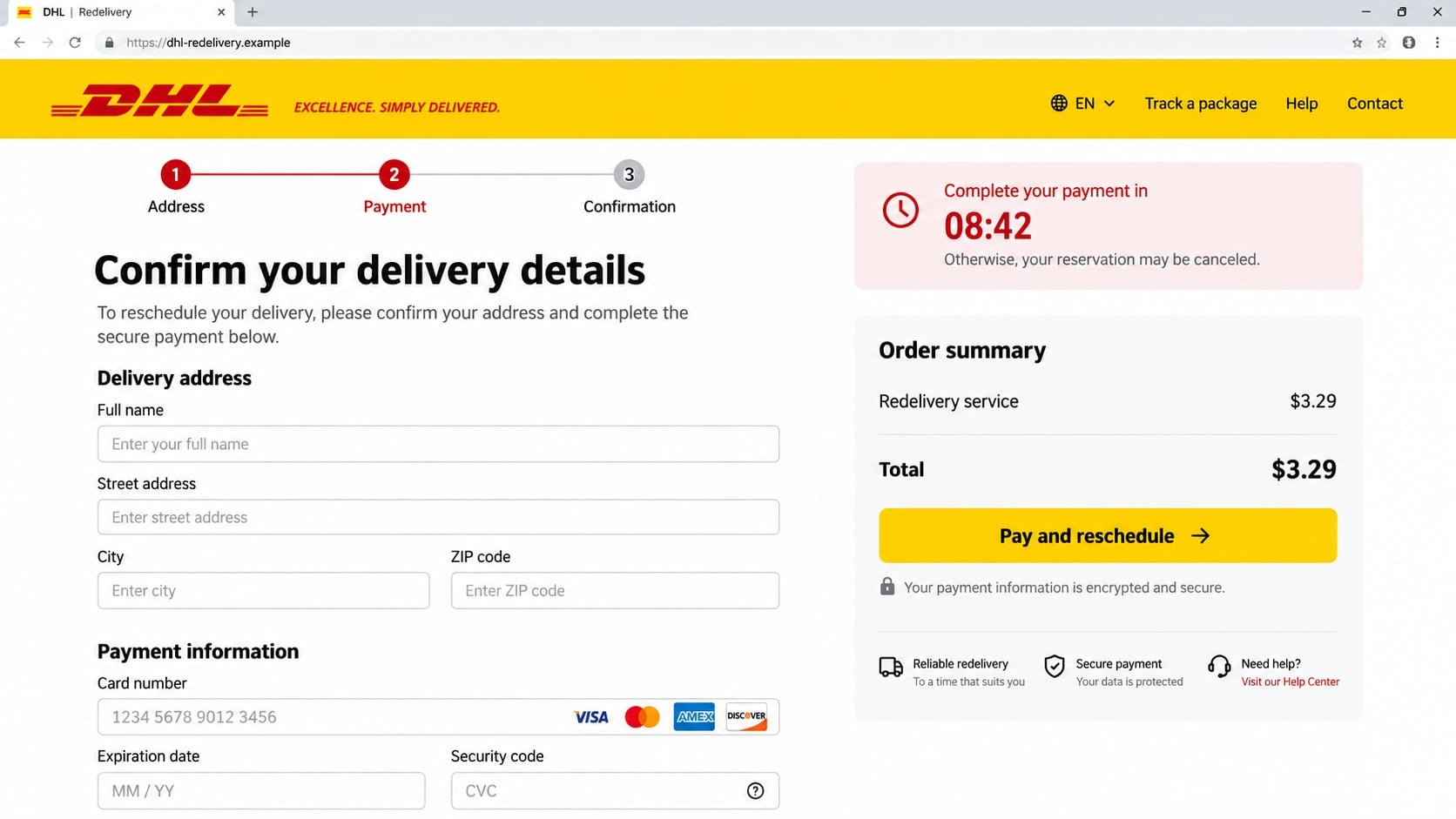
Step 4: A tiny fee captures complete card details
The payment page asks for a card number, expiration date, security code, and sometimes the billing address. A small total keeps the victim focused on convenience rather than on the amount of information being surrendered.
The page may display card logos, a padlock icon, or a claim that payment is encrypted. Those decorations do not identify the company receiving the data, and encryption cannot make a fraudulent operator trustworthy.
Step 5: A real bank prompt may be turned into another trap
After the card is submitted, the site may claim verification failed and request a one-time code. Meanwhile, the attacker can try the stolen card at a merchant or add it to a digital wallet, causing the cardholder’s bank to send a genuine code.
If that code is entered into the fake DHL page, the scammer may use it to approve a transaction that has nothing to do with redelivery. The victim sees a familiar bank message but misunderstands what is being authorized.
Step 6: The page stalls while the stolen data is reused
The victim may receive an error, a fake confirmation, or a request to try another card. Each retry can give the attacker an additional payment method.
Unauthorized charges may begin immediately or days later. The same email address and phone number can also receive follow-up scams about refunds, account security, or another failed package.
Identity, Contact, and Payment Checks
Inspect the destination, not just the button text
A button can say “DHL Tracking” while opening an unrelated address. On a computer, hover over it without clicking. On a mobile device, avoid pressing through the message and instead open DHL through a saved app or a manually typed official address.
DHL warns that official communications use its recognized domains and that it does not use free email services such as Gmail or Yahoo for delivery notices. A domain containing “dhl” somewhere in a longer name is not automatically official.
Verify the shipment outside the email
Find the tracking number in the merchant’s order history or original purchase confirmation. Enter that number in the official DHL site or app rather than copying a number supplied only by the suspicious message.
If no shipment appears, contact the seller through the store where the order was placed. A genuine delivery issue should be visible through at least one independently trusted channel.
Question a payment page that arrives before proof
Customs duties and shipping charges can be real, but a valid charge should connect to a verifiable shipment. A page that demands card details while hiding the sender, merchant, parcel origin, and official tracking history has not established that any payment is owed.
Do not let a small amount bypass normal caution. Losing $3.29 is not the main risk when the page receives everything needed to attempt larger card transactions.
Use official support details you locate yourself
Do not call a telephone number printed inside a suspicious email or fake tracking page. Use the contact options in the official DHL site for your country and provide the tracking number without sharing passwords or bank codes.
DHL accepts reports of suspicious emails at its dedicated phishing mailbox. Forwarding the original message as an attachment preserves technical details that a screenshot may omit.
Red Flags in DHL Delivery and Customs Emails
The strongest warning sign is a mismatch between the story and the available facts. The email may demand immediate payment but fail to name the seller, delivery address, parcel origin, or item. A real-looking logo cannot fill those gaps.
Watch for unusual domains, shortened links, free sender accounts, attachments, and requests to enable document content. DHL has specifically warned that unexpected attachments claiming to arrange delivery can contain malware.
A countdown timer is another manipulation tool. A delivery company can set a collection deadline, but it does not need to prevent you from opening the official site, checking the order, or contacting support first.
Repeated card failures are especially dangerous. A legitimate checkout should not encourage you to expose several cards. Stop after the first unexpected error and contact the bank if the information was submitted.
How to Check Whether a DHL Delivery Notice Is Real
Start with the purchase, not with the email. Open the store or marketplace where you ordered and look at its shipment page. Confirm that DHL is actually the carrier and that the tracking number matches.
Next, type the official DHL address yourself or open its known app. A real tracking record should show events that form a sensible route, not merely repeat the alarming sentence from the email.
Review the sender and link carefully, but remember that a forged sender can still look correct. Independent tracking is more reliable than branding. If the message mentions a fee, ask DHL support what the charge represents before paying.
If you were not expecting anything, do not assume the parcel is a surprise gift. Delete the message after reporting it. Genuine senders can contact you through the retailer or another verifiable route.
What to Do if You Have Fallen Victim to This Scam
- Stop interacting with the page. Close the tab and do not submit another card because the first one supposedly failed. Save the email, full sender address, link, and screenshots as evidence, but do not revisit the site to collect more.
- Contact the card issuer immediately. Use the number on the back of the card or the official banking app. Explain that the card details were entered on a phishing page, ask for the card to be blocked and replaced, and review pending transactions with the fraud team.
- Challenge unauthorized transactions. Report every charge you do not recognize, including small test payments. Ask the issuer about its dispute process and keep the case number, dates, and copies of your communications.
- Secure any password you entered. Change it from a clean device, beginning with the affected email or courier account. If the same or a similar password was used elsewhere, replace it on every account with a unique one and enable multifactor authentication.
- Tell the bank if you shared a one-time code. A verification code can mean that an attacker attempted a transaction, account login, or digital-wallet enrollment. Describe the exact wording of the bank message so the representative can identify the action.
- Check the device if you opened a file. If the email delivered an attachment, installer, or browser notification, disconnect from sensitive accounts and run a full scan with Malwarebytes. Remove anything detected, update the operating system and browser, and avoid banking until the device is clean.
- Block the malicious site and follow-up ads. AdGuard can help block known phishing domains, deceptive redirects, and malicious advertising, but it cannot recover information already submitted. Keep browser and security filters enabled as an additional layer, not as a substitute for verification.
- Monitor for identity misuse. Watch card statements, bank alerts, email sign-ins, password-reset messages, and mobile account changes. If sensitive identity data was exposed, consider a fraud alert or credit freeze with the appropriate credit bureaus in your country.
- Report the message. Send the suspicious email to DHL’s official phishing reporting address as an attachment and report the site to your email provider, browser, national fraud center, or local law enforcement where appropriate.
- Warn anyone who received the link from you. If you forwarded the email or shared it in a group, tell recipients that it is fraudulent. A quick correction can prevent another person from entering card details.
Frequently Asked Questions
Does DHL ever charge a delivery or customs fee?
Legitimate shipping, customs, tax, and storage charges can exist. The presence of a fee alone does not prove a scam. Verify the shipment and charge through DHL’s official site, app, or support channel before paying.
Can a DHL scam email know my real tracking number?
Yes. Tracking information can be exposed through compromised accounts, leaked messages, insecure merchants, or forwarded notifications. A correct number is useful context, but you should still open the official tracking service independently.
Is an email safe if the sender appears to end in dhl.com?
Not necessarily. Sender information can be spoofed, and lookalike characters can be difficult to notice. Check the link destination and verify the shipment outside the message rather than trusting the displayed sender alone.
Why do scammers ask for such a small redelivery payment?
A small fee feels ordinary and reduces hesitation. The criminal may care far more about collecting complete card and identity details than about the advertised amount.
What if I clicked the link but entered nothing?
Close the page, clear any notification permission it requested, and update the browser. Risk is much lower if you did not download a file, enter information, grant permissions, or install anything, but watch for more targeted messages.
Should I reply to tell the sender I know it is a scam?
No. A reply confirms that the address is active and can invite additional phishing. Report the original email through the proper channels, block the sender, and delete it.
The Bottom Line
A DHL scam email turns a familiar delivery inconvenience into a rushed payment decision. The logo, tracking layout, and low fee are props; the decisive question is whether the shipment and payment can be confirmed independently.
Do not use the message’s link or contact details. Check the order through the merchant and DHL’s official service, and treat any request for card data or a one-time code as a reason to stop.

Join the discussion
0 commentsShare your experience or ask a question about this article.
Discussion
Start the conversation
Have a question or something useful to share? Add the first comment.