

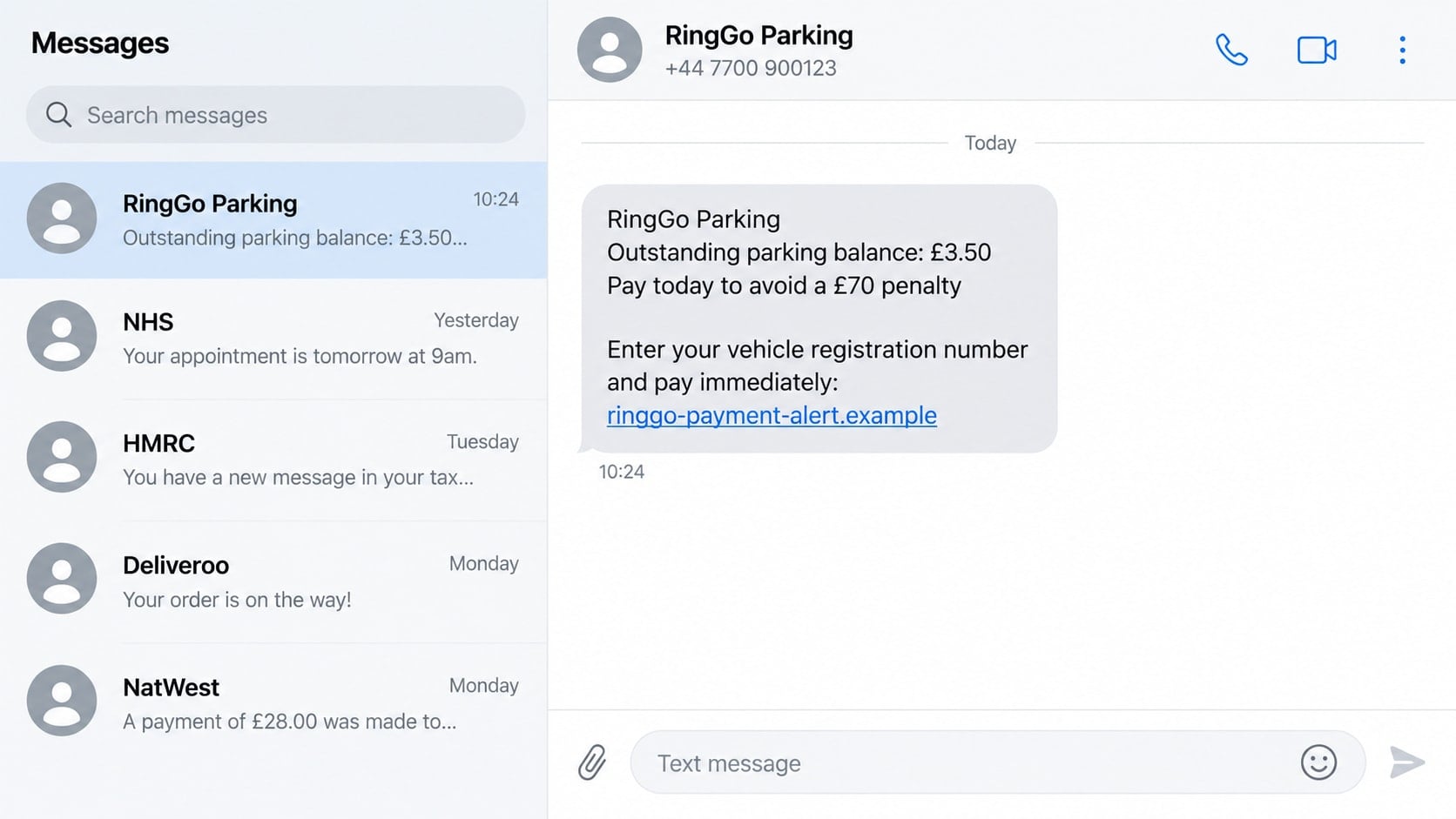
A text marked “RingGo Parking” says a £3.50 balance remains unpaid. Pay today, it warns, or the charge will rise to £70 and enforcement action may follow.
The amount is small, the deadline is close, and the message may arrive soon after you parked. That combination is meant to send you straight to a payment page before you check who actually issued the demand.
Overview
A fake parking balance creates instant uncertainty
The RingGo scam text impersonates the legitimate parking-payment service and claims a recent session was not paid, did not close correctly, or produced an outstanding balance. The message may ask for a vehicle registration number before displaying a charge.
Drivers often use several councils, car parks, and payment systems, so a brief reference to parking can feel credible even without a location or session time.
The link leads to a copied payment form
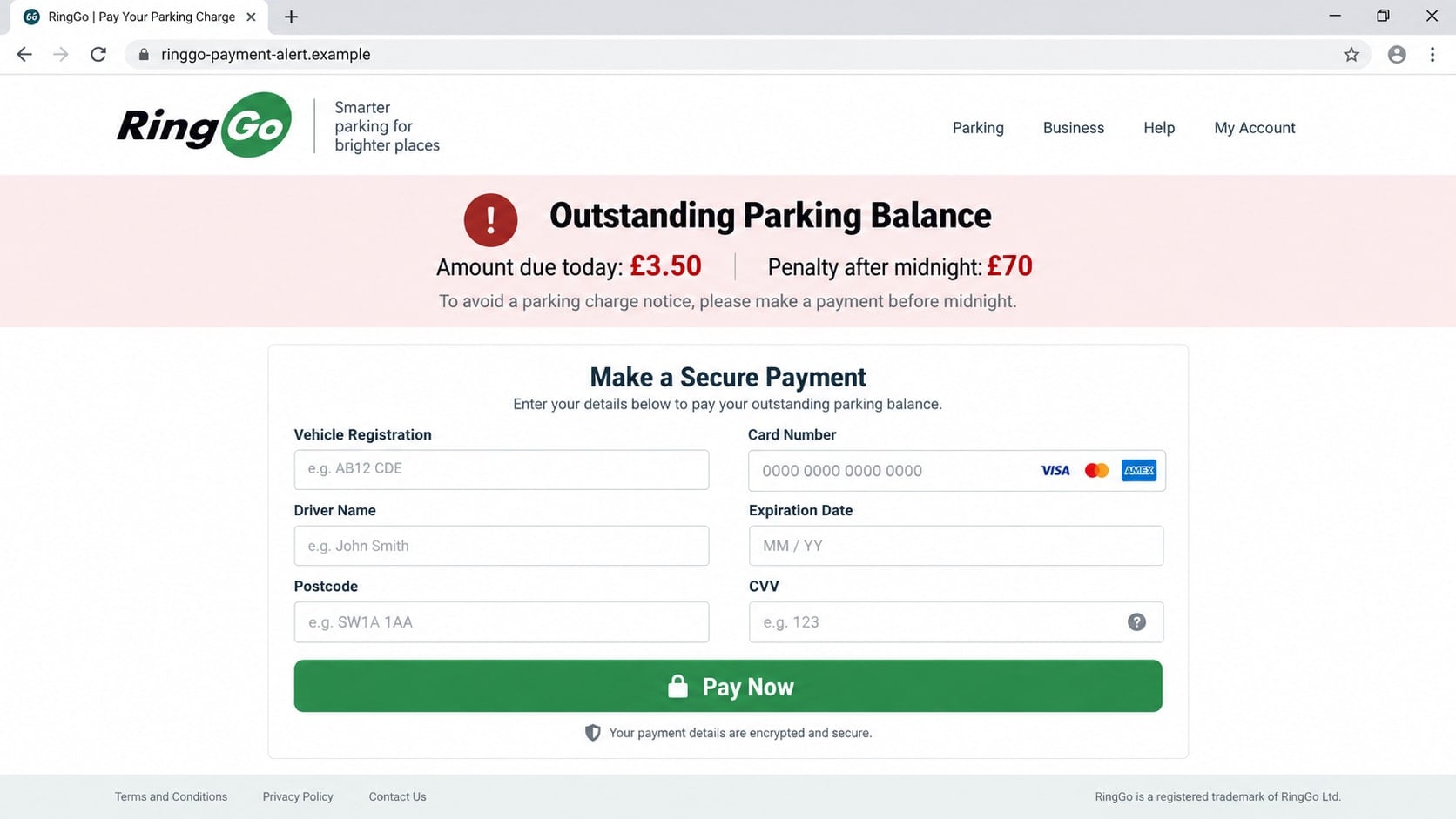
The destination uses RingGo colors, branding, and parking language but sits on an unrelated domain. It requests a registration number, postcode, driver name, phone number, and payment card.
A low balance such as £3.50 reduces hesitation. The threat that it will become £70 supplies the urgency needed to make the victim overlook the address bar.
The text confuses payment service with parking enforcement
RingGo processes parking sessions, but penalty charge notices are issued by the relevant council or parking operator. A scam message blurs those roles and presents RingGo as both payment provider and enforcement authority.
- An unexpected text claims there is an outstanding parking balance.
- The message does not identify a clear location, date, or genuine notice number.
- A link uses an unfamiliar domain with RingGo words added to it.
- The balance is small but paired with a much larger midnight penalty.
- The page asks for registration, identity, and full card details.
- The text says to reply, copy the link, or act before checking the app.
What RingGo Has Said About These Messages
RingGo has warned users about phishing emails and texts that appear to come from the service. Its guidance says it will not ask for a password, PIN, or payment details through email or text.
The company also tells drivers to check parking history through the official app or website. A real session and payment should be visible there without using a link from an unexpected message.
Councils have issued related warnings about texts claiming to be penalty notices. East Sussex County Council, for example, states that it does not send SMS messages about penalty charge notices and recommends forwarding scam texts to 7726.
The distinction matters. RingGo can record a parking payment, while the relevant authority handles enforcement. A surprise text that combines both functions should be verified with each organization independently.
How the RingGo Scam Text Works
Step 1: A bulk text claims a parking payment failed
The message says an unpaid session, outstanding parking balance, or failed payment requires attention. It may use the RingGo name as the sender label even when the number is unrelated.
No specific car park is needed. The campaign depends on reaching enough drivers that some recently used paid parking and find the story plausible.
Step 2: A small balance is paired with a large threat
The text may request £3.50 now and warn that the amount becomes £70 at midnight. The contrast makes immediate payment seem like the sensible option.
This deadline is a social-engineering device. It discourages the recipient from checking parking history, calling the council, or reading the domain carefully.
Step 3: The link opens a fake RingGo payment page
The website copies a logo, green color scheme, and familiar parking terms. It may display a lock icon and claim that payment details are encrypted.
The domain is not ringgo.co.uk or myringgo.co.uk. A secure connection only encrypts the journey to the scammer’s server; it does not make that server legitimate.
Step 4: Vehicle and personal details are collected first
The form asks for a vehicle registration, driver name, postcode, email address, or phone number. These details help the page appear to locate a parking record.
In many cases, any plausible registration produces the same balance. The result is generated by the page, not retrieved from an enforcement database.
Step 5: The victim enters full card information
The payment stage requests the card number, expiration date, and security code. Some pages also request the billing address or online-banking verification code.
The criminal receives this information even if the site later displays an error. Asking for another card after a failed attempt can collect several accounts from one victim.
Step 6: The card is tested and the victim is targeted again
Small test charges may appear before larger purchases. The stolen details can also support a fake bank call that refers to the £3.50 parking payment.
Because the victim’s vehicle and postcode are now known, future parking messages can sound more specific. The first form becomes a source of information for the second scam.
Identity, Contact, and Payment Checks
Check the session in the official RingGo app
Open the app directly and review Receipts or History. Confirm the vehicle, location, start time, end time, and amount paid.
If the official history shows the session was paid, the text’s balance claim has no basis. Do not use its link to repeat the payment.
Verify any penalty with the issuing authority
A genuine penalty charge notice should identify an authority, notice number, vehicle, date, and location. Use the council or operator’s official website to check it.
RingGo is not the authority that decides whether a penalty has been issued. Treat a text that hides the issuer as suspicious.
Read the complete domain before entering a registration
Scam addresses often place ringgo in a subdomain or combine it with words such as payment, balance, secure, or penalty. The recognizable word is meant to distract from the real domain.
RingGo identifies ringgo.co.uk and myringgo.co.uk as its official websites. Open those addresses independently instead of following a text link.
Keep payment details inside trusted channels
Use the official app, approved parking machine, or operator website. RingGo says it will not request payment details through an email or text message.
If the page threatens a larger charge within hours, pause rather than accelerate. A legitimate notice remains verifiable through the issuing authority.
RingGo Texts, Real Reminders, and Fake Penalties
A real parking service may send notifications related to a session, depending on account settings. That does not mean every message using the RingGo name is authentic.
Look for context that only the real account should provide, then confirm it in the app. Do not trust a sender label, because names can be spoofed or inserted by messaging services.
The safest rule is simple: messages can notify you, but they should not choose the payment route. Open the app yourself whenever money or account details are involved.
How to Verify an Outstanding Parking Claim
- Do not reply to the text or open its link.
- Open the official RingGo app and review parking history.
- Check the bank statement for the original parking payment.
- Look for a physical or postal notice from the parking authority.
- Visit the council or operator website by typing its address yourself.
- Ask the authority whether the notice number and balance are genuine.
A real missed payment or penalty can be resolved through the operator that issued it. A false message usually falls apart when asked to provide a verifiable location, session, and notice number.
Why Vehicle Registration Data Still Matters
A registration number is visible in public, but pairing it with a name, postcode, phone number, and active card creates a more useful profile. Context gives ordinary information new value.
A follow-up text can mention the correct vehicle and claim a second parking violation. That specificity may persuade the recipient that the sender has access to an official database.
The same details can support fake insurance, toll, tax, or vehicle-sale messages. Each story begins with a fact the owner recognizes and ends with a request for money or credentials.
Registration and postcode combinations may also be used to query services that expose limited vehicle information. The returned make, model, or tax status can make later impersonation more detailed.
This does not mean entering a registration alone gives direct access to a bank account. It means the victim should expect more believable social engineering and should not treat accurate vehicle data as proof.
If card information was entered as well, the risk changes immediately. The card issuer should be contacted even when no charge appears and even when the page displayed an error.
Drivers should also review the real parking account. Reusing the same password for RingGo and email can turn a payment-form scam into a wider account compromise.
Keep later messages separate from the first story. Verify every new parking, bank, or insurance contact through an independently opened app or official website.
A scam page may claim it found a live balance immediately after a registration is entered. Test-like speed is not proof that a real search occurred; many phishing pages display the same result for every input.
The site might also request a date of birth or driving licence number for verification. Those fields are unrelated to settling a routine parking session and increase the identity-theft risk.
Location permission is another unnecessary request. A historical parking balance should already identify its location and does not need continuous access to the driver’s current position.
If the text names a real council, contact that council through its published website. Do not let the copied name or crest substitute for a verifiable penalty reference.
When warning another driver, share a screenshot with personal and card information removed. Awareness helps, but reposting exposed details can create an additional privacy problem.
Check saved payment methods in the real app as well. Remove any card that was replaced after the incident so an old credential is not mistaken for an active one.
What to Do if You Have Fallen Victim to This Scam
- Stop entering information. Close the fake page and do not try another card. Take note of the domain and every field you completed so the exposure can be handled accurately.
- Call the card issuer. Use the number on the card or official banking app. Explain that the card details were entered on a phishing page and ask whether the card should be blocked and replaced.
- Review card activity carefully. Check pending and completed transactions, including small verification charges. Report anything unfamiliar immediately and keep the fraud case reference.
- Change compromised passwords. If the page asked for a RingGo, email, or banking password, replace it from a clean device. Change reused passwords and enable strong additional verification.
- Check the official RingGo account. Review vehicles, contact details, cards, receipts, and recent sessions. Remove unfamiliar information and contact official support if the account itself may have been accessed.
- Scan if a file or app was installed. Run a full Malwarebytes scan to find malicious downloads or unwanted remote-access components. A plain web form may not install malware, but unexpected software raises the risk.
- Block repeat phishing. Delete the text after saving evidence, block the sender, and remove browser notification permission from the site. AdGuard can help block many known scam domains and malicious ad redirects.
- Report the message and beware of recovery scams. Forward the text to 7726 and report loss through the appropriate fraud service. Ignore anyone who later promises to recover the money or catch the scammer for a fee.
Frequently Asked Questions
Does RingGo send texts about outstanding parking balances?
RingGo warns that scammers send messages about unpaid parking. Verify any balance in the official app or website and never provide payment details through an unexpected text link.
Can RingGo issue a £70 parking penalty?
Parking enforcement is handled by the relevant council or operator. A genuine penalty should identify that authority and provide a verifiable notice number, vehicle, date, and location.
Why did the message arrive after I used a RingGo car park?
The timing may be coincidence because these texts are sent widely. Even a well-timed message must be checked through the app and issuing authority.
Is a website safe if it uses the RingGo logo?
No. Logos and layouts can be copied. Inspect the full domain and open ringgo.co.uk or myringgo.co.uk independently.
What if I entered only my vehicle registration?
The immediate financial risk is lower, but the registration can make future phishing more convincing. Stop using the page and be cautious of follow-up parking or bank messages.
Can I recover a card payment made on the fake page?
Contact the card issuer immediately and explain the fraud. Recovery depends on the payment status and circumstances, so fast reporting is important but success cannot be guaranteed.
The Bottom Line
The RingGo scam text turns a small parking balance into a race against a much larger penalty. Its power comes from timing and uncertainty, not from access to a real parking record.
Keep the message out of the payment path. Check the official RingGo app, verify any penalty with the issuing authority, and never enter card details on a domain delivered by an unexpected text.

Join the discussion
0 commentsShare your experience or ask a question about this article.
Discussion
Start the conversation
Have a question or something useful to share? Add the first comment.