

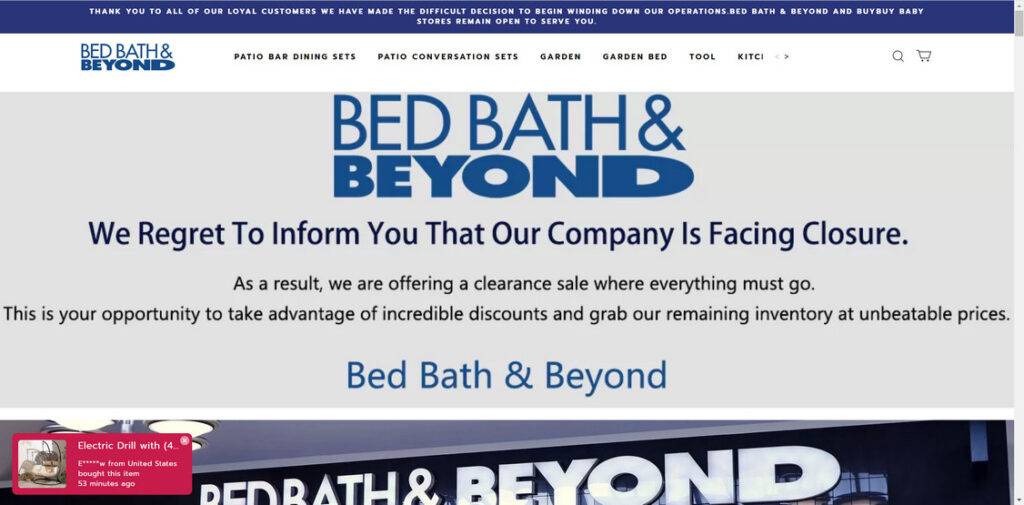
Diuope.com is a website that claims to be selling products from Bed Bath & Beyond at huge discounts as part of a store-closing sale. However, this website is not affiliated with Bed Bath & Beyond and is actually a scam that aims to steal your money and personal information. In this blog post, we will explain what is the Diuope.com site scam, how it works, and what to do if you have fallen victim to it.
What is the Diuope.com scam?
Diuope.com is a scam online shop that uses the logo and name of Bed Bath & Beyond, a popular home goods retailer, to lure customers into buying products that they will never receive. The website claims that all stores are closing and everything must be sold, and offers new merchandise that arrives often. However, these are all lies designed to make you think that you are getting a great deal from a reputable company.
How does the Diuope.com online shop scam work?
The Diuope.com scam works by tricking customers into thinking that they are buying products from the real Bed Bath & Beyond website, when in fact they are giving their money and information to scammers. The scammers use various methods to promote their fake site, such as sending phishing emails, posting fake ads on social media platforms, or creating fake news articles.
Once customers visit the Diuope.com site, they are enticed by the attractive prices and discounts, and they proceed to place an order. They are then asked to provide their personal and financial information, such as their name, address, phone number, email address, credit card number, expiration date, and CVV code.
However, after they complete the payment process, they do not receive any confirmation email or tracking number for their order. They also do not receive any response from the customer service team if they try to contact them. Eventually, they realize that they have been scammed and that they will never receive their products or get their money back.
Moreover, they also risk having their information stolen and used for identity theft or other fraudulent activities. The scammers may use their credit card details to make unauthorized purchases or sell them to other cybercriminals. They may also use their personal information to open new accounts or apply for loans in their name.
What to do if you have fallen victim to Diuope.com scam?
If you have fallen victim to Diuope.com scam, you should take immediate action to protect yourself and your money. Here are some steps that you can take:
- Contact your bank or credit card company and report the fraudulent transaction. Ask them to cancel your card and issue a new one.
- Contact PayPal if you used it to pay and open a dispute. Ask them to reverse the payment and block the seller.
- Change your passwords and security questions for your online accounts, especially if you used the same ones for Diuope.com.
- Report the website to the Federal Trade Commission (FTC) at https://reportfraud.ftc.gov/ and the Better Business Bureau (BBB) at https://www.bbb.org/scamtracker/.
- Warn your friends and family about the scam and share this blog post on social media.
- If you suspect your device is infected with malware, run a scan with Malwarebytes Anti-Malware Free.
Conclusion
Diuope.com is a scam website that uses the logo and name of Bed Bath & Beyond to trick customers into buying products that they will never receive. The website also steals your money and personal information and puts you at risk of identity theft. Do not fall for this scam and avoid any website that claims to be selling products from Bed Bath & Beyond at huge discounts as part of a store closing sale. Always check the official website of the company and verify its contact details before making any purchase online.

Reviews & discussion
0 commentsShare a firsthand experience, or ask a question.
Community reviews
diuope.com
Moderated reader experiences, not an editorial verdict.
Start the conversation
Have a question or something useful to share? Add the first comment.