

A domain expiration notice can stop a website owner cold. Losing a name could disrupt email, sales, customer access, and years of accumulated trust.
The message examined here leans on that fear, then offers a bright red reactivation button before the recipient has time to check the domain independently.
Overview
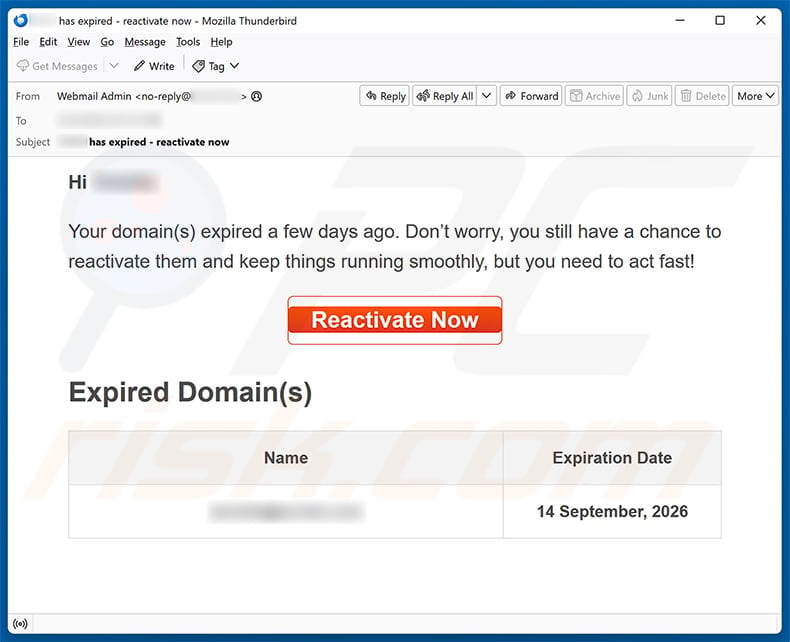
The email says a domain expired several days ago
The captured message claims the recipient’s domain expired and can still be reactivated if action is taken quickly.
It displays an alleged expiration date of September 14, 2026 and places the domain inside an “Expired Domain(s)” table.
A red “Reactivate Now” button appears above the record, presenting renewal as a single urgent task.
The sender identifies itself only as “Webmail Admin,” not as a named registrar, reseller, hosting company, or registry.
No renewal price, invoice, account identifier, grace-period terms, or verified support route appears.
Those omissions matter because domain renewals are handled by specific registrars under documented account and billing relationships.
The reactivation route becomes a password form
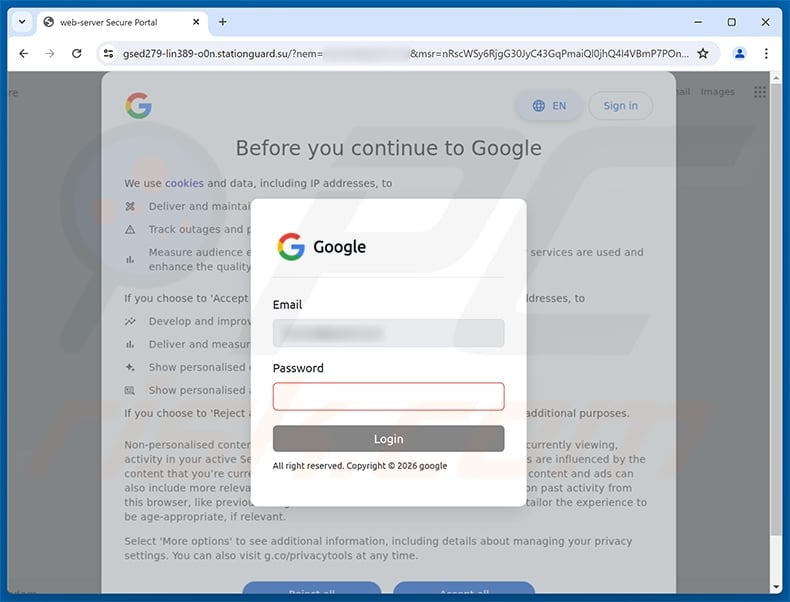
The button led to gsed279-lin389-o0n.stationguard[.]su in the observed sample.
That hostname has no visible connection to the domain’s real registrar or the recipient’s email provider.
Instead of presenting a renewal cart, the page displayed a Google-styled login overlay and requested an email password.
The recipient’s address was already inserted, while a copied cookie-consent screen filled the background.
This is credential phishing. The expiration story explains why the visitor arrived, while the fake login captures a reusable secret.
Domain status can be verified without the message
Website owners can sign in to the registrar through a known bookmark or manually typed address.
The account dashboard shows renewal status, auto-renew settings, expiration dates, payment failures, and contact information.
Public RDAP or WHOIS records can provide additional registration dates, although privacy services and registry formats vary.
DNS resolution and website availability are clues, not complete proof, because expired names can remain active during grace periods.
The email should never be the sole source for deciding whether a valuable domain exists or needs payment.
- “Webmail Admin” does not identify the registrar.
- The message offers no renewal amount or account reference.
- Urgency is based on alleged expiration several days earlier.
- The button goes to stationguard[.]su.
- The destination requests an email password, not payment.
- Google styling appears outside a Google domain.
- A prefilled address is not proof of account access.
- The real registration record can be checked independently.
How the Domain Expired Email Scam Works
Step 1: Public domain information helps shape the lure
Domain names, websites, company identities, and some registration dates are publicly observable.
Attackers can collect addresses from contact pages, leaked databases, marketing lists, or guessed role accounts such as admin and webmaster.
The message becomes more persuasive when it includes a domain the recipient actually recognizes.
That personalization does not prove access to the registrar.
It may reflect information anyone could gather from DNS, search results, certificate records, or previous data exposure.
Even an accurate expiration date should be verified inside the official registrar account.
Step 2: The sender invents a narrow rescue window
The wording says the domain expired a few days ago but can still be reactivated.
Real registration systems often have renewal or redemption periods, which gives the story a believable technical detail.
The message does not explain which policy applies, how long the period lasts, or what restoration would cost.
Instead, “act fast” compresses the decision into one emotional moment.
Owners know that losing a domain could affect email and business continuity, so the claimed consequence outweighs normal caution.
The scammer benefits when the recipient reacts before asking a colleague or checking the registrar dashboard.
Step 3: A generic administrator identity hides missing authority
“Webmail Admin” sounds technical but does not identify who registered or bills the domain.
Email hosting and domain registration can be provided by different companies, making that label especially weak.
A legitimate renewal notice normally names the registrar, account, domain, billing status, and renewal method.
It may include a support route that can be confirmed through the registrar’s established website.
The captured message provides none of that chain.
Its red button asks the reader to treat visual urgency as authority.
Step 4: Reactivation silently changes into email authentication
The destination does not show a registrar account or renewal checkout.
It opens a Google-themed form on stationguard[.]su and asks for the mailbox password.
That task switch is the scam’s most important clue.
A registrar may use federated sign-in, but the browser should then reach an authorized Google domain or a clearly documented identity route.
An unfamiliar .su host cannot become Google because it displays the logo and a familiar privacy screen.
The domain in the address bar identifies who receives the submitted data.
Step 5: Prefilled information makes the form feel connected
The email address shown inside the overlay can be carried in the phishing URL.
Because the attacker already had that address, repeating it requires no account access or provider integration.
The background imitates Google’s cookie choices, while the foreground asks for both email and password.
Layering familiar screens creates the appearance of a normal sign-in interrupted by one additional dialog.
Small mistakes remain visible, including awkward wording and branding that does not match the current host.
Victims who use password managers may also notice that saved credentials do not autofill.
Step 6: The stolen inbox supports domain and financial attacks
A mailbox belonging to a domain owner may contain registrar receipts, transfer codes, hosting notices, and DNS-provider conversations.
An intruder can search for the registrar, request password resets, and attempt to change account recovery details.
Business email also reveals customers, suppliers, hosting credentials, and administrative contacts.
If the password was reused, automated login attempts may reach the registrar directly.
The attacker might never transfer the domain. Email access alone can support invoice fraud, password resets, and convincing impersonation.
That is why recovery should secure both the inbox and the domain-management accounts.
What a Real Domain Expiration Looks Like
The registrar is identifiable
Every registered domain is managed through a registrar or reseller with an established account relationship.
Genuine notices identify that organization and usually match prior billing emails.
The dashboard should show the same domain, expiration date, renewal period, and payment status.
When the email name differs from the account provider, verify whether an authorized reseller relationship exists before acting.
Renewal happens inside the registrar account
A normal renewal flow begins after signing in through the registrar’s official application or website.
The user can review the term, price, taxes, contact details, and payment method before confirming.
An unrelated page asking for an email password does not perform those functions.
Even when Google single sign-on is offered, authentication should occur through a legitimate Google origin and return to the known registrar.
Status can include grace or redemption periods
Expiration does not always make a website disappear at the exact timestamp shown in a record.
Registries and registrars may provide auto-renew grace periods, redemption phases, auctions, or other lifecycle steps.
Policies vary by top-level domain and provider.
That complexity is another reason to use the official dashboard rather than trusting a generic rescue button.
The registrar can explain current status and available recovery options without requesting a password by email.
How to Verify the Domain Safely
Sign in through a stored bookmark
Use the registrar address recorded in past invoices, password-manager entries, or internal documentation.
Avoid search advertisements when urgency is high, because criminals can also buy misleading ads for account services.
Once authenticated, review every domain in the portfolio, not only the name mentioned by the suspicious message.
Confirm the renewal date, lock status, nameservers, registrant email, and auto-renew configuration.
Check payment and notification history
Look for failed card charges, expiring payment methods, renewal receipts, and secure account notifications.
A genuine failure should leave evidence inside the provider’s system.
Compare the questionable email with previous notices from the same registrar, including sender domain and formatting.
Contact support using details from the official site when the records conflict.
Use RDAP as a secondary check
RDAP services provide structured registration data for many domain extensions.
The result may show status codes, registrar identity, and important dates, although privacy protection can hide contact details.
Treat public data as supporting information, not permission to send payment or credentials somewhere new.
The authoritative account remains the place to renew or recover the name.
Why Domain Owners Are Valuable Targets
The mailbox often controls infrastructure recovery
Administrative email can reset hosting, DNS, content management, analytics, and cloud accounts.
Compromising it gives the attacker a map of the services supporting the website.
Recovery messages may be intercepted before the owner notices.
Separate administrative addresses and phishing-resistant authentication reduce this concentration of control.
DNS access can redirect an entire audience
If a criminal reaches the registrar or DNS provider, records may be changed toward malicious servers.
Visitors could then encounter phishing pages under a domain they already trust.
Mail exchanger changes may also reroute email, while nameserver changes can move broader control.
Registrar lock, registry lock for high-value names, and change notifications provide additional defenses.
Business disruption creates leverage
Even unsuccessful takeover attempts consume time because owners fear website and email outages.
Attackers may exploit that concern with follow-up calls offering paid restoration.
A documented renewal calendar and named account owner make surprise notices easier to resolve calmly.
Organizations should avoid leaving domain responsibility with one person or an inaccessible former employee mailbox.
What to Do if You Have Fallen Victim to This Scam
- Close the fake reactivation page. Do not enter another password, approve a prompt, or follow any later payment or recovery instruction.
- Change the email password through the real provider. Use a trusted application or typed address and create a unique credential immediately.
- Revoke mailbox access. Sign out unknown sessions, remove unfamiliar app passwords, and inspect forwarding, filters, delegates, and recovery methods.
- Secure the registrar account. Change its password, enable strong multi-factor authentication, review sessions, and verify the registrant contact and transfer settings.
- Inspect domain controls. Confirm registrar lock, nameservers, DNS records, renewal status, payment methods, and recent account changes.
- Replace reused credentials. Prioritize hosting, DNS, content management, cloud, finance, and other services tied to the administrative email.
- Check for unauthorized approvals. Deny unexpected multi-factor prompts and review alerts for device additions, password resets, transfers, or DNS modifications.
- Scan if something downloaded or ran. Use Malwarebytes and built-in protection for unexpected files. AdGuard can block many later malicious or advertising-driven routes.
- Notify providers and colleagues. Contact the registrar, email provider, hosting company, and internal security team through established channels.
- Preserve evidence. Save the original message, headers, URL, screenshots, login records, and change history before removing the lure.
Preventing Future Renewal Phishing
Maintain a domain inventory
Record every domain, registrar, account owner, expiration date, renewal setting, and approved payment method.
Review the inventory on a schedule rather than waiting for urgent email.
Shared documentation prevents a deceptive message from exploiting uncertainty about who manages the name.
It also reveals forgotten defensive registrations and obsolete domains that need deliberate decisions.
Enable registrar protections
Use a unique password, phishing-resistant multi-factor authentication, registrar lock, and change notifications.
High-value organizations can ask whether registry lock is available for stronger protection against unauthorized updates.
Keep recovery addresses under active control and separate them from public contact mailboxes.
Test emergency access before an actual expiration or employee departure creates pressure.
Verify from the dashboard, never the button
Treat renewal emails as reminders to open the registrar independently.
The message does not need to be trusted for the underlying status to be checked.
This simple separation defeats both inaccurate alerts and highly polished phishing copies.
It also ensures that renewal terms and charges appear inside the established account relationship.
Frequently Asked Questions
Is the Domain(s) Expired email genuine?
The examined version is phishing. Its Reactivate Now button leads to stationguard[.]su and a counterfeit Google password form.
Did my domain really expire?
The email does not prove that claim. Check the known registrar dashboard and, when helpful, an authoritative RDAP service through an independent route.
Why was my real domain shown in the message?
Domain names are public, and addresses can be collected from websites or previous leaks. Accurate personalization does not establish registrar access.
Does the Google-looking page mean my registrar uses Google sign-in?
No. The captured form appears on an unrelated .su host. Genuine federated authentication must occur through a verified provider domain.
Can clicking the link transfer my domain?
A click alone usually cannot authorize a transfer. Submitted credentials, approved prompts, or reused registrar passwords create the more serious takeover risk.
What should I check in my registrar account?
Review expiration, renewal, contact details, nameservers, locks, sessions, payment methods, transfer activity, and every recent security change.
The Bottom Line
The Domain Expired email scam exploits a website owner’s fear of losing a valuable name, then replaces renewal with a fake Google login.
Its generic Webmail Admin identity and stationguard[.]su destination do not belong in a legitimate registrar workflow.
Check expiration through the established registrar. If credentials were submitted, secure email, registrar, DNS, hosting, and recovery settings before the incident can spread.

Join the discussion
0 commentsShare your experience or ask a question about this article.
Discussion
Start the conversation
Have a question or something useful to share? Add the first comment.