

Have you received a text claiming your car has unpaid parking tolls? Scammers are using fake Southern Connector invoices on the website sctoll.com to steal drivers’ personal information. Learn how to avoid this clever toll invoice scam.
Unsuspecting drivers across the country are receiving texts stating their vehicle has an outstanding invoice from Southern Connector toll roads. The message provides a link to sctoll.com where victims can supposedly view and pay the invoice. However, it’s an elaborate scam designed to trick users into handing over their sensitive data.
This article provides an in-depth look at how the sctoll.com scam operates, who’s at risk, and most importantly – how to protect yourself.
An Overview of the Deceptive Sctoll.com Scam Targeting Drivers
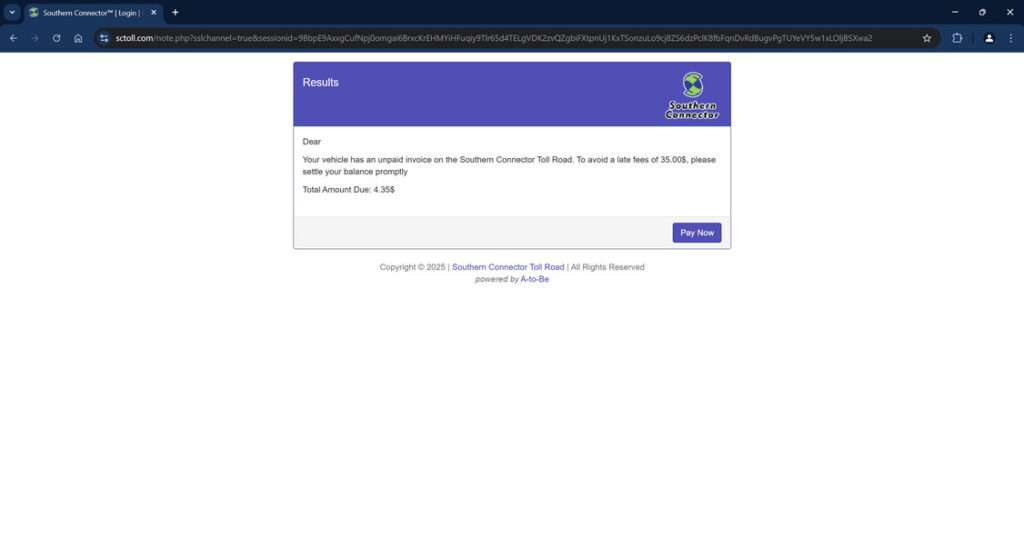
The sctoll.com scam centers around text messages referencing fake unpaid parking invoices from Southern Connector toll roads. Scammers send the texts to unsuspecting drivers, claiming their vehicle has an outstanding invoice that must be paid immediately to avoid hefty late fees.
To view and supposedly pay the invoice, the messages provide a link to sctoll.com. However, this website has no actual affiliation with Southern Connector – it is an elaborate fake site engineered by scammers to deceptively collect victims’ personal and financial information.
By mentioning Southern Connector, a real toll road system in South Carolina, the texts add legitimacy to encourage hurried users to visit sctoll.com without scrutiny. The site boldly displays the fake invoice amount, usually $4-5, and urgently insists immediate payment is required to avoid impacts to credit or vehicle registration.
To pay, it prompts visitors to enter extensive sensitive data including:
- Full legal name
- Home address
- Phone number
- Email address
- Credit card numbers
- Card expiration dates and CVV codes
In reality, there is no unpaid parking invoice from Southern Connector. The urgent payment requests and official-looking site are an elaborate ruse designed only to harvest unsuspecting drivers’ personal data for criminal purposes.
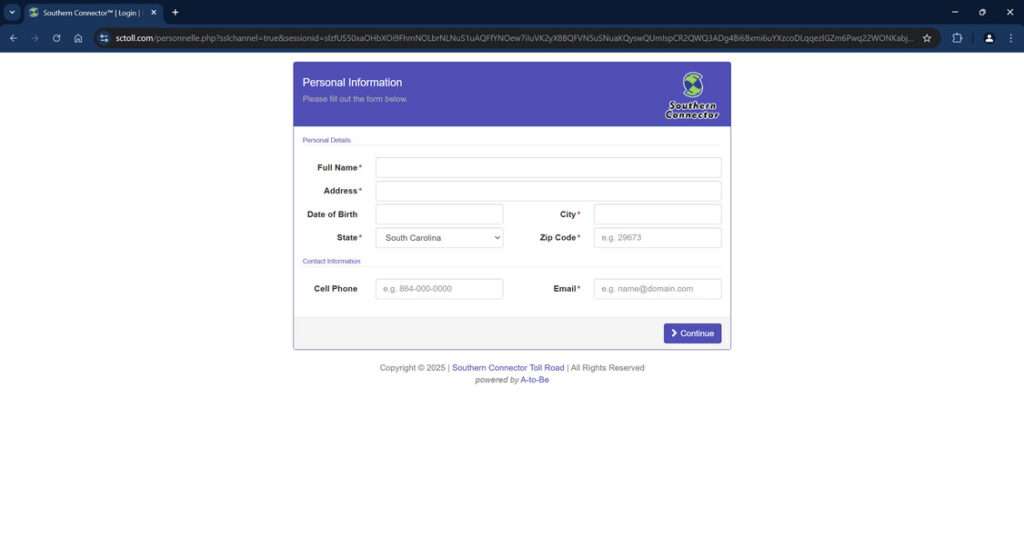
Once submitted, scammers can freely use the stolen information to open fraudulent credit cards and bank accounts, make purchases in the victim’s name, steal government benefits or tax refunds, and commit other serious identity theft and financial fraud.
By targeting cities near actual Southern Connector locations and citing real unpaid invoice amounts, the texts and sctoll.com site are engineered to take advantage of drivers’ familiarity with toll roads. The scheme relies on using urgency, familiar branding, and fear of financial penalties to trick rushed users into handing over the keys to their identity.
How Scammers Leverage Sctoll.com
Here’s a play-by-play look at how scammers orchestrate the sctoll.com toll invoice scam:
1. You Receive an Unsolicited Text About Unpaid Tolls
The text will claim your vehicle has an unpaid Southern Connector parking invoice that must be paid immediately to avoid hefty late fees. It instructs you to visit sctoll.com to view and settle the invoice.
This triggers fears of financial penalties, rushing victims into acting without scrutiny. But no legitimate invoices come via text.
2. You Click The sctoll.com Link
If you click the link, it takes you to an elaborate fake website made to mirror the real Southern Connector site. The sctoll.com URL may have additional words to appear legitimate.
The official branding and logos are utilized to make the urgent payment request look real. In reality, it’s a scam site.
3. You Input Personal and Financial Information
The sctoll.com site prominently displays the unpaid invoice amount, usually $4-5. It states immediate payment is required to avoid fees and potential impacts to your credit or vehicle registration.
To “pay”, it requests extensive personal and financial details including full name, birth date, address, phone, email, credit card information and more.
4. Scammers Steal Your Data for Identity Theft and Fraud
Once submitted, your sensitive data goes straight into the hands of scammers. They can then freely use it to open illicit credit cards and bank accounts, make purchases in your name, steal government benefits, file fake tax returns, and commit any number of identity theft-related crimes.
You may not detect the fraud for months or years until the damage is already done. There was no real unpaid toll invoice.
Protecting Yourself if You Entered Information on Sctoll.com
If you provided your personal or financial information through the fraudulent sctoll.com site, take these steps immediately:
- Contact your bank and credit card companies to report compromised accounts. Cancel current cards and request replacements.
- Closely monitor all financial statements and credit reports for signs of misuse of your information over the next 12-24 months.
- Change account passwords and security questions. Enable two-factor authentication everywhere possible.
- File a scam report with the FTC, state attorney general, and local law enforcement. Provide details to aid investigations.
- Sign up for credit monitoring services that alert you to fraudulent activity. Consider a credit freeze.
- Continuing monitoring credit and accounts for any unauthorized activity indicating identity theft. Report it promptly.
- If possible, contact sctoll.com to demand removal of your data. Report the site for fraud.
Acting quickly can help limit the damage from this scam. But consistent vigilance is key, as identity theft can go undetected for lengthy periods.
Don’t Take the Bait: Protecting Yourself From Sctoll.com
While this scam is troubling, drivers can implement simple precautions to avoid getting hooked by sctoll.com:
- Disregard any texts regarding unpaid toll invoices. Legit notices only come through postal mail.
- Verify any toll-related website before providing personal or financial data, no matter how official it looks.
- Check directly with Southern Connector through known channels if you receive a suspicious notice.
- Never click on links or call phone numbers within unsolicited texts. Manually type out web addresses instead.
- Look for slight variations in scam website URLs like additional words or characters.
- Monitor bank and credit accounts routinely for signs of misuse or fraudulent activity.
With sound judgment, drivers can protect their sensitive personal information from sctoll.com scammers seeking victims. Remember – legitimate invoices only come through official mail, never via random texts with urgent threats and dubious links. Use caution and verify directly with toll agencies to avoid this sneaky scam.
FAQs: The Deceptive Sctoll.com Toll Invoice Scam
1. What is the sctoll.com scam?
Sctoll.com sends texts about fake Southern Connector toll invoices to steal drivers’ personal information for identity theft and fraud.
2. How does the sctoll.com scam work?
Texts are sent stating your car has unpaid Southern Connector tolls that must be paid immediately through sctoll.com. But it’s a fake phishing site.
3. What cities are targeted by sctoll.com texts?
Cities near the real Southern Connector in South Carolina are targeted, such as Greenville, Spartanburg, Greenwood, and Anderson.
4. What information does sctoll.com request?
The site requests full name, birth date, address, phone, email, credit card details, SSN, and other sensitive personal data.
5. Are the unpaid invoices mentioned in sctoll.com texts real?
No, the unpaid parking invoices cited in sctoll.com texts do not actually exist – they are fabricated to trick you.
6. How can I verify if I have real unpaid Southern Connector invoices?
To verify, contact Southern Connector directly through their official website or customer service number – never via texts.
7. What should I do if I entered my information on sctoll.com?
Contact your bank immediately to monitor for fraud. Freeze credit reports. Change account passwords and set up credit monitoring services.
8. Can I get in trouble for not paying the sctoll.com invoice?
No, you cannot get in legitimate trouble for not paying the fake invoice mentioned in the scam texts and website.
9. How do I report sctoll.com?
Report details to the FTC, your state attorney general, and local law enforcement to assist with shutting it down.
10. How can I avoid the sctoll.com scam?
Never click on links or provide information in response to unsolicited texts about unpaid tolls. Verify invoices directly with toll agencies first.
The Bottom Line
The sctoll.com scam leverages familiar branding and urgency to fool rushed drivers into handing over their personal data under false pretenses. While the texts and websites appear legitimate on the surface, it’s simply a deceptive ploy to enable identity theft and financial fraud.
With vigilance and healthy skepticism, drivers can keep their information safe. Disregard suspicious texts, look for website irregularities, verify with official toll agencies directly, and monitor accounts routinely. Using prudence rather than haste is critical to thwarting tech-savvy scammers. Spread awareness so we can shut down sctoll.com and similar phishing ploys for good.








