

Have you received a text claiming you owe money for unpaid toll road parking? Scammers are sending messages about fake Southern Connector parking invoices to fool people into handing over their personal information. Don’t take the bait.
This parking invoice scam targets drivers with texts stating their vehicle has an unpaid invoice from the Southern Connector Toll Road. The message includes a link to view and pay the invoice to avoid additional fees. However, it’s a fraud designed to steal your data.
Southern Connector Toll Road Parking Invoice Scam Overview
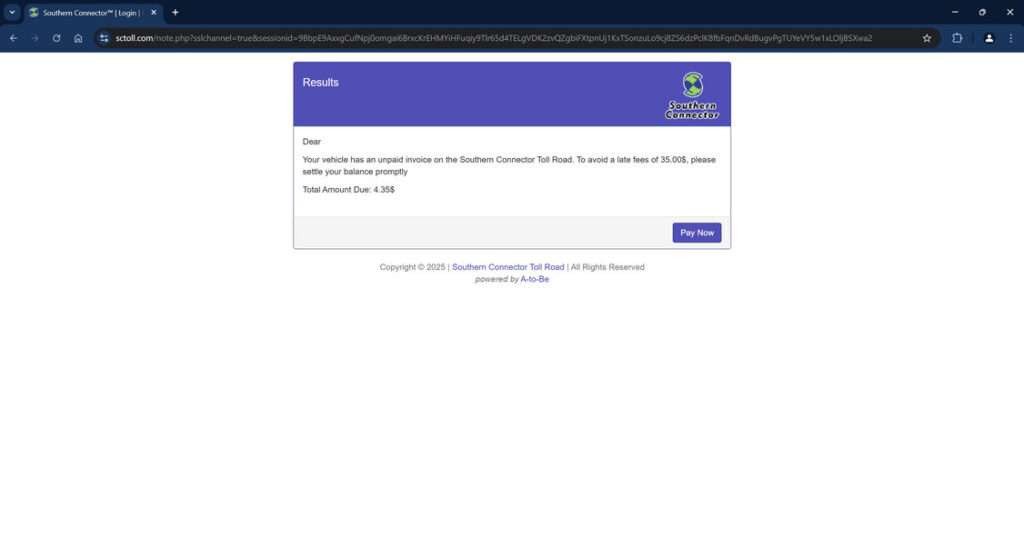
This deceptive scam targets drivers with text messages stating their vehicle has an unpaid parking invoice from the Southern Connector Toll Road in South Carolina. The message claims that a small invoice, usually around $4-5, must be paid immediately to avoid incurring hefty late fees up to $35.
A link is provided to access and pay your invoice online. However, the link actually leads to a fake website designed solely to steal your personal and financial information for criminal purposes.
This is how it works:
The scam text will say it’s from Southern Connector and reference an unpaid parking invoice for your vehicle tied to the toll road. It will display the official Southern Connector logo and branding to appear credible.
The message urges you to click the link provided to view and pay the invoice promptly. If you don’t, it warns you will be subject to large late payment fees. This creates a sense of urgency and panic to get you to act quickly.
However, the link goes to a sophisticated, realistic-looking fraudulent website – not the real Southern Connector site. Everything about the page is intended to convince you the unpaid invoice is legitimate to keep you engaged.
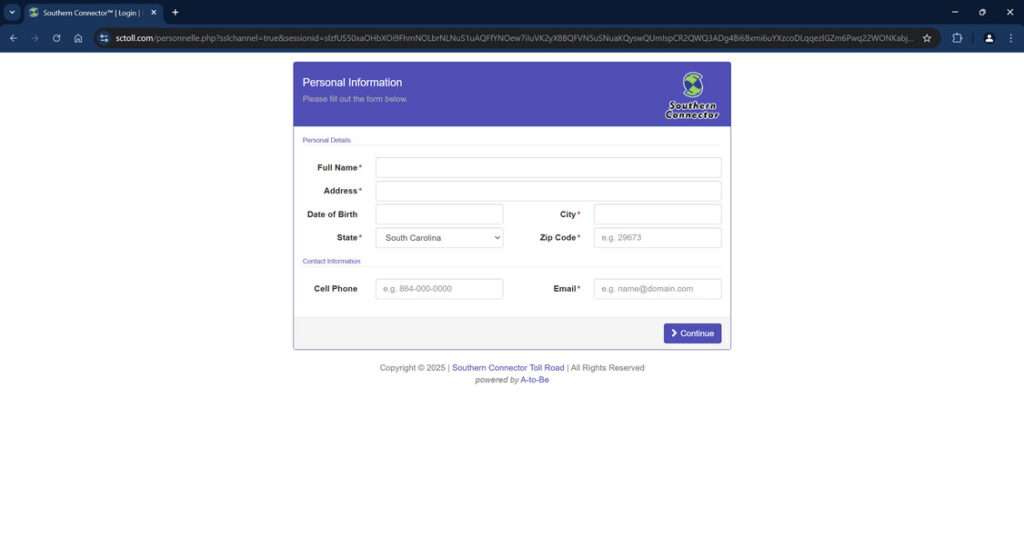
Once on the site, you are prompted to enter extensive personal details to “pay the invoice”. Some examples of the specific types of sensitive information these Southern Connector scam sites collect include:
- Full legal name
- Birth date
- Home address
- Email address
- Phone number
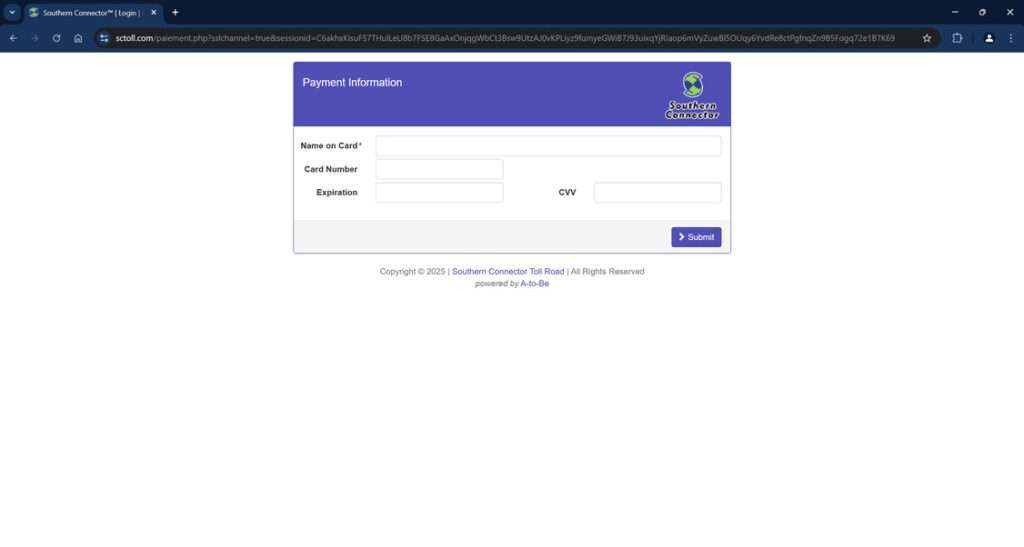
- Credit card numbers
- Card expiration dates
- CVV security codes
Unfortunately, once submitted, your sensitive data goes straight into the hands of scammers. There is no unpaid parking invoice – the text, website and payment prompt are an elaborate ruse to steal your information.
With your details, scammers can commit identity theft, make unauthorized purchases, take out loans in your name, access your bank accounts and more. Meanwhile, you are left paying the price after willingly handing over the data thinking you were avoiding toll road late fees.
Examples of the deceptive text messages and fake invoice websites show just how far scammers go to make their tactics look official and urgent:
- Texts reference real city names near the Southern Connector route to add validity
- Fake websites incorporate the Southern Connector logo, maps and toll information
- The scam texts are unsolicited and unexpected, evoking panic
- Scam websites prominently state “Pay Now” to create urgency
This parking invoice scam has been reported across cities in South Carolina near the real Southern Connector Toll Road, but may expand to target drivers across the U.S. as scammers improve their tactics. With so much sensitive personal data at stake, this is a scam all drivers need to beware.
How the Southern Connector Toll Road Parking Invoice Scam Unfolds
Here’s an inside look at how scammers leverage urgency and familiar branding to trick unsuspecting drivers:
1. You Get a Text About an Unpaid Invoice
The text will claim to be from Southern Connector and say your vehicle has a small unpaid parking invoice. It urges you to click a link to pay it and avoid late fees.
The message is meant to panic you into acting without thinking it through. But real toll agencies don’t conduct business via unsolicited texts.
Here is how the scam text message might look:
Souter Connector
This is a notice from Southern Connector Toll Road.
Your vehicle has an unpaid parking invoice of $4.35. To avoid a late fees of 35$, please settle your balance promptly.To avoid late fees, access your file by typing the following link in your browser.
sctoll.com
(Enter link in your browser to securely access your file)
2. You Click The Link in the Text
If you click the link, it takes you to a website designed to mimic the look of the real Southern Connector site. However, the URL will be slightly different.
The scam site has the Southern Connector logo and branding. This is to falsely convey that the invoice and urgent request for your details are legitimate.
3. You Input Personal and Financial Information
The website prominently states you must pay the unpaid invoice immediately and provide some additional information first.
You’re then prompted to input extensive personal and financial data including your full name, birth date, address, phone number, email address, credit card number, security code, and more.
4. Scammers Steal Your Information
Once submitted, all of your sensitive personal and financial information goes straight to scammers. They can then use it without your knowledge to open fraudulent credit cards or bank accounts, make purchases in your name, steal your identity, and more.
You never actually paid any parking invoice, but it’s too late – the scammers have your data.
What to Do If You Shared Your Information
If you received one of these fraudulent Southern Connector texts and mistakenly clicked the link to provide your personal or financial information through the scam website, take the following steps right away to protect yourself:
- Contact your credit card company and bank immediately. Alert them that you shared your account information through a fraudulent website and that your accounts may be compromised. Request that your current credit and debit cards be cancelled and new cards issued with different numbers.
- Ask your bank to closely monitor your accounts. Request that they watch closely for any suspicious, fraudulent, or unauthorized transactions for the next 6-12 months. Also request alerts for any unusual account activity.
- Check your credit reports. Obtain copies of your credit reports from Equifax, Experian, and TransUnion to determine if any fraudulent accounts have been opened in your name or unauthorized credit inquiries made. If so, take steps to freeze your credit.
- Change account passwords and security questions/answers. Update the passwords and security questions/answers for all of your financial accounts, email accounts, and other sensitive accounts. Make them strong and unique for each account.
- Enable two-factor authentication. Turn on two-factor or multi-factor authentication for an added layer of security on accounts whenever possible. This requires you to input a generated code from a separate device when logging in.
- File reports about the scam. File reports with the Federal Trade Commission, your state attorney general’s office, and your local law enforcement detailing the scam text, fake website, and any financial damage done. Provide as many specifics as possible to aid investigations.
- Sign up for identity theft monitoring services. Consider signing up for identity monitoring services that notify you of any changes to your credit reports or if your personal information appears on suspicious online platforms.
- Continue monitoring all accounts closely. Carefully review all bank and credit card statements, tax records, and other account activity over the next 12-24 months for any signs of misuse of your information. Report any unauthorized activity immediately to financial institutions.
Taking quick action is key to limiting the potential damage from providing data to the fake Southern Connector scam parking sites. Do not wait to start protecting your financial accounts and sensitive information. Consistent monitoring and heightened vigilance following this scam are essential.
FAQs: The Southern Connector Toll Road Parking Invoice Scam
1. How do the scam parking texts for Southern Connector work?
The texts state your vehicle has an unpaid Southern Connector parking invoice that must be paid immediately. They provide a link to a fake website to trick you into entering personal and financial data.
2. What cities are being targeted by this Southern Connector scam?
The scam targets cities near the real Southern Connector toll road in South Carolina, such as Greenville, Spartanburg, Anderson, and Greenwood.
3. What information is requested through the fake Southern Connector websites?
The sites request full name, birth date, address, phone, email, credit card number, security code, and more. Scammers steal this info for identity theft and financial fraud.
4. What are signs a Southern Connector parking invoice text is a scam?
Unsolicited texts, threats of immediate fees, and links to pay are red flags. Legitimate invoices only come via postal mail.
5. What should I do if I shared information through a fake site?
Contact your bank and credit card company ASAP. Monitor all statements closely for fraudulent activity and report it immediately. Enroll in credit monitoring services.
6. How can I avoid falling for the Southern Connector parking invoice scam?
Never click on links or provide info in response to unsolicited texts regarding tolls or parking invoices. Verify directly with Southern Connector first.
7. Can I get in trouble for not paying the invoice mentioned in scam texts?
No, you cannot get in any legitimate trouble for not paying the fake invoice in scam Southern Connector texts. There is no real unpaid invoice.
8. How do I report the Southern Connector scam text and website?
File detailed reports with the FTC, your state attorney general, and your nearest police department with any evidence.
9. Are there legitimate reasons Southern Connector would text about unpaid invoices?
No. Southern Connector only sends official invoices by postal mail. Any texts are scams trying to steal your personal information.
10. Who can I contact to find out if I really have unpaid Southern Connector invoices?
To check for any real unpaid invoices, contact Southern Connector directly through their official website or customer service line at xxx-xxx-xxxx. Do not call any numbers in scam texts.
Don’t Get Hooked: How to Avoid the Southern Connector Toll Road Parking Invoice Scam
While this scam is troubling, there are simple precautions drivers can take to avoid getting caught by it:
- Disregard texts about unpaid parking invoices from toll roads. Legit notices come via mail from official channels only.
- Verify the validity of any website before providing information, no matter how official it looks.
- Check directly with the toll road agency through known official channels before paying anything.
- Never click on links or call phone numbers in suspicious texts – type the website URL directly into your browser instead.
- Don’t be rushed into providing your sensitive details, even if threatened with fees. It’s certainly a scam.
- Routinely monitor financial statements and accounts for any unauthorized transactions.
Using caution rather than haste is the key to avoiding toll road parking invoice scam texts. Drivers should never provide personal or financial data in response to unsolicited messages. Take time to verify legitimacy through official toll road channels first. Stay alert and protect your information from scammers seeking their next victim.








