

Have you received a text claiming to be a final notice from E-ZPass Toll about unpaid tolls? Don’t let this supposed debt threat rush you into anything. This “E-ZPass Toll Final Reminder” text is actually a sneaky scam designed to trick you and steal your money.
Keep reading to learn how to recognize the signs of this toll payment scam and avoid becoming its next victim. With knowledge of the fraudsters’ underhanded tactics, we can work together to stay vigilant against toll and traffic-related scams aiming to exploit innocent consumers.
Overview of the E-ZPass Toll Final Reminder Scam
This text message scam starts by claiming the recipient has outstanding tolls owed to E-ZPass Toll. It states immediate payment is required to avoid penalties or legal action.
However, it’s not actually from E-ZPass Toll. The texts are sent randomly to harvest money and information from victims who fall for the fake debt threat.
Here is how the scam text message look:
E-ZPass Toll Final Reminder:
You have an outstanding toll. Your toll account balance is outstanding. If you fail to pay by March 6, 2025, you will face penalties or legal action.Now Payment:
[malicious link]
(Please reply Y, then exit the SMS and open it again to activate the link, or copy the link to your Safari browser and open it)Please settle your toll immediately after reading this message to avoid penalties for delaying the payment.
Thank you for your cooperation.
The fraudulent E-ZPass Toll texts have been reported by residents across US. But similar “Final Notice” toll scams have also been seen nationwide. They often reference local transportation agencies to appear more legitimate at first glance.
Some common traits can help identify these “Final Reminder” texts as scams:
Key Characteristics
- Threatening language about legal action for unpaid toll balance
- Fictitious urgent deadline to pay a few days away
- Link provided to settle outstanding balance online
- Requests reply of “Y” to activate payment link
- Thanks recipient for cooperation
While made to look official, grammatical and formatting errors are giveaways that these texts aren’t from E-ZPass Toll. And no legitimate agency would demand immediate payment under threat of legal penalties.
The scammers are trying to scare recipients into acting fast without closer scrutiny. Don’t fall for their underhanded tactics.
How the E-ZPass Toll Final Reminder Toll Scam Works
From the initial text blast to stealing money and info, here’s an in-depth look at how the E-ZPass Toll “Final Notice” toll payment scam operates:
1. Victims Receive Text Threat About Unpaid Tolls
The scam starts with an unsolicited text sent randomly to thousands of phone numbers. The fraudulent message claims the recipient has an outstanding unpaid E-ZPass Toll toll balance.
It specifies an exact urgent deadline in a few days when penalties or legal action will supposedly take place if the tolls remain unpaid.
The text includes a link where the victim can easily pay their “overdue” balance online. This is where the real trouble begins.
2. Scam Link Leads to Fake E-ZPass Toll Website
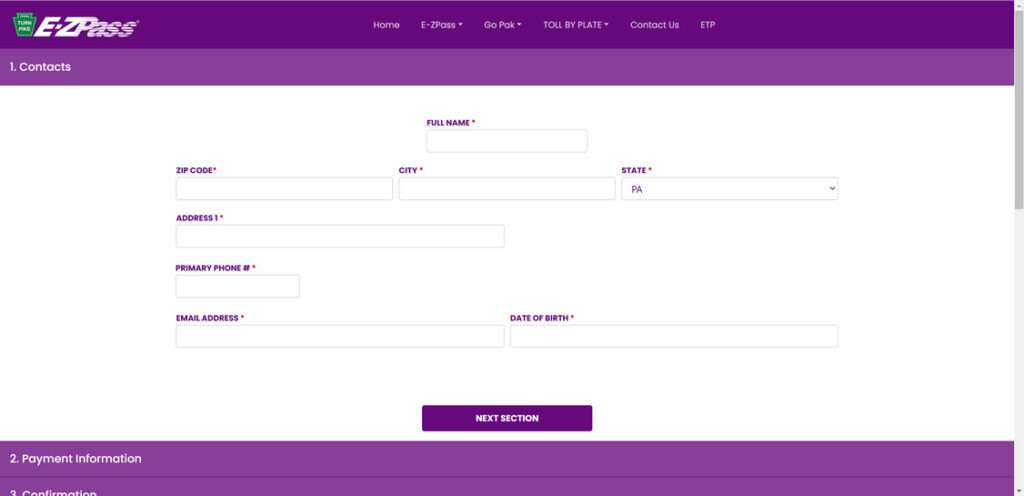
If the recipient clicks the link, it goes to an extremely convincing fake E-ZPass Toll website set up by scammers.
The sophisticated site mirrors official E-ZPass Toll branding and messaging. The victim sees fields to enter payment info to settle their “unpaid” account balance immediately.
In reality, all money sent through the site goes to the scammers rather than paying any real tolls.
3. Scammers Steal Money and Personal Information
In addition to collecting fake toll payments, the scammers are also after personal information entered on the site.
To process payments, the victim will be prompted to input sensitive data like credit card numbers, bank account details, full name, home address, phone, email, and more.
The scammers steal this info for identity theft and to commit additional fraud using the victim’s accounts.
4. Deletion of Scam Text
Once the victim finishes entering information on the fake E-ZPass Toll site, the initial scam text prompting payment may disappear from their phone.
The scammers delete the text evidence to make it harder for victims to connect the dots of what just happened. This covers the scammers’ tracks.
5. Scam Spreads to More Victims
The text blasts are a numbers game for scammers. Out of thousands of messages sent, they only need a small percentage of recipients to fall for the scam to profit.
With money and data stolen from initial victims, the scammers repeat the process on more unsuspecting consumers. This allows toll scam operations to quickly scale up.
What to Do If You Get the E-ZPass Toll Final Reminder Text Scam
If you receive a text claiming to be a E-ZPass Toll Final Notice about unpaid tolls, do not click any links or provide information. Take these steps:
1. Delete the Scam Text
As soon as you identify the text as fraudulent, delete it from your phone. This removes the ability to accidentally click the link.
2. Confirm Status with E-ZPass Toll
Call E-ZPass Toll to have them look up your account status and confirm if you have any outstanding tolls or fees. This verification proves the scam wrong.
3. Report the Scam
Alert local law enforcement and the FTC about the fraudulent text message. Provide all details to aid investigation and prevention efforts.
4. Warn Family and Friends
Let your contacts know about scam texts impersonating E-ZPass Toll to prevent them from also becoming victims. Awareness is key.
5. Monitor Accounts and Credit
Watch for unauthorized charges if you entered information into a scam site. Report any suspicious activity immediately. Also check your credit report for any wrongly opened accounts.
Frequently Asked Questions About the E-ZPass Toll Final Reminder Text Scam
What is the E-ZPass Toll Final Reminder text scam?
This is a fraudulent text scam in which recipients receive a message claiming to be from E-ZPass Toll stating they have unpaid tolls and face penalties if they don’t pay by a deadline. It includes a link to a fake website to trick users into sending money and personal information.
Is the E-ZPass Toll Final Reminder text real?
No. E-ZPass Toll has confirmed these texts are NOT sent by them and are a scam. Legitimate notices from E-ZPass Toll would never threaten immediate penalties or demand payment by text.
What does the E-ZPass Toll Final Reminder scam text say?
The text claims you have outstanding unpaid tolls and will face legal action if not paid by a specific urgent deadline, usually within a few days. It thanks you for cooperation and provides a link to pay the “overdue” balance.
What is the goal of this scam?
The scammers aim to steal money by tricking recipients into paying fake tolls on their website. They also harvest personal information like credit cards and ID details entered, which fuels identity theft.
What if I paid the E-ZPass Toll Final Reminder text scam?
If you provided any financial account information, contact your bank immediately about unauthorized charges. Monitor your credit reports for any fraudulent accounts opened in your name as well.
Should I click the link in the E-ZPass Toll Final Reminder text?
No, never click links in suspicious texts about unpaid tolls. The link goes to a fake site impersonating E-ZPass Toll designed to steal money and information.
How can I report the E-ZPass Toll Final Reminder scam text?
You can report it to local law enforcement and the Federal Trade Commission. This helps authorities track down and stop these scams.
How can I avoid the E-ZPass Toll Final Reminder scam?
Delete suspicious texts immediately rather than clicking on links. Confirm directly with E-ZPass Toll whether any unpaid toll balance actually exists. Use caution providing info in response to threats of legal action from texts.
What are some tips to spot toll payment scam texts?
Be wary of urgent threats, poor grammar/spelling, overly simplistic URLs, requests to reply “Y”, threats of penalties, and demands for immediate payment. Verify with the named agency directly instead.
The Bottom Line
The “E-ZPass Toll Final Reminder” toll payment text scam preys on consumer fears of penalties and legal consequences. Do not let these fraudulent texts rush you into anything – verify directly with E-ZPass Toll about any supposed unpaid tolls.
With knowledge of the scammers’ tricks, we can work together to avoid falling victim and stop their criminal efforts. Stay vigilant against toll and traffic-related scams trying to steal money and identities.

Join the discussion
0 commentsShare your experience or ask a question about this article.
Discussion
Start the conversation
Have a question or something useful to share? Add the first comment.