

Got a text claiming you owe EastLink tolls? Beware – it could be a scam designed to drain your bank account.
Fraudsters are blasting out fake EastLink texts citing small unpaid toll fees in order to steal unwitting Australians’ personal information and money.
Clicking the link in these deceptive messages directs victims to sophisticated fake EastLink websites engineered to harvest financial data.
Before you know it, scammers have enough information to steal thousands of dollars through unauthorized charges and new accounts – well beyond the tiny $12 toll amount initially mentioned.
This article reveals everything about the new EastLink toll scam texts being sent to Australian drivers. Keep reading to learn how to identify and avoid these deceptive messages aimed at stealing your hard-earned money and identity. The scam tactics will shock you.
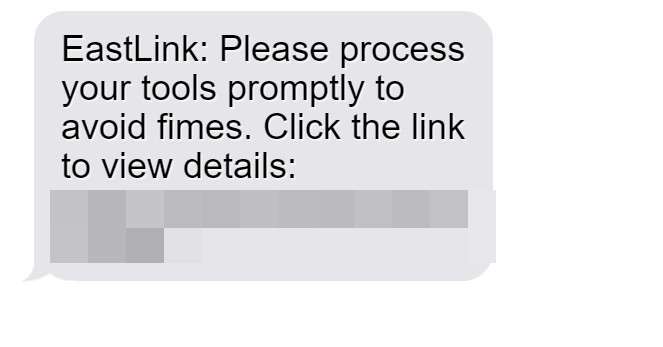
Overview of the EastLink Overdue Tolls Text Scam
The EastLink scam starts with SMS messages claiming recipients have outstanding toll balances requiring immediate payment. Links supposedly direct to the EastLink site to settle fees, but redirect to convincing fake interfaces mimicking EastLink and designed to steal data.
By submitting information, users enable criminals to commit identity theft and drain accounts. The texts leverage small $12 toll amounts to eventually steal thousands per victim through phony charges and new fraudulent accounts.
For example, Brisbane resident Emily Mills received an “EastLink” text last week about unpaid tolls of $12. In a hurry and not thinking, she clicked the link provided which went to “East.LinkRoad.Click” – not the real EastLink site.
Emily entered her card details on what appeared to be a legitimate payment page. But two days later there were over $5,000 in unauthorized iTunes gift card charges on her account from scammers who stole her information on the fake site.
This demonstrates how the seemingly small $12 overdue toll amount mentioned in the scam texts acts as bait to reel in victims and enabling much larger financial fraud.
In-Depth Examination of the EastLink Overdue Tolls Scam
Next, let’s explore the various deception strategies and interfaces on fake EastLink websites used to trick users into giving up valuable personal and financial data.
Scam Text Messages
The texts blast out randomly to Australian mobile numbers claiming EastLink tolls are overdue and face additional fines if unpaid. This pressures recipients to click the link without verifying first. But it goes to fake EastLink-lookalike sites.
Homepage Deception
The fake sites feature EastLink’s logo, colors, images, and navigation links to appear real. Buttons saying “Pay Now”, “Manage Account”, and “Avoid Fines” redirect users to the fraudulent payment portal.
Fake Validation Forms
Before collecting payment, lengthy forms claiming to “verify identity” obtain personal info enabling criminal misuse including:
- Full legal name, home address, phone, email
- Vehicle information
- Driver’s license number
- Partial date of birth
Fake Unpaid Tolls Page
A page appears with the user’s info showing the small outstanding toll amount from the scam text. This builds a false sense of legitimacy when victims enter payment data.
Fraudulent Payment Portal
The payment page imitates EastLink’s real payment interface, showing logos from major card issuers. But all data entered goes to scammers, not EastLink.
A “Payment Successful” confirmation displays after victims enter details, completing the scam.
Impacts of the Fake EastLink Toll Scam on Victims
Beyond unauthorized charges and payments, the scam enables additional identity theft and fraud such as:
- Credit cards opened using stolen information
- Bank account draining through collected account details
- Government benefits claimed using victims’ data
- Utility accounts set up to rack up unpaid bills
- Medical insurance fraud carried out
- Driver’s licenses forged for criminal activity
This demonstrates why staying vigilant against fake EastLink toll scams is critical. Don’t become another victim.
How the Fake EastLink Toll Scam Works to Deceive Australian Drivers
The EastLink toll scam leverages various deception strategies to dupe unwitting drivers into providing valuable personal and financial data. Let’s break down how the scam operates at each stage:
Step 1: Mass Text Messages
The scam begins by sending mass text messages to random Australian mobile numbers. The texts claim outstanding EastLink toll fees of around $12 are owed and must be paid immediately through the provided link.
However, the link goes to scam EastLink-lookalike sites totally unaffiliated with the real EastLink. Victims are not alerted to this fact.
Step 2: Visiting the Fake Site
Recipients who click the link in the scam SMS are taken to fraudulent websites like “East.LinkRoad.Click” designed to mimic the official EastLink portal.
These sites feature EastLink’s logo, fonts, colors, and navigation links to appear 100% legitimate. Texts urging users to immediately pay fines build false urgency.
Step 3: Submitting Personal Information
On the fake sites, users are prompted to provide personal details such as license number, DOB, address, etc. through a toll “validation form.”
This sensitive data enables criminals to commit identity theft and other fraud well beyond just EastLink toll payments. But victims believe they are simply validating themselves to EastLink.
Step 4: Entering Payment Information
After submitting personal information, victims are redirected to a convincing payment page showing the small outstanding toll balance deceptively referenced initially by the scam texts.
At this stage, unwitting users enter credit card or bank account numbers to “pay” the toll fees, handing scammers the ability to steal money and make unauthorized transactions.
Step 5: Confirming the Fake Transaction
To complete the ruse, victims see a “Payment Successful” confirmation after submitting payment information. This cements the false belief that they paid legitimate EastLink tolls.
In reality, scammers now have enough personal and financial data to embark on large-scale identity theft, credit card fraud, and account draining.
Step 6: Committing Wider Fraud
With stolen payment card numbers and personal details in hand, scammers can now:
- Make unauthorized transactions and purchases
- Open new credit accounts to max out
- Access and empty bank accounts
- File fake tax returns to steal refunds
- Apply for loans and government benefits
And much more, all under the unknowing victims’ names, thanks to details entered under the guise of paying $12 in tolls.
Step 7: Covering Tracks
The scammers switch up website names regularly to remain undetected and maximize the scam’s lifespan. Stolen data is quickly sold on the dark web. This allows them to evade authorities and continue duping Australian drivers.
Avoiding the EastLink Overdue Tolls Scam
Use these tips to steer clear of the fake EastLink toll text scam:
- Never click links in suspicious texts to avoid being directed to fake sites
- Manually navigate to the official EastLink site if you receive a toll notice
- Verify any supposed tolls directly with EastLink before taking action
- Watch for typos, mismatched URLs, and other red flags on sites
- Contact banks immediately about unauthorized charges
- Place fraud alerts if you suspect identity theft
Staying informed about the deceptive tactics and interfaces used in these scams helps protect Australians from real financial harm.
What To Do If You’ve Fallen For The Fake EastLink Toll Scam
If you entered any personal or payment information on a fraudulent EastLink-lookalike website, take the following steps right away to protect yourself:
Contact Banks and Financial Institutions
- Call your bank and credit card companies immediately to report any unauthorized transactions or activity. Request new account and card numbers.
- Ask about reversing recent unauthorized charges and payments made on compromised accounts.
- Closely monitor all accounts for further fraudulent activity.
Lock Down Your Credit
- Place 90-day fraud alerts on all three major credit reports at Equifax, Experian and TransUnion.
- Consider freezing your credit reports entirely to block scammers from opening new accounts.
- Order free copies of your credit reports to check for inquiries or accounts you don’t recognize. Dispute any fraud.
Change Account Passwords and Settings
- Reset all account passwords that may have been entered on fake EastLink sites as a precaution. Make them strong and unique.
- Opt out of any recurring payments attached to compromised cards or accounts.
- Update account recovery information and security question answers scammers could have obtained.
Report the Scam Activity
- File reports about the scam with EastLink, ACORN, ACSC, ACMA, ACCC and other relevant agencies. Provide details to aid investigations.
- Contact police to file an identity theft and fraud report. Get a copy of the report for banks and creditors.
Monitor for Further Misuse
- Carefully check statements and credit reports for any signs of continued identity theft and account misuse over the next 12 months. Scammers can hold onto stolen data.
- Consider enrolling in credit monitoring to receive alerts about suspicious activity in your name.
Acting quickly can help limit damages and prevent further abuse of your personal and financial information. Don’t let the scammers get away with defrauding Australian drivers.
Shut Down Fake EastLink Websites
To prevent ongoing victimization, fake EastLink toll sites must be reported to authorities like:
- EastLink directly
- ACMA
- ACCC
- ACSC
- Domain name registrars
With law enforcement involvement, fraudulent sites imitating EastLink can be suspended and eliminated.
Frequently Asked Questions About the Fake EastLink Toll Scam
1. What are the scam EastLink toll text messages?
The EastLink scam texts are fraudulent SMS messages sent randomly claiming outstanding toll fees must be paid through a provided link. However, the link directs to fake EastLink-lookalike websites designed to steal users’ personal and financial data.
2. Who is sending the EastLink scam text messages?
The fake EastLink texts originate from scammers and fraudsters, not the real EastLink. The messages are sent en masse using technology to drive traffic to the scam websites.
3. Does EastLink contact drivers about toll notices via text message?
No. EastLink does not contact customers about outstanding toll balances or fines through text messages. Any texts referencing EastLink tolls are fraudulent.
4. What happens if I click the link in the EastLink text?
The link directs victims to elaborate fake EastLink websites made to mimic the real site. Entering any information on these fraudulent sites enables scammers to steal data and commit financial crimes.
5. How do the fake EastLink websites steal my information?
The sites use fake EastLink forms and interfaces to trick users into inputting personal details, payment info, IDs, and more. Scammers harvest this data to open accounts and make unauthorized transactions.
6. What are signs a site is an EastLink scam site?
Warning signs include mismatched URLs, threatening language, requests for sensitive info like SSNs, typos, incorrect logos, and interfaces that seem “off”. Verify with EastLink before providing data.
7. What happens if I enter my information on a fake EastLink site?
Submitting any personal or financial data enables thieves to commit identity theft and fraud in your name. This includes opening accounts, filing fake tax returns, and making unauthorized purchases with your card.
8. How can I tell if scammers have misused my information?
Watch for unauthorized charges, accounts opened in your name, credit inquiries you don’t recognize, and bills for services you didn’t sign up for. Check statements regularly.
9. What should I do if I shared information on a fake EastLink site?
Immediately contact banks to halt charges on compromised cards. Place fraud alerts on your credit files, reset account passwords, continue monitoring statements vigilantly for further misuse, and file reports with agencies.
10. How can I avoid the EastLink toll scam?
Never click text links, manually navigate to EastLink’s site, verify notices directly with EastLink, watch for red flags on sites, monitor statements diligently, and do not trust texts regarding outstanding tolls.
Conclusion
The EastLink overdue tolls text scam tricks Australians into providing valuable information that enables large-scale identity theft and financial fraud well beyond the small outstanding toll amounts initially cited. But awareness of the scam tactics, checking text links, and verifying notices directly with EastLink can keep residents safe. Don’t let scammers capitalize on your hurry – double check toll texts first.

Join the discussion
0 commentsShare your experience or ask a question about this article.
Discussion
Start the conversation
Have a question or something useful to share? Add the first comment.