


The message arrives just as you’re getting a newsletter ready. It mentions a login you don’t recognize, and suddenly the campaign can wait.
An Elastic Email security alert scam borrows that familiar worry. Before following its instructions, look at the difference between checking your account and trusting the message.
Overview
Real security notifications make the imitation believable
Elastic Email is a legitimate email-delivery service. Its account-security guidance confirms that it sends notifications about suspicious or new logins.
That means the subject alone cannot tell you whether a message is fraudulent. A genuine warning and a convincing imitation may describe the same concern.
The scam is the counterfeit request that sends you to an impostor’s sign-in or asks you to disclose account secrets. It is not the real service’s notification feature.
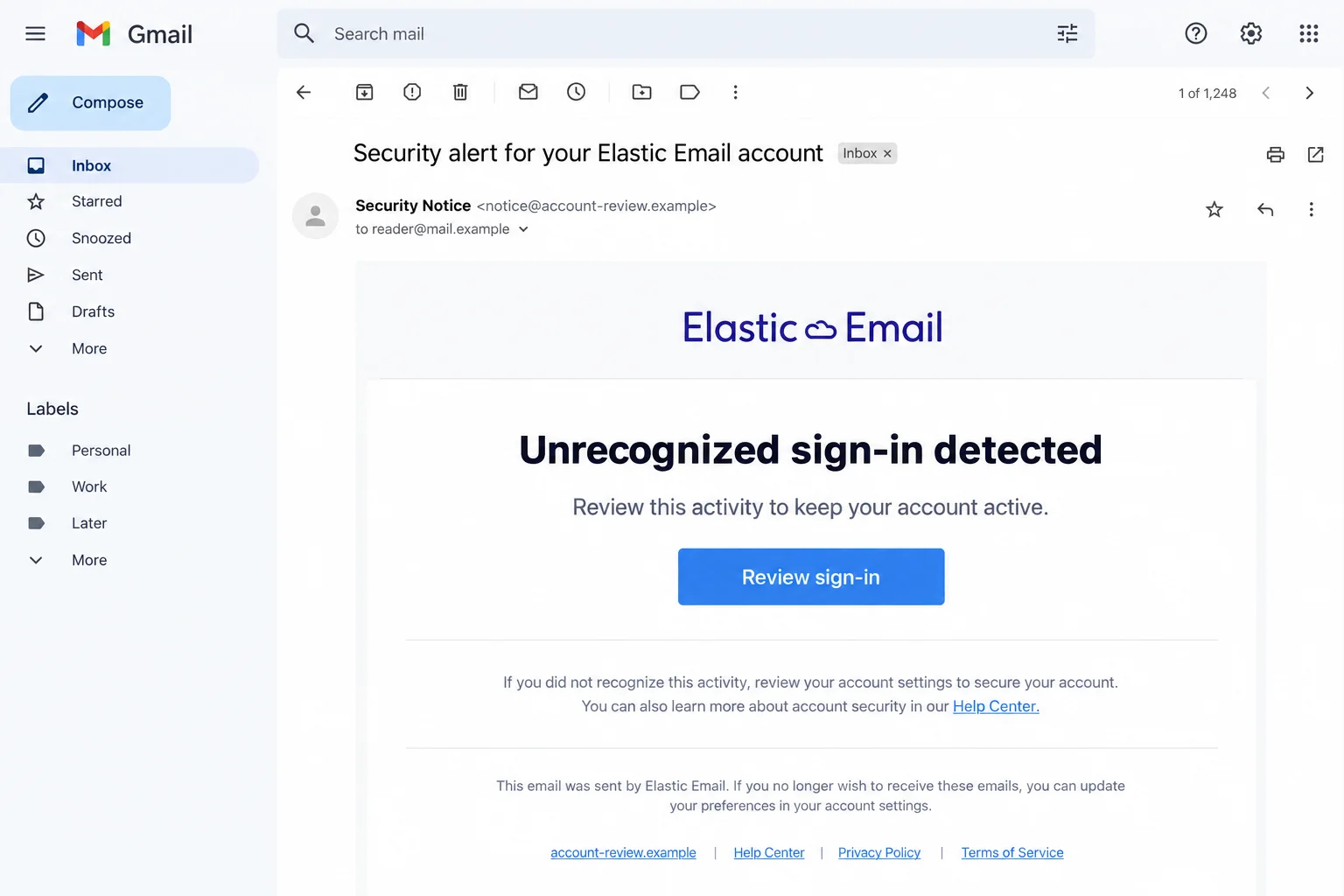
The illustration uses fictional addresses and wording. It shows how an impersonation can look, not an authenticated message from a particular victim or attacker.
A delivery-service account can expose more than one newsletter
Think about what your account connects to: campaigns, contact lists, a website, or an application that sends customer messages. Those connections matter during recovery.
A stolen dashboard password and a leaked API key are different problems. Changing one credential should not be treated as proof that every other access route is secure.
You also need to distinguish the delivery account from the mailbox receiving its alerts. They may have different passwords, recovery settings, and administrators.
Keep your response tied to what happened. Receiving an alarming email does not, by itself, establish that your contacts were exported or your website was compromised.
The safest check starts outside the warning
Open the service through a bookmark or its known website, rather than using the message’s button. Then examine the account or contact genuine support.
Pause before responding if the message asks you to:
- Enter your password on an unfamiliar domain to keep sending enabled.
- Copy a verification code into a form opened from the warning.
- Send an API key or SMTP credential to a supposed adviser.
- Install a repair tool before you can inspect your account.
- Keep the incident away from the person who manages your email system.
You can investigate a real security issue without allowing the email to choose your login page, software, or support contact.
What a Genuine Elastic Email Warning Can Mean
The familiar subject is not a verdict either way
The company documents a real notification titled Security alert for your Elastic Email account. A message using those words is not automatically fake.
Nor does a matching subject authenticate its sender. Copying a public phrase takes far less effort than obtaining access to the account it describes.
Read the warning as something to check, not an instruction you must complete inside that email. Use your own route into the service.
If the activity turns out to be yours, resolve it through genuine account controls. If it is unfamiliar, keep working through verified support instead of the unsolicited form.
Account trouble deserves attention without panic
A login problem can have several causes. An expired session, mistyped password, or account review is not enough to diagnose a takeover on its own.
But unexplained changes should not be dismissed because the original email looked suspicious. Rejecting a phishing link and checking the genuine account are compatible actions.
Describe what you can actually observe: when access stopped, what changed, and which actions you recognize. That gives support a clearer starting point than a guessed explanation.
Elastic Email and Elastic are not interchangeable names
This warning concerns the email-delivery service at elasticemail.com. Do not apply another company’s recruitment rules or sender domains to it merely because both names contain Elastic.
A job offer and an email-delivery account alert also ask different things of you. Identify the actual service before choosing a recovery or reporting route.
The real company’s security policy provides phishing-reporting and support contacts. Reach those published channels independently rather than trusting an address inside the questionable message.
How the Elastic Email Security Alert Scam Works
Step 1: A routine account concern interrupts your work
The message claims a new sign-in, suspicious activity, or a problem that could interrupt sending. For a small business, that can feel immediately consequential.
You may be preparing an important announcement or expecting order messages to reach customers. Losing access sounds like something you need to prevent quickly.
The sender may know your address without knowing anything about your campaigns. Do not confuse delivery to the right inbox with access to private account information.
Start with one question: can I check this through the service I already use? You do not need the message’s permission to do that.
Step 2: Familiar formatting makes the button feel official
A copied wordmark, neat layout, or device description can make the alert resemble ordinary account mail. Polished spelling does not establish where the button leads.
Even a message describing a browser you use can be generic. A plausible detail is not necessarily a detail obtained from your actual login history.
Check the complete address rather than recognizing a brand word somewhere inside it. Display names and button labels are presentation, not account authorization.
If your mail app does not show the destination clearly, leave it alone. Opening your existing bookmark is easier than investigating an unfamiliar link by visiting it.
Step 3: The supposed account review becomes a new sign-in
The fraudulent route may open a page resembling a legitimate login. Its purpose is to make entering your password feel like the first step toward protection.
You’re trying to protect your mailing account. Instead, the unfamiliar page gets the password that opens it.
A secure-connection icon does not identify the operator as Elastic Email. Encryption can protect a connection to the wrong website just as it protects a genuine connection.
Do not submit a dummy password to test the page, then a real one when it appears convincing. Use the known service instead.
The FTC’s phishing guidance recommends contacting a company through a website or number you already know, rather than the message’s contact information.
Step 4: A second request can expose another credential
A follow-up screen may ask for a code, another password, or an access key. Each request needs its own scrutiny, even after you completed the first.
Read genuine code notifications carefully. A code for signing in or changing account information should not be treated as a harmless confirmation that you saw an email.
API and SMTP credentials deserve particular care because applications can use them without the same interactive login you normally see.
If someone requests a key, stop and involve your administrator. Share identifiers and incident details through verified support, not secret values through an untrusted conversation.
Different imitations can ask for different information. There is no need to assume every message reaches all these stages before protecting something you already disclosed.
Step 5: The account problem can continue beyond the email
An error message after submission does not mean the password was rejected before anyone received it. Do not keep trying variations to get past the form.
Once you suspect disclosure, move to containment. The priority is no longer making the warning disappear; it is controlling the access you may have surrendered.
For a team account, tell the people responsible for sending and integrations. Quietly resetting one password can leave them unaware of another exposed connection.
Tell support what you entered while you still remember it. Don’t return to the form hoping an error message will make the disclosure harmless.
Check the Sending System, Not Just the Inbox
A password reset and an integration review do different jobs
Your website may send mail through an integration even when nobody is logged into the dashboard. Ask the administrator which credentials that connection uses.
If access keys may be exposed, coordinate their replacement with the service and the person maintaining the application. Avoid interrupting essential customer messages through an improvised cleanup.
Keep a record of what was replaced and where the new credential was installed. A successful dashboard login does not test every application’s mail connection.
Unfamiliar activity is a reason to investigate, not guess
Check recent account activity with support and compare it with your planned campaigns. Ask teammates before treating an unfamiliar but authorized task as an intrusion.
If unauthorized messages were sent, identify the affected campaign and audience as accurately as possible. Do not announce a complete contact-list breach without evidence.
A clear correction should explain which communication was unsafe and what recipients should avoid. It should not repeat a working malicious link.
Protect the mailbox that receives recovery messages
A reused password can expose your ordinary email account as well as the delivery service. Secure both if the same secret was disclosed.
Review recovery details and unfamiliar sessions through the email provider’s controls. Otherwise, a password-reset message for the delivery service may arrive in an inbox you no longer fully control.
For work accounts, follow the organization’s incident process. That lets the people with the relevant access check settings you cannot see yourself.
What to Do if You Have Fallen Victim to This Scam
-
Leave the unverified page and document the exposure. Keep the email, sender details, destination address, and approximate time. Do not submit anything else to finish the review.
Write down whether you entered a password, shared a code, disclosed an access key, downloaded a file, or only opened the message. Do not record actual secrets.
That distinction keeps recovery proportionate. Seeing the email alone does not mean you need to cancel every campaign or replace all your equipment.
-
Reach Elastic Email through its genuine help channel. The published support address is support@elasticemail.com. Explain what happened and which account is affected, without including your password.
Ask for help if the account email or other recovery information changed. Use the provider’s process instead of paying an outsider who promises immediate restoration.
For a business account, include your administrator in the response. Agree who will handle support and who will check connected applications.
-
Replace disclosed passwords through trusted controls. Use a trusted device and open the real service independently. Choose a unique replacement and secure reused passwords elsewhere.
Check the account’s contact information and available security settings. Enable two-factor authentication where appropriate, without treating it as a substitute for reviewing existing access.
If you cannot sign in, follow verified account-recovery instructions. A new message claiming to expedite the case should not choose your next login page.
-
Address exposed API or SMTP credentials separately. Tell the person who manages your integrations exactly which credential may have been shared. Arrange revocation and replacement through official controls.
Check every legitimate application using that credential so important messages can continue safely. Do not paste the new value into the original email conversation.
Elastic Email’s compromised-account guidance specifically discusses access keys and connected websites. Ask support how those recommendations apply to the access involved in your incident.
-
Review sending activity and billing with the account owner. Identify unfamiliar changes, messages, or charges, and distinguish them from scheduled work by authorized teammates.
Keep relevant logs and receipts before altering settings. If customers received an unauthorized message, coordinate a factual warning through a trusted channel.
For exposed payment details or suspicious charges, contact the payment provider directly. Account recovery does not automatically reverse a transaction.
-
Check the device if you installed something. An unsolicited alert is not a reason to run the repair tool it recommends. Obtain security software from its official source.
Malwarebytes can help investigate downloaded malicious software. A clean scan cannot revoke an API key, recover a mailing list, or settle whether an account was accessed.
AdGuard can reduce exposure to intrusive ads and some dangerous destinations. It does not authenticate a security email or replace the provider’s recovery process.
-
Report the impersonation without exposing more information. Elastic Email lists phishing@elasticemail.com for suspicious messages and fake websites. Include the relevant destination without adding secret credentials.
Use your mailbox’s phishing-report feature as well. Preserve any evidence your organization or provider needs before deleting the message.
For financial fraud in the U.S., ReportFraud.ftc.gov is an official reporting route. Reporting is separate from requesting a payment dispute or account recovery.
-
Verify that your normal work can resume safely. Confirm the intended account contacts, integrations, and sending behavior with your team and support.
Keep the incident reference and watch for follow-up messages using details from the first exchange. Familiar information does not prove a new helper is genuine.
Handle future alerts through the same independent route. You should not have to choose between ignoring a real account issue and trusting an unsolicited button.
Frequently Asked Questions
Does Elastic Email send real security alerts?
Yes. Its help center documents new or suspicious login notifications. A familiar subject is a reason to check independently, not proof of fraud or authenticity.
Is every message containing Elastic about the same company?
No. Confirm the actual service. Elastic Email account guidance should not be confused with another company’s recruitment notices or sender-domain rules.
What if I only opened the email?
A received message alone does not establish credential theft. Avoid its unverified route and inspect the real account if the warning concerns you.
Does changing my password replace an exposed API key?
Do not assume so. Review keys and integrations separately with the administrator and official support, then coordinate any necessary replacement.
Should I keep trying when the form rejects my password?
No. A fraudulent form can collect entries while displaying an error. Leave it and protect any credentials you already submitted.
Can a malware scan confirm that my mailing account is safe?
No. A scan examines software threats. Account activity, access keys, recovery information, and unauthorized sending require their own checks.
The Bottom Line
Do not let an Elastic Email security alert scam choose where you sign in or disclose secrets. Check the genuine service through your own trusted route.
If you already responded, secure the credentials involved and contact official support. Include connected applications in the recovery instead of stopping at the first password reset.

Join the discussion
0 commentsShare your experience or ask a question about this article.
Discussion
Start the conversation
Have a question or something useful to share? Add the first comment.