

A remote job offer lands just when your search feels exhausting. The company name is familiar, the role sounds promising, and somebody wants to move quickly.
An Elastic recruitment scam can look like that welcome turning point. Before rearranging your plans around the offer, check who is actually doing the hiring.
Overview
Scammers are impersonating a real employer
The Elastic recruitment scam concerns fake recruiters and job offers using Elastic’s identity. Elastic is a legitimate technology company; the impersonation is the fraud.
A public recruitment warning shared by Elastic employee Kristine Boccio describes fake interviews, invented offers, and demands for personal information, banking details, or payments.
That establishes a real impersonation concern, but not a single universal script. The exact role, contact method, and eventual request can differ.
The company name should not be confused with unrelated services carrying similar wording. This article addresses recruitment claims involving the employer whose official website is elastic.co.
Genuine hiring has independently verifiable steps
Elastic’s published hiring process describes recruiter screening, interviews, role-specific assessments, and a recruiter communicating an offer after the hiring decision.
The public fraud warning identifies company email addresses ending in @elastic.co and secure onboarding. A familiar name inside an email address is not the same thing.
Even an apparently correct sender address is not sufficient by itself. Spoofing or account compromise can affect otherwise convincing communications.
Verify the role and recruiter through a channel reached independently. A legitimate offer should not rely on your accepting the sender’s own proof without question.
What the false hiring process may ask from you
Job applications involve personal information, which makes the timing and recipient especially important. Scammers can present an inappropriate request as ordinary employment administration.
- An onboarding form seeking identity documents before you have verified the employer and offer.
- Bank details requested through an unverified email, chat, or imitation portal.
- A payment described as a hiring, processing, training, or activation requirement.
- A deadline that discourages confirming the position through the company’s own careers channels.
- A supposed interview or assessment that redirects you to an unexplained download or login.
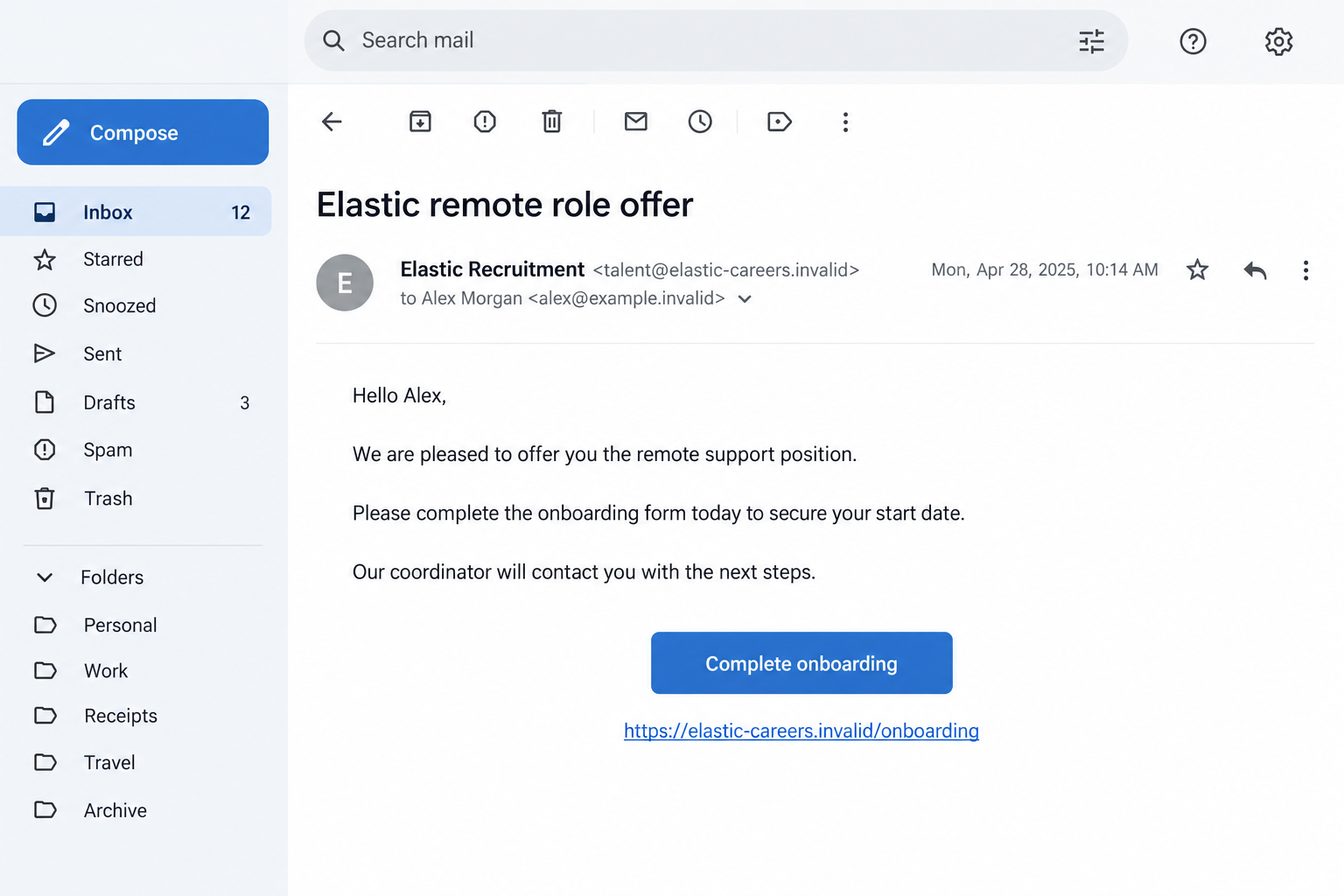
The fictional screenshots illustrate an offer and a possible data-and-payment request. They are not genuine Elastic communications or captured records of a specific applicant’s experience.
Why the Offer Can Seem Credible
A genuine company name supplies borrowed trust
Finding a real business when you search the name can feel reassuring. Unfortunately, that confirms the company exists, not that the person contacting you represents it.
The impersonator may use public job descriptions or employee names. Those details are available without access to the employer’s hiring systems.
A convincing job description therefore needs a separate identity check. The role can resemble a real opening while the attached contact route belongs to someone else.
Remote work creates room for plausible online communication
A video interview, digital application, or online offer is not inherently suspicious. Elastic describes remote interview stages, so online communication alone cannot establish fraud.
The risk appears when online contact cannot be verified and sensitive requests arrive through the same unconfirmed channel. Convenience should not remove the identity check.
A recruiter who schedules a call still needs verification. A voice, confident introduction, or polished message does not independently prove employment with the named business.
Excitement can make unusual requests feel temporary
Once you imagine starting the job, a form or small payment can feel like the final obstacle. The decision shifts from checking authenticity to completing onboarding.
That emotional shift is understandable, especially after a difficult search. It is also a useful moment to pause and ask someone outside the conversation to review it.
You do not need to demonstrate enthusiasm by sharing documents immediately. Verification is a professional precaution, not a sign that you do not want the role.
How the Elastic Recruitment Scam Works
Step 1: A fake recruiter creates an apparent job opportunity
The first contact may come through email, a job listing, or a professional platform. The sender presents themselves as connected to Elastic or its hiring team.
A plausible position attracts attention before the applicant checks the contact route. A real employee’s name may be included to make the introduction sound established.
The FBI has separately documented employer impersonation through fraudulent recruitment listings. That broader warning explains why platform visibility does not guarantee an employer’s involvement.
Do not assume a role is genuine simply because it appears alongside legitimate vacancies. Check the listing against the company’s own recruiting channels.
Step 2: A conversation or interview gives the process momentum
The impersonator can ask about experience, availability, and interest in the role. Those familiar questions make the exchange resemble normal recruitment.
Some reported impersonation schemes include fake interviews. That does not establish that every Elastic-themed approach uses the same format or takes the same amount of time.
An applicant may begin trusting the contact after providing a resume and answering questions. Neither step proves the interviewer has authority to offer employment.
Keep the application trail organized. The original listing, contact address, and role reference are useful when you later ask the genuine company to confirm the process.
Step 3: An offer arrives with instructions to act quickly
A written offer can make the opportunity feel settled. The sender may announce a start date or refer to a coordinator who will finish onboarding.
An offer letter can be fabricated. A signature, company name, or professional layout should not replace confirmation of the person and job behind it.
Look for continuity with a verified application and interview process. If the offer appears unrelated to anything you applied for, ask why before moving forward.
Urgency is especially concerning when the sender refuses time for basic confirmation. A supposed deadline should not determine whether you surrender identity documents.
Step 4: A false onboarding stage collects sensitive information
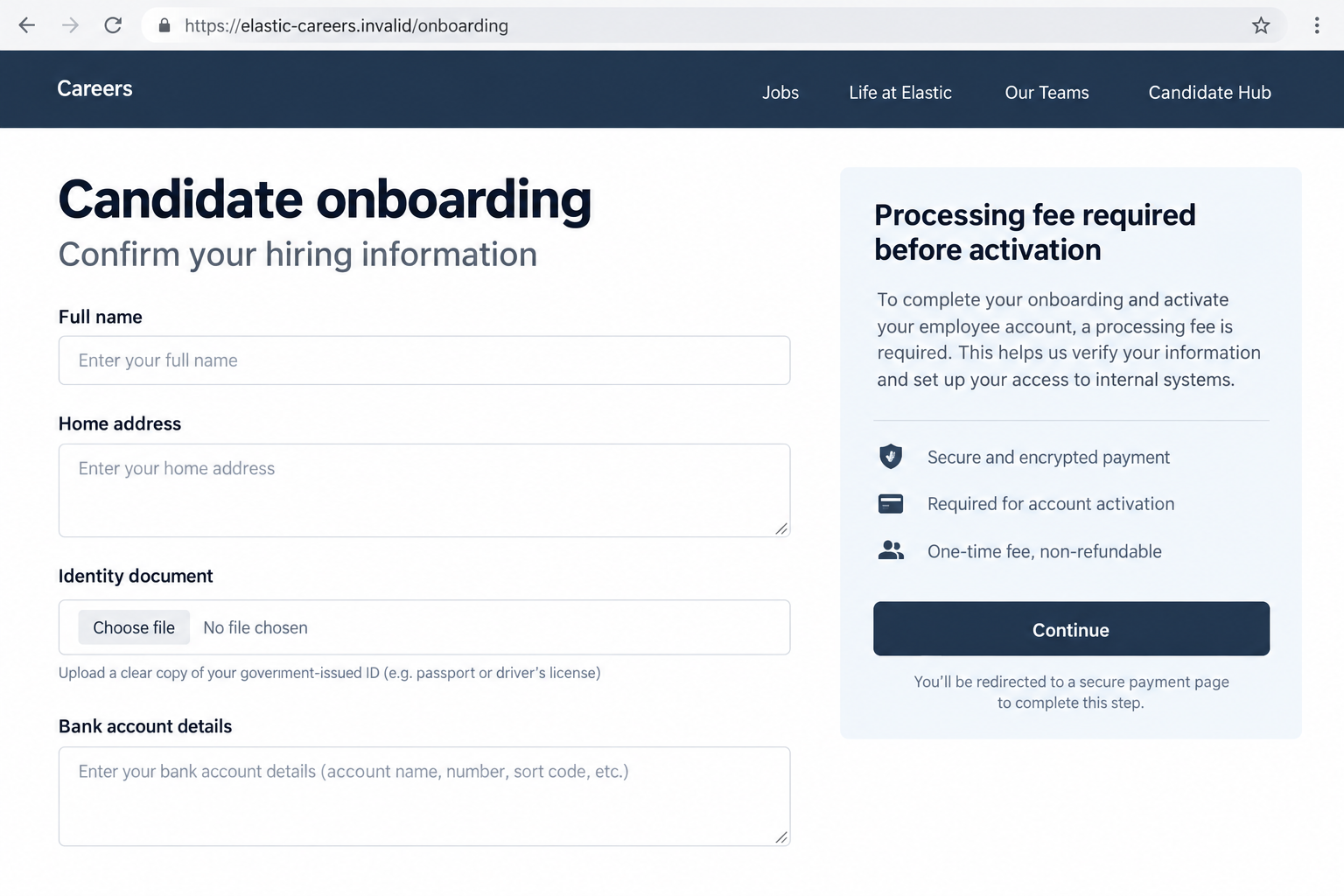
The next request may ask for identification, a home address, or banking details. The sender describes the disclosure as necessary for payroll or employee verification.
Real employers can need such information after hiring. The difference is whether the employer, offer, portal, and purpose have been established through trusted channels.
A page can use convincing employment language without belonging to the company. An encrypted connection protects traffic; it does not establish who owns the site.
The illustration below depicts a hypothetical false onboarding page. It shows the risk of combining sensitive information requests with an unverified activation demand.
Step 5: A payment is presented as the requirement for employment
A possible demand is a processing, activation, or other hiring-related fee. The applicant is asked to spend money to keep the promised opportunity.
A fee request attached to this impersonation should not be normalized as a minor administrative expense. Confirm it independently rather than asking the sender for reassurance.
The public recruitment warning specifically includes payment requests among the reported risks. It does not establish a standard amount or identical payment method across incidents.
If the sender introduces another person to collect the fee, the identity problem remains. A handoff within the same chain is not independent verification.
Step 6: The applicant discovers that the employer was never involved
The supposed start date may pass, the recruiter may disappear, or the real company may confirm that the offer is not theirs.
By then, the applicant might have disclosed information or paid a fee. The appropriate response depends on those actual exposures, not only the disappointment of losing the role.
There is no evidence that every fake offer produces account theft or financial loss. However, shared credentials, identification, and banking details warrant specific protective action.
Keep the false offer separate from genuine applications. Discovering an impersonator does not mean the real employer or every vacancy bearing its name is fraudulent.
How to Verify a Supposed Elastic Recruiter
Begin from the company’s careers page
Open Elastic’s official careers page independently. Use its job links and hiring information rather than entering through the message you are checking.
Compare the role, location, and application path. If a listing has closed, that alone does not prove fraud, but you still need confirmation of the contact.
Use an official recruiting contact route if available to ask about the specific opportunity. Do not use a telephone number supplied only by the questionable recruiter.
Read the actual email domain
The published warning distinguishes @elastic.co from lookalike company addresses. Expand the sender details and inspect the part after the @ symbol.
A longer address containing the word Elastic can still belong to an unrelated domain. The same applies to a reply destination that differs from the displayed sender.
If a third-party recruiter claims authorization, confirm that relationship with the employer. A vendor’s separate address cannot settle the issue without that additional check.
The sample screenshots use .invalid addresses deliberately. They are nonfunctional examples, not domains you should visit while assessing a real offer.
Keep legitimate payroll information inside verified onboarding
Do not treat all requests for banking information as inherently fraudulent. Payroll may require it after a genuine offer, through a verified process.
Before submitting anything, confirm the portal and request through your established employer contact. A logo and a secure-looking button are not adequate proof.
An employer does not need your personal banking password or one-time login code to set up payroll. Keep those account-access credentials private.
If asked to install assessment or collaboration software, verify the product and requirement independently. Obtain legitimate software from its official source, not a recruiter’s unexplained attachment.
What to Do if You Have Fallen Victim to This Scam
- Stop the false hiring process.
Do not complete another form or pay another charge to preserve the offer. Pause any planned purchase based solely on the unverified recruiter.
After saving the evidence, block the contact. You do not need a fraudulent recruiter’s permission to withdraw your cooperation.
- Save the application and communication trail.
Record the original listing, profile link, sender address, interview messages, offer letter, portal address, and payment requests. Include dates and role identifiers where available.
Keep identity documents and banking details out of public warning posts. Reports can describe what was requested without reproducing the private information you submitted.
- Contact the payment institution about any fee.
Tell the provider that someone impersonated an employer to obtain the payment. Ask which dispute, recall, or fraud-reporting options fit the method you used.
Keep the receipt and case reference. Do not label a transaction unauthorized if you personally approved it under deception; explain that distinction honestly.
Notify your bank if you supplied account details, even when no fee was paid. It can assess whether additional controls or account changes are appropriate.
- Take action on exposed identity information.
List the documents and identifiers you shared. A resume with work history creates a different exposure from a passport copy or Social Security number.
Consult IdentityTheft.gov in the US for a situation-specific plan. Ask about protective steps relevant to the information involved rather than buying unsolicited monitoring services.
Watch for follow-up messages that quote your application details. Accurate information from the earlier exchange does not make the new sender trustworthy.
- Recover any account credentials used on a false portal.
Change the affected login through the authentic service. If that password was reused elsewhere, update those accounts with separate credentials.
Review recent sessions, recovery information, and connected applications. Use multifactor authentication, and never approve a login request initiated by the supposed recruiter.
- Check software exposure without confusing it with identity recovery.
If you opened a suspicious attachment or installed a requested application, run Malwarebytes and remove unrecognized extensions or programs. Get help if remote access was granted.
AdGuard can provide another filtering layer for some harmful links and advertising. It cannot validate a job offer or retract information already submitted to an impostor.
A resume sent as an ordinary attachment does not automatically mean your device is infected. Base the security response on the files or software you actually opened.
- Report the listing and impersonation through verified channels.
Use the job platform’s reporting feature and notify the genuine employer using independently found contact information. Provide the fake contact and role details.
Report online financial or identity-related crime to the appropriate authorities, including IC3 in the US. Separate confirmed facts from assumptions about the sender’s real identity.
A genuine company may also be a victim of the impersonation. Direct a report toward the false listing instead of attributing the scammer’s conduct to its staff.
- Keep your real job search moving safely.
Check genuine pending applications through their established contacts. Do not let a fraudulent offer pressure you into resigning or abandoning verified opportunities.
Reject recovery pitches demanding another payment to retrieve the supposed job, documents, or fees. You deserve practical support, not another expensive promise.
Frequently Asked Questions
Is Elastic itself a scam company?
No. This warning concerns people impersonating the legitimate employer. Their false interviews, offers, and information requests should not be attributed to Elastic.
Can a remote interview with Elastic be legitimate?
Yes. The company’s hiring information describes remote interview stages. Verify the recruiter and application path; online communication alone does not prove fraud.
What email domain does the recruitment warning identify?
The public warning identifies @elastic.co for company communications. Inspect the full address and verify unusual contact arrangements independently, rather than trusting the visible sender name.
Should I pay a processing fee to secure the offer?
Do not pay an unverified recruiter to unlock employment. Payment demands appear in the impersonation warning and need confirmation outside the recruiter’s conversation.
Is a request for payroll bank details always fraudulent?
No. A verified employer may need payroll information after hiring. Confirm the offer and secure onboarding route before providing it.
What if I only shared my resume?
Save the exchange, report the impersonation, and be alert to personalized follow-ups. Sharing a resume is not the same as revealing passwords or complete identity documents.
The Bottom Line
The Elastic recruitment scam uses a real employer’s reputation to sell a false hiring process. A polished offer cannot establish the recruiter’s authority.
Confirm the opportunity through official careers channels before sharing sensitive information or spending money. If you already cooperated, respond to the specific information and payments involved.

Join the discussion
0 commentsShare your experience or ask a question about this article.
Discussion
Start the conversation
Have a question or something useful to share? Add the first comment.