

The Elon Musk “100,000 ETH giveaway” is one of those scams that feels believable for just long enough to cost people real money.
It usually shows up as a “live” crypto event tied to X, Tesla, or SpaceX, with a big headline that screams urgency: 100,000 ETH is supposedly being handed out to the community. The page looks clean, the instructions feel simple, and the promise is always the same in different words.
Send ETH first, and you will get more back.
That one detail is the giveaway. Not the kind you hope for, but the kind scammers want.
Scam Overview
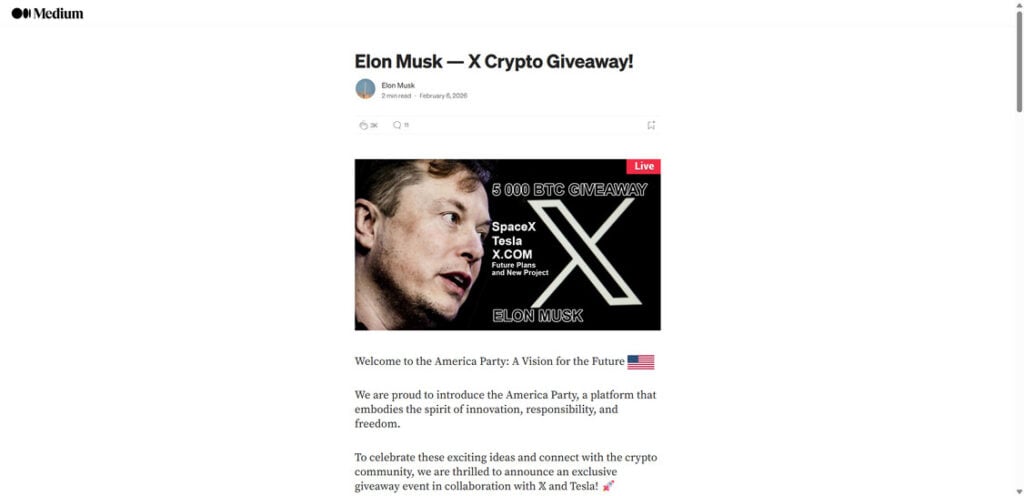
The Elon Musk 100,000 ETH giveaway scam is a high-volume crypto theft scheme that cycles through many domains and landing pages. Some versions mimic a social post. Others look like a news article, a Medium-style write-up, or an “official campaign” portal with branding that resembles X, Tesla, or a generic “foundation” style page.
The goal is consistent: trick victims into sending Ethereum to a scammer-controlled address by promising an instant return, usually “2x back,” “bonus ETH,” or a “verified allocation.”
What these scam sites typically claim
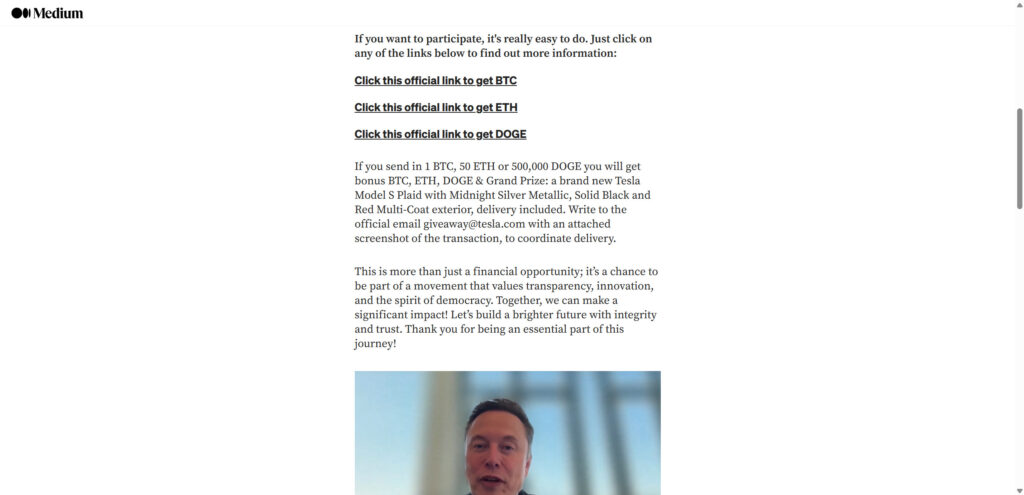
Most 100,000 ETH giveaway scam sites revolve around a few repeating claims:
- Elon Musk is celebrating an announcement or milestone with a crypto giveaway
- The giveaway is “live” and limited, with a countdown or supply counter
- Participants can choose ETH (and sometimes BTC, DOGE, or USDT)
- Sending crypto “verifies your address” or “activates your allocation”
- Once the transfer is received, you will get back more ETH, instantly
- There is “no risk,” with language about refunds, instant returns, or guaranteed payouts
These claims are designed to sound simple and procedural, not risky or speculative. That is intentional.
Why scammers focus on ETH giveaways
Ethereum is a favorite target for giveaway scammers because:
- Many users keep ETH on exchanges or hot wallets, ready to move quickly
- ETH is commonly used for DeFi and tokens, so “airdrop” language feels familiar
- QR codes and copy-to-clipboard addresses make fast sending easy
- Victims may assume delays are “network congestion,” giving scammers time
- ETH transfers, once confirmed, are generally irreversible
Scammers do not need a lot of victims. They need a steady stream of people who send “just a test amount,” then send more when the site pushes a bonus tier or a second payment.
The “100,000 ETH” number is a psychological lever
A headline like “100,000 ETH giveaway” is not meant to be realistic. It is meant to create:
- Scale: it feels like a major, official campaign
- Urgency: “I should act now before it ends”
- Social proof: “This must be real if it’s this big”
- FOMO: “If I wait, I lose the chance”
That emotional reaction is what replaces careful verification.
Why these pages look so polished
This scam category has matured. Many of these sites now look professional because scammers understand conversion.
You will often see:
- Clean dark UI with gold accents or “official” branding
- Big “Live” banners and slick promotional graphics
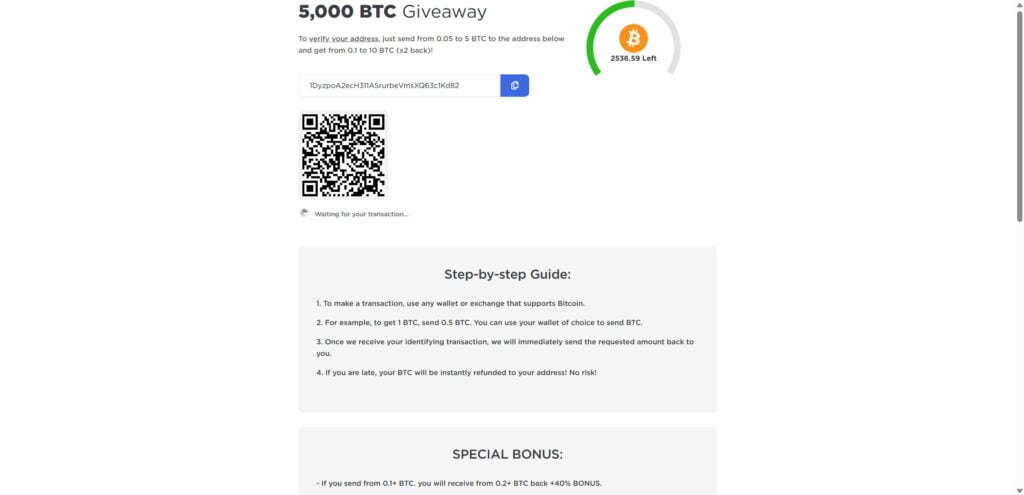
- A visible ETH address with a copy icon
- A large QR code to scan and send quickly
- A “waiting for your transaction” message that keeps you engaged
- A transactions table that appears to show inbound and outbound payments
- Comment sections that claim successful payouts
- A “bonus” ladder that rewards higher deposits with higher returns
None of those elements prove legitimacy. They are there to increase the chance you send.
Why the “recent transactions” section is misleading
A transaction list can be:
- Entirely fake data rendered as a table
- Real deposits into the scam wallet, framed as “payouts”
- Wallet-to-wallet shuffling by the scammer to mimic activity
- Random hashes and addresses reused to look legitimate
Even if you see real transactions, that only confirms money is moving. It does not confirm anyone is receiving the promised “2x back.”
How these scams spread
The distribution channels shift, but common sources include:
- Impersonated posts or reply spam on X
- Promoted posts from hacked or purchased accounts
- Fake “news” sites or cloned blog pages
- Redirect ads and pop-ups that send users through multiple pages
- Lookalike domains that change frequently (the template stays the same)
A key detail: these scams rarely rely on one site. They rely on many sites, rotating domains to stay ahead of reports and takedowns.
Elon Musk is not behind these giveaways
There is no legitimate Elon Musk giveaway that requires people to send ETH to receive more ETH back. The “send first” model is the scam itself.
If a page asks you to transfer ETH to “verify” or “activate” anything, it is not a giveaway. It is a wallet controlled by someone who wants your money.
How The Scam Works
The exact design varies by domain, but the funnel is predictable. Once you recognize the sequence, you can spot the next variant quickly.
Step 1: You encounter a “live” giveaway announcement
You see a post, a screenshot, a page, or a “story” claiming:
- Elon Musk is hosting a giveaway
- 100,000 ETH is being distributed
- The event is happening now
- Participation is simple and open to everyone
The message is built to reduce the impulse to verify. It sells speed and exclusivity.
Step 2: You click a link that looks official
The link often uses:
- A domain that looks brand-adjacent or tech-themed
- A clean landing page with “official” language
- A short article format to build trust
- Buttons like “Claim ETH,” “Get Allocation,” or “Official Link”
The goal is to move you from curiosity to action with minimal friction.
Step 3: The giveaway portal shows a wallet address and QR code
This is the money page.
You are presented with:
- An ETH address and a copy button
- A QR code to scan from your phone
- “Minimum” and “maximum” limits
- A simple promise: send ETH and get more back
- A line like “waiting for your transaction…”
The design removes the last obstacle: effort.
Step 4: The scam uses “verification” language to justify the transfer
They usually claim you are not “paying,” you are:
- Verifying your address
- Activating your allocation
- Initiating your claim
- Confirming eligibility
- Triggering an instant payout
This is one of the most important red flags. Real verification does not require you to send funds.
Step 5: Bonus tiers push you to send more
Many versions include a ladder like:
- Send X ETH, get Y ETH back
- Larger transfers unlock higher “bonus” percentages
- “Limited-time” boosts to increase urgency
This is an upsell. The scam’s profit depends on turning a small test transfer into a larger second transfer.
Step 6: Fake proof appears to calm your nerves
Once you hesitate, the page provides “proof”:
- A transactions table showing “In” and “Out”
- Comments that claim “It works!”
- Counters showing how much ETH is “left”
- Badges like “verified,” “official,” or “live updates”
These elements are meant to answer your doubt without you leaving the page to verify anything.
Step 7: You send ETH, and nothing comes back
After sending, victims typically see:
- No payout at all
- A permanent “waiting” status
- A message blaming network congestion
- A prompt to click a help link
- A demand for an additional payment
This is where many people lose more: they try to “fix” the non-payment by sending again.
Step 8: The scam escalates with a second payment request
Common second-stage claims include:
- “You must send a verification fee”
- “You must pay a gas fee to release the payout”
- “You must increase the amount to qualify”
- “Your transfer was too small, send again”
- “The system detected an error, retry”
None of these are legitimate. Once you send again, you are only increasing your loss.
Step 9: The domain disappears or redirects
Scam domains often:
- Go offline quickly
- Start redirecting to a new domain
- Clone the same template under a different name
- Change addresses frequently
This is why victims struggle to “find the site again” or contact support. There is no support, only churn.
What To Do If You Have Fallen Victim to This Scam
If you sent ETH to a giveaway address or interacted with a “100,000 ETH giveaway” site, take these steps in order.
- Stop sending money immediately
- Do not send more ETH to “unlock” anything.
- Do not pay a “verification” or “gas” fee.
- Do not chase bonuses or tiers.
- Capture evidence right now
- Screenshot the page showing the address and claim.
- Save the domain name and any redirects.
- Copy the destination address into a note.
- Save your transaction hash (TXID) and timestamp.
- If you sent from an exchange, contact the exchange support team
- Provide the TXID, destination address, amount, and domain.
- Ask whether they can flag the address and assist with reporting.
- Recovery is uncommon, but speed matters.
- If you sent from a wallet you control, assume the transfer is irreversible
- ETH transfers are typically final once confirmed.
- Do not rely on promises of refunds or automatic returns.
- If you connected a wallet or signed anything, move remaining funds
- Move assets to a new wallet that has never touched the scam site.
- Use a clean device if possible.
- Revoke approvals on the affected wallet if any tokens were approved.
- Secure your email and exchange accounts
- Change passwords (especially if reused anywhere).
- Enable 2FA on email and crypto accounts.
- Review login history for unusual activity.
- Check your browser for malicious extensions
- Remove anything you do not recognize.
- Be cautious of “wallet helpers,” coupon extensions, or random add-ons.
- Watch for recovery scams
- Anyone promising to recover your ETH for an upfront fee is likely running a second scam.
- Do not pay “investigators” in DMs.
- Report the scam
- Report the domain to the registrar and host.
- Report the page as phishing in your browser.
- Report to your local cybercrime reporting channel.
- If you are in the United States, file with the FBI Internet Crime Complaint Center (IC3).
- Warn others where you saw it
- A short, factual warning can slow down the next victim.
- Do not engage in long arguments with scam accounts.
The Bottom Line
Elon Musk is not running a 100,000 ETH giveaway, and no legitimate giveaway requires you to send ETH first to receive more back. That is not how real promotions work in crypto.
These scam sites succeed because they are built to feel official, urgent, and simple. The QR code, the counters, the transactions table, and the comments are all there to push you into one irreversible action: sending crypto to a wallet you do not control.
If you already sent ETH, do not send anything else. Document what happened, secure your accounts, and report the domain and transaction details. And for the future, treat one rule as non-negotiable: any “giveaway” that asks you to send crypto first is a scam.
FAQ: Elon Musk 100,000 ETH Giveaway Scam Sites
Is the Elon Musk “100,000 ETH giveaway” real?
No. These are scam sites built to steal crypto. The giveaway claim is bait, and the real goal is to get you to send ETH to a scammer’s wallet address.
Does Elon Musk have anything to do with these giveaway sites?
No. Scammers use his name and themes related to X, Tesla, and SpaceX to borrow credibility. The branding is not proof of affiliation.
Why do these sites say I must “send ETH to verify my address”?
Because it sounds technical and harmless. In reality, it is just a request for money. Legit giveaways verify wallets with signatures or official claim flows, not by asking you to transfer ETH first.
How does the “send ETH and get 2x back” part work?
It does not. Once you send ETH, the scammer controls it. Ethereum transfers are generally irreversible after confirmation, and the scammer has no reason to send anything back.
The page shows a live counter like “ETH left.” Is that real?
Usually not. “ETH left” counters are easy to fake and are used to create urgency so you act before thinking or researching.
The site shows “recent transactions” and payouts. Does that prove it’s legit?
No. Those transaction tables are often fake, staged, or misleading. Even if the scam wallet receives real deposits from victims, the site can display that activity as if it were proof of payouts.
Why do these scams use QR codes and copy buttons?
To remove friction and speed up the transfer. The faster it is to send, the less time you have to pause, verify, or reconsider.
I sent ETH from an exchange. What should I do?
Contact the exchange support team immediately and provide:
- The destination wallet address
- Your transaction hash (TXID)
- The amount and time sent
- The scam site domain
Ask if they can flag the address and assist with reporting. Recovery is not common, but quick reporting can still help.
I sent ETH from my own wallet. Can I get it back?
In most cases, no. If the transaction is confirmed, it is typically final. Focus on preventing additional losses and securing your accounts.
If I only sent ETH, can the scammer drain the rest of my wallet?
If you only sent ETH to their address, they usually cannot drain your wallet automatically just from that transfer.
However, if you connected your wallet to the site or approved token permissions, the risk is higher.
I connected my wallet or clicked “Connect Wallet.” What should I do?
Treat it as urgent:
- Move remaining assets to a fresh wallet you control
- Revoke any suspicious token approvals on the affected wallet
- Stop interacting with the scam site and any related links
The site says my payout is “pending” and asks for a second payment (verification fee, gas fee, activation). Is that normal?
No. That is a common second-stage tactic to extract more money. Do not send anything else.
Why do these scams keep changing domains?
To avoid takedowns and reports. The same template gets re-used across many new domains and social posts. Domain rotation is a hallmark of this scam category.
What are the clearest red flags that confirm a “100,000 ETH giveaway” site is a scam?
Watch for:
- Any claim that you must send ETH first to receive more back
- “Verify your address” language tied to a transfer
- Huge giveaway numbers with little or no verifiable source
- “Live” counters, countdown timers, or “limited allocation” pressure
- A “recent transactions” feed used as social proof
- Bonus tiers encouraging larger deposits
- Requests for a second payment to unlock or release funds
How do real airdrops or giveaways work?
Real airdrops typically use official project channels, clear eligibility rules, and wallet signatures or claim pages. They do not require you to transfer ETH to a random address to “activate” a payout.
How can I report these scam sites?
You can:
- Report the domain to the registrar and hosting provider
- Report the link as phishing in your browser
- Report the wallet address on chain explorers and abuse databases (if supported)
- File a cybercrime report with your local authority
If you are in the United States, report to FBI Internet Crime Complaint Center (IC3).
What should I do if someone messages me saying they can recover my ETH?
Be cautious. “Recovery” DMs are often a second scam. Do not pay upfront fees, do not share seed phrases, and do not install remote access software.








