SBDeal100.com Scam – The $100 Starbucks Gift Card Offer Is Fake
Written by: Thomas Orsolya
Published on:
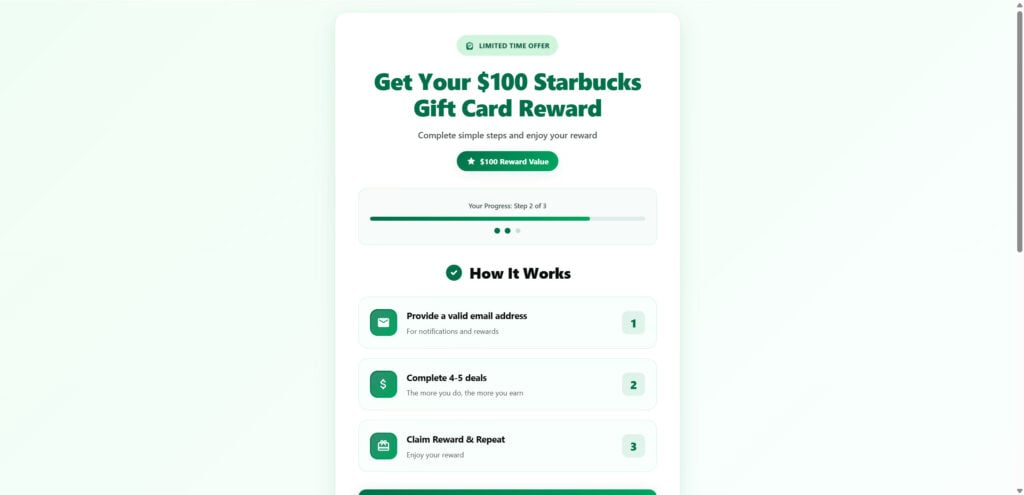
Imagine seeing an ad that says you can get a $100 Starbucks Gift Card just for filling out a short survey about Starbucks’ new menu items. It looks clean, professional, and even features the official Starbucks logo. The site, SBDeal100.com, promises easy money and free coffee – all you have to do is answer a few questions and provide your email.
Sounds tempting, right? But here’s the truth: it’s a scam.
The SBDeal100.com Starbucks Gift Card offer has nothing to do with Starbucks. It’s part of a growing web of affiliate link scams that impersonate major brands like Apple, Target, and Costco to trick users into completing endless “deals” while collecting personal information. Despite its professional design, no one ever receives the $100 Starbucks card – only spam emails, hidden charges, and frustration.
This article breaks down the SBDeal100.com scam, how it works, and what you should do if you’ve already interacted with it.
Scam Overview
The SBDeal100.com Starbucks Gift Card scam is a deceptive marketing scheme that uses fake branding and fraudulent promises to generate money for its operators. It claims you can get a $100 Starbucks gift card for giving feedback on new menu items – but it’s not connected to Starbucks in any way.
How It Appears
The scam typically shows up in social media ads or pop-up promotions. It uses Starbucks’ green-and-white logo, clean typography, and realistic product images to look legitimate. The headline usually reads:
“Get a $100 Starbucks Gift Card by giving feedback on their new menu items.”
The ad links to a simple website (often SBDeal100.com) that looks like a Starbucks feedback page. It even has a “How to Start” section that lists:
Complete a quick survey
Enter your basic info
Complete recommended deals
Check your email for the checkout code
The instructions seem reasonable – until you realize that step three, “complete recommended deals,” is where the scam makes its money.
The Illusion of Authenticity
Everything on the page is designed to mimic Starbucks’ branding:
The logo is identical to Starbucks’ official mermaid emblem.
The color palette uses Starbucks’ signature green and white.
The language sounds corporate and friendly: “Thank you for your feedback,” “Exclusive offer for valued customers.”
The design gives users a false sense of legitimacy. Most people don’t suspect anything because it looks nearly identical to a genuine Starbucks promotion.
The Real Purpose Behind SBDeal100.com
The main goal of this scam is affiliate revenue and data collection. Scammers earn money when users complete sponsored tasks – known as “offers” – on their site. These offers are often hosted by affiliate marketing networks that pay a small commission for each signup or app download.
For example:
Completing a “free trial” of a streaming service might earn the scammers $2–$5.
Downloading an app through their link could earn another $1–$3.
The scam doesn’t end there. In addition to affiliate payouts, SBDeal100.com collects personal data – names, emails, and sometimes phone numbers or payment info – which can be sold to marketing companies or used for future scam campaigns.
Why It’s Effective
The SBDeal100.com scam works because it feels low-risk and believable. After all, who wouldn’t take a two-minute survey for free Starbucks? It plays on three psychological triggers:
Trust: Starbucks is a well-known, respected brand.
Desire: Everyone loves free coffee or easy rewards.
Ease: The steps are simple, and the website looks safe.
This combination makes users act quickly without stopping to question the legitimacy of the offer.
Starbucks’ Official Statement
While Starbucks has not specifically mentioned SBDeal100.com, the company has publicly warned consumers in the past about unauthorized promotions and fake gift card offers. Starbucks confirms that all genuine promotions are hosted only on their official website (starbucks.com) or through the Starbucks Rewards app.
Any third-party site claiming to offer Starbucks gift cards in exchange for surveys or deals is not affiliated with the company.
How the SBDeal100.com Scam Works
The scam follows a clear, step-by-step funnel designed to extract personal data and generate money through affiliate marketing. Here’s how it works from start to finish.
Step 1: The Social Media Hook
The scam starts with an ad on platforms like Facebook, Instagram, TikTok, or Snapchat. The post may include captions such as:
“Starbucks is giving away $100 gift cards for feedback on their fall drinks!” “I just got my free Starbucks card in 5 minutes!”
The ad often uses stock images of Starbucks drinks or people smiling with gift cards. When you click the “Get Now” button, you’re taken to SBDeal100.com or a cloned version of it.
Step 2: The Fake Survey Page
Once on the site, you’re greeted by a sleek page with the Starbucks logo and a short introduction:
“Thank you for helping Starbucks improve our menu. Complete a short survey to receive your $100 gift card.”
The survey contains simple questions like:
“How often do you visit Starbucks?”
“What’s your favorite Starbucks drink?”
“Would you recommend Starbucks to friends?”
After answering, a message appears saying:
“Congratulations! You qualify for your $100 Starbucks Gift Card.”
Step 3: Data Collection
Next, the site asks for personal information such as your name, email, and sometimes phone number. This step claims it’s needed to “deliver your reward,” but in reality, it’s the first phase of data harvesting.
Once you enter your details, your inbox becomes a target for marketing spam, phishing emails, and potentially malicious links disguised as follow-up offers.
Step 4: The “Recommended Deals” Trap
After providing your info, you’re told you must “complete several recommended deals” to receive your gift card. These deals include:
Signing up for subscription services.
Downloading mobile apps.
Entering additional surveys.
Providing payment details for “free trials.”
Every time a user completes a deal, the scammers earn an affiliate commission. These offers can also lead to recurring charges if users forget to cancel subscriptions.
Step 5: The Endless Loop
After finishing the offers, users are often redirected to another “verification” page that says they need to complete one more deal to qualify. This process repeats indefinitely.
No matter how many offers you finish, you’ll never receive a $100 Starbucks card. The scam’s fine print always includes vague terms like “rewards not guaranteed” or “subject to verification,” giving scammers legal cover while keeping users stuck in the loop.
Step 6: The Aftermath
Victims of the SBDeal100.com scam often experience:
Floods of spam emails and unwanted marketing messages.
Unauthorized charges from subscriptions tied to “free trials.”
Data exposure, as their information is sold to third-party databases.
The scammers, meanwhile, walk away with affiliate commissions and a new batch of potential victims for future scams.
What to Do If You Fell for the SBDeal100.com Starbucks Scam
If you interacted with SBDeal100.com or entered your information, it’s important to act quickly to limit any potential damage.
1. Stop Using the Site Immediately
Close all tabs connected to SBDeal100.com and don’t click on any follow-up emails or ads from the same source.
2. Change Your Passwords
If you entered your email, change your password immediately. Use a strong, unique password and enable two-factor authentication on your accounts.
3. Check for Unfamiliar Charges
If you provided credit card information for a “trial offer,” review your bank or credit card statements for suspicious transactions. Cancel any recurring charges you don’t recognize.
4. Cancel Any Free Trials
Log in to any services you might have signed up for during the process and cancel the trials before they start billing you.
5. Run a Security Scan
Use reliable antivirus software to check your device for potential malware or trackers that could have been installed during the scam.
6. Report the Scam
Report the fake promotion to the appropriate authorities:
You can also report the scam to Starbucks through their customer service to alert them of the unauthorized use of their brand.
7. Monitor Your Inbox
Be cautious of new emails asking for additional information, confirmation codes, or follow-up rewards. These are often phishing attempts linked to the same scam network.
8. Educate Others
Warn your friends, coworkers, or classmates about the SBDeal100.com scam – especially those who might see it on social media. Sharing awareness is one of the best ways to stop scams from spreading.
Is Your Device Infected? Run a Free Malware Scan
Slow performance, constant pop-ups, or strange behavior? These are classic signs of a malware infection. The fastest way to find out is to scan your device with Malwarebytes Anti-Malware Free — one of the most trusted malware removal tools available.
The free version detects and removes the most common threats, including:
Adware — the cause of those annoying pop-ups
Browser hijackers — unwanted redirects and changed homepages
Trojans and spyware — hidden programs stealing your data
Potentially unwanted programs (PUPs) — software you never asked for
👉 Select your device below — Windows, Mac, or Android — then follow the simple steps to download Malwarebytes, scan your system, and remove any threats it finds. The whole process takes about 5 minutes.
Malwarebytes for WindowsMalwarebytes for MacMalwarebytes for Android
Run a Malware Scan with Malwarebytes for Windows
Malwarebytes is one of the most popular and trusted anti-malware tools for Windows — and it’s completely free for removing infections. It catches threats that many antivirus programs miss, including adware, browser hijackers, and trojans. Follow the steps below to scan and clean your PC in just a few minutes.
Download Malwarebytes
Click the button below to download the latest version of Malwarebytes for Windows from the official source. The free version is all you need — it will scan your computer and remove adware, browser hijackers, and other malicious software at no cost.
(The link opens in a new page where your download will start)
Install Malwarebytes
When the download finishes, open your Downloads folder and double-click the MBSetup file. If Windows shows a User Account Control pop-up, click “Yes” to allow the installation.
Follow the On-Screen Prompts to Install Malwarebytes
The setup wizard will walk you through a few quick screens:
Choose where you’re installing the program — “Personal Computer” or “Work Computer” — then click Next.
Malwarebytes will now install on your device. This usually takes under a minute.
When installation is complete, the “Welcome to Malwarebytes” screen will open automatically.
On the final screen, click Open Malwarebytes to launch the program.
Enable “Scan for Rootkits”
Before scanning, turn on rootkit detection so Malwarebytes can find even the most hidden threats. Click the Settings gear icon on the left side of the screen.
In the settings menu, find “Scan for rootkits” and click the toggle so it turns blue.
Done? Click “Dashboard” in the left pane to return to the main screen.
Start the Scan
Click the blue Scan button. Malwarebytes will automatically update its virus database and start checking your computer for malware.
Wait for the Scan to Finish
The scan checks your entire system for browser hijackers and other malicious programs, so it can take several minutes. Feel free to do something else — just check back occasionally to see the progress.
Quarantine the Detected Threats
When the scan is done, you’ll see a list of everything Malwarebytes found — malware, adware, and potentially unwanted programs. Click the “Quarantine” button to remove all of them at once.
Malwarebytes will now remove the malicious files and registry entries and move them safely into quarantine.
Restart Your Computer
Some threats can only be fully removed after a reboot. If Malwarebytes asks you to restart, click Yes. Once you’re logged back in, your PC is clean and you can continue with the next steps in this guide.
When the scan finishes, click Quarantine to remove everything Malwarebytes found. That’s it — your Windows PC is now clean of trojans, adware, and other malware, and should be back to running smoothly.
If your current antivirus allowed this malicious program on your computer, you may want to consider purchasing Malwarebytes Premium to protect against these types of threats in the future. If you are still having problems with your computer after completing these instructions, then please follow one of the steps:
Malwarebytes for Mac is a free on-demand scanner that removes the malware other security software tends to miss — adware, browser hijackers, and unwanted programs included. Cleaning an infected Mac with Malwarebytes has always been completely free, and it’s our go-to recommendation. Follow the steps below to scan and clean your Mac in just a few minutes.
Download Malwarebytes for Mac
Click the button below to download the latest version of Malwarebytes for Mac.
When the download finishes, open your Downloads folder and double-click the setup file to begin the installation.
Follow the On-Screen Prompts to Install Malwarebytes
The Malwarebytes for Mac Installer will guide you through a few quick screens. Click “Continue” and keep following the prompts until the installation completes.
When the installation is complete, Malwarebytes opens to the Welcome to Malwarebytes screen. Click “Get started“.
Select “Personal Computer” or “Work Computer”
Malwarebytes will ask what type of computer you’re installing it on. Click either Personal Computer or Work Computer, whichever applies.
Start the Scan
Click the “Scan” button. Malwarebytes will automatically update its detection database and begin checking your Mac for malware.
Wait for the Scan to Finish
Malwarebytes will scan your Mac for adware, browser hijackers, and other malicious programs. This can take a few minutes, so feel free to do something else — just check back occasionally to see the progress.
Quarantine the Detected Threats
When the scan is done, you’ll see a list of everything Malwarebytes found. Click the “Quarantine” button to remove all the threats at once.
Restart Your Mac
Malwarebytes will now remove all the malicious files it found. Some threats can only be fully removed after a reboot — if Malwarebytes asks you to restart, allow it. Once you’re logged back in, your Mac is clean.
Once the scan is done, remove every threat it detected. Your Mac is now free of adware, rogue browser extensions, and other potentially harmful software.
If your current antivirus allowed a malicious program on your computer, you might want to consider purchasing the full-featured version of Malwarebytes Anti-Malware to protect against these types of threats in the future. If you are still experiencing problems while trying to remove a malicious program from your computer, please ask for help in our Mac Malware Removal Help & Support forum.
Run a Malware Scan with Malwarebytes for Android
Malwarebytes for Android automatically detects and removes dangerous threats like malware and ransomware so you don’t have to worry about your most-used device being compromised. Aggressive detection of adware and potentially unwanted programs keeps your Android phone or tablet running smooth.
Download Malwarebytes for Android.
You can download Malwarebytes for Android by clicking the link below.
In the Google Play Store, tap “Install” to install Malwarebytes for Android on your device.
When the installation process has finished, tap “Open” to begin using Malwarebytes for Android. You can also open Malwarebytes by tapping on its icon in your phone menu or home screen.
Follow the on-screen prompts to complete the setup process
When Malwarebytes will open, you will see the Malwarebytes Setup Wizard which will guide you through a series of permissions and other setup options. This is the first of two screens that explain the difference between the Premium and Free versions. Swipe this screen to continue. Tap on “Got it” to proceed to the next step. Malwarebytes for Android will now ask for a set of permissions that are required to scan your device and protect it from malware. Tap on “Give permission” to continue. Tap on “Allow” to permit Malwarebytes to access the files on your phone.
Update database and run a scan with Malwarebytes for Android
You will now be prompted to update the Malwarebytes database and run a full system scan.
Click on “Update database” to update the Malwarebytes for Android definitions to the latest version, then click on “Run full scan” to perform a system scan.
Wait for the Malwarebytes scan to complete.
Malwarebytes will now start scanning your phone for adware and other malicious apps. This process can take a few minutes, so we suggest you do something else and periodically check on the status of the scan to see when it is finished.
Click on “Remove Selected”.
When the scan has been completed, you will be presented with a screen showing the malware infections that Malwarebytes for Android has detected. To remove the malicious apps that Malwarebytes has found, tap on the “Remove Selected” button.
Restart your phone.
Malwarebytes for Android will now remove all the malicious apps that it has found. To complete the malware removal process, Malwarebytes may ask you to restart your device.
After the scan, tap Remove Selected to delete all detected threats. Your Android phone is now clean — no more malicious apps, adware, or browser redirects.
If your current antivirus allowed a malicious app on your phone, you may want to consider purchasing the full-featured version of Malwarebytes to protect against these types of threats in the future. If you are still having problems with your phone after completing these instructions, then please follow one of the steps:
Restore your phone to factory settings by going to Settings > General management > Reset > Factory data reset.
Now that your device is clean, keep it that way. Most infections start with a malicious ad or a fake download button — so blocking them at the source is your best defense.
We recommend AdGuard, which blocks malicious ads, phishing pages, and dangerous redirects before they can reach you.
What is the SBDeal100.com Starbucks Gift Card scam?
The SBDeal100.com Starbucks Gift Card scam is a deceptive online scheme that falsely claims users can earn a $100 Starbucks gift card by completing a quick survey about new Starbucks menu items. The site, SBDeal100.com, mimics Starbucks’ official branding to appear legitimate. It instructs visitors to answer a few questions, enter personal details, and finish “recommended deals” to qualify for the gift card.
However, no gift card ever arrives. The website is not affiliated with Starbucks, and it exists solely to collect user data and generate affiliate income. Scammers behind the site earn commissions each time users complete the so-called “deals” or sign up for free trials. Victims end up with spam emails, unwanted charges, and no actual Starbucks reward.
Is SBDeal100.com officially connected to Starbucks?
No. SBDeal100.com has no affiliation with Starbucks Corporation. The scammers behind the site illegally use Starbucks’ name, logo, and colors to appear trustworthy. Starbucks has warned customers to be cautious of fake promotions and confirmed that it does not operate any website or program offering gift cards in exchange for surveys or deals.
Legitimate Starbucks promotions can only be found on the official Starbucks website (starbucks.com) or within the Starbucks Rewards app. If a site is asking for personal information or payment details outside those platforms, it’s not genuine.
How does the SBDeal100.com scam work?
The scam follows a structured process designed to look real while profiting from unsuspecting users:
The Ad: You might see a social media post claiming “Get a $100 Starbucks Gift Card for taking a survey.” These ads appear on Facebook, Instagram, or TikTok and use Starbucks’ logo and products to gain attention.
The Fake Survey: After clicking the ad, you land on a website that asks basic questions like “How often do you visit Starbucks?” or “Which new drink do you want to try?”
The Data Collection: You’re then asked to enter personal information such as your name, email, or phone number to “receive your reward.”
The Offer Wall: Next, the site claims you need to complete several “recommended deals” — downloading apps, signing up for free trials, or filling out forms.
The Payout Trap: Each completed deal earns money for the scammers through affiliate links. You, however, receive nothing.
The Endless Loop: Even after finishing all the steps, the site tells you to complete “one more deal” or “verify your information,” keeping you stuck in the process.
The result is a continuous cycle that benefits only the scammers while leaving victims with spam, data exposure, and sometimes unexpected subscription fees.
Why do people believe the SBDeal100.com offer is real?
The scam appears convincing because it imitates Starbucks’ branding almost perfectly. The website uses Starbucks’ green-and-white color scheme, logo, and typography. The language feels friendly and professional, using phrases like “We value your feedback” and “Thank you for helping us improve our menu.”
Additionally, the steps sound easy and believable — take a short survey, provide an email, and get a reward. The promise of a $100 Starbucks gift card plays on people’s desire for free coffee and quick perks, making it harder to spot the deception at first glance.
What is the real purpose of SBDeal100.com?
The true goal of SBDeal100.com is to make money from affiliate marketing and data collection. Each “deal” you complete on the site pays the scammers a commission from third-party advertisers. These offers often involve trial subscriptions, app installs, or surveys. The scammers earn even more by selling user data — including names, email addresses, and sometimes credit card information — to data brokers and marketing companies.
In short, the site profits from your participation and personal details while giving you nothing in return.
What happens if you enter your information on SBDeal100.com?
If you submitted your information to SBDeal100.com, you’ll likely experience one or more of the following:
Spam emails and texts from marketing lists or other scam sites.
Unwanted phone calls promoting fake offers or products.
Possible subscription charges if you entered payment details for “free trials.”
Increased phishing risk, as your email or phone number may be shared with other scam networks.
Your data becomes part of a marketing database that can be resold to countless third-party advertisers. In some cases, scammers may use your information for identity theft attempts or future scams.
Are the Starbucks gift cards shown on SBDeal100.com real?
No. The Starbucks gift cards displayed on the SBDeal100.com website are fake promotional images used to lure users. These images are publicly available graphics taken from the internet and edited to make the scam appear legitimate. Starbucks does not issue physical or digital gift cards through third-party websites or survey programs.
Any claim that Starbucks is giving away $100 gift cards for completing surveys or deals is fraudulent.
Can you actually get a $100 Starbucks card by completing surveys?
No, you cannot. Despite what SBDeal100.com promises, there is no real reward. Completing surveys or deals on this site will not result in a Starbucks card or any legitimate payout. The “reward pending” or “verification in progress” messages you see are simply part of the scam’s design to keep you engaged longer.
Even after completing every step, the site will either crash, loop back to the start, or display a message claiming your reward is still being processed.
How can you tell if a Starbucks gift card offer is a scam?
You can identify fake Starbucks promotions by looking for these red flags:
Non-official domain name: Starbucks promotions only come from “starbucks.com.” Any other URL is fake.
Overly generous offers: Starbucks does not give away $100 cards for simple surveys.
Requests for personal data: Genuine promotions never require you to enter sensitive information.
Third-party offers or downloads: Real Starbucks programs do not ask users to complete unrelated “deals.”
Lack of secure website connection: Many scam sites lack HTTPS or show poor-quality layouts.
If a site looks suspicious or too good to be true, it almost certainly is.
What should I do if I fell for the SBDeal100.com scam?
If you participated in the SBDeal100.com scam, take these immediate steps to protect yourself:
Stop using the website and close all tabs related to it.
Change your passwords for any accounts linked to the email you used.
Check your bank and credit card statements for unfamiliar charges.
Cancel any free trials or subscriptions you might have accidentally signed up for.
Run a security scan on your device to detect possible trackers or malware.
Inform Starbucks Support about the unauthorized use of their brand.
By acting quickly, you can reduce the risk of identity theft or ongoing fraudulent charges.
Can I get my money back if I was charged?
If you entered payment details during the scam and were charged for a subscription or “free trial,” contact your bank or credit card provider immediately. Explain that you were tricked by an online scam. Many financial institutions can reverse fraudulent transactions and issue a new card to prevent future charges.
What is an affiliate link scam?
An affiliate link scam is a deceptive marketing tactic where scammers earn commissions by tricking users into completing specific actions. When you sign up for a “deal” or install an app through their links, they receive a small payout from affiliate networks. The SBDeal100.com Starbucks scam is a classic example — users think they’re earning a reward, but the scammers are the ones profiting from their actions.
Why do scams like SBDeal100.com keep appearing?
Scammers reuse the same structure with different brand names because it’s profitable and easy to replicate. After a domain like SBDeal100.com is reported or blocked, they simply create a new one — for example, “CoffeeGiftNow.com” or “CafeFeedbackRewards.com.” These scams spread rapidly through social media ads and take advantage of trending brands, especially ones with strong customer loyalty like Starbucks.
How can I avoid falling for similar scams in the future?
You can protect yourself from scams like SBDeal100.com by following these tips:
Only trust promotions from official company websites.
Avoid clicking on ads that promise free rewards or gift cards.
Be skeptical of offers that sound too good to be true.
Never provide payment information for free offers.
Use antivirus software and browser extensions that block suspicious domains.
Double-check URLs and look for misspellings or unusual domain names.
Research offers online — often, others have already reported the scam.
Does Starbucks ever run real promotions or giveaways?
Yes, Starbucks runs legitimate promotions through its official channels. For example, the Starbucks Rewards program offers real benefits, such as free drinks or discounts earned through points. Occasionally, Starbucks holds seasonal promotions, but these are always announced on starbucks.com, the official Starbucks app, or verified social media accounts.
Starbucks does not ask users to complete third-party surveys, download apps, or enter personal information for rewards. Any site claiming otherwise is fraudulent.
The Bottom Line
The SBDeal100.com $100 Starbucks Gift Card Scam is just one of many affiliate link scams exploiting trusted brands to trick users into completing endless offers and giving away personal information. Despite the professional look and use of Starbucks’ logo, the website is not affiliated with Starbucks in any way.
No matter how many surveys you take or deals you complete, you’ll never receive the promised gift card. Instead, the scammers profit from your clicks, subscriptions, and data.
If you want legitimate Starbucks rewards, stick to official Starbucks channels – such as the Starbucks Rewards app or verified promotions listed on starbucks.com. Starbucks never runs third-party giveaways that ask users to complete offers or share personal details.
Remember: If a website promises large rewards for minimal effort – especially one that mimics a major brand – it’s almost certainly a scam. Always verify promotions on the company’s official site before entering any personal information.
Staying skeptical, informed, and cautious online is the best way to protect yourself – and your wallet – from scams like SBDeal100.com.
10 Rules to Avoid Online Scams
Here are 10 practical safety rules to help you avoid malware, online shopping scams, crypto scams, and other online fraud. Each tip includes a quick “if you already got hit” action.
Stop and verify before you click, log in, download, or pay.
Most scams win by creating urgency. Verify using a trusted method: type the website address yourself, use the official app, or call a known number (not the one in the message).
If you already clicked: close the page, do not enter passwords, and run a malware scan.
Keep your operating system, browser, and apps updated.
Updates patch security holes used by malware and malicious ads. Turn on automatic updates where possible.
If you saw a scary “update now” pop-up: close it and update only through your device settings or the official app store.
Use layered protection: antivirus plus an ad blocker.
Antivirus helps block malware. An ad blocker reduces scam redirects, phishing pages, and malvertising.
If your browser is acting weird: remove unknown extensions, reset the browser, then run a full scan.
Install apps, software, and extensions only from official sources.
Avoid cracked software, “keygens,” and random downloads. During installs, choose Custom/Advanced and decline bundled offers you do not recognize.
If you already installed something suspicious: uninstall it, restart, and scan again.
Treat links and attachments as untrusted by default.
Phishing often impersonates delivery services, banks, and popular brands. If it is unexpected, do not open attachments or log in through the message.
If you entered credentials: change the password immediately and enable 2FA.
Shop safely: research the store, then pay with protection.
Be cautious with brand-new stores, “closing sale” stories, and prices that make no sense. Prefer credit cards or PayPal for dispute options. Avoid wire transfers, gift cards, and crypto payments.
If you already paid: contact your card issuer or PayPal quickly to dispute the transaction.
Crypto rule: never pay a “fee” to withdraw or recover money.
Common patterns include fake profits, then “tax,” “gas,” or “verification” fees. Another is a “recovery agent” who demands upfront crypto.
If you already sent crypto: stop paying, save evidence (wallet addresses, TXIDs, chats), and report the scam to the platform used.
Secure your accounts with unique passwords and 2FA (start with email).
Use a password manager and unique passwords for every account. Enable 2FA using an authenticator app when possible.
If you suspect an account takeover: change passwords, sign out of all devices, and review recent logins and recovery settings.
Back up important files and keep one backup offline.
Backups protect you from ransomware and device failure. Keep at least one backup on an external drive that is not always connected.
If you suspect infection: do not connect backup drives until the system is clean.
If you think you are a victim: stop losses, document evidence, and escalate fast.
Move quickly. Speed matters for disputes, account recovery, and limiting damage.
Stop payments and contact: do not send more money or respond to the scammer.
Call your bank or card issuer: block transactions, replace the card if needed, and start a dispute or chargeback.
Secure your email first: change the email password, enable 2FA, and remove unfamiliar recovery options.
Secure other accounts: change passwords, enable 2FA, and log out of all sessions.
Scan your device: remove suspicious apps or extensions, then run a full malware scan.
Save evidence: screenshots, emails, order pages, tracking pages, wallet addresses, TXIDs, and chat logs.
Report it: to the payment provider, marketplace, social platform, exchange, or wallet service involved.
These rules are intentionally simple. Most online losses happen when decisions are rushed. Slow down, verify independently, and use payment methods and account controls that give you recourse.
Thomas is an expert at uncovering scams and providing in-depth reporting on cyber threats and online fraud. As an editor, he is dedicated to keeping readers informed on the latest developments in cybersecurity and tech.