

A call or text from the 312 area code can look reassuringly familiar. The number appears to come from Chicago, perhaps near your workplace, bank, doctor’s office, customer, or family member. That local connection often makes people answer before they have time to question who is really contacting them.
Most 312 numbers belong to ordinary people and legitimate organizations. The danger begins when scammers use a real or fabricated local-looking number to hide their identity, create trust, and push the recipient toward a payment, password, security code, or malicious link.
Overview
The 312 area code is a legitimate Illinois telephone code strongly associated with central Chicago. Businesses, government offices, hospitals, professionals, residents, and visitors can all use 312 numbers. Seeing 312 on caller ID is not evidence that the call is fraudulent.
It is not proof that the caller is in Chicago either. Caller ID information can be changed, or spoofed, so a call made from another state or another country can appear to come from a local 312 number.
The Federal Trade Commission warns consumers not to rely on caller ID because scammers can make almost any name or number appear on the screen. The Federal Communications Commission calls the local version of this tactic “neighbor spoofing.” It is designed to increase the chance that a person will answer and trust the conversation.
A 312 area code scam is therefore not one specific operation. It is a broad group of phone and text scams that use a 312 number as part of the disguise. The story may involve a bank, police department, delivery company, employer, utility provider, technical support agent, or even a stranger who supposedly contacted the wrong person.
Why scammers choose a 312 number
Chicago is a major business, travel, education, healthcare, and financial center. Many people outside Illinois still have legitimate reasons to receive a call from the city. That makes a 312 caller ID useful to criminals because it does not immediately look unusual.
For someone living or working in the Chicago area, the number creates a different advantage. It looks local. The recipient may assume it is a nearby business, school, clinic, city office, delivery driver, or person whose number is not saved.
Scammers can go further by matching the first six digits of the target’s own phone number. This makes the call resemble one from a neighbor or local contact. The displayed number may belong to an innocent person who has no idea it is being misused.
This matters when deciding what to do next. Blocking a suspicious number is sensible, but calling back to confront the owner can reach someone who had nothing to do with the scam. Judge the request and verify the claimed organization independently instead of assuming the caller ID identifies the criminal.
Common 312 area code scam calls and texts
The script changes constantly, but the underlying goal is usually to steal money, account access, or personal information. The following themes appear frequently in local-number scams.
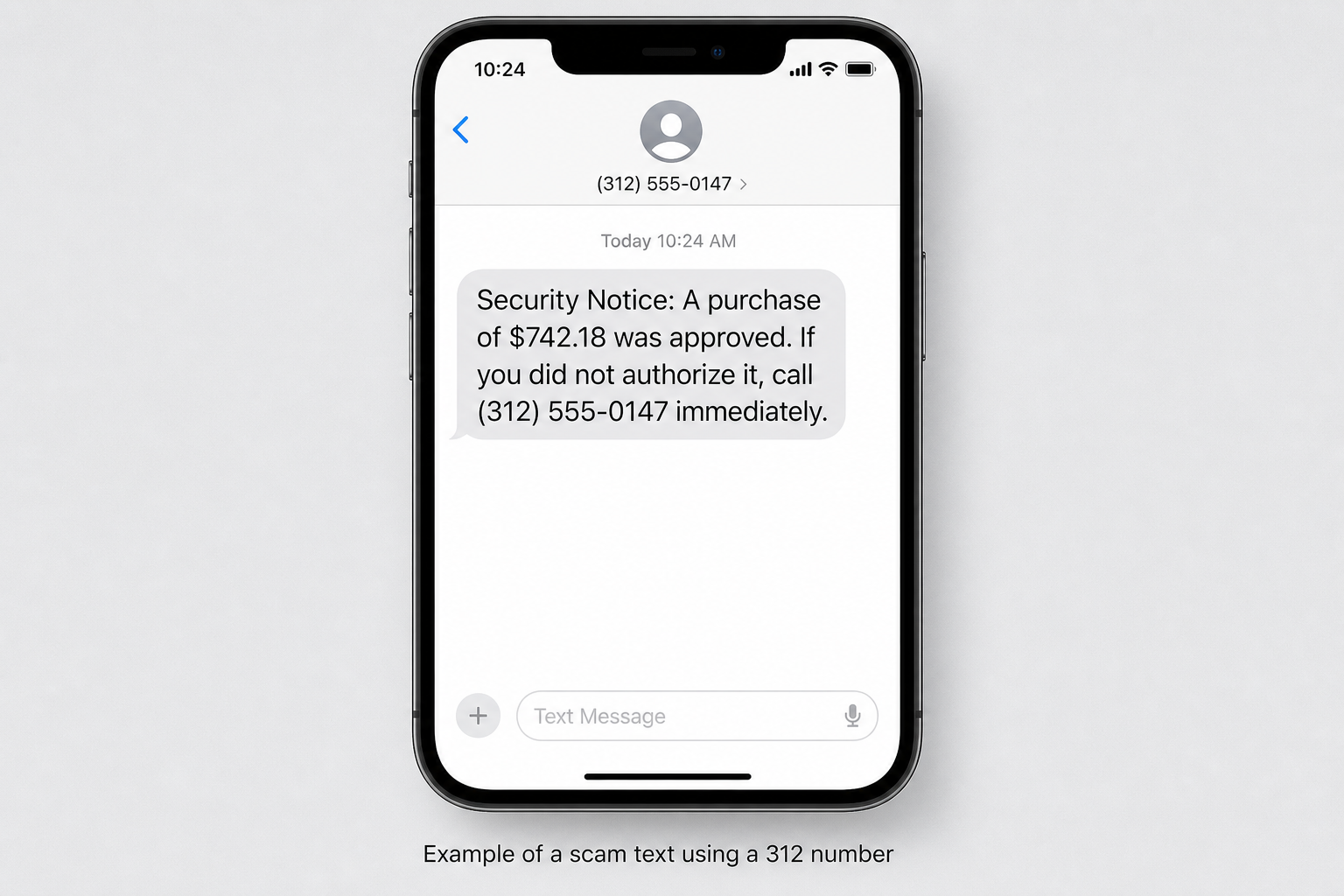
- Bank fraud alerts. A caller or text claims that a large purchase, transfer, or new payee was approved. The victim is told to call back, open a link, or read out a one-time security code.
- Police, court, and jury duty threats. Someone posing as a local officer or court employee says there is a warrant, missed jury summons, or unpaid fine. Immediate payment is demanded to prevent arrest.
- Delivery and toll messages. A text claims that a package cannot be delivered or that a road toll remains unpaid. The link opens a fake payment page that collects card and identity information.
- Utility shutoff calls. The caller says electricity, gas, water, or another essential service will be disconnected unless a balance is paid within minutes.
- Tech support calls. A supposed support agent reports malware, account hacking, or suspicious network activity and asks the victim to install remote access software.
- Fake jobs and tasks. An unexpected message offers flexible remote work, easy commissions, mystery shopping, or a paid product-review role. The victim is later asked to deposit money, buy equipment, or pay to unlock earnings.
- Wrong-number conversation scams. A friendly stranger pretends to have contacted the wrong person, then tries to build a relationship that can lead to an investment or cryptocurrency scheme.
- Prize, refund, and loan offers. The caller promises money but requires an advance fee, bank details, or personal information before the supposed benefit can be released.
What about a one-ring call from 312?
A one-ring call is intended to make the recipient curious enough to call back. With some international numbers that resemble North American numbers, returning the call can lead to expensive international or premium charges.
A normal 312 number is different. It is a domestic Chicago area code, so calling a standard 312 number does not automatically create an international premium-rate charge. Claims that every one-ring 312 callback produces enormous per-minute fees are misleading.
Calling back can still be a bad idea. The number may connect to a robocall, sales funnel, impersonator, or social engineering script. It may also show the operator that someone answers or returns calls at your number.
If the call is important, a legitimate caller can leave a useful voicemail with a name, organization, reason for calling, and contact information that you can verify. Do not rely on the callback number in the message when the caller claims to represent a bank, government office, or business.
Red flags that matter more than the area code
No area code can determine whether a conversation is safe. Focus on what the caller wants, how quickly they want it, and whether you can verify the story through a separate channel.
- The call or message is unexpected and immediately introduces an emergency.
- You are threatened with arrest, deportation, account closure, service disconnection, or financial loss.
- The caller refuses to let you hang up and independently contact the organization.
- You are asked for a password, PIN, Social Security number, full card number, or one-time verification code.
- Payment must be made with gift cards, cryptocurrency, a wire transfer, cash courier, or payment app.
- You are told to move money into a new or “safe” account for protection.
- A text contains a shortened link or a domain unrelated to the organization being impersonated.
- The caller asks you to install remote access software or share your phone or computer screen.
- You are instructed to keep the conversation secret from family, bank employees, or police.
- The caller becomes aggressive when you ask for written information or time to verify the claim.
Honest organizations understand that customers need to verify unexpected contact. A bank employee, government office, utility company, or police department will not lose legitimacy because you hang up and call an official published number.
How The Scam Works
Although the stories vary, most 312 area code scams follow a recognizable sequence. Understanding that sequence makes it easier to step out of the conversation before the pressure takes control.
1. The scammers obtain or generate a list of targets
Phone numbers can come from old data breaches, marketing databases, public records, online forms, social media profiles, previous scam campaigns, or automated number generation. A criminal does not need a detailed file about every person before making contact.
Many campaigns send the same text or prerecorded message to thousands of numbers. A broad claim such as an unauthorized payment or missed delivery will match the real circumstances of some recipients simply by chance.
More targeted operations may combine a phone number with a name, address, employer, bank, or family connection found in leaked data. Accurate details make the call sound informed, but they do not prove the caller represents a legitimate organization.
2. Caller ID is spoofed to display a 312 number
The scammer uses internet-based calling tools or a dishonest service to alter the caller ID information sent with the call. Your phone displays the selected 312 number even though the call may originate somewhere entirely different.
Sometimes the number belongs to a real Chicago resident or company. At other times it may be unassigned, temporary, or controlled by the scammers. A reverse-number search can provide context, but it cannot reliably prove who placed a particular call.
Caller ID authentication systems and carrier spam labels can reduce abuse, but they are not perfect. A call that lacks a spam warning is not automatically safe, and a legitimate number can be mislabeled after scammers spoof it repeatedly.
3. The first message creates fear, curiosity, or opportunity
The opening is designed to trigger emotion before careful thought. A bank alert creates fear of losing money, while a police call creates fear of arrest.
A job message creates hope. A wrong-number text creates curiosity and invites a harmless-looking reply.
The details are often intentionally incomplete. The recipient is encouraged to respond to learn which purchase, account, package, case, or opportunity is involved. That first response gives the scammer a chance to control the explanation.
Urgency then narrows the victim’s choices. The caller may say a transaction is processing now, an officer is on the way, a service will be disconnected today, or an offer will expire within minutes.
4. The victim is moved to a channel controlled by the scammer
A fraudulent text may contain a link to a fake sign-in or payment website. A robocall may instruct the recipient to press a number or call a different line. A live caller may move the conversation to a messaging app where the account is harder to connect to a real identity.
The new channel is built to look official. A phishing page may copy a bank’s logo, a caller may use professional background noise, and a fake officer may quote a real address or employee name found online.
Verification must happen outside that controlled environment. Use the number printed on your bank card, the official government website, a statement, or an app you already trust. Do not use search advertisements or contact details supplied by the caller.
5. Information or payment is requested in small steps
The scammer may begin with details that feel routine, such as your name, ZIP code, or the last four digits of an account. Once you cooperate, the requests become more sensitive.
A fake bank representative may ask for a one-time code while claiming it will cancel a payment. In reality, the code may approve a password reset, digital wallet enrollment, money transfer, or new-device login.
A police or utility impersonator may demand a payment that is difficult to reverse. Gift cards, cryptocurrency, wire transfers, and cash provide little of the protection available with a credit card.
A tech support scam can be even more invasive. Remote access software allows the caller to view the screen, manipulate online banking pages, copy files, or persuade the victim that ordinary account activity is evidence of hacking.
6. The victim is kept isolated while the fraud continues
Scammers often tell victims not to speak with anyone else. They may claim a bank employee is involved in the crime, a court order is secret, or explaining the situation to a family member will interfere with an investigation.
This isolation protects the story from outside scrutiny. A second person can often notice contradictions that are difficult to see while the victim is frightened and under time pressure.
The caller may remain on the line while the victim travels to a store, bank, cryptocurrency ATM, or money transfer counter. Any instruction to hide the true reason for a transaction is a strong sign of fraud.
7. Stolen details support follow-up scams
A victim who does not pay may still have disclosed useful information. A confirmed phone number, bank name, email address, account detail, or family connection can make the next attempt more convincing.
The same person may later receive a call from a supposed fraud investigator who knows about the first incident. Recovery scammers may promise to retrieve lost money in exchange for another fee or more account access.
Criminals also trade information. A new caller can appear unrelated while using data collected by the earlier operation. This is why monitoring should continue even after the first suspicious call has ended.
8. Numbers and scripts are rotated
Blocking one 312 number may stop that number from appearing again, but the same campaign can switch to another local-looking caller ID. The operator may also change brand names, payment amounts, or recorded messages.
Long-term protection comes from recognizing the behavior, not memorizing individual numbers. An unverified caller asking for money, secrets, codes, or device access deserves the same caution regardless of the area code displayed.
What To Do If You Have Fallen Victim
Do not let embarrassment delay action. Phone scams are designed to create a convincing emergency, and experienced professionals can be caught at the wrong moment. The steps below can reduce financial loss and prevent additional account access.
-
End the contact and stop following instructions
Hang up, close the website, stop replying, and do not send another payment. If remote access software is active, disconnect the device from the internet and end the session.
Do not stay on the line while contacting your bank. Use another trusted device or phone if the scammer had access to your screen, calls, or messages.
-
Write down what happened
Record the displayed 312 number, callback number, date, time, names used, website addresses, payment instructions, and information you disclosed. Save screenshots, text messages, emails, voicemails, receipts, and transaction records.
Do not revisit a malicious website or continue a dangerous conversation just to collect more evidence. Preserve what is already safely available.
-
Contact the bank or payment provider immediately
Use the number printed on your physical card or the official app. Explain that the transaction or card information was connected to an impersonation scam and ask what can be stopped, reversed, frozen, or replaced.
If you paid by gift card, contact the card issuer and keep the card and receipt. If you used a wire transfer, payment app, or cryptocurrency exchange, report the transfer to that provider immediately. Recovery is not guaranteed, but speed can matter.
Tell the bank if you shared a one-time code or approved a notification. That may indicate account access rather than only a compromised card.
-
Change exposed passwords from a clean device
Start with your email, bank, mobile carrier, cloud storage, and any account whose password was entered on a linked website or shared during the call. Replace reused passwords everywhere they appear.
Use a unique password for each account and enable multi-factor authentication. Prefer a passkey, authenticator app, or hardware security key where available.
Review signed-in devices, recovery addresses, forwarding rules, and recent security events. Sign out unfamiliar sessions and remove changes you did not make.
-
Secure a device that was remotely accessed
Uninstall the remote access program the caller told you to use and run a reputable security scan. Check for newly installed applications, browser extensions, startup items, configuration profiles, and accounts.
If the scammer accessed online banking or sensitive files, contact the bank before reconnecting and consider professional help. A factory reset or clean operating-system installation may be appropriate when persistent access cannot be ruled out.
Changing passwords on a device that an attacker can still view may expose the new credentials. Use a separate clean device until the compromised system is secured.
-
Protect your phone number and mobile account
Contact your carrier if you shared an account PIN, carrier password, Social Security number, or one-time code related to your mobile service. Ask the carrier to check for unauthorized SIM or device changes.
Add or strengthen the account PIN and enable protections against SIM swaps or number transfers if your carrier offers them. Watch for sudden loss of service, which can indicate that your number was moved.
-
Respond to identity exposure
If you disclosed your Social Security number or substantial identity information, visit IdentityTheft.gov for a personalized recovery plan. Review your credit reports and consider a fraud alert or credit freeze with Equifax, Experian, and TransUnion.
Monitor for unfamiliar accounts, address changes, tax notices, medical bills, and collection letters. Identity misuse may appear weeks or months after the original call.
-
Report the scam call or text
Report fraud and financial loss to the FTC at ReportFraud.ftc.gov. If no money was lost and you want to report an unwanted call, use DoNotCall.gov.
You can also file an unwanted call, text, or spoofing complaint with the FCC Consumer Inquiries and Complaints Center. Include the number that received the call, the caller ID number, any callback number, and the date and time.
Forward scam texts to 7726, which spells SPAM, or use your messaging app’s report function. Contact local police when money was stolen, threats were made, or a local agency was impersonated.
-
Block and filter future contact
Block the number and enable call-screening, spam-labeling, or unknown-sender filtering offered by your phone and carrier. These tools will not stop every fraudulent call, but they can reduce interruptions.
Registering at the National Do Not Call Registry can reduce sales calls from legitimate companies that follow the law. It cannot force scammers to obey the rules, so continue to treat unexpected requests cautiously.
-
Watch for recovery scams
Anyone promising a guaranteed refund for an advance fee should be treated with suspicion. Real agencies do not charge victims in cryptocurrency, gift cards, or wire transfers to investigate a phone scam.
A follow-up caller may know accurate details about the original loss. End the conversation and independently contact the organization they claim to represent.
The Bottom Line
The 312 area code is a genuine Chicago area code, not a warning label. What makes a call or text dangerous is the request behind it and the scammer’s ability to falsify caller ID, not the three digits displayed on the screen.
Let unexpected calls go to voicemail, never use an unverified callback number, and independently contact any bank, agency, or company that supposedly needs urgent action. If you already shared money or sensitive information, move quickly, document the incident, secure the affected accounts, and report it. A local-looking number may create trust, but verification should always come from a channel you choose.

Join the discussion
0 commentsShare your experience or ask a question about this article.
Discussion
Start the conversation
Have a question or something useful to share? Add the first comment.