

The Elon Musk “50,000,000 DOGE giveaway” usually shows up when you are scrolling fast and your guard is down. A post looks official, the graphics look polished, and the pitch feels almost harmless: send a small amount of Dogecoin to “verify” your wallet, then receive more DOGE back instantly.
That is the trap.
These giveaway scam sites are built to convert impulse into a crypto transfer, and once that transfer happens, it is typically gone for good. The name, the countdowns, the “live” banners, even the comments saying “it worked” are there for one reason: to make sending DOGE feel normal.
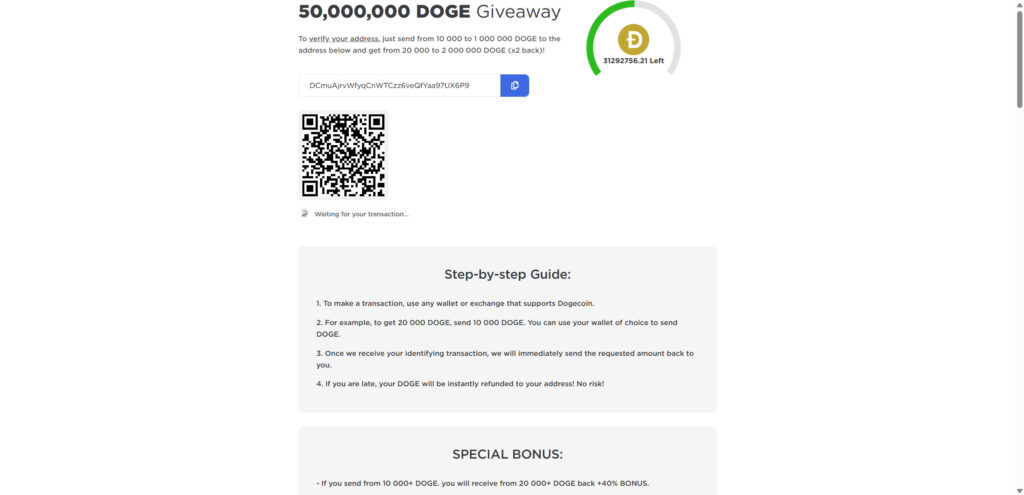
Scam Overview
The “Elon Musk 50,000,000 DOGE giveaway” scam is a long-running, high-volume crypto theft pattern that keeps reappearing under new domain names and slightly different designs. The theme stays the same: scammers impersonate a famous public figure, claim a massive giveaway is underway, and instruct visitors to send cryptocurrency first in order to receive more back.
This exact “send crypto, get more crypto back” setup has been repeatedly flagged as a common scam format, including in cases that specifically use Elon Musk’s name as a credibility shortcut.
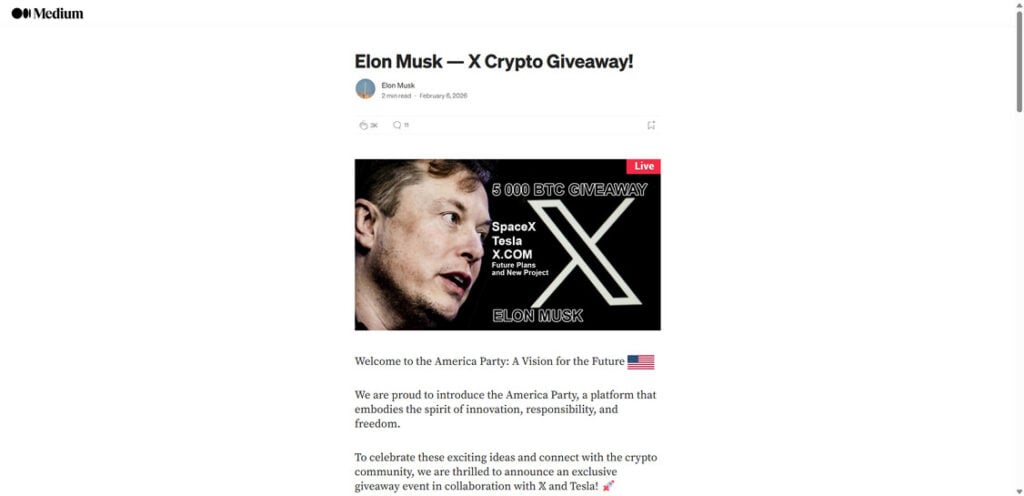
What the scam claims
Most 50,000,000 DOGE giveaway pages share a familiar script:
- Elon Musk is “celebrating” something with a limited-time Dogecoin giveaway
- A large pool, like 50,000,000 DOGE, is being distributed to the community
- Participation is “first come, first served”
- You must send DOGE to a listed address to “verify” your wallet
- You will receive 2x back, sometimes with “bonus tiers” for larger deposits
- The transfer is “instant,” “guaranteed,” or “risk-free”
None of that is how legitimate giveaways work. The “send first” requirement is not a feature. It is the scam.
Why Dogecoin is a popular bait coin
Dogecoin scams work well for a few practical reasons:
- DOGE is widely held by casual crypto users, not just advanced traders
- Transfers can feel low-stakes because the unit price is smaller than BTC or ETH
- Sending DOGE is straightforward, especially from mobile apps
- Transactions are generally irreversible once confirmed, like most crypto transfers
Scammers do not need to convince everyone. They need to catch a small percentage of people in a hurry.
Why these pages look convincing
Modern giveaway scam sites are designed like marketing funnels. They are not thrown together. They are optimized.
Common credibility props include:
- “Live” banners, countdown timers, and “DOGE left” counters
- A large QR code and a copy-to-clipboard wallet address
- “Recent transactions” feeds that appear to show deposits and payouts
- Comment sections claiming success, often with bot-like repetition
- Brand references to X, Tesla, SpaceX, or crypto exchanges
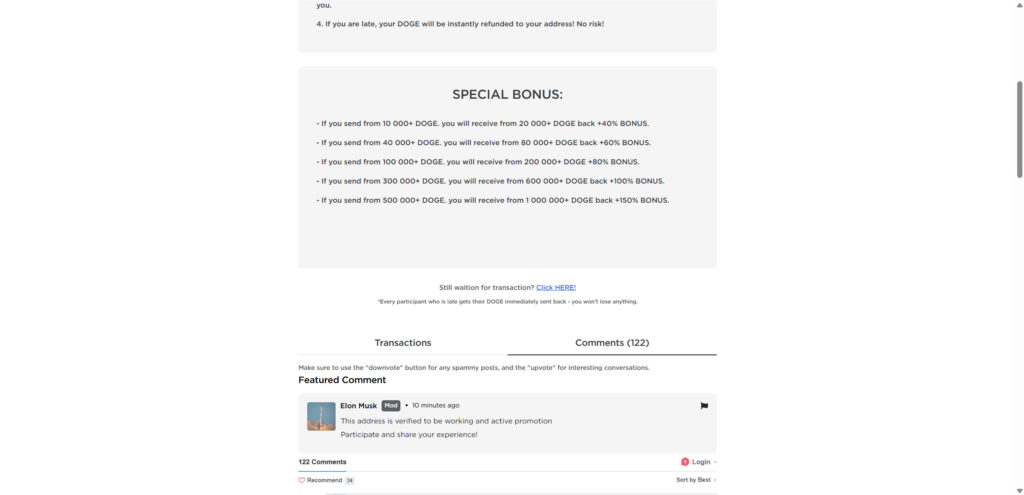
- A bonus ladder that pushes people to send more than they planned
This mix is intentional. It creates urgency, social proof, and a sense that the process is already working for other people.
The core lie: “Send DOGE to verify, then get 2x back”
The scam only works if the victim sends crypto first.
Scammers often call it “verification” because that word feels administrative, like a normal step in a real system. But the transaction is not verifying anything. It is simply transferring DOGE to a wallet controlled by the scammer.
This “send DOGE to an address with the promise you will receive double back” pattern has been documented in real-world Dogecoin-themed scam campaigns. (TRM Labs)
Why “recent transactions” and “payout proofs” are not proof
A transaction feed on a webpage can be:
- Completely fake data rendered as a table
- Real deposits from victims, presented as if they are payouts
- Wallet-to-wallet shuffling by the scammer to simulate activity
- Random hashes and addresses used to look technical and legitimate
Even if the page shows real on-chain deposits, that only proves money is going into a wallet. It does not prove anyone is receiving the promised DOGE back.
Where these scam sites come from
The distribution method changes, but the playbook is stable:
- Impersonation posts on social media platforms, especially in replies
- Hacked or purchased accounts posting “giveaway” announcements
- Lookalike “news” pages or blog posts that lead into the scam portal
- Redirect chains that bounce you through multiple pages before the final site
- Livestream-style posts that claim a live event is underway
Impersonation-driven crypto scams have been circulating for years, and Musk-themed giveaway scams have been specifically highlighted as a recurring example. (Reuters)
The red flags that matter most
If you only remember a few signs, remember these:
- Any giveaway that requires you to send DOGE first is a scam
- “Verify your wallet” is often a cover story for taking your money
- Huge numbers (50,000,000 DOGE) are used to create urgency and credibility
- Bonus tiers are designed to increase your loss, not reward you
- Comment sections and “live transactions” are frequently staged
If a page pushes you toward a wallet address and a QR code within seconds, it is not trying to inform you. It is trying to convert you.
How The Scam Works
Below is the typical flow for Elon Musk 50,000,000 DOGE giveaway scam sites. Different domains may change the visuals, but the sequence is remarkably consistent.
1) The hook: a “live” giveaway announcement
The scam starts with a headline that feels time-sensitive:
- “Elon Musk DOGE Giveaway Live”
- “50,000,000 DOGE allocated to the community”
- “Only today” or “limited time”
- “Official link” language that suggests legitimacy
Often, the post is written to stop you from researching:
- It tells you it is easy
- It tells you it is ending soon
- It tells you other people are already receiving payouts
The goal is momentum.
2) The click: you land on a page that feels official
Many victims do not land directly on the wallet page. There is often a trust-building step first, such as:
- A blog-style article explaining the “event”
- A Medium-style post with images and a confident narrative
- A page that mimics a corporate campaign site
- A fake “press” page that implies a verified announcement
This layer exists for one reason: it gives your brain permission to keep going.
3) The portal: choose DOGE, see the “rules,” feel safe
Next, you are funneled into the giveaway interface.
Common elements:
- A “choose your cryptocurrency” section with DOGE among other coins
- A minimum and maximum deposit range
- A simple promise: send DOGE and get 2x back
- A big call-to-action button like “Claim,” “Participate,” or “Get Bonus”
The language is designed to sound structured. It feels like a promotion with rules.
4) The money moment: wallet address + QR code
Then the page presents the key payload:
- A Dogecoin address to send to
- A copy icon to reduce mistakes
- A QR code so you can send quickly from a phone
- A progress indicator like “Waiting for your transaction…”
This is where the scam becomes real. Everything before this was setup.
5) The justification: “verify your wallet” by sending DOGE
To a careful reader, “send DOGE to receive DOGE” should sound wrong.
So scammers add a story that tries to make it feel normal:
- Address verification
- Anti-bot protection
- Eligibility confirmation
- One-time activation
- KYC-like language, without actual KYC
It is all packaging. The action is still the same: you send DOGE to their wallet.
6) The upsell: bonus tiers push you to send more
A common feature is a bonus ladder, like:
- Send X DOGE, receive Y DOGE back
- Higher amounts “unlock” higher bonuses
- “Special bonus” sections for larger transfers
This is not generosity. It is math.
The scammer would rather steal 10,000 DOGE from one person than 200 DOGE from fifty people. Bonus tiers are how they tilt victims toward bigger amounts.
7) The fake proof: transactions, comments, and “live updates”
Right when you hesitate, the page offers reassurance:
- A transaction table that implies payouts are happening
- Green check marks and status icons
- Comments like “It worked!”
- A counter showing DOGE is running out
- “Live updates” badges
These props are especially effective because they look like evidence, even when they are not.
This exact structure, fake proof paired with a “send DOGE, get double back” promise, has been observed in documented Dogecoin giveaway scam campaigns. (TRM Labs)
8) After you send: delay, excuses, and the second payment attempt
Once you send DOGE, one of three things happens:
- Nothing happens, and the page stays on “waiting” forever
- You get a message blaming congestion or a “processing queue”
- You are told you need an additional payment to unlock the payout
That last one is where losses compound.
Second-stage prompts often claim:
- A “verification fee” is required
- A “release fee” is needed
- Your amount was too small, send again
- You must send a larger amount to qualify
- Your transaction is “stuck,” retry the transfer
It is all designed to extract more money from someone who already feels committed.
9) The exit: the domain changes, and the wallet moves
Scam campaigns rotate constantly:
- Domains get reported and replaced
- Templates get cloned with new names
- Wallet addresses change to evade tracking and reduce heat
This is why victims often cannot find the exact page again later. The funnel is built to be disposable.
What To Do If You Have Fallen Victim to This Scam
If you sent DOGE to a giveaway address, you are not alone. Act quickly, stay calm, and focus on damage control.
- Stop sending crypto immediately
Do not send more DOGE to “unlock” the payout. Do not pay a “verification” or “release” fee. That is the most common way victims lose even more. - Capture proof while you still can
Take screenshots of:
- The giveaway page showing the DOGE amount and promises
- The destination address and any QR code
- Any “bonus” ladder or rules section
- The domain name and any redirects
Save:
- Your transaction ID (TXID)
- The exact amount sent
- The date and time
- Any messages you received after sending
- If you sent from an exchange, contact support right away
If you used an exchange such as Coinbase, Binance, or Robinhood, open a support ticket immediately.
Provide the TXID and destination address. Ask them to flag the address and advise on internal reporting. Recovery is uncommon, but quick escalation matters.
- If you sent from a personal wallet, assume the transfer is final
Most crypto transfers are irreversible once confirmed. Do not waste time negotiating with “support” on the scam site. - Watch for seed phrase phishing and “wallet sync” traps
Some DOGE scam variants try to steal more by asking you to:
- Enter your seed phrase to “claim”
- Upload a wallet file
- Install a “helper” extension
- Connect to a suspicious wallet tool
Never share a seed phrase. Not for verification, not for support, not for refunds.
- Secure your accounts and devices
- Change passwords for email and exchange accounts
- Turn on 2FA wherever possible
- Check your browser extensions and remove anything suspicious
- Run a reputable security scan if you installed anything during the process
- Report the scam and the wallet address
Reporting helps connect cases and supports takedowns.
- File a report with FBI Internet Crime Complaint Center (IC3) if applicable
- Report the scam to the Federal Trade Commission
- Report the domain to the registrar and hosting provider
The FBI also warns about “recovery” schemes that target crypto scam victims, so be skeptical of anyone who contacts you offering to retrieve funds for a fee. (Internet Crime Complaint Center)
- Ignore recovery scammers
After you lose crypto, it is common to receive messages claiming:
- They can recover your DOGE
- They are investigators
- They have insider access
- They can reverse the transaction for a fee
This is frequently a second scam layered on top of the first. The FBI has explicitly warned about these recovery scams.
The Bottom Line
Elon Musk is not running a 50,000,000 DOGE giveaway, and no real giveaway requires you to send Dogecoin first to receive more back. That single requirement is the entire scam.
These scam sites are engineered to feel official and urgent. They use polished layouts, QR codes, counters, “live” labels, and staged social proof to push you into making an irreversible transfer.
If you already sent DOGE, do not send anything else. Save the evidence, contact the platform you used to send it, lock down your accounts, and report the domain and wallet address. And going forward, treat this as a hard rule: any “giveaway” that starts with “send crypto to get more back” is a scam.
FAQ: Elon Musk 50,000,000 DOGE Giveaway Scam Sites
Is the “Elon Musk 50,000,000 DOGE giveaway” real?
No. It is a scam built to steal Dogecoin. The giveaway claim is bait, and the page exists to get you to send DOGE to a scammer-controlled wallet.
Does Elon Musk have anything to do with these DOGE giveaway sites?
No. Scammers use his name and references to X, Tesla, and SpaceX to make the offer feel credible. That branding is not proof of affiliation.
How does the scam actually work?
The core move is simple: the site tells you to send DOGE first, usually claiming it is to “verify” your wallet or activate your claim. Once you send, you do not get the promised DOGE back. The wallet address belongs to the scammer.
Why do they say I must “verify my wallet” by sending DOGE?
Because it sounds like a normal technical step. Real giveaways do not verify wallets by taking your crypto. Verification is typically done through official claim rules or wallet signatures, not by sending funds to an address.
The page promises “2x back” or a bonus. Is that ever legitimate?
No. A legitimate giveaway does not need you to pay upfront to receive a prize, and it will not promise to double your crypto on demand. “Send first, get more back” is a classic scam pattern.
The site shows “recent transactions” and payouts. Does that prove it’s real?
No. Those transaction feeds are often fake, staged, or misleading. Even if you see real transactions, they may simply be deposits going into the scam wallet, not proof of payouts to victims.
What is the purpose of the QR code and copy-address button?
Speed and convenience. It reduces friction and gets you to send quickly, often from your phone, before you stop to verify the domain or search for warnings.
Why are the numbers so huge, like 50,000,000 DOGE?
Large numbers create urgency, excitement, and credibility. They make people think the event must be “official” or widely supported. The number is a psychological hook, not evidence.
Are these scam sites always the same domain?
No. The template gets reused across many domains. Scammers rotate domains to avoid takedowns and reports, so the same scam can appear under dozens of different site names.
I sent DOGE. Can I get it back?
Usually not. Crypto transactions are generally irreversible once confirmed. If you sent from an exchange, contact the exchange support team immediately with the transaction ID (TXID) and destination address. Recovery is still uncommon, but fast reporting matters.
If I sent DOGE from my own wallet, can they drain the rest of my wallet?
If you only sent DOGE to their address, they usually cannot drain your wallet just from that transfer.
However, if you connected a wallet on a related page, installed anything, or shared sensitive info, treat it as higher risk and secure your accounts.
The page says my payout is “pending” and asks for a second payment. Should I send it?
No. That is a common second-stage tactic. Scammers often claim you need a “verification fee,” “release fee,” or a bigger deposit to unlock the payout. Sending again only increases your loss.
What are the clearest red flags that confirm a DOGE giveaway is a scam?
Watch for:
- Any request to send DOGE first to receive more back
- “Verify your wallet” language tied to a transfer
- Big “live” counters, countdown timers, or “DOGE left” meters
- Bonus ladders that reward larger deposits
- A transactions table and comments used as social proof
- Domains that are not official brand domains, plus vague “official” wording
How can I safely verify if a crypto giveaway is real?
Use a strict rule set:
- Only trust announcements from official, verified channels (and still verify links)
- Check the official company site directly (type it, do not click ads or replies)
- Search the exact domain name plus “scam” before sending anything
- Never send crypto to “verify” eligibility
How do I report these scam sites?
You can:
- Report the domain to its registrar and hosting provider
- Report the link as phishing in your browser
- Report the wallet address where possible on chain explorers
- File a cybercrime report locally
If you are in the United States, report to FBI Internet Crime Complaint Center (IC3).
What about people messaging me saying they can recover my DOGE?
Be cautious. Many “recovery” offers are follow-up scams aimed at victims. Do not pay upfront fees, do not share seed phrases, and do not install remote access software.








