

An email account takeover can begin with a password exposed months or years earlier in an unrelated data breach. Nothing unusual appears until security messages quietly stop reaching the inbox.
By the time the owner notices, the intruder may have used the mailbox to find a cryptocurrency exchange, reset its password, and hide every warning along the way.
Overview
The email inbox is the key to many other accounts
An email account takeover gives a criminal access to far more than messages. The inbox can reveal which banks, cryptocurrency exchanges, wallets, shops, cloud services, and social platforms the owner uses.
Password-reset links and security codes often arrive through email. If the mailbox is already compromised, the intruder can intercept those messages and use them to take over linked services.
The victim may have a strong exchange password and still lose control if the email account can reset it. Securing the primary mailbox is therefore part of securing every financial account connected to it.
Hidden inbox rules can silence the warning system
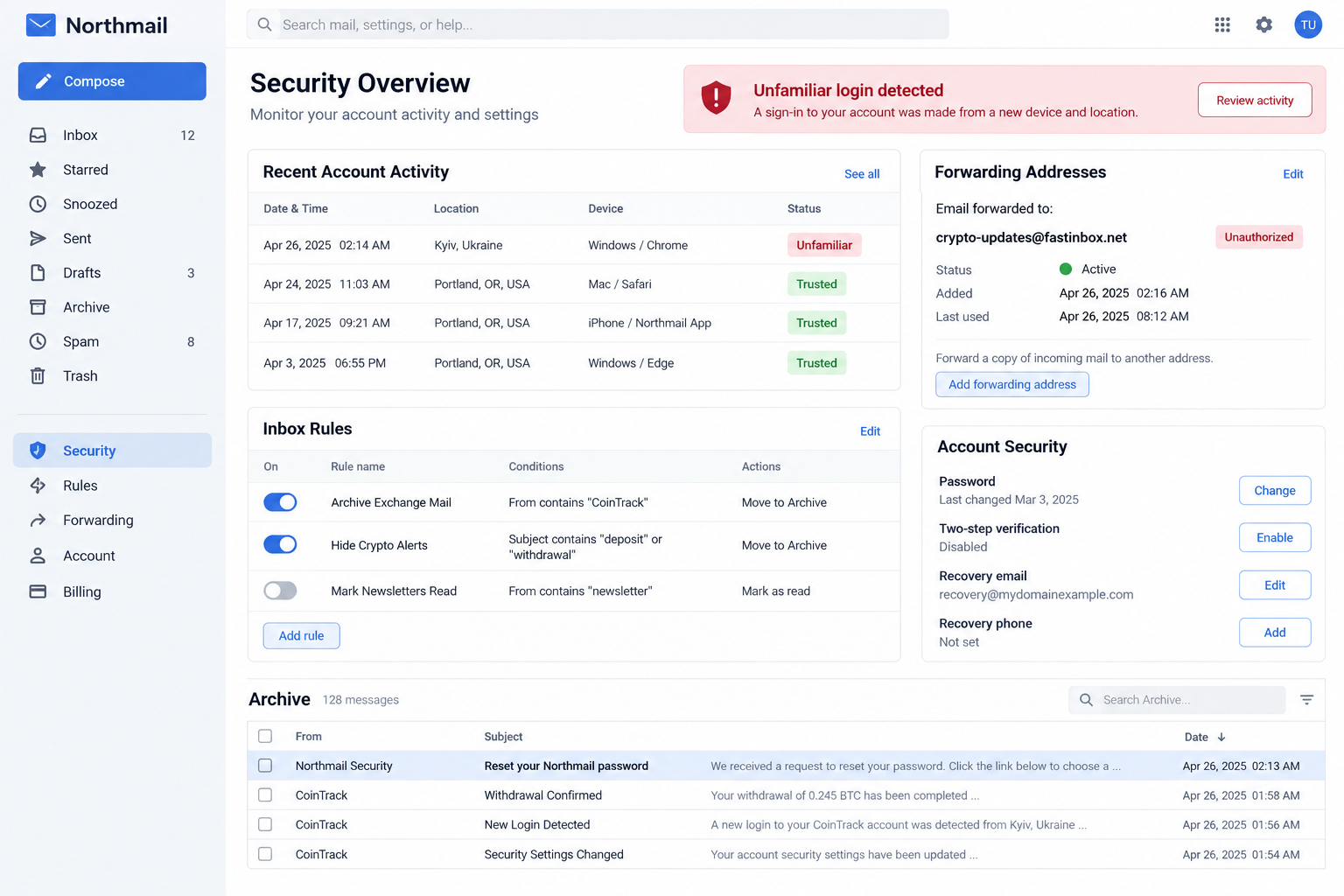
After entering the mailbox, the criminal may create rules that move messages from a cryptocurrency exchange into Archive, Trash, Spam, or another folder. Forwarding can send copies to an outside address.
The owner continues receiving ordinary mail and may not realize that security alerts are being filtered selectively. This quiet period gives the intruder time to change passwords, recovery methods, and withdrawal settings.
Deleting one suspicious email is not enough. The malicious rule remains active until the account owner finds and removes it.
Police have documented a recent increase in this crime
On September 12, 2026, the Singapore Police Force warned about unauthorized access to cryptocurrency accounts through compromised email. Police observed an increase in cases from mid-August.
Investigators found that several affected email accounts had appeared in earlier data breaches. Criminals searched those inboxes for exchanges, created rules to hide alerts, intercepted reset links and codes, and exploited reused passwords.
Warning signs include:
- an unfamiliar login to the email account;
- a forwarding address the owner did not add;
- rules mentioning security, login, deposit, withdrawal, or an exchange name;
- exchange messages appearing only in Archive, Spam, or Trash;
- password-reset notices the owner did not request;
- new trusted devices, recovery methods, or application passwords;
- a cryptocurrency withdrawal address the owner does not recognize;
- the same password reused for email and financial services.
How an Old Data Breach Becomes a New Crypto Loss
Stolen credentials do not always get used immediately. A breach list can circulate for years and be tested repeatedly against popular services.
Credential stuffing is the automated use of exposed username and password pairs on other websites. Password reuse turns one breached account into a possible path across many accounts.
Email is especially valuable because it identifies services and supports password recovery. A criminal does not need to guess which exchange the victim uses when receipts and alerts are searchable in the inbox.
The operator may search terms such as wallet, exchange, deposit, withdrawal, verification, statement, or cryptocurrency. Old messages reveal account names even if the victim has not traded recently.
Multifactor authentication helps, but its value depends on the method and account state. Codes delivered into the compromised mailbox offer little protection from the person already reading it.
Existing sessions can also matter. If a device token, application password, or connected app remains authorized, changing the main password may not remove every route.
How the Email Account Takeover Scam Works
Step 1: Exposed credentials are tested against email providers
The criminal obtains a username and password from a breach, phishing page, malware infection, or underground market. Automated tools test the pair against common email services.
A reused password allows entry even though the original breach happened somewhere else.
Step 2: The intruder studies the mailbox
Search reveals exchanges, wallets, banking relationships, identity documents, and earlier security messages. The criminal learns how the owner names accounts and which services are active.
Messages can also expose full names, telephone numbers, addresses, and transaction history useful for support impersonation.
Step 3: Persistence and hiding rules are added
The attacker creates forwarding, filtering, or deletion rules. Recovery details, trusted devices, application passwords, or connected applications may be added.
The goal is to keep access and conceal future alerts without disrupting ordinary email enough to attract attention.
Step 4: The cryptocurrency account is reset
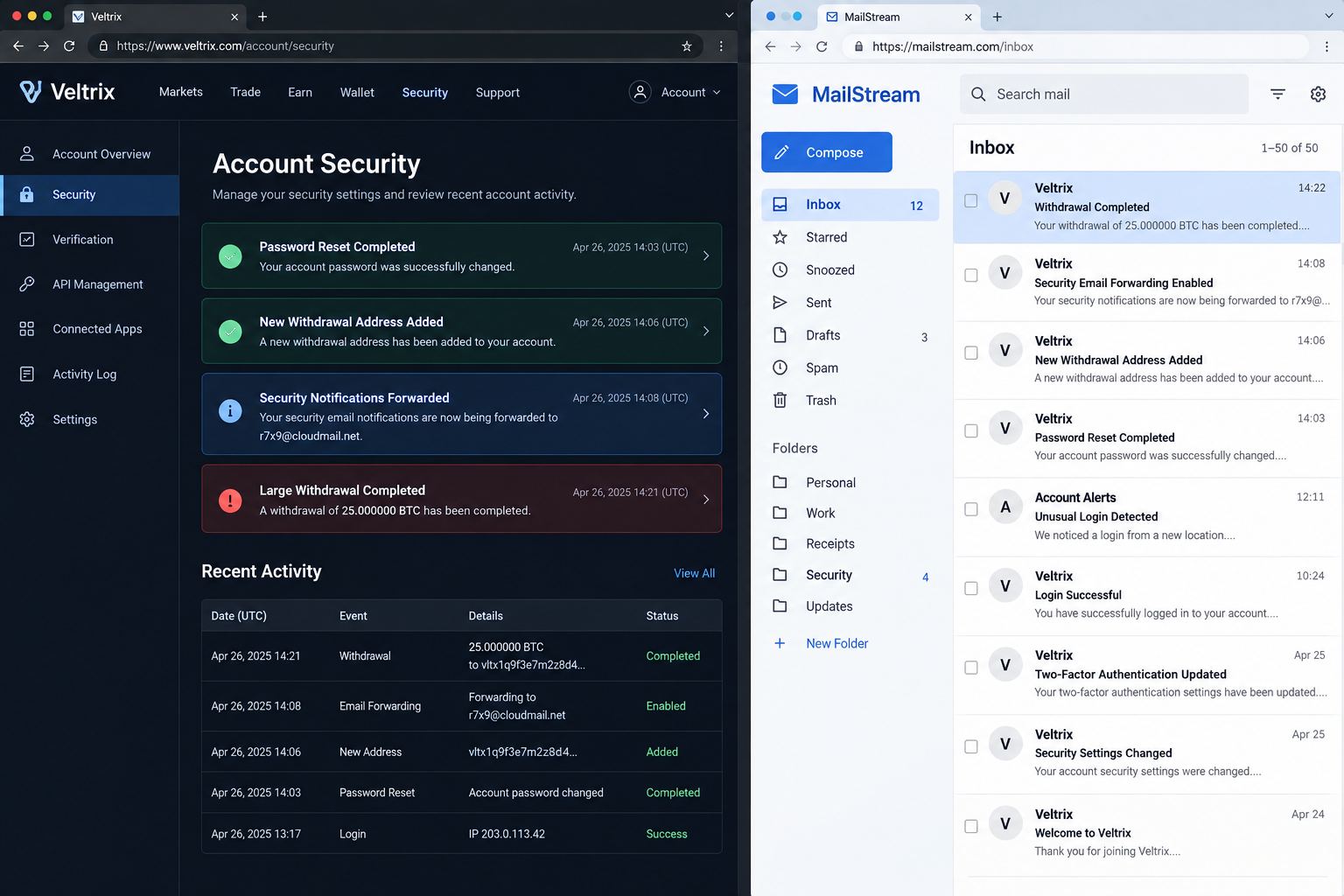
The criminal requests a password reset from the exchange. The link or code arrives in the compromised inbox and is moved away from the normal view by the malicious rule.
If the same password was reused on the exchange, the reset may not even be necessary.
Step 5: Security controls are changed
The intruder adds a trusted device, changes multifactor settings, generates an API key, or registers a new withdrawal address. Exchange waiting periods may determine how long the attacker remains quiet.
Notifications are intercepted so the owner does not challenge the changes.
Step 6: Cryptocurrency is transferred out
Assets are moved to an attacker-controlled address, possibly through several wallets or services. Blockchain transfers generally cannot be reversed through a card-style dispute.
The theft may include multiple assets and linked accounts discovered through the mailbox.
Step 7: The criminal removes evidence or expands the attack
Messages may be deleted, forwarding left active, and account settings changed again. The compromised email can be used to reset social, cloud, shopping, or banking accounts.
Contacts may receive believable requests sent from the victim’s real address.
Check These Email Settings Immediately
Review recent login activity and active sessions. Sign out every device you do not recognize, then consider signing out all sessions after changing the password.
Inspect forwarding addresses, inbox rules, filters, blocked senders, delegates, mailbox sharing, and automatic replies. Remove anything you did not create.
Check recovery email addresses and telephone numbers. An intruder may replace or add a recovery route that survives a password change.
Review application passwords, connected applications, OAuth grants, and mail clients. Revoke unknown access rather than assuming the main password controls it.
Open Archive, Trash, Spam, Deleted, and custom folders. Search for the names of financial services plus terms such as login, reset, withdrawal, address, API, and security.
Confirm whether messages were forwarded externally. Some providers record forwarding changes or send notices that may still exist in another folder.
Turn on multifactor authentication with an authenticator application or hardware security key when available. Save recovery codes somewhere outside the mailbox.
Then Inspect Every Linked Crypto Account
Use the exchange’s official app or type its address yourself. Do not follow a link from an email found during the investigation because a phishing message may be mixed with genuine alerts.
Review login history, trusted devices, active sessions, withdrawal addresses, API keys, connected wallets, recovery contacts, and recent security changes.
Cancel pending withdrawals and freeze the account if the provider offers that control. Contact its security team through official support immediately.
Rotate the exchange password to a unique value that has never been used elsewhere. Replace compromised authentication methods and regenerate backup codes.
API keys can move funds without a normal interactive login. Delete unknown keys and limit permissions on any keys that must remain.
Check for address-book changes and withdrawal whitelists. An attacker may prepare a destination before moving the balance.
Repeat the process for every service found in the mailbox, even if its current balance seems small. An old account may contain identity records or connected payment methods.
Password Changes Must Follow the Right Order
Begin from a clean, trusted device. Malware that captured the first password can capture the replacement as well.
Secure the email account before services that depend on it for recovery. Otherwise the intruder may immediately reset the other passwords again.
Remove malicious rules, sessions, recovery methods, and connected apps as part of the same recovery. A password change alone is incomplete.
Use a password manager to create a long, unique password for every account. Similar variations of one base password remain vulnerable to automated guessing.
Choose stronger multifactor options for email and cryptocurrency. SMS is better than no second factor, but authenticator applications and hardware keys resist more interception methods.
Monitor the accounts after recovery. Attackers may have copied identity documents or support information that can be used in a later impersonation attempt.
The First Hour of Recovery Matters
Write down the current time and the first suspicious event before settings change. A simple timeline helps providers compare logins, password resets, and withdrawals.
Use another trusted communication channel to reach the exchange if the compromised mailbox cannot be trusted. Tell support explicitly that email access and recovery messages may be controlled by an intruder.
Do not delete suspicious rules before recording them. Capture the rule name, conditions, destination folder, forwarding address, and creation time if the provider shows it.
Ask the email provider to preserve access logs. Consumer dashboards may show only recent activity, while the provider may retain more detail for a formal investigation.
Tell close contacts that messages from the account may be fraudulent. An attacker can use genuine conversation history to request money, documents, or security codes.
Check telephone service if SMS authentication was involved. Unexpected loss of signal, a changed SIM, or carrier account activity can indicate a second takeover route.
Do not rush assets into a wallet suggested by an unsolicited helper. During a real emergency, recovery scammers monitor public posts and offer fake security assistance.
Once immediate access is contained, review identity documents and financial records stored in email. The mailbox may expose more accounts than the cryptocurrency service that revealed the incident.
Company, Address, and Fulfillment Checks
The email provider must confirm the real account activity
Use the provider’s own security dashboard to review sessions, forwarding, rules, and recovery changes. A warning email alone may itself be phishing.
Contact support only through the official provider site.
The exchange must be reached through its verified domain
Open the official app or type the known address. Search advertisements and urgent support numbers can lead to impersonators during recovery.
Ask the exchange to freeze assets and preserve logs.
The login location and withdrawal destination need separate checks
An unfamiliar IP address suggests access, while a new wallet address shows where assets were sent. Save both without publishing personal information.
Give the transaction hash and destination to the exchange and police.
The only real fulfillment is control restored without further payment
No recovery agent needs an upfront cryptocurrency fee, seed phrase, or remote access. Verified recovery occurs through the email provider, exchange, and law enforcement.
A promise to reverse the blockchain for a fee is another scam.
What to Do if You Have Fallen Victim to This Scam
- Use a clean device. If malware may have captured credentials, disconnect the affected computer or phone before changing anything important.
- Secure the email account first. Change the password, sign out all sessions, remove unknown forwarding and rules, restore recovery details, and enable strong multifactor authentication.
- Freeze cryptocurrency accounts. Contact each exchange through its official support route. Cancel pending withdrawals and disable API or trading access if possible.
- Preserve transaction evidence. Save login records, email headers, rule settings, wallet addresses, transaction hashes, timestamps, amounts, and support tickets.
- Rotate every reused password. Prioritize financial, cloud, social, shopping, and identity accounts connected to the same email.
- Revoke connected access. Delete unknown OAuth grants, application passwords, API keys, trusted devices, wallet connections, and withdrawal addresses.
- Scan affected devices. Run a full Malwarebytes scan and remove suspicious applications or extensions. Consider a professional rebuild if credential-stealing malware is found.
- Block malicious follow-up. AdGuard can help filter known phishing pages and deceptive ads, but continue reviewing account activity and messages manually.
- Report the theft. Notify local police and the national cybercrime authority. US victims can file at IC3.gov. Give exchanges the report number when requested.
- Ignore guaranteed recovery offers. Do not share a seed phrase or send another transaction to someone who claims they can retrieve the assets.
Frequently Asked Questions
Can someone steal crypto with only my email password?
The mailbox may provide exchange discovery, reset links, and security codes. Additional controls can help, but compromised email creates a serious path to linked accounts.
Why am I still receiving normal email?
Attackers often hide only messages from financial services. Selective rules keep the compromise quiet while the inbox appears normal.
Is changing the email password enough?
No. Remove forwarding, rules, sessions, connected apps, application passwords, and altered recovery methods as well.
Does multifactor authentication stop this attack?
It reduces risk, especially with an authenticator app or hardware key, but recovery channels and active sessions must also be secured.
Can the exchange reverse a completed withdrawal?
Usually not directly, but rapid reporting may help freeze funds at a receiving service and preserves evidence for investigation.
How do I know whether my password appeared in a breach?
Use reputable breach-notification services and provider alerts, then replace any exposed or reused password. Do not enter credentials into an unknown checking site.
The Bottom Line
An email account takeover can quietly disable the warnings that stand between exposed credentials and a cryptocurrency withdrawal.
Protect email as a financial account: use a unique password, strong multifactor authentication, regular rule checks, and immediate action after any unfamiliar login.

Join the discussion
0 commentsShare your experience or ask a question about this article.
Discussion
Start the conversation
Have a question or something useful to share? Add the first comment.