

Erika Carr, a 30-year-old single mother from Ogden, Utah, has recently gone viral due to her heartbreaking terminal illness story and goal to raise funds for her own funeral expenses. The mother of two young children shared on GoFundMe.com that what she initially thought was just a normal shoulder injury turned out to be stage 4 small cell lung cancer, diagnosed on May 7th, 2022.
This shocking news understandably garnered an immense outpouring of sympathy and support worldwide. However, where there is money involved, scammers are never far behind. Multiple fake Erika Carr GoFundMe campaigns have now cropped up, attempting to capitalize on her misfortune.
This article will uncover the truth about the real Erika Carr GoFundMe fundraiser and how to avoid falling victim to malicious impersonators.
NOTE: Carr’s GoFundMe can be found here.
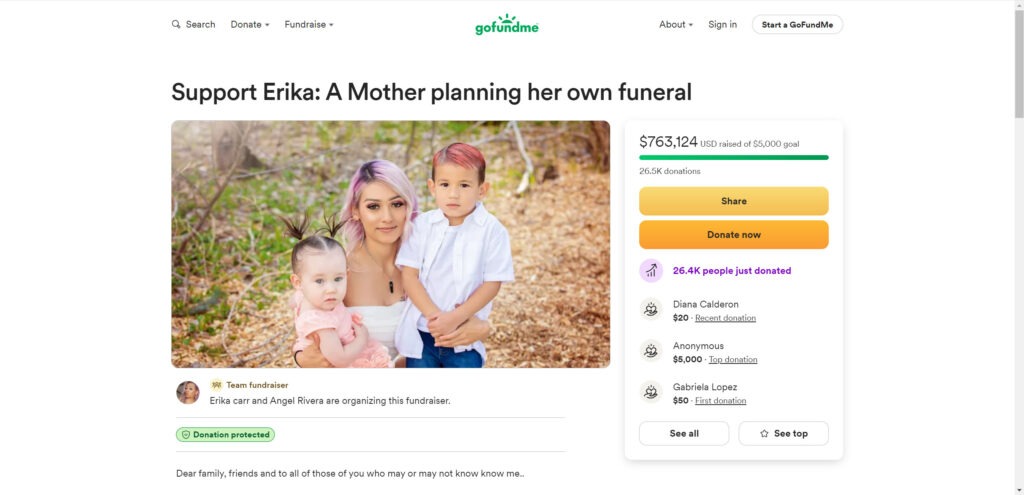
Erika Carr’s Genuine GoFundMe Campaign
The authentic GoFundMe set up by Erika Carr herself, titled “Support Erika: A Mother Planning Her Own Funeral”, is located at https://www.gofundme.com/f/help-erika-and-her-children-with-funeral-expenses. It was created in June 2024 with the modest goal of raising $5,000 to cover upcoming funeral costs and leave some money behind for her two young children, Jeremiah (7) and Aaliyah (5).
On the campaign page, Erika candidly shares her devastating diagnosis of stage 4 small cell lung carcinoma, a rare and aggressive neuroendocrine cancer, just one day before Mother’s Day 2022. Despite rigorous treatments including surgery, chemotherapy, and radiation, the cancer spread aggressively. By September 2024, doctors delivered the heartbreaking news that Erika had only 3 months left to live.
Given this terminal prognosis, Erika made the difficult choice to cease treatments and spend her remaining precious time with her beloved children. She is now faced with the unimaginable task of planning her own funeral arrangements with extremely limited financial means, prompting her to start the GoFundMe.
How The GoFundMe Went Viral
While the initial goal was small, Erika’s story quickly went viral worldwide. Her authentic and vulnerable sharing of her traumatic cancer journey as a young single mother resonated with thousands. In just a short time, the campaign amassed over 26,500 donations totaling more than $750,000.
With funds far exceeding her original target, Erika added an update to the page. She established a trust fund so extra money can be left to support her children’s future after she is gone. Understandably, Erika expresses profound gratitude for the aid, writing: “I never expected to have a big funeral service, or a lot of people reach out and help me. With the way it’s went, I’m just in shock … just very grateful for everybody and everything that’s been there.”
The Fake Erika Carr GoFundMe Scam Campaigns
Unfortunately, several fake campaigns impersonating Erika Carr have popped up, deceitfully leveraging her popularity. Scammers have created multiple social media pages using Erika Carr’s name, photos, and story. They share posts spreading awareness about Erika’s GoFundMe, but the attached links actually redirect to fraudulent fundraiser pages.
These misleading campaigns all have slightly altered titles along the lines of “Support Erika Carr” or “Erika Carr’s Funeral Donations”. Some even use Erika’s own words and images from her authentic GoFundMe page to appear more convincing. However, the listed account details clearly point to unrelated third parties attempting to misdirect donations.
The most distinguishing sign is the URL. None of these dubious fundraisers are hosted on GoFundMe’s legitimate website. Instead, they aim to collect payments through bank transfers or gift cards, which offer no accountability. These are surefire red flags of a GoFundMe scam.
How to Identify the Real Erika Carr GoFundMe Campaign
When searching for Erika Carr’s GoFundMe, double check that you have the precise URL:
https://www.gofundme.com/f/help-erika-and-her-children-with-funeral-expenses
The legitimate campaign clearly states it is organized by Erika Carr herself along with her supporter Angel Rivera. Erika’s own photographs are featured alongside her tragic story.
Critically examine any social media links before clicking or donating. Be wary of slight variations to the title or listed beneficiary. Avoid any fundraisers requesting direct bank payments, gift cards, or currency transfers. All legitimate GoFundMe’s use their own fully secure payment processing.
Cross-reference with Erika’s known social media profiles like Facebook to check for consistencies. Contact the campaign organizer if anything seems questionable. And remember, if it seems too good to be true, it likely is. Sadly, even well-meaning individuals get duped by manipulative scammers.
GoFundMe’s Policy Against Misleading Fundraisers
GoFundMe has a zero-tolerance policy for any fundraisers set up deceitfully. Their terms of service explicitly prohibit campaigns that:
- Share misleading information or omit key facts.
- Impersonate or falsely claim to represent a person without permission.
- Mislead donors by redirecting funds elsewhere.
GoFundMe investigates suspicious activity reports and works swiftly to remove scams and fraudulent fundraisers. They also offer a donor protection guarantee, issuing full refunds to any donors impacted by fraud.
How to Report a GoFundMe Scam
If you uncover an illegitimate fundraiser scamming under Erika Carr’s identity, or any suspicious campaign for that matter, immediately report it. Contact GoFundMe directly via their official website or mobile app.
Provide the fraudulent fundraiser’s direct URL along with a brief explanation of why you believe it is an impersonating scam. Try to include specific examples of misleading details on the page at hand. The more evidence the better, so GoFundMe can promptly vet and shut down the fraudulent sources. Don’t forget to also report the associated fake social media pages.
You can also report GoFundMe scams directly to crowdfunding watchdog sites like GoFraudMe. Their team thoroughly investigates public accusations of crowdfunding fraud across platforms, maintaining a database of proven scams. They work to keep both donors and the crowdfunding community protected.
It’s also wise to directly notify Erika Carr of any fake fundraisers you discover. This allows her to take legal action to protect her identity and reputable campaign. Contact can be made via her GoFundMe page or known social media profiles.
Advice to Avoid GoFundMe Scams
While most GoFundMe users have only good intentions, scams are an unfortunate reality. Exercising caution protects both your wallet and your compassion from manipulation.
- Stick to causes you have a direct, personal connection to.
- Vet any viral sob stories for corroborating evidence before donating.
- Confirm the correct URL and beneficiary before sharing or donating to links.
- Read updates, comments, and organizer responses for any red flags.
- Avoid campaigns using pressure tactics or requesting unusual payment methods.
- Report anything suspicious promptly to GoFundMe for investigation.
Conclusion
In summary, while Erika Carr’s true GoFundMe campaign has brought hope to many and restored faith in humanity, some nefarious individuals try to misuse her plight for personal gain. Always carefully validate any fundraising links tied to her name to avoid scams. Together we can shield Erika and her children, allowing them to focus fully on cherishing their remaining precious time together.

Join the discussion
0 commentsShare your experience or ask a question about this article.
Discussion
Start the conversation
Have a question or something useful to share? Add the first comment.