


A domain renewal email arrives while your website is working normally. It names an expiry date and a small charge, making it easy to treat as routine.
For anyone running a business through that domain, the possibility of losing email access is enough to make the notice feel urgent.
Overview
The message borrows a real hosting company’s name
The Exabytes renewal email scam impersonates a legitimate hosting and domain provider. The fraudulent notice uses domain maintenance as a reason to send readers elsewhere.
Exabytes itself has warned customers about fake renewal messages using its branding and company details. The business being impersonated is separate from the people sending these emails.
The supposed renewal leads toward an email password
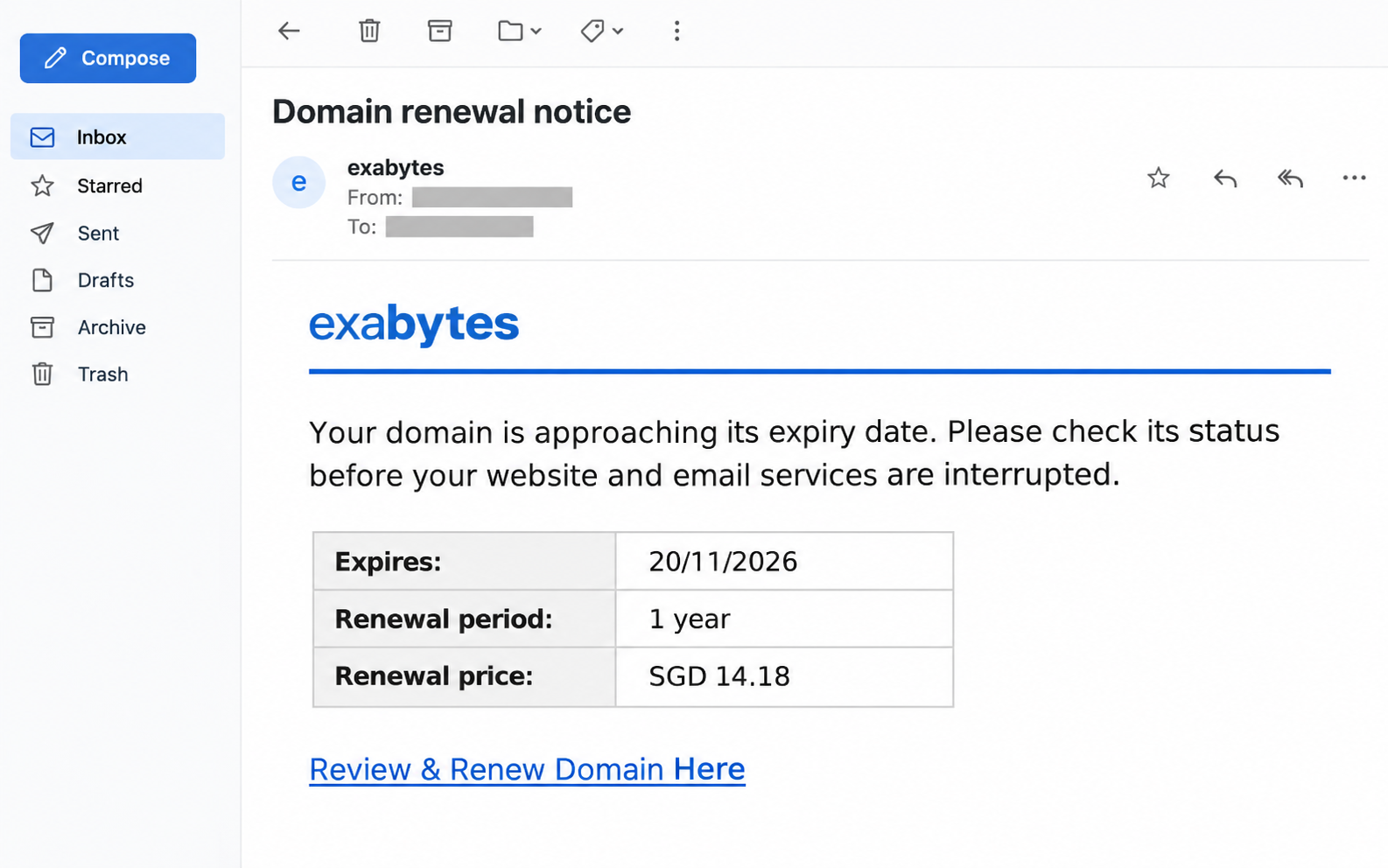
A documented version displays a one-year renewal for S$14.18 and an expiry date of November 20, 2026. Those are claims inside the message.
The reported destination, turnmaps[.]com, presents a copied sign-in rather than normal domain billing. Its request concerns the reader’s email credentials.
Check the account that actually holds your domain
A genuine expiry can still require attention. The safe response is to inspect your existing registrar account independently, without using the unexpected email’s renewal route.
- Identify which company currently manages the domain registration.
- Compare the actual domain record with your billing account.
- Keep the hosting account and email account distinct.
- Resolve a genuine invoice through the provider you already use.
A Familiar Invoice Can Hide an Unrelated Request
The amount makes the message feel like housekeeping. You might spend longer checking a large purchase than a modest renewal that appears to protect your business.
That difference matters because the most valuable thing requested may never appear on the invoice. A password can expose far more than the advertised renewal charge.
Think about an inbox used for customer orders. It may contain supplier conversations, hosting receipts and password-reset messages, even when the owner rarely considers it sensitive.
Someone who gains access could try using that correspondence to impersonate you. Whether any particular account was accessed requires evidence from the actual provider.
The useful question is therefore broader than whether the price looks reasonable. Ask whether the action on the next page belongs to the service being renewed.
A domain invoice should make sense within your domain account. A new request for an unrelated mailbox password needs independent verification before anything is entered.
The image above simplifies the reported email’s presentation. Its account details are obscured, and it contains no working renewal destination.
How the Exabytes Renewal Email Scam Works
Step 1: Familiar billing details turn maintenance into pressure
The sender presents an ordinary business problem: a domain supposedly needs renewal. That framing reaches people who depend on their website and cannot comfortably ignore interruptions.
A reader may already be expecting several annual bills. The email only needs to resemble one of them closely enough to interrupt a busy morning.
It helps to separate that expectation from the sender’s authority. Expecting a renewal means you should check the real account, rather than accepting whichever message arrives first.
A recognizable brand, an apparent billing period and a specific amount invite quick recognition. Those details can be copied into an email without granting its sender account access.
Personalization has limits when establishing a sender’s identity. An email naming your domain is different from a provider displaying it inside your independently opened account.
Public business details can make an unsolicited message feel private. The stronger check is whether the notice agrees with records you obtain independently.
Step 2: The renewal label hands you to another website
The transition deserves more attention than the button’s wording. A label describing maintenance does not establish who operates the destination behind it.
Do not reopen the suspicious page to investigate its appearance. Your old invoice, saved provider bookmark or existing account app offers a safer starting point.
If a colleague forwarded the notice, ask where it originally arrived. A familiar coworker’s forwarding address does not authenticate the original sender.
Step 3: A copied sign-in asks for the wrong account
The reported example imitates Google’s appearance. Google is a real service, but familiar page styling does not establish that Google receives the password.
A sign-in prompt should match both the intended account and its actual website. A convincing background cannot make an unrelated address part of your provider’s billing system.
Some services genuinely let you use a Google account to sign in. Confirm that option through your provider’s established site before using it.
Step 4: Exposed credentials put the mailbox at risk
If you supplied credentials, stop treating the incident solely as a questionable invoice. The account whose password you entered needs attention, even if no renewal payment occurred.
Write down which account you used before changing anything. A personal Gmail password, a hosted mailbox password and a registrar password require different recovery routes.
Tell your administrator about any verification prompt you also approved. Changing a password may be only one part of closing an unauthorized session.
Check the Renewal Without Following the Notice
Start with the provider in your own records
Find an earlier receipt you already recognize. Compare the domain name, customer account and provider with the records maintained by whoever normally handles your renewals.
If an agency manages the website, contact that agency through your existing conversation. Ask who holds the registration and who pays the invoice.
A developer, hosting company and registrar can have different roles. Being able to edit the website does not necessarily mean someone controls its registration.
Resolve that ownership question before paying a new sender. Otherwise, two people may assume the other has checked the notice while neither opens the real account.
Compare the expiry and invoice separately
Open the provider independently and inspect the domain’s status. Then check whether a matching invoice exists inside that same customer account.
Exabytes’ billing reminder guidance describes invoices issued to the billing account’s primary email address. A copied email outside that account is not the invoice record itself.
Do not assume the sample’s date describes your domain. A fraudulent notice can arrive before, after or coincidentally near a real renewal.
If the records disagree, ask the provider to explain the discrepancy through its established support system. Keep the suspicious message available for that conversation.
A real expiry needs its own practical response
Ignoring this phishing route should not mean abandoning domain maintenance. Website owners still need a clear renewal contact, current recovery details and access to legitimate billing.
Check whether your normal renewal arrangement depends on a card that recently expired. Ask the responsible person to confirm the account rather than forwarding another payment link.
If renewal genuinely failed, obtain the current options from the registrar. Do not rely on a universal grace period copied from a different domain’s situation.
The ICANN renewal and expiration guidance explains why renewal, redemption and eventual deletion are different stages. Costs and availability require the actual registrar’s information.
Which Password Matters After a Fake Renewal?
Consider two business owners who opened the same notice. One stopped at the email, while the other entered the Gmail password used for supplier correspondence.
The first person needs to report the message and check the genuine domain account. The second also needs to secure that Gmail account.
Neither situation proves that the registrar account was changed. Checking the domain remains sensible, but recovery should follow the information actually exposed.
If you reused the same password elsewhere, those matching credentials also need replacement. Use different passwords so another incident cannot rely on that same overlap.
For Gmail, Google’s compromised-account guidance covers recovery information, suspicious activity and unexpected mailbox changes. Use the guidance from the account provider you actually use.
An unexpected forwarding rule deserves particular attention. It may allow future correspondence to leave the mailbox even after the original phishing message has been deleted.
Review changes with the person responsible for the account. Avoid removing a business setting merely because you do not personally recognize its name.
The recorded phishing page places an extra sign-in dialog over a Google-looking background. That layered appearance does not connect the form to your domain’s billing account.
What to Do if You Have Fallen Victim to This Scam
-
Close the suspicious route and record what happened.
Note whether you only opened the notice, entered a password, approved a sign-in prompt or supplied payment information. Those differences determine the next actions.
-
Secure the account whose credentials you entered.
Use its established app or independently opened website. If access has been lost, follow that provider’s recovery process rather than instructions from the renewal sender.
-
Review signed-in devices and active sessions.
For Google accounts, the device review instructions explain session information and signing out. Ask workplace administrators to check centrally managed accounts.
-
Check recovery details and mailbox changes carefully.
Look for unfamiliar recovery contacts, forwarding, filters or delegated access. Have authorized administrators investigate unexplained changes and preserve useful account activity records.
-
Check the genuine domain and billing account.
Confirm the registrar, expiry status and existing invoice through your normal provider. If the hosting password was also exposed, tell that provider explicitly.
-
Contact the payment provider if money was involved.
Use a number from your card or an established banking app. Describe the actual transaction and ask what blocking, reversal or dispute options remain available.
-
Preserve the original message for a useful report.
Keep its sender details, destination information already recorded and any transaction reference. Send evidence through your provider’s reporting route without asking colleagues to open the phishing link.
-
Refuse follow-up offers requiring another secret or payment.
A stranger claiming to restore the domain, recover your inbox or retrieve money can create another exposure. Continue through the actual provider and payment company.
What to Tell Your Hosting Provider
Give support the domain you intended to renew and explain how you reached the unexpected page. Do not include your password in the support request.
State which type of account was involved. A report saying that you entered a mailbox password is more useful than saying only that you were hacked.
If you approved an extra verification request, include its approximate time and the service named on it. That helps administrators look for the relevant sign-in.
Ask whether the real renewal is outstanding and whether any account details changed. Those questions address both the legitimate maintenance issue and the security incident.
Keep the response in your established support account. An unsolicited message claiming to follow up on the ticket still needs verification through that same account.
When Several People Manage the Same Domain
A shared business inbox creates another practical problem: several people may see the notice, but nobody knows whether someone else has already checked it.
Choose one person to verify the domain account and tell the others what was confirmed. Forwarding the email around is not the same as assigning that check.
For example, a shop owner might manage Gmail while an agency handles registration. The owner should ask the agency about the invoice through their existing contact.
If the owner already entered a Gmail password, the agency’s renewal check cannot repair that exposure. Both people have useful work, but the tasks differ.
The owner secures the mailbox, while the agency checks the registrar account. Neither needs to share a password with the other to describe what happened.
Keep a short record of who checked each account and what remains unresolved. That prevents an apparent renewal confirmation from being mistaken for a complete security response.
When support answers, compare its explanation with the account record. A reply that merely repeats the original email’s claim does not settle whether an invoice exists.
For future renewals, keep the responsible person’s details somewhere accessible outside the affected mailbox. Losing email access should not erase your only route to the registrar.
This is especially useful when a business changes agencies or staff. Confirm who retains access before the next reminder arrives, rather than reconstructing responsibility under pressure.
Frequently Asked Questions
Is Exabytes itself behind this renewal scam?
No, the warning concerns impersonation of a legitimate provider. Exabytes has published its own advice about fraudulent renewal messages using its identity.
Does the amount prove my actual domain needs renewal?
No, a price inside an email is a claim from its sender. Check your domain and invoice inside the provider account you already use.
Can a genuine domain renewal require signing in?
Yes, legitimate account management can require authentication. The important checks are the correct account, actual website and independently verified route into that service.
What if I clicked but entered no information?
Close the page and report the message. Escalate separately if you downloaded or ran software, granted access or noticed an unexpected account change.
Should I cancel my legitimate hosting service?
The impersonation does not require canceling an otherwise valid service. Contact your real provider to check renewal status and any account information you exposed.
What if the genuine domain really expires soon?
Handle that renewal through your existing registrar account or established support contact. Do not use the suspicious email merely because its timing seems plausible.
The Bottom Line
Do not renew through this Exabytes impersonation email. Check the domain in your real provider account, where the renewal and invoice can be matched.
If you entered a password, secure that account immediately and review its access. Deal with any genuine renewal separately through the provider you already trust.

Join the discussion
0 commentsShare your experience or ask a question about this article.
Community experiences
Did this happen to you?
Your experience could help someone recognize the same scam. Submit a private report for our team to review.
I experienced this tooReports are reviewed before publication. Sharing publicly is always your choice.
Discussion
Start the conversation
Have a question or something useful to share? Add the first comment.