


A delivery error arrives with technical language about sending permissions. If you depend on webmail for work, it sounds like a problem worth fixing quickly.
The message offers a dashboard instead of a clear explanation. Before opening it, establish who actually runs the mailbox you use every day.
Overview
The notice dresses a login request as mail maintenance
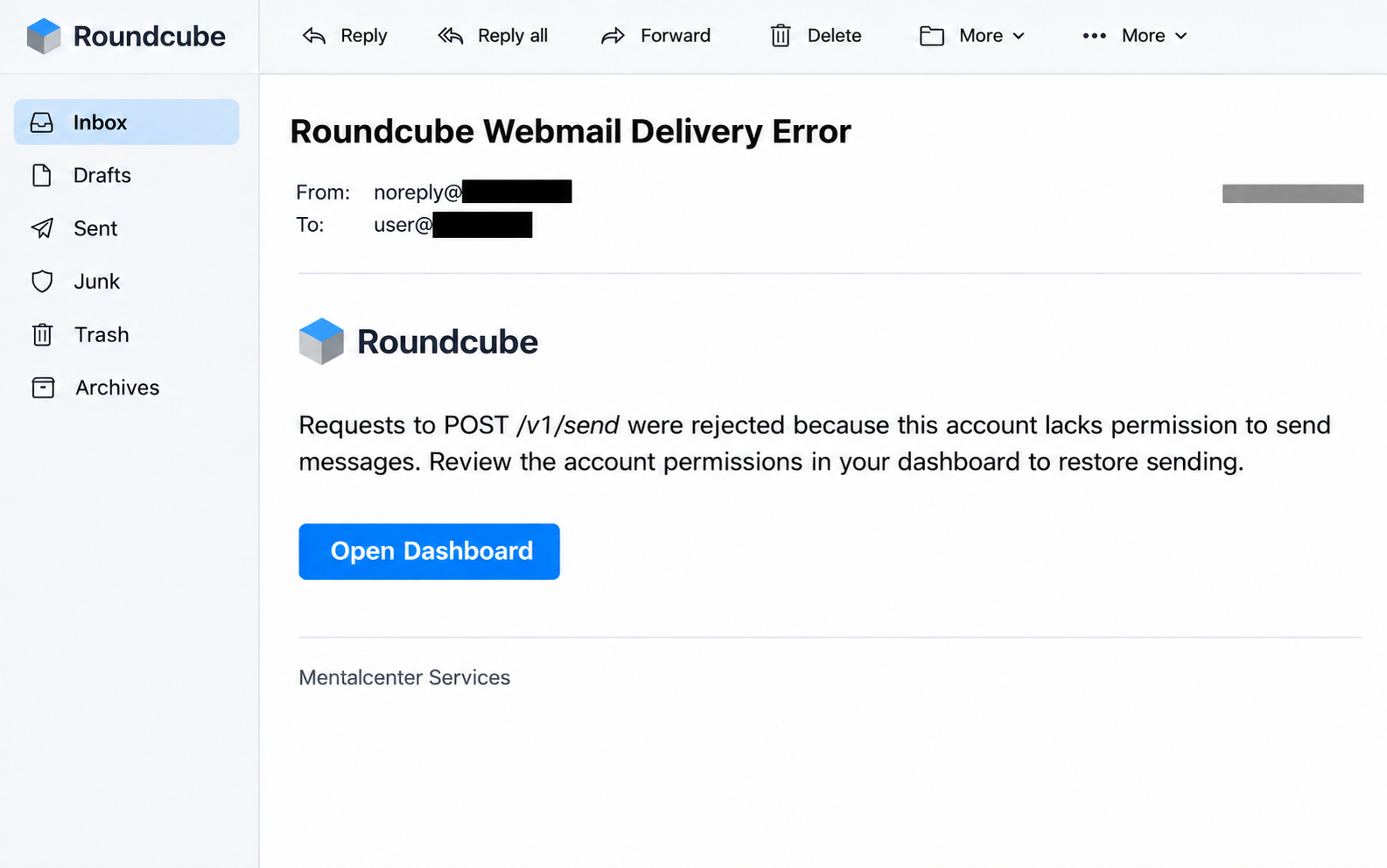
The Roundcube delivery error scam claims that requests to POST /v1/send lack the required sending permissions. It directs the reader toward an apparent dashboard.
The documented destination, centralparkadoor[.]com, hosts an imitation webmail login. This is credential phishing, rather than a repair that restores mail delivery.
Roundcube does not operate your mailbox account
Roundcube is a legitimate webmail software product. Its project contact guidance directs account and password problems to the provider operating your email service.
That distinction gives you a practical route out of the message. Contact your actual hosting provider or workplace administrator, using details you already have.
Your response depends on what you actually entered
A received warning, an exposed password and an unauthorized account session are different events. Establish which happened before deciding how much recovery work is needed.
- Leave the unexpected dashboard link unopened.
- Check sending through your established webmail address.
- Ask the mailbox provider about genuine delivery failures.
- Secure exposed credentials through the actual account operator.
Why the Technical Wording Can Be Persuasive
A message about permissions asks you to accept a diagnosis before checking the symptoms. The supposed fault sounds detailed enough to belong to a technician.
You do not have to understand an application programming interface to reject that shortcut. You only need to know which provider has authority over your email account.
A technical term can be real while its use in a particular notice is misleading. Familiar vocabulary is different from a verified explanation of your service.
Consider how an ordinary workday changes the decision. A customer expects an invoice, and an alert suggests you might suddenly be unable to send it.
The easiest-looking response is to finish the offered repair. Yet doing so lets the unsolicited message choose both the diagnosis and the website collecting your credentials.
Checking independently breaks the connection between diagnosis and destination. If a real problem exists, your provider can investigate without authenticating through the suspicious email.
The lead image is an inert reconstruction of the notice’s main elements. It illustrates the request without exposing a working destination or anyone’s account details.
How the Roundcube Delivery Error Scam Works
Step 1: A sending problem supplies the pretext
The message presents itself as an automated service warning. Its explanation encourages the recipient to think about restoring access rather than checking the sender.
This version concerns permission to send, rather than a full inbox or an oversized attachment. The action it wants remains an account sign-in.
Keep the alleged symptom separate from what you can observe. Receiving a warning is not evidence that your own sending permissions have changed.
Step 2: The dashboard label makes the next action familiar
People already use dashboards for hosting, invoices and account settings. Calling a destination a dashboard makes the transition sound like normal administration.
The label tells you what the sender wants you to believe about the page. It cannot establish who operates the site behind that label.
Opening your usual account independently is a better test. You are then checking a service you already recognize instead of evaluating the sender’s chosen route.
Step 3: Familiar webmail styling lowers resistance
The reported page copies Roundcube’s sign-in appearance. A reader who uses the software regularly might recognize the branding before noticing the actual website address.
Recognition and authentication do different jobs. A logo can make a page familiar, while the provider’s independently verified address establishes where you intend to sign in.
Do not enter a made-up password to test an unfamiliar form. A test submission cannot establish that the operator is legitimate or that your real account is safe.
Step 4: Account credentials become the target
Entering a password into a phishing form exposes it to that form’s operator. The risk concerns the account represented by those credentials, regardless of the repair story.
If you entered the address and password for a hosted mailbox, contact the host. If you supplied another account’s credentials, secure that account through its own provider.
Do not wait for a visible loss before reporting the exposure. The provider needs to know what you supplied and whether you approved any additional sign-in request.
Step 5: A compromised inbox can affect other conversations
An email account may contain customer messages, invoices and account-recovery correspondence. Unauthorized access could give someone material for impersonation or attempts against connected services.
That is a reason to investigate, not a finding that every recipient lost money. Check actual activity before telling contacts that their information was definitely stolen.
If suspicious messages were sent from your account, warn the affected recipients through an established channel. Explain which instructions they should verify before acting.
Check the Mailbox Without Trying to Fix an Unknown API
Identify the organization that provides the service
Start with your hosting bill, workplace directory or established support account. The organization accepting payment or administering your mailbox is the useful first contact.
The name on a webmail screen may describe software rather than the business responsible for your account. Ask support if you are unsure who holds that responsibility.
A company IT team may operate the service itself or arrange hosting elsewhere. Employees should follow that team’s reporting process rather than contacting software project developers.
Describe the actual sending failure, if there is one
If an ordinary message genuinely failed, preserve its error separately from the unexpected notice. Note the time and whether the problem concerns one recipient or several.
That information gives your provider something concrete to investigate. Avoid changing server addresses, DNS records or account permissions because an unrelated email told you to.
A service problem can coexist with phishing. Even if your mailbox is malfunctioning, the coincidence does not give the suspicious dashboard authority to collect your password.
Use the account operator’s actual controls
Some hosted mail accounts are managed through cPanel. Its Email Accounts documentation distinguishes account management from simply opening webmail.
Your own provider may expose different controls or restrict changes to administrators. Ask for the correct recovery route instead of assuming every Roundcube installation works identically.
Keep the hosting account password separate from the mailbox password. Knowing which one was exposed helps the provider decide what account activity needs review.
Two Mailbox Settings Worth Checking After Exposure
Resetting a password addresses one secret. It does not tell you whether an unauthorized person changed how mail is delivered or handled while they had access.
If your account uses cPanel, forwarders can direct messages to another address. Review unfamiliar destinations with your provider before assuming they belong to an attacker.
Businesses sometimes use legitimate shared routing arrangements. Preserve an unexplained entry and ask who created it instead of deleting every rule and disrupting normal mail.
Email filters are another separate setting. Depending on the rule, messages may be redirected or handled differently from what you expect.
Ask the administrator to check rules that hide warnings or account correspondence. A clean-looking inbox cannot tell you how every incoming message was processed.
Also review the messages actually sent from the account. Focus on unfamiliar recipients, requests for payment changes and conversations you do not recognize.
Record suspicious activity before removing it where practical. The provider may need timestamps and message details to understand the extent of unauthorized access.
What to Do if You Have Fallen Victim to This Scam
-
Stop using the dashboard from the unexpected email.
Close the page and avoid replying to its sender. Use your familiar webmail bookmark or established provider account for every recovery action that follows.
-
Tell the real mailbox administrator what you entered.
Include the account address, approximate time and whether a password or verification approval was supplied. Never send the password itself inside the incident report.
-
Replace exposed passwords through the legitimate account operator.
Change any reused password on other services as well. If you cannot get back into the mailbox, ask the provider for its account-recovery process.
-
Have existing access and recovery settings reviewed.
Ask about active sessions, connected applications and unexpected recovery contacts where those controls exist. Do not assume a password change automatically resolves every access method.
-
Inspect forwarding and message-handling changes with your provider.
Check unexplained destinations and rules, preserving useful details before correction. Keep legitimate business routing unless its responsible administrator determines that it should change.
-
Warn the people affected by suspicious outgoing messages.
If account activity shows impersonation, contact relevant customers or colleagues independently. Ask them to verify changed bank details and unexpected files through an established contact.
-
Report the notice without circulating its working link.
Use your organization’s reporting route or the mail client’s phishing control. Preserve the original email for the authorized support team investigating the incident.
-
Escalate separately if software or money was involved.
A password-only incident needs account recovery. Tell IT about downloaded or executed software, and contact the payment provider immediately if a transaction actually occurred.
A Useful Report Separates Three Different Events
Tell support whether the mailbox actually failed, whether you used the unexpected link and whether you disclosed credentials. These events should not be collapsed into one diagnosis.
For example, a person may receive the notice, ignore it and later discover a genuine delivery failure. The provider should troubleshoot that failure through its normal process.
Another person may have fully working email but enter a password on the copied page. That incident needs credential recovery even without any original service problem.
A third person may do both. Their administrator needs the timeline to distinguish ordinary delivery errors from account activity that followed the phishing exposure.
This approach makes the report easier to act on. It avoids asking support to fix an unfamiliar permission claim before explaining the actual account-security concern.
Keep any support case number alongside your notes. If another email later claims to continue the investigation, check it through the support account you already opened.
Give IT the Original Context, Without Sharing Your Password
A useful report lets the administrator identify the account, message and exposure. You do not need to supply the credentials again to prove what happened.
Include the address of the affected mailbox and the subject you received. If the notice was forwarded, explain who originally received it.
Distinguish the displayed sender name from any underlying address you already recorded. Do not guess an address or reopen a malicious page to obtain one.
Ask the support team whether it wants an original message file, headers or a screenshot. Different reporting systems accept evidence in different ways.
A screenshot can show the wording that persuaded you, but it may omit technical message details. Preserve the email until the authorized team explains what it needs.
Record the approximate time of any sign-in attempt and the account used. Add whether another prompt appeared on your phone and what you did with it.
If you changed the password afterward, note when and through which legitimate service. That helps the administrator understand the order of events.
Keep any actual delivery failure separate from the phishing notice. A real bounced message can be investigated without treating the unsolicited repair instructions as trustworthy.
If an administrator asks to review the mailbox, follow your organization’s established process. An unexpected person claiming to continue the same incident still needs independent verification.
Keep the evidence private enough for the investigation. A public post showing customer correspondence or an active phishing destination can expose other people unnecessarily.
Finally, ask what the team has confirmed and what remains under review. Normal sending after recovery does not itself establish the full history of account access.
Frequently Asked Questions
Did the Roundcube project send this delivery error?
No, this campaign uses Roundcube’s identity deceptively. The legitimate project explains that the provider running your mailbox handles account access and password issues.
Does an API reference make the message authentic?
No, technical vocabulary does not identify the sender or authorize a destination. Ask your actual provider whether the claimed problem applies to your account.
Should I change server settings to restore sending?
Do not change them because of this email. If sending genuinely fails, have your provider investigate the real error through its established support route.
What if I already entered my mailbox password?
Change it through the account operator immediately and report the exposure. Ask about sessions, recovery settings and mailbox changes that may need separate attention.
Does receiving the email prove my computer is infected?
No, the notice alone does not establish device compromise. Report any additional download, installation or remote-access action separately so the response matches your actual exposure.
Can I rely on my Sent folder alone?
No, a single folder cannot establish the full account history. Your provider may need to review available activity records and message-handling settings as well.
The Bottom Line
Do not use the dashboard in this Roundcube delivery error email. Check your real mailbox independently and have its operator investigate any genuine sending problem.
If you supplied credentials, secure the affected account and review its access. Restoring normal email service and responding to phishing exposure are separate tasks.

Join the discussion
0 commentsShare your experience or ask a question about this article.
Community experiences
Did this happen to you?
Your experience could help someone recognize the same scam. Submit a private report for our team to review.
I experienced this tooReports are reviewed before publication. Sharing publicly is always your choice.
Discussion
Start the conversation
Have a question or something useful to share? Add the first comment.