

With over 2.8 billion monthly active users, Facebook is the biggest social media platform worldwide. This immense userbase unfortunately attracts scammers and hackers looking to exploit users’ accounts for profit. One phishing scam that has recently emerged is from the domain “Facebook-Help.Report“.
This deceptive scam uses fictitious copyright violation warnings and threats of account deactivation to trick users into handing over their Facebook login credentials. Once scammers gain access, they can steal identities, spread malware, and hijack valuable Facebook pages.
This comprehensive guide will break down exactly how the Facebook-Help.Report phishing scam operates, who is vulnerable, and most crucially, how you can identify and avoid falling victim to it.
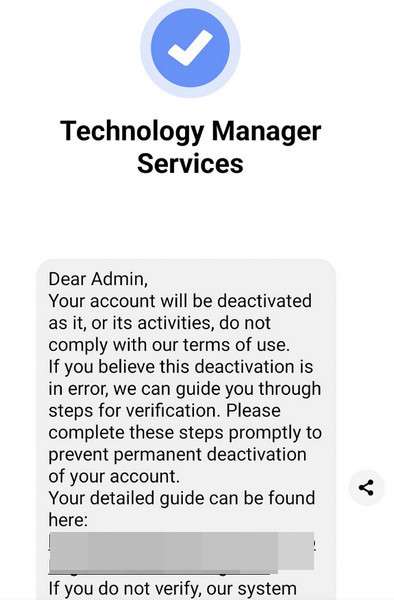
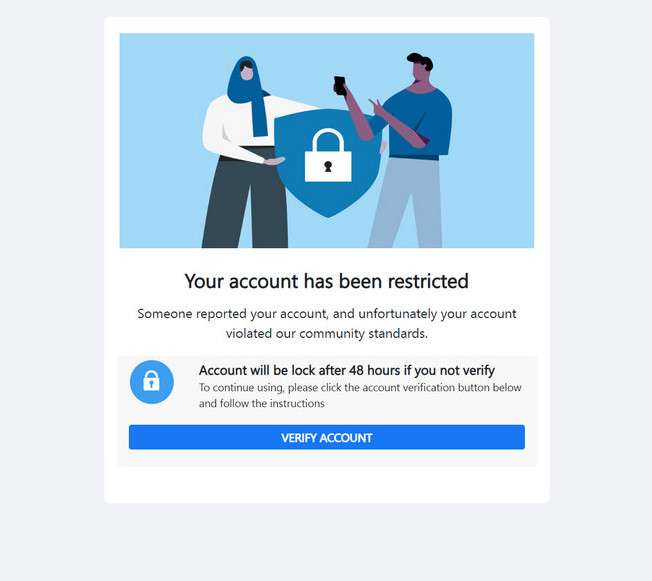
Overview of the Facebook-Help.Report Scam
The Facebook-Help.Report phishing scam uses fabricated copyright violations and account deletion threats to steal Facebook users’ login details. Targets receive intimidating yet official-looking messages that their account is at risk.
To avoid supposed permanent deactivation, the message provides a link to “validate” their account. However, this actually directs victims to a fake Facebook login page to capture usernames and passwords.
Who is Being Targeted?
While any Facebook user could be targeted, the scam appears focused on two groups:
- Page administrators – Compromising accounts managing popular Facebook pages allows scammers to post dangerous links and material to large audiences.
- Regular users – Scammers cast a wide net, knowing some everyday users will fall prey out of fear of losing their account.
Where Do the Messages Originate From?
This scam uses the domain “Facebook-Help.Report” in the messages. The website pretends to be Facebook’s help site but is not affiliated in any way. Scammers register domains like this to appear legitimate.
Messages also falsely claim to be from Facebook’s copyright and account security teams. However, Facebook has not sent these – they come only from scammers.
How the Facebook-Help.Report Scam Works
The Facebook-Help.Report scam unfolds in several carefully planned steps designed to steal credentials:
1. Recipients Get a Message Warning of Violations
Targets receive an unsolicited Facebook message claiming their account has been “detected in violation” of policies like copyright, community standards, or terms of service.
Threatening language is used, like saying violations are “serious” or that failure to take action could lead to permanent account deletion.
2. Message Provides a Link to Verify the Account
After instilling fear of account deactivation, the scam message provides a link supposedly to “validate” or “verify” your account with Facebook to resolve the issue.
This makes it appear clicking the link will fix the supposed violations. In reality, it takes victims to a phishing site.
3. The Link Leads to a Fake Facebook Login Page
While made to look official, the link goes to a fake Facebook login page controlled by the scammers. The page is designed to mimic Facebook’s real login to trick users.
Without realizing, victims enter their username and password on this fake page, sending their info directly to scammers.
4. Users’ Login Details are Captured
Because the fake login page looks so similar to the real Facebook, most people instinctively enter their credentials when prompted without considering it could be fraudulent.
This gives the scammers immediate access to victims’ Facebook accounts as soon as they enter their username and password.
5. Scammers Take Over the Account
With the stolen login info, scammers log into victims’ accounts and take control as if they were the legitimate owner. They have full access to all account content and connected profiles.
For page admins, scammers now control any high-follower pages too. This allows them to reach massive audiences.
6. Account Settings are Changed to Lock Out the User
Once scammers access the account, they quickly update settings like the password, email address, phone number, and two-factor authentication to lock out the real owner.
This prevents victims from recovering their account while allowing scammers to operate it freely. The rightful user is shut out.
7. Further Scams Are Perpetrated Leveraging the Account
With the ability to post and message as a compromised user or page, scammers can now execute additional scams on a much larger scale.
Examples include spreading malware links, posting dangerous misinformation, hijacking connected accounts, identity theft using personal info, or ruining reputations by posting offensive content.
8. Recovering Stolen Accounts is Very Challenging
Even if users realize their account has been compromised, getting it back is incredibly difficult once scammers change credentials and settings.
Proving account ownership without access to the associated email or phone number is a complex process that Facebook makes users jump through hoops to complete.
As this walkthrough demonstrates, the Facebook-Help.Report scam can completely compromise accounts and lead to serious follow-on frauds and damages. Awareness of how this process unfolds is key to staying secure.
How to Identify the Facebook-Help.Report Scam
Being able to recognize the hallmark signs of the Facebook-Help.Report phishing scam is key to avoiding becoming a victim. Here are the common traits to watch out for:
Messages Claiming Policy Violations
Scam messages will accuse you of violating Facebook terms, community standards, or copyright rules. They may say you recently shared prohibited content or made an offensive post. This sets up fictitious reasons for urgency.
Threats of Account Deactivation
The messages will threaten consequences like permanent account deletion or deactivation if you do not take immediate action. These warnings are entirely fabricated but designed to incite fear.
Links for Account “Verification”
The message will provide a link supposedly to verify, validate, or confirm your account with Facebook to avoid the deletion threats. The link claims to resolve the fake violation but actually leads to a phishing site.
URLs Containing Facebook-Help.Report
While made to look official, the verification link will point to a website domain containing “Facebook-Help.Report” rather than Facebook’s real URL. This is a clue it is fraudulent.
Requests for Login Credentials
Genuine Facebook messages will never ask you to enter your password, login via an external link, or provide sensitive account information. These are tricks to capture your credentials.
Typos, Grammatical Errors, and Odd Wording
Scam messages often contain spelling mistakes, sentence structure issues, formatting problems, and linguistic quirks as many originate from non-native English speakers overseas.
Any message containing these characteristics should raise immediate red flags. Remember Facebook will never message you out of nowhere demanding you verify your account to avoid deletion. Check directly on Facebook via their official website or app if you have any notifications.
What to Do If You Fall Victim to This Scam
If you unfortunately submitted your Facebook login details on the fake page, here are the steps you should take immediately to start recovering your account:
1. Change Your Password from Another Device
If you act quickly enough, log into your account from a secondary device the scammers would not have access to and change your password. Enable two-factor authentication as well, if not already on.
2. Check Connected Apps and Remove Suspicious Ones
Review connected apps and websites in your Facebook settings and remove any that look unfamiliar or fraudulent. This cuts off potential backdoor access points.
3. Run Anti-Virus Software to Detect Malware
The fake login page may have secretly downloaded malware onto your computer. Run a scan with Malwarebytes to uncover and remove anything suspicious found.
4. Contact Facebook to Report the Scam
Report to Facebook that your account was compromised through a phishing scam. Provide details that can help them escalate and restore access.
5. Warn Friends About Suspicious Activity on Your Account
Let your Facebook friends know about the scam and that suspicious posts or messages from your account are not actually from you. Urge them to tighten their own security settings.
6. Follow Facebook’s Account Recovery Process
If you can no longer access your account, go through Facebook’s account recovery process. Be prepared to answer questions only the real account holder would know.
7. Monitor Financial and Credit Accounts Linked to Facebook
Check bank statements, credit reports, and other financial accounts linked to Facebook for any fraudulent activity, as personal data could have been stolen in the scam.
Frequently Asked Questions About the Facebook-Help.Report Scam
Many Facebook users have pressing questions regarding the Facebook-Help.Report phishing scam as they try to protect their accounts. Below are comprehensive answers to some of the most commonly asked questions:
What exactly is the Facebook-Help.Report scam?
This scam sends fake warning messages claiming your Facebook account is violating policies and is at risk of deletion. The Facebook-Help.Report phishing link is provided to supposedly verify your account, but it actually steals your login credentials when entered.
Who is behind the Facebook-Help.Report scam messages?
The messages pretend to be from Facebook’s security and copyright teams, but are not affiliated with Facebook in any way. Scammers register domains like Facebook-Help.Report to appear legitimate and fool victims.
What techniques does this scam use?
It uses intimidation about account deletion, urgency to click the Facebook-Help.Report “verification” link, and a fake Facebook login page mimicking the real one to capture usernames and passwords unsuspectingly entered by victims.
What do scammers do once they have your credentials?
They log into your account, change the password and key account settings to lock you out, and then leverage your identity and connections to perpetrate further scams at scale.
How can I avoid falling for the Facebook-Help.Report scam?
Never click unsolicited links in messages warning of account violations, even if they look official. Instead, login directly via the Facebook app or website to view any notifications. Turn on login approvals for extra security.
What should I do if I entered my login details on the fake page?
Immediately change your password from a secondary device the scammers wouldn’t have access to. Check for any unauthorized connected apps in your settings and remove them. Scan your computer for malware. And notify Facebook Support about the compromised account.
How can I report this scam to Facebook?
You can report any fraudulent messages or account access violations directly to Facebook through their help pages. Provide as many details as possible such as the scam domain, fake account names, phishing links, and any account impacts.
How can I increase my Facebook account’s security?
Enable two-factor or multi-factor authentication, be selective when connecting third-party apps, use unique and complex passwords, review settings and connected accounts regularly, and be very cautious of unsolicited messages.
Am I at risk even if I don’t manage a Facebook page?
Yes, scammers will target any potential victim. They only need a small number of compromised accounts to try perpetrating larger scams, accessing connected apps, spreading malware, and stealing identities.
Stay vigilant against phishing attempts and do not let fear or urgency cloud your judgment if you receive suspicious violation warnings. Protect your account by recognizing the Facebook-Help.Report scam.
The Bottom Line
The Facebook-Help.Report scam is an increasingly prevalent phishing technique that can completely compromise both personal and page accounts. Never enter your Facebook login credentials unless on the legitimate Facebook app or website.
If you receive suspicious copyright or policy violation messages, report them immediately without clicking included links. With vigilance and the right security precautions, you can avoid becoming a victim of this scam.

Reviews & discussion
0 commentsShare a firsthand experience, or ask a question.
Community reviews
facebook-help.report
Moderated reader experiences, not an editorial verdict.
Start the conversation
Have a question or something useful to share? Add the first comment.