

A text message claims you have failed to pay a toll and must settle the balance immediately to avoid penalties, late fees, or account suspension.
It may look like it came from a toll agency, DMV, highway authority, or traffic enforcement office. It may include a payment link, QR code, or small balance due.
Do not rush. These messages are often phishing scams designed to steal your credit card details and personal information.
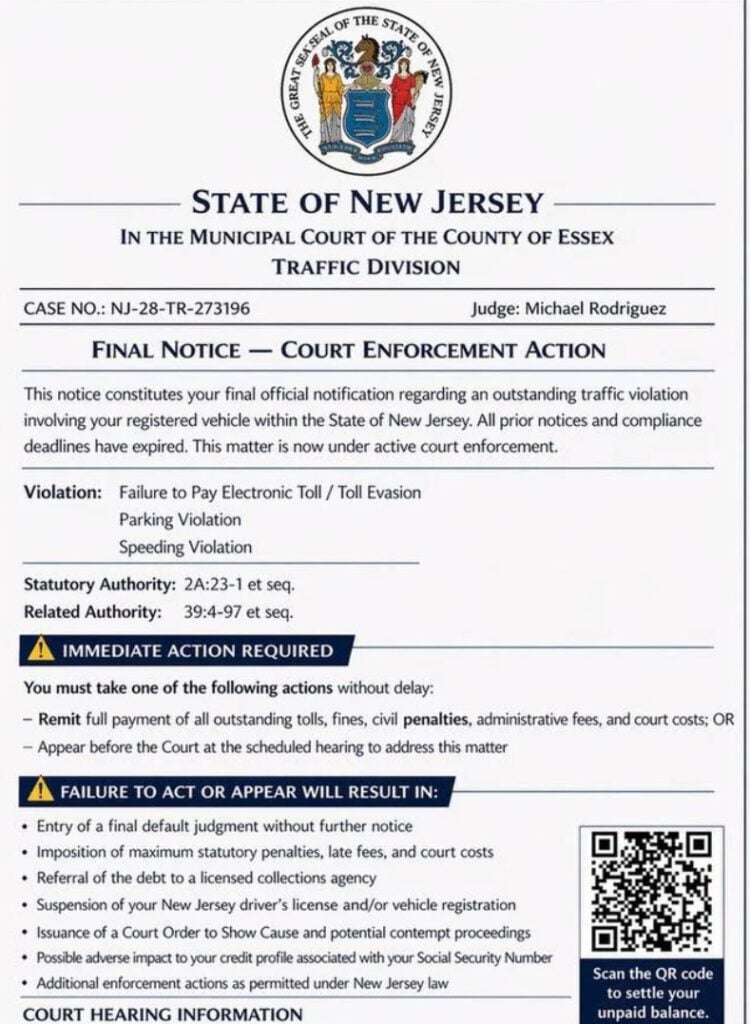
Scam Overview
The Failure To Pay Toll scam text is a widespread smishing attack, meaning phishing delivered by SMS or mobile message. Scammers pretend to represent toll agencies, DMV offices, or road authorities and send urgent messages claiming you owe money for an unpaid toll. The FTC has warned that scammers are impersonating tolling agencies “from coast to coast” and sending texts demanding payment.
The message usually sounds simple:
- You have an unpaid toll balance
- Your account may be suspended
- Late fees will be added
- You must pay immediately
- A link or QR code is provided
That link is the trap.
Once clicked, it usually opens a fake payment site designed to look like a legitimate toll service, DMV portal, or citation page. The website may ask for your name, address, phone number, email, license plate, and credit card details.
The FCC has also warned about toll road payment scam texts that claim the recipient has an unpaid toll or owes a balance and must pay immediately to avoid account suspension.
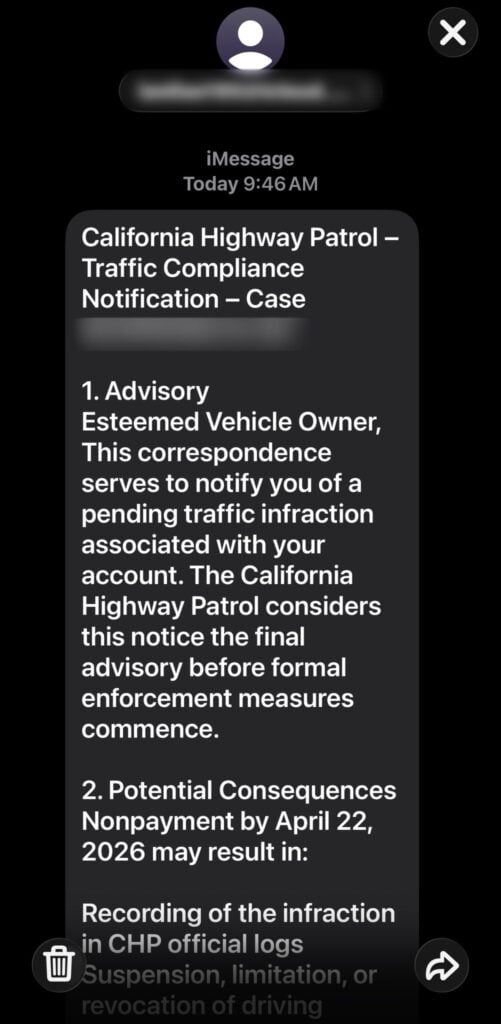
What the scam text may say
The wording changes, but many messages follow the same pattern.
A typical scam message may look like this:
“Failure to pay toll notice: Our records show an unpaid toll balance associated with your vehicle. Pay now to avoid late fees, account suspension, and additional penalties.”
Other versions may say:
- “Final notice: unpaid toll detected”
- “Your toll account has an outstanding balance”
- “Immediate payment required to avoid penalties”
- “Failure to pay will result in administrative fees”
- “Your registration may be affected”
- “Pay now through the secure portal”
Some versions impersonate known toll systems such as FasTrak, E-ZPass, SunPass, Peach Pass, TxTag, I-PASS, or regional toll road authorities. The FBI has warned that these texts often claim the recipient owes money for unpaid tolls and include links created to impersonate state toll service names.
Why the scam works
This scam works because it feels believable.
Many drivers use toll roads, bridges, express lanes, or automated billing systems. It is easy to imagine missing a small charge, especially if the message says the amount is minor.
The scam usually uses three pressure tactics:
1. A small balance
The amount may be low, often around $6.99, $9.99, or another small number.
That low amount is intentional. Scammers know people are more likely to pay a small fee quickly than spend time verifying it.
The fee is bait. The real target is your card number, CVV, billing address, and personal information.
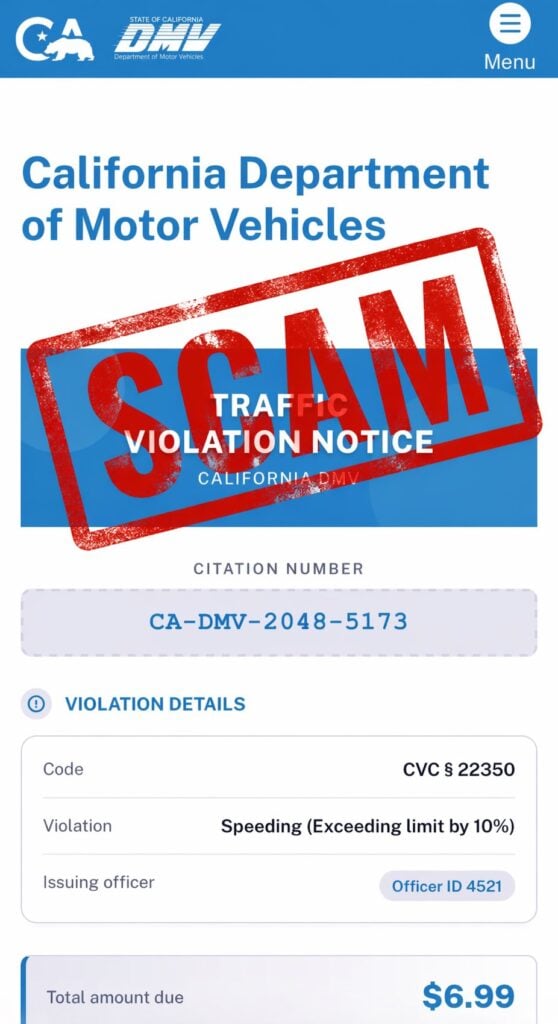
2. Urgent consequences
The text may threaten:
- Late fees
- Account suspension
- Registration problems
- Collections
- Administrative penalties
- Legal action
The goal is to make you act quickly.
3. A realistic-looking payment site
The fake site may use:
- Toll agency logos
- State names
- Road or bridge branding
- Payment buttons
- Case or citation numbers
- Fake account balances
- “Secure payment” language
It may look professional, but that does not make it legitimate.
How The Failure To Pay Toll Scam Works
Step 1: The scam text arrives
The message usually arrives from an unknown number, short code, or spoofed sender.
It may mention:
- An unpaid toll
- A toll violation
- A final notice
- A balance due
- A penalty deadline
The scam does not necessarily mean scammers know you drove on a toll road. These messages are often sent in bulk to large lists of phone numbers.
Step 2: The message creates pressure
The text tries to make the issue feel immediate.
It may say:
- “Payment required today”
- “Final notice”
- “Avoid late penalties”
- “Account will be suspended”
- “Resolve immediately”
This is designed to stop you from thinking clearly.
A real agency gives you verifiable ways to check your account. A scam pushes you into one fast action.
Step 3: The link or QR code sends you to a fake site
The message includes a link or QR code that appears to lead to an official payment page.
In reality, the website is controlled by scammers.
Step 4: The fake site asks for personal information
Before payment, the site may ask you to “verify” your account.
Common fields include:
- Full name
- Address
- Phone number
- License plate number
- Vehicle information
- ZIP code
This information can be used in future scams, even if you stop before paying.
Step 5: The payment page captures your card details
The fake payment form asks for:
- Credit card number
- Expiration date
- CVV
- Billing ZIP code
- Billing address
Once entered, your card should be treated as compromised.
Even if the website shows a confirmation page, the scammers may already have captured the data.
Step 6: Fraud may happen later
Some victims see unauthorized charges quickly. Others do not notice anything for days or weeks.
Scammers may:
- Run small test charges
- Attempt larger purchases
- Sell the card information
- Send more fake toll or DMV messages
- Use your personal details in targeted scams
That is why a small fake toll payment can turn into a much bigger financial problem.
Common Red Flags
The message arrives unexpectedly
If you did not recently receive an official mailed notice, log into a toll account, or request a payment link, be suspicious.
The link looks unusual
Scam links often use strange domains, misspellings, extra words, or non-government endings.
Examples may include fake versions of toll names, DMV wording, or “secure-payment” style domains.
The payment amount is very small
A tiny balance like $6.99 may be used to lower your guard.
The text threatens fast consequences
Scammers often threaten penalties, suspension, collections, or legal action on a short deadline.
The message asks for personal or financial information
Official agencies generally do not request sensitive card or identity information through random text links.
The message tells you to use only the provided link
A legitimate issue should be independently verifiable through an official website or customer service channel you find yourself.
What To Do If You Receive a Failure To Pay Toll Text
Do not click the link
Do not open the link “just to check.” The page may be designed to collect information or push you into a payment flow.
Do not scan the QR code
A QR code is simply a hidden link. If it came from an unexpected toll text, treat it as unsafe.
Do not reply
Replying may confirm that your number is active. That can lead to more scam messages.
Verify through official channels
If you think the toll might be real:
- Go directly to the official toll agency website by typing it yourself
- Use the official app you already trust
- Call a verified number from the agency’s official website
- Check your toll account directly
Do not use the phone number, link, or QR code from the text.
Report the message
You can:
- Mark it as junk or spam in your messaging app
- Block the sender
- Forward the text to 7726 (SPAM) if your carrier supports it
- Report fraud through official consumer protection channels
What To Do If You Already Paid or Entered Information
1. Call your card issuer immediately
Use the number on the back of your card.
Tell them:
- You entered your card details on a fraudulent toll payment site
- The site came from a scam text
- You want the card blocked and replaced
- You want recent transactions reviewed
Do this even if you do not see fraud yet.
2. Review your recent transactions
Look for:
- Small test charges
- Unknown online purchases
- Subscription charges
- Charges from unfamiliar merchants
Dispute anything you do not recognize.
3. Turn on transaction alerts
Enable alerts for:
- Every purchase
- Online transactions
- Charges over $1
- International transactions, if available
Fast alerts can help you catch fraud early.
4. Monitor your identity information
If you entered personal details, watch for:
- More scam texts
- Fake DMV alerts
- Fake bank calls
- Password reset emails
- Unusual account activity
Scammers may reuse the information later.
5. Change passwords if needed
If the fake site asked you to create an account or sign in, change that password immediately.
Also change it anywhere else you reused it.
6. Save evidence
Take screenshots of:
- The original text
- The sender number
- The link or QR code
- The fake website
- Any payment confirmation
- Any charges that appeared afterward
This can help with bank disputes or fraud reports.
The Bottom Line
The Failure To Pay Toll scam text is a phishing attack designed to look like a routine unpaid toll notice.
It may use real toll agency names, DMV-style branding, small balances, urgent deadlines, and official-looking payment pages. But the goal is not to collect a real toll. The goal is to steal your credit card details and personal information.
If you receive one of these messages, do not click, do not scan, do not reply, and do not pay. Verify any real toll balance only through official websites, apps, or phone numbers you access yourself.








