

A text message claims you have a Code CVC § 22350 violation for speeding or unsafe driving. It may look like a California DMV or traffic compliance notice, show a small amount due, and push you to pay through a link or QR code.
The law code is real. The text message is the trap.
Scam Overview
The Code CVC § 22350 violation scam text is a phishing scam that impersonates California traffic authorities, the California DMV, the California Highway Patrol, or a fake traffic compliance office. The message claims you have a traffic infraction linked to your vehicle and pressures you to pay quickly before “enforcement measures” begin.
The scam often uses wording such as:
- California Highway Patrol Traffic Compliance Notification
- Traffic Violation Notice
- California Department of Motor Vehicles
- Pending traffic infraction
- Final advisory before enforcement
- CVC § 22350
- Speeding, exceeding limit by 10%
- Total amount due: $6.99
The use of CVC § 22350 is what makes this scam feel more believable. California Vehicle Code section 22350 is a real statute, commonly known as California’s Basic Speed Law. It says drivers may not drive faster than is reasonable or prudent for conditions, including weather, visibility, traffic, and the condition of the roadway.
That real legal reference does not make the text legitimate.
Scammers frequently include real laws, real agency names, official-looking logos, and fake citation numbers because they know people tend to trust legal details. The purpose is not to explain the law. The purpose is to make you believe the message long enough to click.
Why CVC § 22350 Is Used in the Scam
It sounds official
A message that says “you owe a speeding fee” may look suspicious.
A message that says Code CVC § 22350 feels more specific. It gives the fake notice a legal tone and makes the recipient think, “Maybe this is real.”
That is the trick.
Scammers are not relying on legal accuracy. They are relying on recognition. Most California drivers have seen “CVC” on traffic tickets or DMV paperwork, so the abbreviation creates instant credibility.
It fits the fake speeding notice
CVC § 22350 is associated with unsafe speed for conditions, so scammers use it in fake notices claiming:
- speeding
- exceeding the limit by 10%
- unsafe speed
- traffic compliance failure
- pending traffic infraction
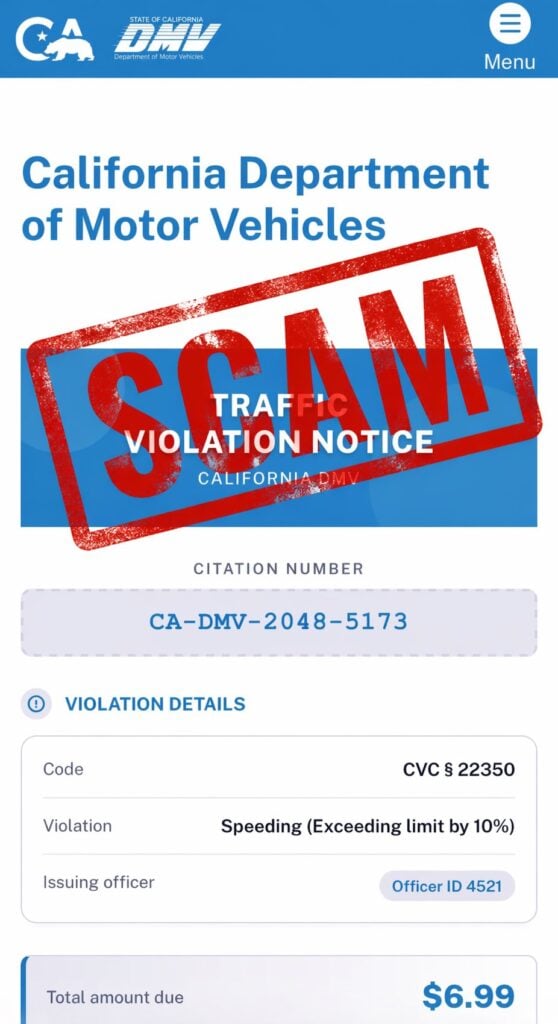
The fake payment page may show a neat set of fields, such as:
- Citation Number: CA-DMV-2048-5173
- Code: CVC § 22350
- Violation: Speeding
- Issuing Officer: Officer ID 4521
- Total Amount Due: $6.99
This layout is designed to look clean, modern, and official. But a polished page does not prove authenticity.
What the Scam Text Usually Says
The wording varies, but many versions follow this pattern:
Example scam wording
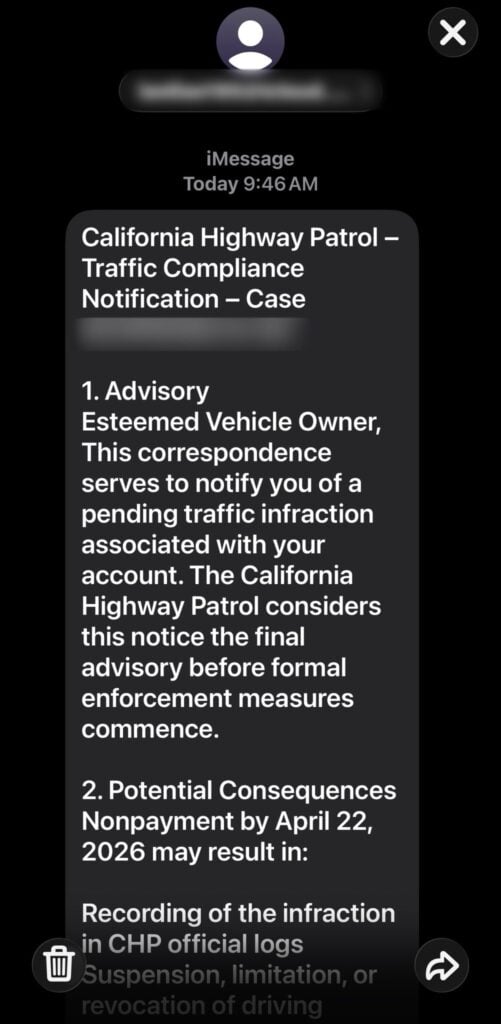
California Highway Patrol – Traffic Compliance Notification – Case [number]
Esteemed Vehicle Owner,
This correspondence serves to notify you of a pending traffic infraction associated with your account. The California Highway Patrol considers this notice the final advisory before formal enforcement measures commence.
Potential Consequences
Nonpayment may result in:
- recording of the infraction in official logs
- suspension, limitation, or revocation of driving privileges
- additional fees
- registration-related consequences
- referral for enforcement action
A link or button then directs the recipient to a payment page.
What the fake site may show
The fake site may appear as a California DMV or traffic violation page with:
- California DMV-style branding
- “Traffic Violation Notice”
- a citation number
- violation details
- CVC § 22350
- a small amount due
- a payment form
This is the phishing stage. The site is not there to help you resolve a real citation. It is there to collect your information.
Why the $6.99 Fee Is a Red Flag
A real traffic citation for speeding is not typically resolved through a random text link for $6.99.
That small amount is part of the manipulation.
Scammers use low amounts because they reduce hesitation. A victim may think:
- “It is only $6.99.”
- “I do not want this to become bigger.”
- “I will just pay it and move on.”
- “It is not worth calling anyone.”
That is exactly the reaction scammers want.
The payment amount is bait. The real target is:
- card number
- expiration date
- CVV
- billing ZIP code
- full name
- address
- phone number
The FTC has warned about traffic violation scam texts that show official-looking notices, fake case numbers, QR codes, and threats of enforcement. The FTC says scammers use these messages to push people into scanning codes or following payment paths, where they may try to steal personal information, credit card numbers, money, or even install malware. (Consumer Advice)
Why This Scam Looks Convincing
It copies trusted names
The scam may use names like:
- California DMV
- California Highway Patrol
- Traffic Compliance
- California Courts
- Traffic Division
- Citation Processing Center
These names are used to create authority. The scammers know people are more likely to obey a message that appears to come from an official traffic or government source.
It uses real-looking design
Fake pages may copy:
- blue DMV-style colors
- state logos
- menu icons
- citation cards
- violation details boxes
- payment panels
The design is meant to reduce suspicion. It creates the feeling that you are already inside an official system.
It creates urgency
The message may say this is the final warning before:
- enforcement measures
- license suspension
- formal traffic action
- added penalties
- court escalation
- registration problems
California Courts warns that fake court messages often say you owe money for a traffic ticket and ask you to pay right away. Their guidance says not to click links or give personal information. (Self-Help Guide to the California Courts)
The Biggest Red Flags
Use this quick checklist.
The message is likely a scam if it:
- arrives unexpectedly by text or iMessage
- claims to be from CHP, DMV, or a traffic compliance office
- includes a payment link or QR code
- uses vague language like “pending traffic infraction”
- addresses you generically as “vehicle owner”
- shows a small fee like $6.99
- asks for credit card information
- threatens enforcement if you do not pay quickly
- sends you to a non-government domain
- does not include verifiable citation details
The California DMV says it will never ask for personal or financial information by text and advises people not to open, reply to, or trust suspicious DMV-related messages.
How The Scam Works
Step 1: The text arrives
The scam begins with a message that looks like a traffic notice.
It may claim:
- your vehicle is tied to a violation
- a traffic infraction is pending
- this is the final advisory
- enforcement will begin soon
- you must pay by a deadline
The message is written to make you pause and worry.
Step 2: The scam uses CVC § 22350 to look legitimate
The fake notice references CVC § 22350 because it is a real California traffic law.
That does not mean the notice is real.
It only means the scammers copied a believable legal code into the message.
Step 3: The message offers a quick payment path
After creating fear, the scam gives you a simple action:
- click the link
- scan the QR code
- open the “official portal”
- pay the small amount due
This is the moment where the scam moves from pressure into theft.
Step 4: The fake website appears
The site may look like a DMV or traffic portal.
It may display:
- citation number
- violation code
- violation type
- officer ID
- amount due
- deadline
- payment button
The page may look professional, but it is controlled by scammers.
Step 5: Personal information is collected
The site may ask for:
- full name
- address
- ZIP code
- phone number
- plate number
- vehicle details
This information can be used for identity theft, follow-up scams, or more convincing phishing attempts.
Step 6: Card details are stolen
The payment page asks for:
- card number
- expiration date
- CVV
- billing address
Once submitted, your card should be treated as compromised.
Even if the page shows a confirmation, the data may already be stolen.
Step 7: Fraud may happen later
Some victims see unauthorized charges immediately.
Others do not see suspicious activity for days or weeks.
Scammers may:
- test the card with small transactions
- make larger purchases later
- sell the card data
- send more fake traffic or DMV texts
- use the victim’s details in other scams
That delay is why fast action matters.
What To Do If You Receive a CVC § 22350 Scam Text
Do not click the link
Do not open the link, even just to inspect it.
A fake site can capture information, pressure you into paying, or attempt additional tricks.
Do not scan the QR code
A QR code is just a disguised link.
If it came from an unexpected traffic text, treat it as unsafe.
Do not reply
Replying confirms your number is active. That can lead to more scam messages.
Verify independently
If you are worried about a real citation:
- go directly to the official court website
- use an official traffic case portal
- contact the court using a trusted phone number
- visit the official DMV website by typing the address yourself
California Courts says to check tickets through your local court’s traffic website, the court’s traffic case portal, or by calling the court directly using a trusted number. It also says to pay only through the official court website or in person at the courthouse. (Self-Help Guide to the California Courts)
What To Do If You Already Paid or Entered Information
1. Call your card issuer immediately
If you entered card details, call the number on the back of your card.
Tell them:
- you entered your card details on a fraudulent traffic violation website
- the site came from a scam text
- you need the card blocked and replaced
- you want recent transactions reviewed
Do this even if you do not see fraud yet.
2. Review recent transactions
Look for:
- small test charges
- unfamiliar purchases
- recurring charges
- online transactions you do not recognize
Dispute suspicious charges immediately.
3. Turn on transaction alerts
Enable alerts for:
- every card purchase
- online payments
- charges over $1
- international activity, if available
4. Change passwords if you created an account
If the fake portal asked you to log in or create an account, change that password.
Also change it anywhere else you reused it.
5. Monitor for identity misuse
If you entered personal information, watch for:
- more scam texts
- fake bank alerts
- password reset emails
- suspicious account activity
- new phishing messages using your name or vehicle details
6. Save evidence
Take screenshots of:
- the text message
- sender information
- fake website
- citation number
- QR code
- payment confirmation or error page
7. Report the scam
You can:
- mark the message as junk or spam
- block the sender
- forward the message to 7726 (SPAM) if your carrier supports it
- report it to the FTC at ReportFraud.gov
The FTC advises people not to respond to these traffic violation texts, not to scan QR codes, and to report the scam if they paid or shared information.
The Bottom Line
The Code CVC § 22350 violation scam text uses a real California traffic law to make a fake speeding notice look legitimate.
The fake notice may claim to be from CHP, DMV, or a traffic compliance office. It may show a citation number, officer ID, violation code, and a small amount due like $6.99. But the goal is not to collect a real citation payment.
The goal is to steal your card details and personal information.
If you receive one of these messages, do not click, do not scan, do not reply, and do not pay.
Verify traffic citations only through official court or DMV channels you access yourself.








