

The fake carrier email scam does not resemble a typical consumer con. It lands inside the fast-moving language of dispatch, compliance, ratings, and load paperwork.
A message can feel routine when dozens of similar documents cross a broker’s desk each day. That familiarity makes this story worth examining.
Overview
The opening move is a business phishing email
Cyber-enabled cargo theft often starts with a message aimed at a broker or carrier employee.
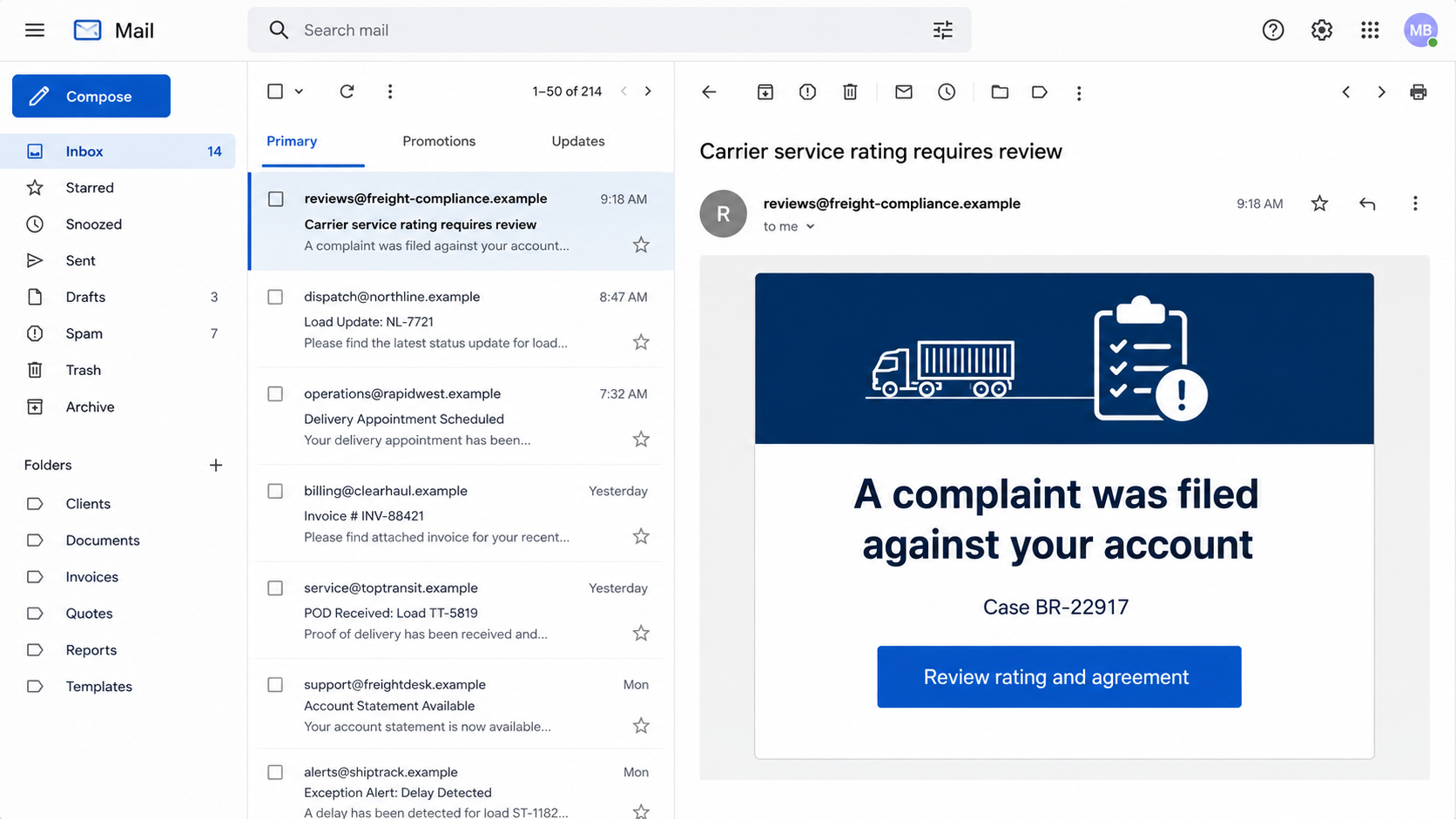
The lure may claim there is a bad service review, a carrier-broker agreement, a document update, or a problem that must be corrected.
The link can open a spoofed site or deliver remote-management software.
Either route is designed to give the attacker access to a real logistics account or the computer used to manage it.
The target is the account that connects shippers, brokers, carriers, and drivers. Once criminals control it, they can impersonate a real company inside the systems the industry already trusts.
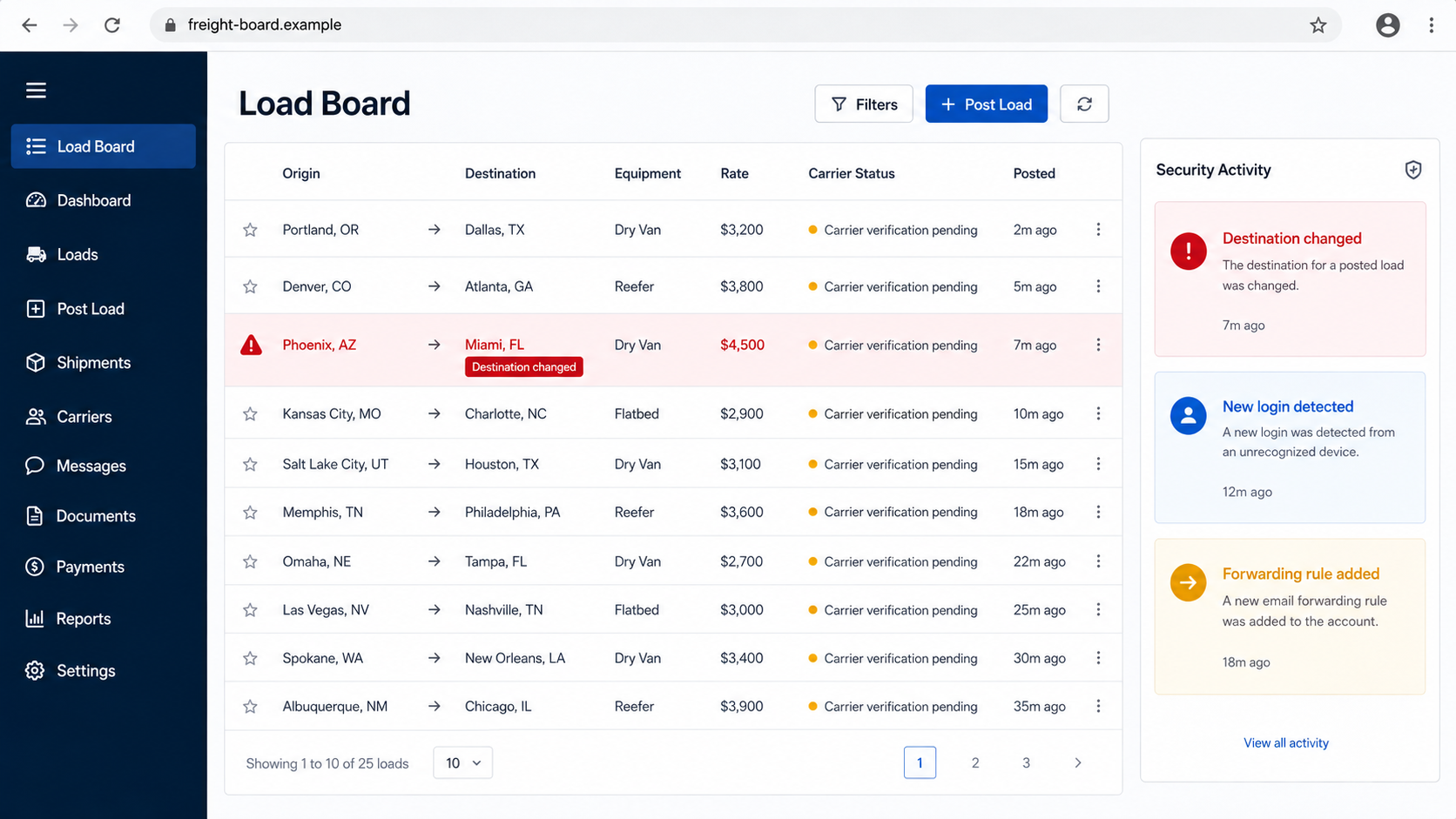
They may post fraudulent loads, change pickup details, substitute a carrier, or redirect a shipment after it has left the dock.
By the time someone notices the paperwork does not line up, the cargo can be at a different warehouse under a different identity.
A stolen account turns into a trusted shipping identity
With valid access, criminals can enter load boards and communications as a legitimate broker or carrier. They are no longer sending a cold email from an unknown company.
They are speaking through an identity that already has history, ratings, insurance information, and business relationships.
The access may be used to:
- post large numbers of fraudulent loads;
- book a real shipment under a stolen carrier identity;
- change pickup or delivery instructions;
- send rate confirmations from a compromised mailbox;
- hide replies with mailbox forwarding and deletion rules;
- route high-value goods to a warehouse controlled by thieves.
The loss is physical even though the entry point is digital
The FBI warned in April 2026 that cyber-enabled strategic cargo theft was surging.
Its alert described spoofed emails, fake URLs, compromised carrier accounts, fraudulent load-board postings, and remote-management software used to redirect goods.
The scheme is not a disagreement over a late delivery. It is an organized fraud path that begins with account compromise and ends with freight being intentionally diverted and stolen.
Why Freight Workflows Give the Email Cover
Logistics runs on speed, handoffs, and documents. A broker may communicate with dozens of carriers. A warehouse may receive revised appointments throughout the day.
A driver may be waiting while people in different offices confirm one detail.
That pressure gives the attacker two advantages. First, an unexpected document does not feel unusual.
Second, a request to act quickly can be explained as an effort to keep a truck moving.
Routine variation helps the disguise. Different customers use different forms, portals, and naming rules, so an employee cannot reject every unfamiliar layout without checking the business behind it.
The email may also use information gathered from public carrier records, job titles, load postings, compromised partners, or earlier mailbox access.
Correct details make the false instruction feel connected to real work.
A generic delivery phish usually wants a consumer password or small fee. Strategic cargo theft wants operational control.
The criminal is looking for the point where digital instructions become possession of physical goods.
This is different from the fake COSCO shipping notification, which sends recipients to a counterfeit webmail login.
The new cargo-theft pattern can use similar phishing, but it continues into load boards, dispatch calls, carrier substitution, and destination changes.
How the Fake Carrier Email Scam Works
Step 1: The attacker selects an account with operational value
Brokers, dispatchers, carriers, freight forwarders, warehouses, and employees who handle documents are attractive targets. Public websites and industry platforms can reveal names, roles, and contact addresses.
The attacker wants an account that can post loads, book freight, send trusted instructions, or view active shipments.
Step 2: A routine business problem becomes the lure
The email may say a carrier agreement must be reviewed or a poor rating threatens future work.
Other versions mention onboarding, insurance, compliance, proof of delivery, or an updated rate confirmation.
The message can use a slightly altered domain, a free mailbox, or a compromised account belonging to another real company.
Display names and signatures are copied because they are easy to imitate.
Step 3: The link steals credentials or installs remote access
A button may open a fake load-board or cloud login. The recipient enters credentials and perhaps a one-time code, which the attacker uses immediately.
In the tradecraft described by the FBI, phishing pages may also host malicious executable files that install legitimate remote monitoring and management software.
A real support tool becomes dangerous when a criminal deploys it without authorization.
Step 4: The criminal studies the real operation
Account access reveals customers, active loads, documents, pricing, contacts, and normal writing style. Mailbox rules can forward messages externally or hide replies from the victim.
The attacker can wait for a valuable shipment rather than acting immediately. That delay makes the original phishing event harder to connect to the later theft.
Step 5: Fake loads or stolen identities enter the market
Criminals use compromised accounts to post fraudulent listings, sometimes at scale. They may impersonate brokers to attract carriers or impersonate carriers to secure freight from brokers.
A load offered at an attractive rate can move quickly.
The paperwork appears to come from a known platform or valid account, so each participant assumes someone else completed the verification.
Step 6: Pickup and delivery instructions are manipulated
The wrong truck may arrive with convincing documents, or a legitimate driver may receive a last-minute destination change.
Phone numbers can be temporary VoIP lines, and email addresses may differ from the real domain by one character.
The criminal relies on urgency. A driver waiting at a dock and a broker solving a problem are less likely to pause for an independent callback.
Step 7: The cargo moves beyond the normal chain
Goods are redirected to a warehouse, cross-dock, or receiver chosen by the thieves. High-value products can then be broken up and resold.
Fraudulent records and compromised messages create confusion about who authorized the move. That delay is valuable to the criminals and costly to every legitimate business in the chain.
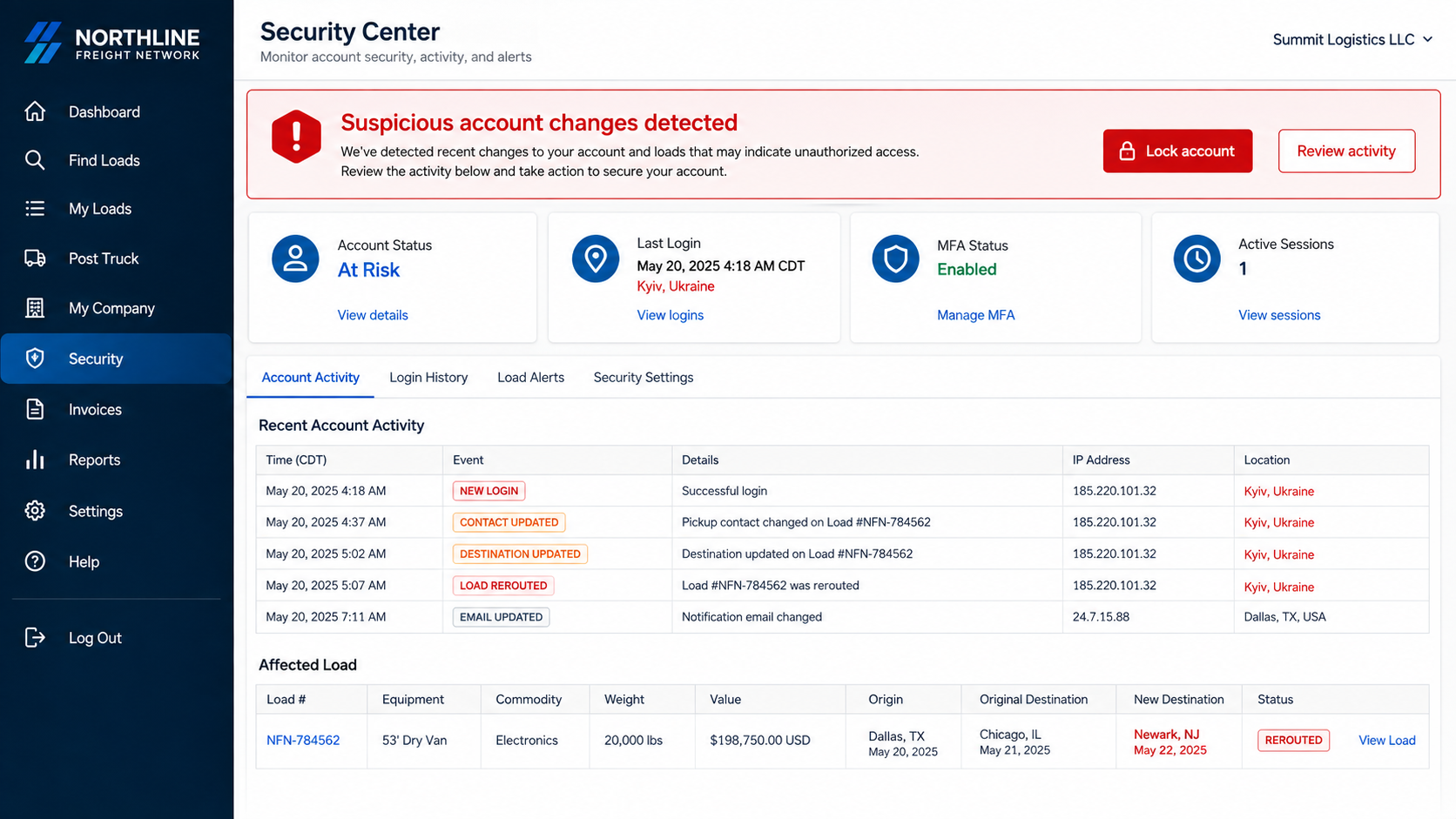
Account logs can expose the handoff from phishing to cargo theft. New sessions, changed contacts, and rerouted loads create a timeline worth preserving for investigators and insurers.
That record can also support rapid alerts to every affected partner.
Preserve original message headers, login timestamps, load confirmations, and call records. Those details help investigators connect the compromised account to the attempted diversion.
Company, Address, and Fulfillment Checks
The display name is not the carrier identity
Match the legal name, operating authority, insurance, phone number, domain, and known contacts. A valid carrier number copied into an email does not prove the sender controls that company.
Use records and contacts already held by your organization. Do not let the suspicious message supply every fact used to verify itself.
The pickup and delivery addresses need independent confirmation
A last-minute address change is a high-risk event. Compare it with the original tender, shipper records, facility contacts, and geolocation history.
Call the known broker, shipper, or consignee using a number already on file.
A warehouse named in a fresh email should not become trusted because the same email calls it approved.
Support should survive an out-of-band callback
Contact the carrier or broker through a previously verified number. Ask questions tied to the actual load that an impostor may not know.
If the caller refuses, changes numbers repeatedly, pressures the driver to avoid dispatch, or insists that all verification stay inside a new email thread, stop the movement.
Every handoff should leave a traceable chain
Record who tendered the load, who accepted it, which tractor and trailer arrived, which driver was verified, who changed the destination, and where the goods were received.
High-value loads deserve stronger checks at every change. A complete chain does not eliminate fraud, but it makes an unauthorized substitution harder to hide.
Warning Signs in Email, Load Boards, and Dispatch Calls
- A carrier agreement or rating notice arrives from an unfamiliar domain.
- The link is shortened or the download is an executable file.
- A document requires webmail or load-board credentials to open.
- An unexpected remote-management program appears on the computer.
- New mailbox forwarding, deletion, or filtering rules are present.
- A large number of loads appears under an account without explanation.
- Contact details change immediately before pickup.
- A driver, truck, or trailer does not match the verified record.
- The delivery address changes after the shipment is in motion.
- Someone insists the normal callback or verification process be skipped.
None of these checks should depend on replying to the suspicious sender. Use the organization’s established records, platform contacts, and known telephone numbers.
How Logistics Companies Can Break the Chain
Start with email containment. Use phishing-resistant MFA where possible, block unapproved remote-management tools, monitor new forwarding rules, and alert on unusual sign-ins or mass downloads.
Then protect the operational transition. A change to pickup contact, carrier, driver, destination, or payment instructions should require verification through a second channel.
Do not make the callback number editable in the same transaction being verified.
Keep known contact data in a controlled system so a compromised email cannot replace both the instruction and its proof.
Teach staff what a load-board support team will and will not send. A complaint or agreement should be opened through the platform reached independently, not through an unsolicited link.
At the dock, verify driver identity, tractor and trailer numbers, carrier authority, and pickup reference. Record discrepancies before releasing goods.
Finally, create an incident route that dispatchers can use without being blamed for delaying a shipment. Criminals benefit when staff believe speed matters more than verification.
What to Do if You Have Fallen Victim to This Scam
- Stop the affected shipment. Contact the driver, shipper, consignee, platform, and law enforcement immediately. Do not rely on the compromised email thread.
- Secure the accounts. Reset credentials from clean systems, revoke sessions and tokens, remove unfamiliar MFA methods, and disable compromised users until reviewed.
- Remove hidden mailbox access. Inspect forwarding rules, delegates, filters, app passwords, connected apps, and deleted items.
- Isolate affected computers. If software was downloaded, disconnect the device from the network and let the security team preserve evidence before cleanup.
- Check remote-management tools. Find unauthorized installations and sessions. Removing the visible program may not remove every persistence method.
- Notify the load board and partners. Ask them to freeze postings, preserve logs, and warn businesses that received instructions from the account.
- Verify every active load. Reconfirm drivers, equipment, pickup details, destinations, and payment instructions using known contacts.
- Contact insurers and financial institutions. Report cargo exposure and any changed payment instructions promptly. Follow policy requirements for notice and evidence.
- Preserve the timeline. Save emails with headers, links, files, phone numbers, platform logs, GPS data, camera footage, bills of lading, rate confirmations, and access records.
- Scan relevant endpoints. Malwarebytes can help detect malicious files and unwanted remote-access software. In a business incident, use it as part of the security team’s response rather than a substitute for forensic review.
- Reduce malicious-link exposure. AdGuard can block many known phishing and malicious advertising destinations, while company controls should also filter new domains and unsafe downloads.
- Report the crime. File with the FBI Internet Crime Complaint Center and the law-enforcement agencies responsible for the pickup and destination areas.
- Beware paid recovery claims. No stranger can guarantee the return of stolen freight or account data for an upfront fee.
Frequently Asked Questions
Is this just an ordinary shipping phishing email?
No. The opening lure may look familiar, but the larger scheme uses compromised logistics identities to book, redirect, and steal physical cargo.
Can a legitimate remote-management tool be involved?
Yes. Criminals may install real administration software through a malicious link. The tool is legitimate, but the installation and control are unauthorized.
Why do load-board accounts matter so much?
They connect trusted companies and active freight. A compromised account can carry reputation, records, and access that make fraudulent listings appear legitimate.
Should a driver follow a destination change sent by email?
Not without independent confirmation through established dispatch and broker contacts. Changes after pickup should trigger a documented second-channel check.
What is the first sign after an account takeover?
Common clues include unfamiliar sign-ins, forwarding rules, missing messages, unexpected postings, altered contact details, or partners asking about instructions you did not send.
Who should receive an incident report?
Notify law enforcement, the load board, insurers, affected shippers and carriers, and the organization’s security team. Speed matters because goods may still be moving.
The Bottom Line
The fake carrier email scam can become physical cargo theft. A stolen login supplies trust, then altered instructions send valuable goods into criminal hands.
Open platforms independently, call established contacts, and reverify every late change involving identity, vehicle, pickup, or destination. Routine logistics language should never replace confirmation.
If an account or shipment is affected, secure the digital systems and stop the cargo immediately. Both sides must be contained before the next handoff.

Join the discussion
0 commentsShare your experience or ask a question about this article.
Discussion
Start the conversation
Have a question or something useful to share? Add the first comment.