


A polished website says FIFA World Cup jobs are open for drivers, security guards, laundry attendants, sales assistants, and other temporary workers across the United States, Canada, and Mexico.
The roles sound believable because a tournament really does need a huge workforce. The page even promises agent support and flight tickets for successful candidates.
But the application does something a normal first-stage job form should not do. Before trusting the badge, the job title, or the word “official,” look at what the site wants you to upload.
Overview
A fake careers site borrows the urgency of a real tournament
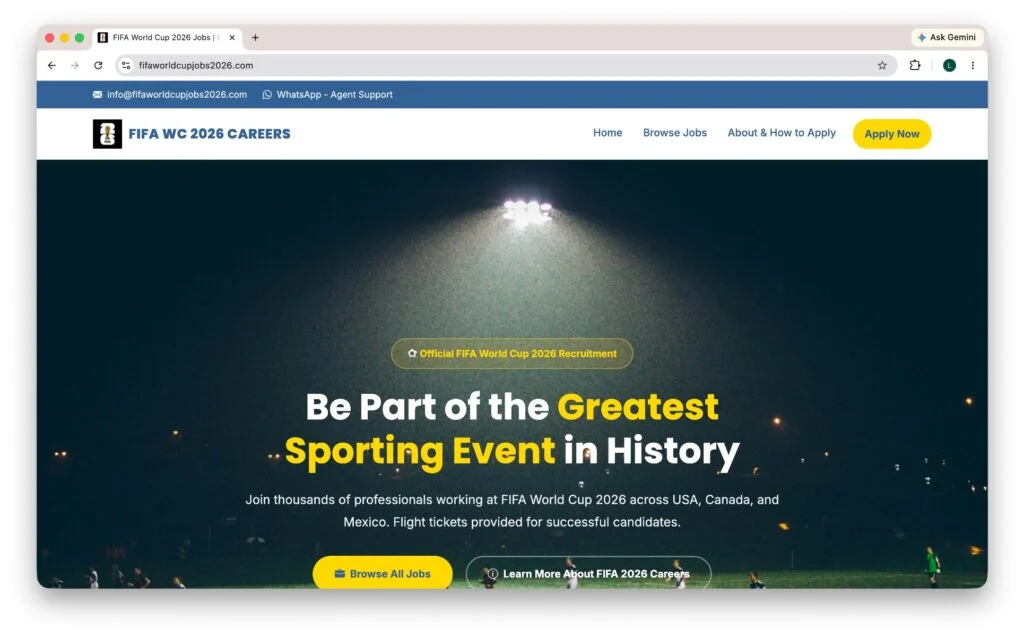
The fake FIFA World Cup jobs scam uses fifaworldcupjobs2026[.]com, a domain built to sound descriptive and official. The page copies tournament imagery, presents a careers-style navigation menu, and advertises plausible event roles in all three host countries.
The homepage labels itself “FIFA WC 2026 Careers” and calls the opportunity official recruitment. A visitor who arrived through a search result or shared link could mistake the descriptive domain for a FIFA-operated site.
The application changes from ordinary to dangerously invasive
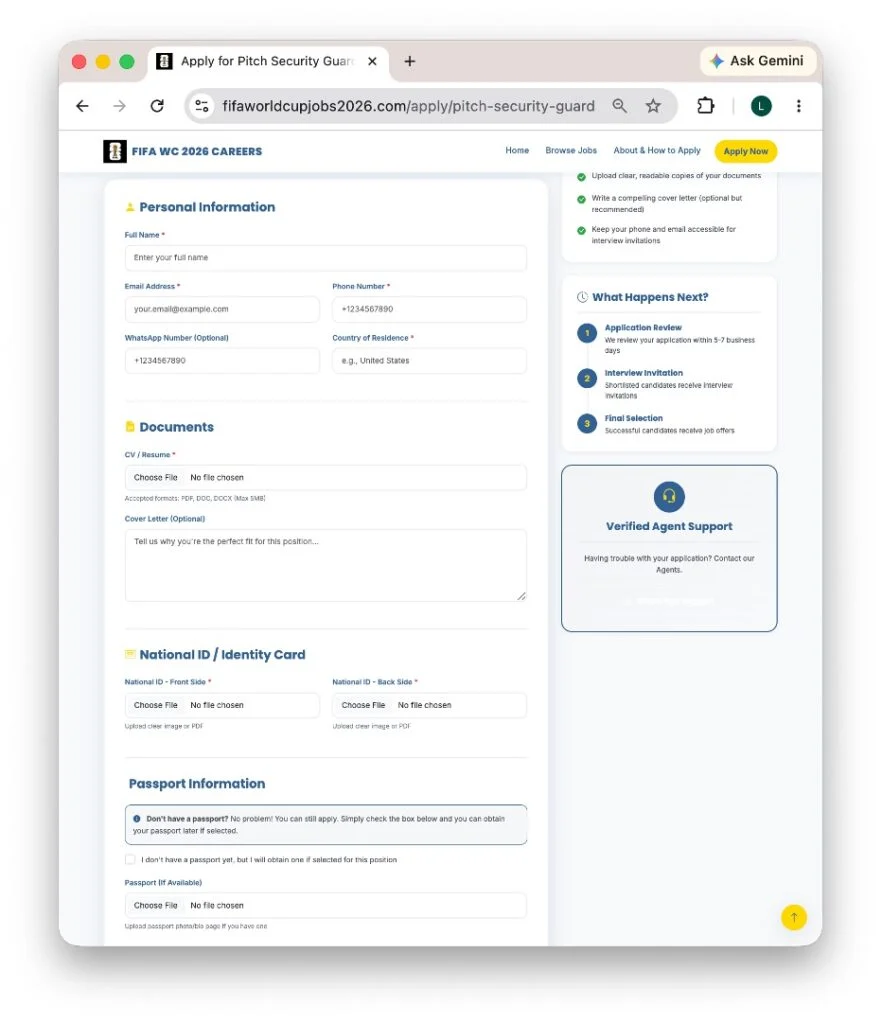
The form begins with details job seekers expect to provide, including a name, email address, telephone number, country, résumé, and optional cover letter. That familiar opening lowers resistance.
Further down, the form asks for images of the front and back of a national identity card. It also requests a passport image and a WhatsApp number. Those documents can support identity theft long after the supposed vacancy disappears.
The genuine hiring route is easy to verify independently
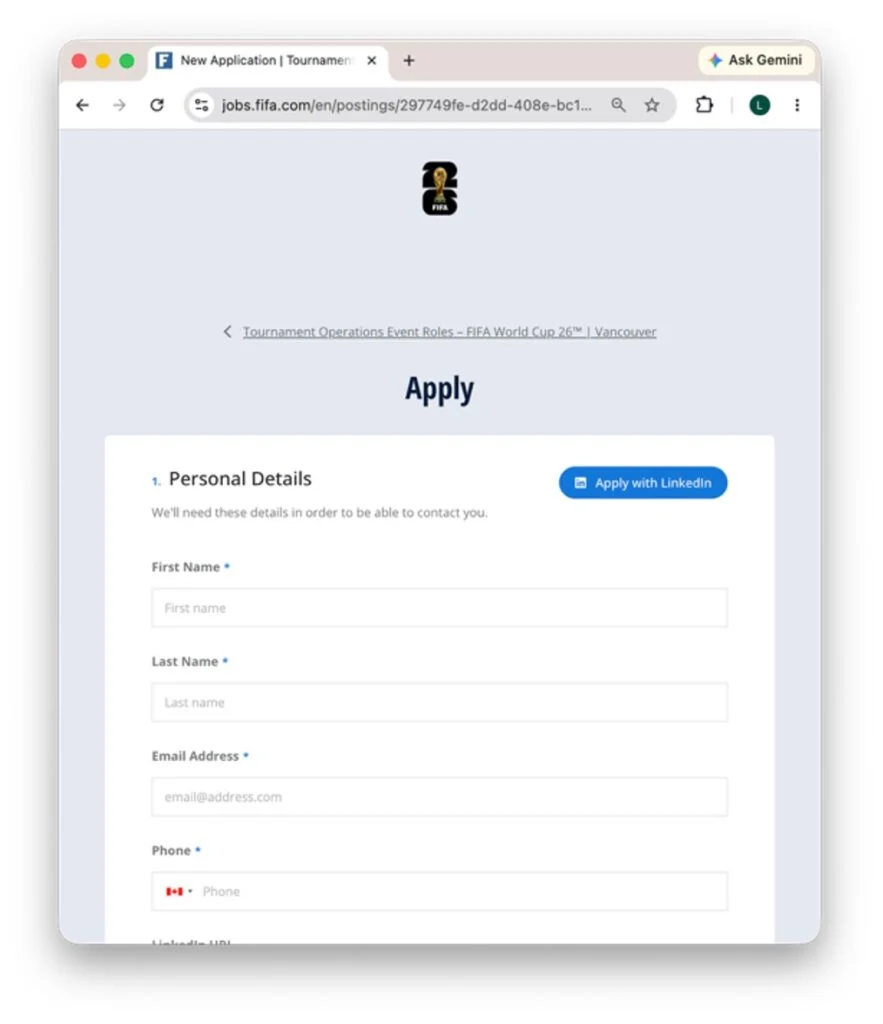
FIFA operates a separate careers portal at jobs.fifa.com. Real listings identify a department, employment type, workplace, location, responsibilities, and candidate requirements. The fake page uses a different registered domain and asks for identity documents during the application stage.
The differences are not merely visual. They reveal two different goals. A legitimate employer evaluates experience and suitability. The copied page gathers a reusable identity package.
- The site is not hosted under fifa.com.
- The roles contain little information about qualifications or reporting lines.
- The form requests both sides of a national ID before an interview.
- A passport image is requested before any verified offer exists.
- “Verified Agent Support” pushes communication toward WhatsApp.
- No independently verifiable employer identity explains who receives the files.
What the Fake Careers Page Actually Shows
The homepage is designed for a quick emotional decision. A stadium image fills the screen while large text invites applicants to become part of “the greatest sporting event in history.” Buttons lead directly to job browsing and applications.
A banner provides an email address using the same fake domain and advertises WhatsApp agent support. This creates the appearance of a complete recruitment operation, even though each trust signal is controlled by the same unverified website.
The jobs themselves are broad enough to attract applicants with many backgrounds. Listings include pitch security, merchandise sales, shuttle assistance, uniform distribution, dishwashing, laundry, and driving.
That variety is useful to the operator. A narrow professional vacancy would exclude most visitors. A collection of entry-level tournament roles lets the site collect applications from people who may have little reason to question an international hiring campaign.
The promise of travel makes the form feel more valuable
The homepage says flight tickets are provided for successful candidates. That promise can make an ordinary temporary role feel like a rare route into the World Cup.
It also gives the site a reason to mention passports, countries, and relocation. The travel story does not make a passport upload appropriate before an interview or verified offer.
“Verified agent” is a label, not independent verification
A site can place the word “verified” beside any email address, chat button, or support box. The label only proves that the page designer typed it.
Real verification comes from reaching the employer through a domain and contact route published by the employer itself. A WhatsApp conversation started by the questionable site does not provide that independence.
Why the Passport and National ID Requests Matter
A résumé contains useful personal data, but a clear identity-document image is much more powerful. It may show a full legal name, birth date, document number, photograph, signature, nationality, and expiration date.
Collecting the front and back of a card may reveal security features or additional identifiers. A passport scan can provide another authoritative document tied to the same person.
Criminals can combine those images with the applicant’s telephone number, email, address, and résumé history. The resulting profile may be used in account-opening attempts, identity-verification checks, targeted impersonation, or resale to other fraud groups.
Not every misuse happens immediately. Stolen identity files can remain valuable after the original website goes offline. A victim may connect later fraud to a bank breach or unrelated incident and forget the job form completed months earlier.
A checkbox does not make premature collection safe
The form includes a passport-related option for applicants who do not yet have one. That extra detail makes the request look procedural, but it does not answer who controls the server, how files are protected, or why the documents are required now.
A privacy policy cannot cure a false identity. The first question is whether the recruiter and domain genuinely belong to the organization they claim to represent.
The FBI Warning Fits This Recruitment Pattern
The FBI Internet Crime Complaint Center warning describes criminals spoofing FIFA websites to collect personal information and facilitate money scams around the 2026 World Cup.
The warning explains that fake domains may use small spelling changes, different domain endings, or words that imitate a legitimate FIFA subdomain. It specifically lists job-themed examples such as jobs-fifa[.]com, fifa-hr[.]com, and fifa-hiring[.]com.
Fifaworldcupjobs2026[.]com follows the same naming logic. It places the event, year, and word “jobs” inside a separate registered domain, hoping those familiar words matter more than the missing fifa.com ending.
The FBI advises typing fifa.com directly instead of relying on ads or search results. That single habit separates pages reached through FIFA’s own navigation from sites that merely contain FIFA-related words.
The domain is the evidence the copied design cannot hide
Logos, colors, photographs, job titles, and tournament facts are public and easy to copy. The registered domain is harder to explain away.
A genuine FIFA careers page can be reached from fifa.com and uses jobs.fifa.com. The fake recruitment site sits on its own unrelated domain. HTTPS would only encrypt the connection to that site, not prove FIFA ownership.
The roles look plausible because the event is real
This campaign does not invent an impossible profession. It borrows jobs that a major sporting event could genuinely need, then removes the detailed responsibilities and qualification checks found in formal recruitment.
The result feels inclusive and urgent. Almost anyone can find a role that appears suitable, and the application button arrives before careful verification.
How the Fake FIFA World Cup Jobs Scam Works
Step 1: A search result or shared link reaches job seekers
The page targets people actively searching for tournament work, travel opportunities, or temporary employment. A recommendation may also circulate through social media groups, WhatsApp chats, or community pages.
Because the applicant initiated a job search, the result does not feel like an unsolicited scam message. That context gives the website an early credibility advantage.
Step 2: A descriptive domain is mistaken for an official address
The domain combines FIFA, World Cup, jobs, and 2026. It reads like a page title, so a visitor may overlook that it is not a subdomain of fifa.com.
Criminal domains often use this technique. Familiar words are arranged into a new registered name that survives a quick glance but fails a careful ownership check.
Step 3: Copied branding creates a complete careers experience
The site includes a homepage, job browser, application pages, an explanation section, email, and WhatsApp support. Each component reinforces the others.
Volume should not be confused with verification. The operator controls the claimed employer identity, job descriptions, support channel, and application form at the same time.
Step 4: Broad roles pull in a large applicant pool
Applicants see jobs that do not require a specialized degree or long professional history. The site offers positions across several countries and tournament functions.
This widens the campaign and reduces the chance that a visitor will demand technical details before applying.
Step 5: The form collects normal recruitment data first
Name, email, phone, country, résumé, and cover letter fields make the form feel routine. Completing these fields also creates commitment.
After spending time on the application, a person may be more willing to finish the remaining steps rather than abandon the opportunity.
Step 6: Identity documents become the real prize
The application asks for both sides of a national ID and a passport image. The files are submitted before any verified interview, named hiring manager, or confirmed offer.
At this point the site can receive a package valuable for identity fraud even if it never asks the applicant for money.
Step 7: WhatsApp can extend the recruitment story
The page collects a WhatsApp number and advertises agent support. Follow-up messages can claim the application was shortlisted or needs one final verification.
Similar job scams may introduce visa, relocation, background-check, equipment, or processing fees. That is a possible later stage, not proof that every applicant to this site received the same demand.
Step 8: The domain can disappear while the data remains useful
A fake careers domain can be replaced quickly. The collected documents, contact details, and résumé history do not lose value when the page closes.
Victims may later receive bank impersonation calls, account alerts, loan messages, or new job offers containing enough personal detail to feel convincing.
Company, Address, and Fulfillment Checks
The FIFA name is not the website operator
The fake page uses FIFA branding and tournament language, but FIFA’s genuine careers portal is jobs.fifa.com. The copied name does not establish ownership, authorization, or involvement by FIFA.
FIFA is being impersonated in this story. Its real jobs and services are not responsible for the fraudulent page.
The domain is separate from fifa.com
Fifaworldcupjobs2026[.]com is a standalone registered domain, not a section of fifa.com. Reading from the right side of the hostname exposes that separation.
A word such as FIFA can appear anywhere in a criminal domain. Ownership must be confirmed through the organization’s official site, not inferred from the label.
The support channel cannot verify itself
An address ending in the fake domain and a WhatsApp “verified agent” both lead back to the same unverified operation. Neither is independent evidence that a recruiter works for FIFA.
Use contact routes found at fifa.com or jobs.fifa.com. Do not ask the questionable recruiter to confirm whether the questionable recruiter is genuine.
The document destination is not traceable to a real hiring team
The form does not provide a verifiable FIFA department, hiring manager, document-retention period, or secure candidate portal tied to the real organization.
Without that chain, an applicant cannot know who downloads the files, where copies are stored, or whether they are shared after submission.
Warning Signs That the FIFA Job Page Is Not Genuine
- The URL ends in a separate jobs-themed domain instead of fifa.com.
- The site calls itself official without linking back to a verified FIFA property.
- Job descriptions lack detailed duties, qualifications, department names, and reporting lines.
- The form requests a passport and both sides of an identity card before an interview.
- The recruiter emphasizes WhatsApp agent support.
- Travel benefits appear before a verified offer or hiring process.
- No named FIFA hiring contact can be confirmed independently.
- Any later demand for a visa, equipment, relocation, or processing payment appears.
MalwareTips has a broader guide to FIFA 2026 World Cup scam websites. It explains how the same event branding can be reused for fake tickets, stores, hospitality offers, careers pages, and checkouts.
If contact moves to messaging, the WhatsApp job scam guide explains additional warning signs involving fake recruiters, identity collection, and advance fees.
How to Check a FIFA Job Before You Apply
Open fifa.com yourself and follow its careers link, or type jobs.fifa.com directly. Search for the position inside that portal rather than trusting a link from an advertisement, chat, or unrelated search result.
Compare the department, location, employment type, responsibilities, and requirements. A genuine listing should explain the work well enough for a candidate to judge suitability before providing sensitive records.
Do not upload a national ID, passport, Social Security number, bank information, or payment details merely to submit an initial application. Ask why the information is required, who receives it, and how the request can be confirmed through the official employer.
If a recruiter contacts you, verify the vacancy and the person’s role using contact information you found independently. A matching logo, email signature, or WhatsApp profile photo is not sufficient.
What to Do if You Have Fallen Victim to This Scam
- Stop uploading files and end the conversation. Do not send another document, selfie, verification code, or payment. Block the WhatsApp account after preserving the evidence.
- Save the complete record. Capture the URL, application pages, confirmation screen, emails, telephone numbers, WhatsApp profile, messages, and every document requested.
- Contact the document issuer. Tell the passport or identity-card authority that clear copies were submitted to a fraudulent recruitment site. Ask what replacement, invalidation, or monitoring steps apply.
- Create an identity-theft recovery plan. Visit IdentityTheft.gov if you are in the United States. Follow the personalized steps for exposed or misused identity information.
- Protect your credit and financial accounts. Review reports, consider a fraud alert or security freeze, notify banks of the document exposure, and monitor for unfamiliar accounts or verification attempts.
- Change exposed passwords. If the form, email, or follow-up page received a password, replace it everywhere it was reused. Start with email because password resets for other accounts may arrive there.
- Scan any device used for downloads. If the site supplied a file, app, extension, or document, run a full scan with Malwarebytes. It can detect malware and unwanted software that may have arrived with the recruitment funnel.
- Block malicious advertising and follow-up pages. AdGuard can reduce exposure to known scam pages, malicious ads, and tracking links. It does not replace identity monitoring after documents were shared.
- Report the operation. File reports with ReportFraud.ftc.gov and IC3. Include the domain, screenshots, contact details, and requested documents.
- Ignore recovery and verification callers. Anyone who knows about the application may use that knowledge to impersonate FIFA, a bank, police, or an identity-recovery service. Verify every follow-up independently.
Frequently Asked Questions
Is fifaworldcupjobs2026.com an official FIFA jobs site?
No. FIFA’s genuine careers portal is jobs.fifa.com. The job-themed site uses a separate registered domain and should not be treated as a FIFA property.
Does FIFA hire temporary World Cup workers?
Real tournament roles do exist, which is why the story is convincing. Verify every opening inside jobs.fifa.com and follow the application route published there.
Should a job application ask for my passport?
An employer may need identity or work-authorization documents later in a verified hiring process. A request for passport and national ID images before an interview or confirmed offer is a major warning sign.
What can criminals do with my ID and résumé?
The information may support account-opening attempts, impersonation, targeted phishing, loan fraud, or resale. Contact the document issuer and begin identity monitoring even if no immediate misuse is visible.
Is a FIFA recruiter on WhatsApp automatically fake?
Not automatically, but WhatsApp cannot establish employment. Confirm the vacancy and recruiter through jobs.fifa.com and an independently located corporate contact before sharing information.
What if I submitted the form but paid nothing?
The document theft can be the primary loss. Preserve evidence, contact the relevant identity-document authority, protect your credit, change exposed passwords, and report the domain.
The Bottom Line
The fake FIFA World Cup jobs scam turns a real tournament and plausible temporary roles into an identity-document collection funnel. The decisive clue is not the polished design. It is the separate domain and the premature demand for passport and national ID images.
Apply through jobs.fifa.com, verify each recruiter independently, and do not pay or upload sensitive documents to secure a job. A legitimate hiring process can explain who needs your information and why.
If you already submitted documents, act as an identity-theft victim now rather than waiting for a suspicious charge. The website can vanish, but the information it collected can remain useful for years.

Join the discussion
0 commentsShare your experience or ask a question about this article.
Discussion
Start the conversation
Have a question or something useful to share? Add the first comment.