


Crypto launches come with a vocabulary of their own. If you followed HumidiFi’s rollout, terms like Wetlist and token allocation were already part of the conversation.
That history makes the next notice easy to take at face value. Before opening your wallet, it pays to ask what the notice actually promises.
Overview
A blue HumidiFi lookalike announced an airdrop
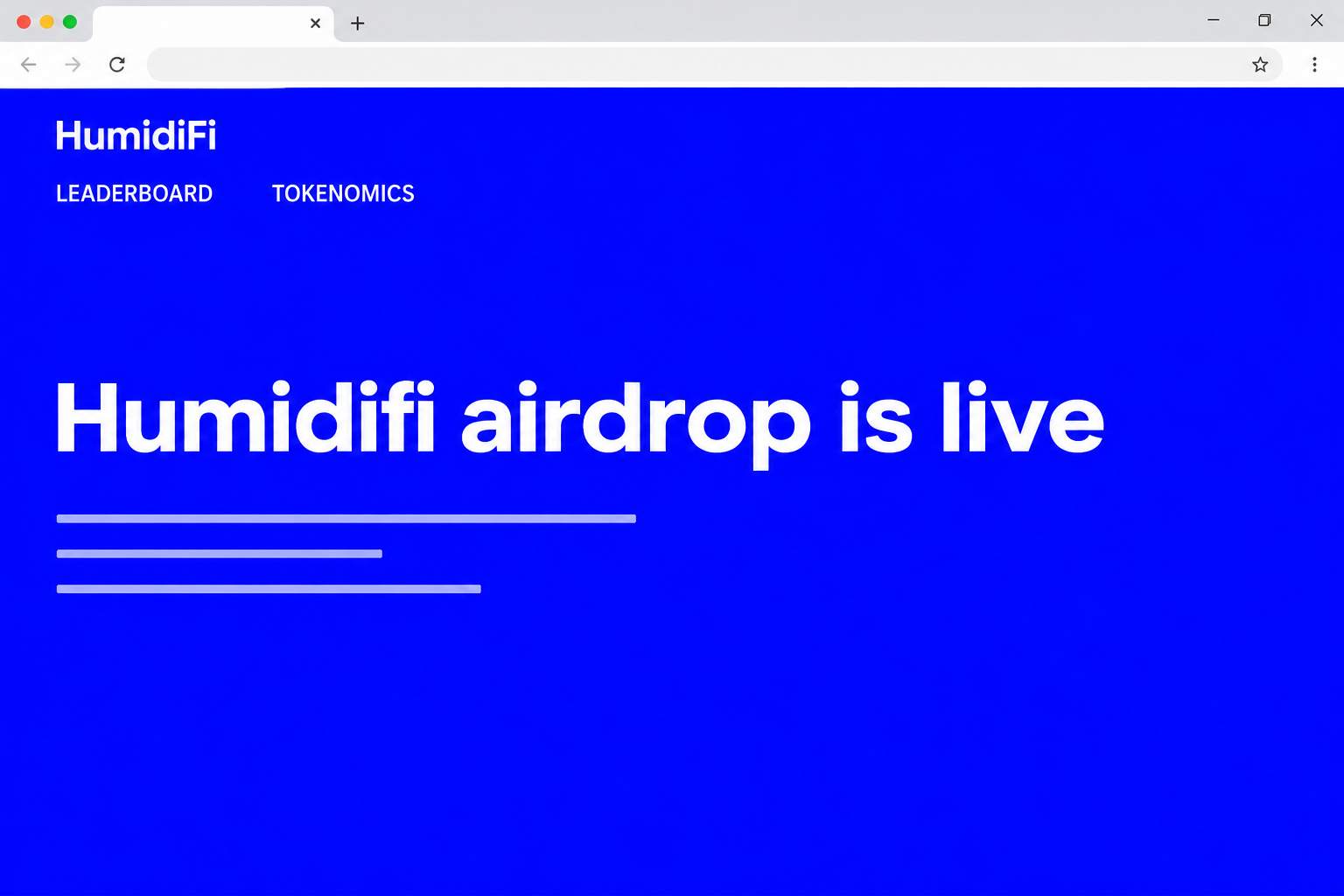
The fake HumidiFi airdrop appeared at eligibility-humidifi[.]org. It borrowed the project’s bright blue presentation and announced that an airdrop was live, beside text about its Solana trading infrastructure.
This was more than a stray account copying a project name.
The recorded page included navigation for a leaderboard, litepaper, and tokenomics, headings you can also find on HumidiFi’s own site.
Its prominent action asked visitors to connect a wallet.
The archived view shows a wallet-selection window, but it does not establish a completed claim, a signed transaction, or a specific victim loss.
The project and the website impersonating it are separate. Seeing familiar wording about quotes or liquidity on the imitation does not mean the team is running the giveaway.
In this case, compare the complete addresses. The project uses humidifi.xyz, whereas eligibility-humidifi[.]org is a different domain.
“Eligibility” in the name does not make it part of the real site.
What HumidiFi actually documented about WET
HumidiFi’s tokenomics page describes WET as a Solana token and lays out a token sale through Jupiter’s Decentralized Token Formation platform.
The project described several routes into that sale, including a Wetlist allocation, a category for Jupiter stakers, and a public presale. Those are distinct groups, not one broad free-token entitlement.
HumidiFi also described a leaderboard snapshot connected to certain allocations.
A real snapshot can give a false eligibility page extra credibility if you remember hearing about it but not what it determined.
The distinction is simple even if the documentation is technical.
A place on a list might matter for a sale, but it does not prove that anyone has opened a new giveaway.
The tokenomics page includes different versions of its figures.
Use the dated note and the official announcements for the event in question rather than treating old allocation details as current instructions.
What you can check without sharing wallet access
- Confirm the event name, not just the project name or ticker.
- Find the launch partner through HumidiFi’s documentation, not a banner on the claim page.
- Check whether the announcement describes a purchase window, a past allocation, or a genuine new distribution.
- Look for confirmation of the exact destination before interacting with a form or a wallet request.
You do not have to connect in order to establish where project documentation is published. Begin at the real address and read what the project actually says about that offer.
Old coverage is another source of confusion. A real article announcing a past launch says nothing by itself about whether an “airdrop is live” page is current or authorised.
How the Scam Works
Step 1: The headline turns launch curiosity into an eligibility question
The copy says an airdrop is live. There is no need to explain the token from scratch because people looking for HumidiFi may already know the name.
Readers who remember a snapshot or a presale can supply their own explanation.
Perhaps the early allocation has become claimable, or perhaps the site makes it possible to check a missed reward.
The evidence does not show which link brought an individual visitor to the page.
If you see it in a reply, an ad, or a forwarded chat, judge the destination independently.
This is the point where a precise question helps. Can you find a recent official announcement of this particular airdrop, rather than an old mention of WET?
Step 2: Project material makes the page feel like part of the launch
The site’s visuals and project language resemble the source material closely enough to give the headline context.
Navigation labels and several paragraphs about liquidity make it seem less like a standalone giveaway.
That familiar context is not a security check. Actual project language can appear on a website with no relationship to the project.
The domain name adds another layer. It keeps HumidiFi together with a word you would expect in a claim process, while putting the whole thing on a different address.
Read the complete hostname as one unit. If you cannot confirm it from the project, keep that browser tab closed while you look for the primary announcement.
Step 3: The site moves from marketing copy to wallet choice
The capture shows an “All Wallets” window over the blue page, complete with recognizable wallet names and icons. That is where curiosity starts to involve your own account.
Wallet brands shown in a menu are not independent endorsements. An imitation page can display familiar icons, and a genuine wallet can receive a request from an untrusted site.
The safest place to stop is before picking a wallet.
Do not connect to find out whether the offer is real, since finding the publisher and confirming the promotion come first.
Not every step has the same consequence. Seeing the chooser does not expose your private key, and even a completed connection is different from authorising a transaction.
Step 4: What happens next depends on what the wallet was asked to approve
A connection can disclose the wallet’s public address and let the site request further actions. That is not the same as giving the site permission to spend the balance.
A deceptive follow-up might request a transfer or give someone authority over assets.
This is the broader risk with pages like this, not a confirmed transaction from the captured HumidiFi flow.
Read any outbound asset movement, recipient, and permission in the wallet itself, not on the airdrop’s marketing page. If the approval window does not explain the request clearly, stop.
The same applies to a screen that calls a request a harmless “check.” A claim that something is only verification does not tell you what a wallet approval will do.
When a request takes you by surprise, reject it first. You can look up the project or speak to your wallet provider without leaving an approval open.
What to Do if You Have Fallen Victim to This Scam
-
Separate a visit from a wallet interaction. If you closed the HumidiFi lookalike before connecting or entering any secrets, do not return to see whether you qualified.
Save the name of the site from browser history if you can do it safely. Tell anyone you warned where you originally found the link, without sending an active copy.
-
If your wallet connected, remove that website from connected apps. Open the wallet you already use outside the suspect tab and look for the exact entry around the relevant time.
Review recent activity even if you think you cancelled the next prompt. A connected session and an approved action are recorded differently, and one does not tell you the other.
Phantom’s wallet compromise guide explains this distinction and lists separate steps for disconnecting apps, reviewing approvals, and protecting remaining funds.
-
If you approved something, investigate the network it used.
A WET-themed page does not prove every request used Solana, so use your wallet’s record rather than the name in the browser.
Write down the transaction signature or other identifier, status, and any outgoing assets. Then check whether the change was a transfer or an approval that may still be active.
Follow your wallet provider’s instructions for checking or revoking permissions on the relevant network. Get to that guide separately, not through a response from the airdrop account.
-
If you disclosed a recovery phrase, protect the assets, not the old login. Stop relying on the old wallet and seek the wallet provider’s instructions from a device you trust.
Set up a genuinely new wallet with a different recovery phrase. Adding another account under the exposed phrase does not fix the underlying problem.
If balances include staked tokens or positions in another app, ask official support what can be moved safely. Do not accept a stranger’s offer to handle the transfer.
-
Save evidence after you have addressed immediate risk. Keep the dates, screenshots, conversation link, wallet address, and transaction identifier. Do not record secret recovery information in a report.
If a trading platform handled a related deposit or withdrawal, notify it through its authenticated support channel. It may ask for the destination, network, and reference number.
The FTC’s crypto scam guide explains U.S. reporting options. A report can document the incident, but it is not a promise that a transfer can be reversed.
How to Read an Eligibility Claim Without Opening Your Wallet
Put the event on a timeline
Look at the date of an old token launch, the date of the link you received, and the dates on the project’s identity or tokenomics materials.
They should describe the same event.
An older screenshot can be perfectly genuine and still have no bearing on what a link does today. If it names a partner, look up that partner’s notice directly.
A leftover promo generally will not tell you whether you acquired anything. Your own purchase record, wallet activity, and confirmation from an established channel are more useful.
An announcement should tell you how to distinguish sale participation from a token balance. Do not read a leaderboard rank as proof that a transfer happened.
If you have an older purchase confirmation, check its platform and date. It should not lead to a new registration requirement on an unrelated domain.
Ask what the scheme says you are entitled to receive
“Eligible for a sale” describes a chance to participate under given terms. “Eligible to claim” suggests a distribution of something you are already entitled to receive.
Those meanings are not interchangeable. A page that switches between them without pointing to matching terms is asking you to accept a promise it has not substantiated.
If you really were on a list, you should be able to find out which one and why without trusting an unverified link.
Avoid introducing new wallets merely to test a rumour.
Compare announcements, not branding
The useful comparison is the same event name, the same partner, the same terms, and the same link. Colors and navigation tell you surprisingly little about those four things.
Use the project’s main site as the starting point for any official social channels. A reply beneath an authentic announcement can come from an unrelated person.
Leave the claim alone if one page insists on immediate access and the actual launch partner makes no such offer.
You do not need to settle the discrepancy on the spot.
Frequently Asked Questions
Is the HumidiFi airdrop page at eligibility-humidifi legitimate?
No, the documented page at eligibility-humidifi[.]org is a lookalike rather than the project’s normal site. Do not use the address to check your WET allocation.
The real existence of WET does not validate a different domain. Confirm specific announcements from HumidiFi and the authorised venue identified in those announcements.
Does a Wetlist spot mean I have free tokens waiting?
HumidiFi’s tokenomics describes a Wetlist allocation connected with its planned sale. It does not establish that this unrelated “airdrop is live” page can deliver anything.
If you are checking an older transaction, use your original confirmation and wallet records. Do not sign a new request to find out what happened during a past event.
Can the fake page spend funds just because it opened my wallet?
Losing funds is not an automatic consequence of opening a wallet picker or connecting. Review whether you also authorised an action, entered a secret, or noticed an unknown outgoing transaction.
Disconnected apps can still have previously granted permissions. Check those separately when a request was approved or you are unsure what happened.
Why were so many wallets shown on a page about Solana?
A list of wallet names shows what the page displayed, not which service backs the promotion.
An apparent choice of wallet is not proof of a relationship with any of them.
For an action you approved, inspect the actual network and address in your wallet. Do not assume the brand on the page correctly describes the request.
How can I make sure a later link is from Jupiter?
Find Jupiter through the route referenced by the official project, then check for a matching announcement reached from a trusted link. Compare the complete destination, not just the label.
You can read the terms without authorising access to your wallet. Any event that cannot be independently confirmed is one you can safely skip.
Does a failed transaction mean everything is safe?
A wallet can show a failed attempt alongside other activity. Check for separate approvals or successful transfers and consider whether you revealed a phrase or private key.
If you acted more than once, review the entire period you interacted with the page. Use support documentation from your wallet provider if the entries are unclear.
The Bottom Line
The HumidiFi lookalike borrows credibility from a real project and a real WET launch. Neither proves that its separate eligibility domain has tokens waiting for you.
Match the exact announcement to its official destination before touching a wallet request. If you already interacted, let the wallet’s activity tell you which recovery steps matter.

Join the discussion
0 commentsShare your experience or ask a question about this article.
Community experiences
Did this happen to you?
Your experience could help someone recognize the same scam. Submit a private report for our team to review.
I experienced this tooReports are reviewed before publication. Sharing publicly is always your choice.
Discussion
Start the conversation
Have a question or something useful to share? Add the first comment.