

Online shopping has become a convenient and popular way to buy goods and services, especially during the pandemic. However, online shoppers also face the risk of falling prey to scammers who create fake websites that mimic legitimate ones. One such scam involves fake online shopping sites that use Macy’s logo and colors to trick people into buying counterfeit or non-existent products, or stealing their personal and financial information.
What is the Fake Macy’s Online Shopping Sites Scam?
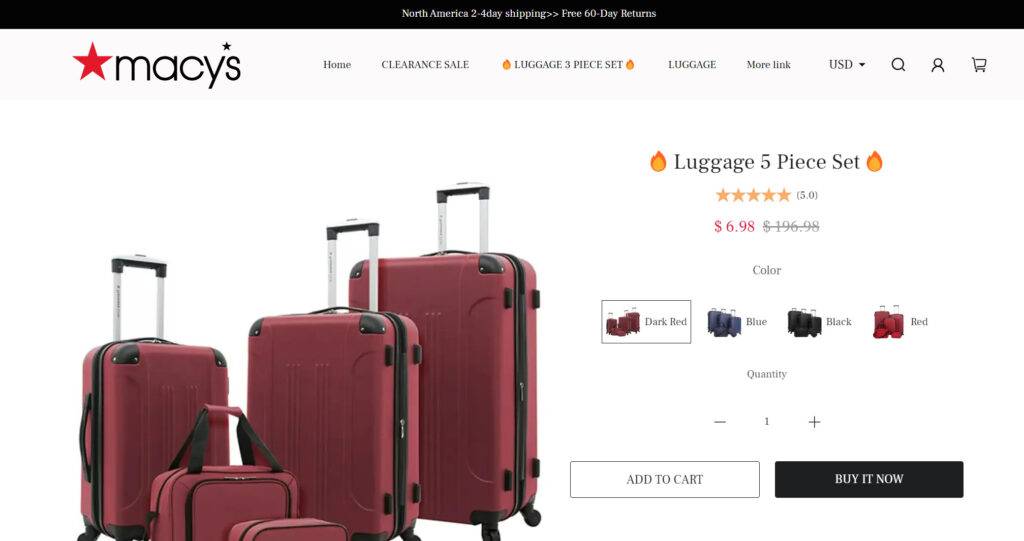
The Fake Macy’s Online Shopping Sites Scam is a type of phishing scam that targets online shoppers who are looking for deals on Macy’s products. The scammers create fake websites that look like Macy’s official website, but have different domain names, such as macys-online.com, macys-sale.com, or macys-discount.com. These websites offer products that are either counterfeit, damaged, or never delivered. They also ask for the shoppers’ personal and financial information, such as name, address, credit card number, or social security number, which they use for identity theft or fraud.
How does the Fake Macy’s Online Shopping Sites Scam work?
The scammers use various methods to lure online shoppers to their fake websites. They may send spam emails or text messages that claim to offer discounts, coupons, or free shipping on Macy’s products. They may also use social media platforms, such as Facebook, Instagram, or TikTok, to post fake ads or reviews that link to their fake websites. They may also use search engine optimization (SEO) techniques to make their fake websites appear higher in the search results when people search for Macy’s products.
Once the online shoppers click on the link to the fake website, they are presented with a website that looks very similar to Macy’s official website, with the same logo, colors, layout, and product categories. However, there are some signs that can indicate that the website is fake, such as:
- The domain name is different from Macy’s official website (macys.com).
- The website has poor grammar, spelling, or punctuation errors.
- The website does not have a secure connection (https) or a padlock icon in the address bar.
- The website asks for personal and financial information that is not necessary for the purchase, such as social security number or bank account number.
- The website does not have a clear return policy, customer service contact information, or privacy policy.
If the online shoppers proceed to buy products from the fake website, they may end up receiving counterfeit or damaged products, or no products at all. They may also find unauthorized charges on their credit card statements, or receive calls or emails from scammers who claim to be from Macy’s and ask for more information or money.
What to do if you have fallen victim?
If you have fallen victim to the Fake Macy’s Online Shopping Sites Scam, you should take the following steps:
- Contact your bank or credit card company and report the fraudulent transaction. Ask them to cancel your card and issue a new one.
- Contact Macy’s customer service and inform them of the scam. They may be able to help you verify if the website you visited was legitimate or not.
- File a complaint with the Federal Trade Commission (FTC) at https://reportfraud.ftc.gov/. You can also report the scam to your state attorney general or local consumer protection agency.
- Change your passwords and security questions for your online accounts, especially if you used the same ones for the fake website.
- Monitor your credit reports and bank statements for any suspicious activity.
Conclusion
The Fake Macy’s Online Shopping Sites Scam is a serious threat to online shoppers who are looking for deals on Macy’s products. The scammers use fake websites that look like Macy’s official website to trick people into buying counterfeit or non-existent products, or stealing their personal and financial information. To avoid falling victim to this scam, online shoppers should be careful and vigilant when shopping online. They should always check the domain name, security features, and content of the website before making a purchase. They should also avoid clicking on links or ads that come from unknown sources. If they have fallen victim to this scam, they should report it to their bank, credit card company, Macy’s customer service, and FTC as soon as possible.

Join the discussion
0 commentsShare your experience or ask a question about this article.
Discussion
Start the conversation
Have a question or something useful to share? Add the first comment.